Dental Website Video Statistics 2026: 549 Practices Checked
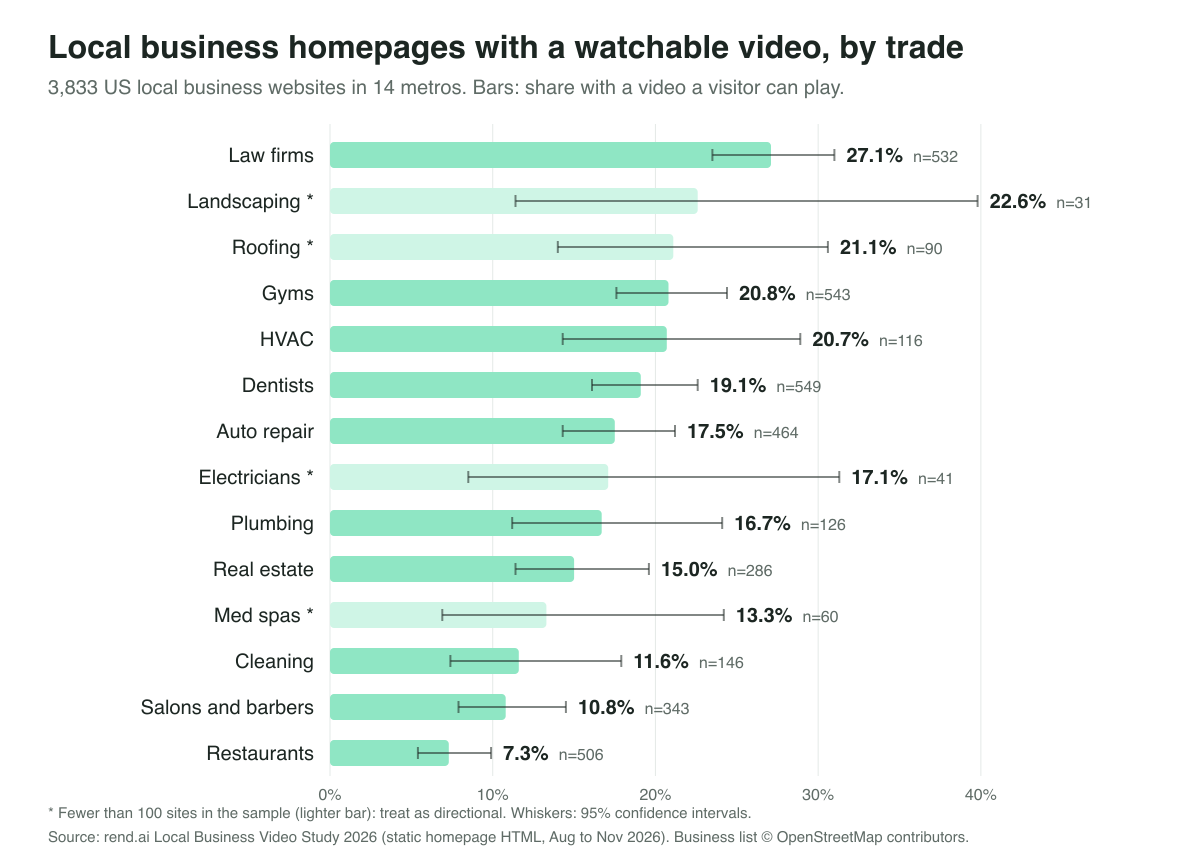
Only 19.1% of US dental practice homepages have a video a patient can press play on. That comes from our check of 549 dental websites in fall 2026 (95% CI 16.1 to 22.6%), which is statistically level with the 17.3% average across all 14 local trades we studied. Dental sites look busier on video than that, because 36.2% have some video on the homepage, but 94 of those 199 sites show nothing except a silent background loop.
So the most common dental "video" is a few seconds of a smiling patient or a spotless operatory playing on mute behind the headline. No voice, no message, no play button. Just 2.7% of dental homepages have a playable video marked up with VideoObject schema, the code that tells Google what the video is.
The numbers for dental practices
Source: rend.ai, Local Business Video Statistics 2026. Method in one line: businesses from OpenStreetMap in 14 US metros, static homepage HTML from Common Crawl (August to October 2026) or one direct fetch (November 21, 2026), homepage only, and players injected by JavaScript are not counted, so every rate is a lower bound.
| Measure | Dentists (n=549) | 95% CI | All 14 trades (n=3,833) |
|---|---|---|---|
| Watchable video on the homepage | 19.1% | 16.1 to 22.6% | 17.3% |
| Only a silent background loop | 17.1% | 14.2 to 20.5% | 12.4% |
| Any video, including loops | 36.2% | 32.3 to 40.4% | 29.7% |
| Embedded YouTube player | 9.1% | 7.0 to 11.8% | 8.6% |
| Embedded Vimeo player | 3.6% | 2.4 to 5.6% | 1.8% |
| VideoObject schema anywhere on the page | 3.8% | 2.5 to 5.8% | 3.1% |
| Watchable video plus VideoObject schema | 2.7% | 1.7 to 4.5% | 2.4% |
| Links to a YouTube channel | 22.4% | 19.1 to 26.1% | 22.4% |
| Links to Facebook | 81.6% | 78.1 to 84.6% | 66.2% |
| No watchable video and no YouTube or TikTok link | 64.1% | 60.0 to 68.0% | 64.8% |
Three things in that table matter for a practice owner.
The loop habit is real. 17.1% of dental homepages have a background loop and nothing to play, against 12.4% across all trades, and the two confidence intervals don't overlap. Only gyms and med spas sit in the same range. Dental website templates clearly push the muted hero clip.
Playable video is no edge yet. 19.1% against 17.3% is inside the margin of error. About four in five practices still give a nervous new patient nothing to watch before they book.
Facebook is where dentists point people. 81.6% of dental homepages link to Facebook, the highest of the 14 trades. Only 22.4% link to YouTube, and 7.3% to TikTok. If you are posting video anywhere, it is probably Facebook, and the homepage isn't showing it.
A separate read of 340 dental homepages by Mark Studios on November 1, 2026 found 35.0% showed a video player, and 21.2% played autoplay background video. Different sample and different rules, same picture: lots of motion, little to watch.
Why the loop doesn't do the job
A patient choosing a new dentist is checking three things: who will I see, will it hurt, and what happens when I walk in. A five-second clip of a chair answers none of them. It has no sound, it can't be shared, and nobody remembers it.
It also does nothing for search. Google's video best practices say a video has to be embedded on a watch page and can't be hidden behind other elements to be eligible for video features. A decorative loop with no title, no description and no schema gives Google nothing to describe.
You don't have to delete the loop. Keep it if the practice likes the look. Add a real video directly below it.
The fix: one "first visit" video
Most dental video advice starts with a brand film or a list of twenty ideas. Start with one video instead, 60 to 90 seconds, that walks a new patient through their first appointment. It's the question your front desk answers on the phone every day, and it's the one that keeps anxious patients from booking.
The dentist (or the office manager, if the dentist hates the camera) narrates. Phone footage is fine. Sound matters more than picture, so use a clip-on mic. If you want a full talking-head script, our homepage video guide has a filled dental example. Here is the shot list for the first-visit version.
Shot list: one morning before patients arrive
| # | Shot | Length in the cut | What it answers |
|---|---|---|---|
| 1 | The building from the parking lot, walking up to the door | 3 to 4 s | Where is it, is parking easy |
| 2 | Front desk team member, to camera: "Hi, I'm Maria, I'll check you in" | 4 to 5 s | Who greets me |
| 3 | Waiting area, one slow wide shot | 3 s | What it feels like |
| 4 | Walking into the treatment room, the chair, the screen where x-rays are shown | 5 s | Where it happens |
| 5 | Dentist seated at eye level, mask off: who they are and what a first exam includes | 20 to 30 s | Who will I see |
| 6 | Dentist, same setup: "If you're nervous, tell us. Here's what we do." | 10 to 15 s | Will it hurt |
| 7 | Hygienist showing one instrument or the intraoral camera on a team member | 5 s | What will they do to me |
| 8 | Front desk: insurance and payment in one line | 5 to 8 s | Can I afford it |
| 9 | Dentist close: "Book online or call us, we'll see you soon" | 4 to 5 s | What do I do now |
Use team members as stand-in patients. If a real patient appears, get written permission first, and check the consent notes in our guide to dentist and med spa videos. Keep insurance lines factual: name the plans you're in network with, or say "we'll check your coverage before your visit." No outcome promises.
Caption the whole thing, so someone in an office or a waiting room can follow it with the sound off. The caption style previewer shows how a style reads on a phone before you commit.
Where it goes on the page
- Directly under the hero, next to the booking button. The play button should be visible on a phone without much scrolling.
- An inline player, not a pop-up. A click-to-open lightbox hides the player until someone clicks, which is weaker for search than a player sitting on the page.
- Also on the New Patients page. Same video, same schema block.
- A 30-second vertical cut for your Google Business Profile (Google allows up to 30 seconds, see our Google Business Profile video guide) and for the Facebook page your homepage already links to.
YouTube hosting is free and fast if your builder lazy-loads the player. If the original file is too big for an upload form, the video compressor shrinks it in the browser.
VideoObject schema for a dental homepage
Google's video structured data guide requires name, thumbnailUrl and uploadDate, and recommends description, duration and contentUrl or embedUrl. Google says the markup lets you influence the description, thumbnail, date and duration it shows, and makes the video easier to find. Paste this into the page that shows the video and change the values:
<script type="application/ld+json">
{
  "@context": "https://schema.org",
  "@type": "VideoObject",
  "name": "Your first visit at Riverside Family Dental",
  "description": "Dr. Ana Ruiz walks you through a new patient exam: check-in, x-rays, the cleaning, and what we do if you're nervous.",
  "thumbnailUrl": "https://www.example.com/images/first-visit-thumbnail.jpg",
  "uploadDate": "2026-11-22",
  "duration": "PT1M20S",
  "embedUrl": "https://www.youtube.com/embed/VIDEO_ID"
}
</script>
For the thumbnail, pick a frame of the dentist mid-sentence, looking at the lens, not a frame of the empty chair. The video frame grabber pulls a still at any timestamp. Then run the page through Google's Rich Results Test. Every property is defined at schema.org/VideoObject.
On WordPress, most SEO plugins have a video schema field, or use a custom HTML block. On Squarespace and Wix, use a code block or the page header code injection.
A five-minute audit of your own homepage
| Check | What most dental homepages have | What to aim for |
|---|---|---|
| Is there a video with a play button? | No (about 81 in 100) | Yes, under the hero |
| Does it have sound and captions? | Muted loop | Voice plus burned-in or player captions |
| Who is on screen? | Stock smile or empty room | Your dentist and your front desk |
| How long? | 5 to 10 s loop | 60 to 90 s |
| Is there VideoObject schema? | No (about 96 in 100) | Yes, passing the Rich Results Test |
| Does it play on a phone? | Not checked since the redesign | Tested after every site change |
One site in our spot-check still had its video player in the code, commented out, so visitors saw nothing. Load your homepage on your own phone and press play.
Where Rend fits
Rend is an AI video agent. Send it the morning's phone clips, in chat, by email or through a web form, and say what you want: "a 75-second first-visit video for the homepage and a 30-second vertical for our Google profile." It cuts on the dentist's exact words, removes the false starts, adds captions in your font, and builds it on a real timeline you can open and change. A brand kit keeps the same caption style and music bed on every video after this one. Editing is free and you only pay when Rend renders or generates something (pricing).
If the practice manager needs to sign off, send a review link. They can draw on the frame ("blur the chart on the monitor here") and Rend reads every note and makes the fix.
FAQ
What percentage of dental websites have a video?
In our 2026 study of 549 US dental practice homepages, 19.1% had a video a visitor can play (95% CI 16.1 to 22.6%). Counting silent background loops, 36.2% had some video. These are lower bounds, because players loaded by JavaScript are not counted.
Is a background video on a dental website worth it?
As decoration, maybe. As marketing, it does very little: no sound, no message and nothing to share. 17.1% of dental homepages have only a loop. If you keep one, put a real video with a play button directly under it.
How long should a dental homepage video be?
60 to 90 seconds for the homepage version, long enough to show the office, introduce the dentist and explain a first visit. Cut a 30-second vertical version for your Google Business Profile, which accepts videos up to 30 seconds.
Do I need VideoObject schema if I embed a YouTube video?
Google tries to understand videos on its own, but its guide says the markup lets you shape the title, thumbnail, date and duration it shows and makes the video easier to find. Only 2.7% of dental homepages have a playable video with schema, so it's a cheap way to stand out.
Can I show real patients in a website video?
Only with their written permission, and check your state board and your own privacy policies before you post. The simpler route for a homepage video is to use team members as stand-in patients.
Which dentists have the most video on their homepage?
Our study didn't break dentists down by specialty or practice size. Across trades, law firms lead at 27.1% and restaurants trail at 7.3%, with dentists in the middle at 19.1%.
You probably have the footage already, or can shoot it in one morning. Start free on Rend, send the clips, and get a first-visit video for your homepage plus a short cut for your Google profile.