Law Firm Website Video Statistics 2026: 532 Firms Checked
27.1% of US law firm homepages have a video a visitor can play, the highest of any local trade we measured. That figure comes from our fall 2026 check of 532 law firm websites (95% CI 23.5 to 31.0%), against an average of 17.3% across 14 trades. But only 4.9% of law firm homepages pair that video with VideoObject schema, and 54.5% have no playable video and no link to a YouTube or TikTok account at all.
So law firms are ahead, and still mostly empty. Nearly three firms in four give a visitor nothing to watch. Among the firms that do have video, most haven't done the two small things that help Google find it.
The numbers for law firms
Source: rend.ai, Local Business Video Statistics 2026. Method in one line: businesses from OpenStreetMap in 14 US metros, static homepage HTML from Common Crawl (August to October 2026) or one direct fetch (November 21, 2026), homepage only, and players injected by JavaScript are not counted, so every rate is a lower bound.
| Measure | Law firms (n=532) | 95% CI | All 14 trades (n=3,833) |
|---|---|---|---|
| Watchable video on the homepage | 27.1% | 23.5 to 31.0% | 17.3% |
| Only a silent background loop | 6.0% | 4.3 to 8.4% | 12.4% |
| Any video, including loops | 33.1% | 29.2 to 37.2% | 29.7% |
| Embedded YouTube player | 16.5% | 13.6 to 19.9% | 8.6% |
| Embedded Vimeo player | 3.2% | 2.0 to 5.1% | 1.8% |
| Click-to-play lightbox video | 4.9% | 3.4 to 7.1% | 1.8% |
| VideoObject schema anywhere on the page | 5.6% | 4.0 to 7.9% | 3.1% |
| Watchable video plus VideoObject schema | 4.9% | 3.4 to 7.1% | 2.4% |
| Links to a YouTube channel | 33.1% | 29.2 to 37.2% | 22.4% |
| No watchable video and no YouTube or TikTok link | 54.5% | 50.3 to 58.7% | 64.8% |
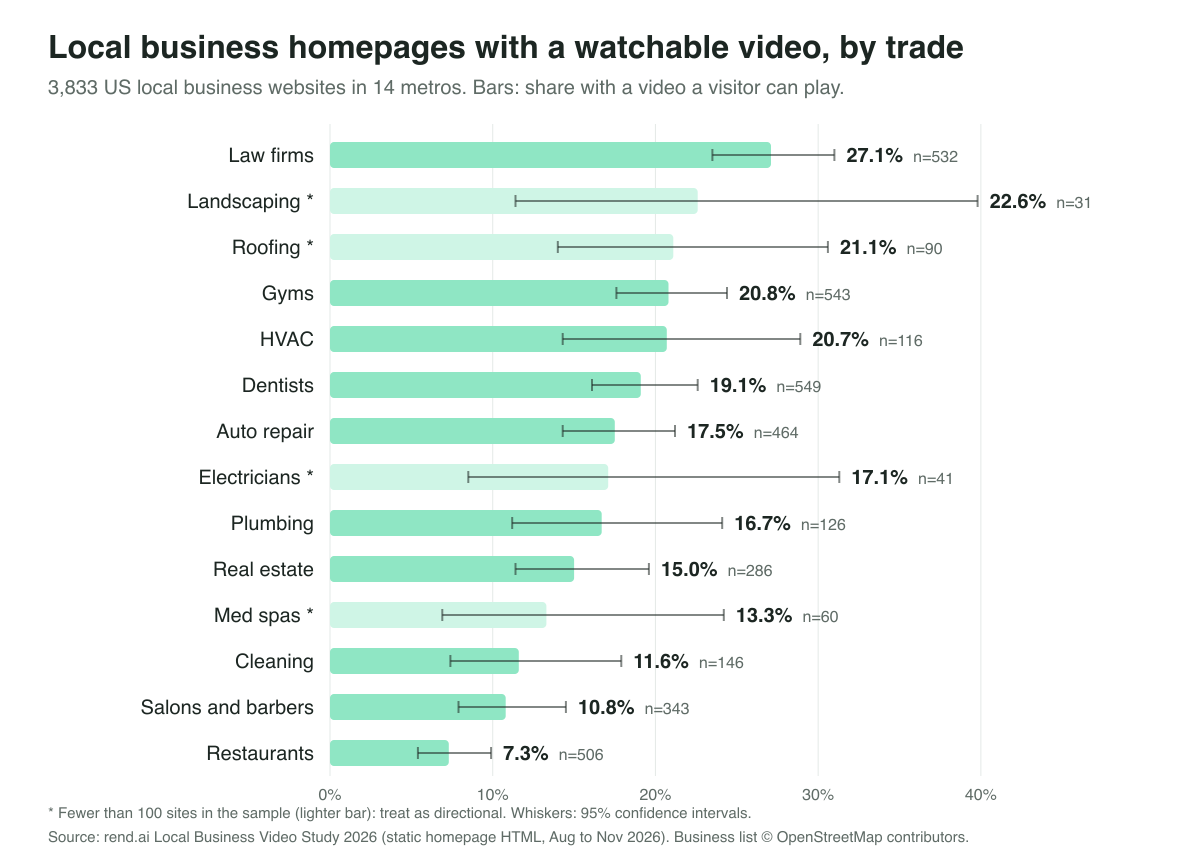
What stands out:
The lead is real. The law firm interval (23.5 to 31.0%) sits entirely above the all-trade interval (16.1 to 18.5%). Firms have been filming "what to do after an accident" clips for years, and it shows.
Law firms skip the decorative loop. Only 6.0% have a background loop and nothing to play, half the all-trade rate and one of the lowest of any trade (auto repair is at 5.8%). When a firm puts video on the homepage, it is usually an attorney talking.
They lean on YouTube and pop-ups. 16.5% embed a YouTube player, about twice the average. And 26 of the 144 firms with a watchable video use a click-to-play lightbox: a "Watch our video" button that opens the player in an overlay. That's 4.9% of all firm homepages, the highest rate of any trade with 100 or more sites.
Schema is still rare. 4.9% have a playable video with VideoObject markup. That's double the average, and it still means about 95 firms in 100 give Google no structured description of their video.
What a lightbox costs you
The pop-up player keeps the hero section clean, which is why designers like it. The tradeoff is search. Google's video best practices say a video must be embedded on a watch page and can't be hidden behind other elements to be eligible for video features. A player that only appears after a click is about as hidden as it gets.
The fix is cheap: keep the button if you like it, and also put an inline player lower on the homepage, or on a dedicated "Meet the firm" page that Google can treat as the video's watch page.
The fix: an intake video, not a commercial
Most firm homepage videos are brand spots: skyline, gavel, a confident walk down a hallway, a voiceover about fighting for you. Visitors have seen hundreds. What a person in trouble wants to know before they call is more practical: who picks up, what happens on the first call, what it costs to talk, and what they should have ready.
Make that video. 60 to 90 seconds, one attorney and the intake person, filmed in the office. For the attorney intro and FAQ formats themselves, our guide to law firm video marketing has shot lists and the testimonial rules. This one is the homepage piece.
Shot list: "what happens when you call us"
| # | Shot | Length in the cut | What it answers |
|---|---|---|---|
| 1 | Attorney at their desk, to camera: name, practice area, city | 6 to 8 s | Is this the right kind of lawyer |
| 2 | Intake coordinator answering a phone, then to camera: "I'm usually the first person you'll talk to" | 6 s | Who picks up |
| 3 | Attorney: what the first conversation covers, in plain words | 20 to 25 s | What happens on the call |
| 4 | Close-up of a notepad or checklist on the desk (no client names visible) | 3 s | Cutaway to hide the edit |
| 5 | Attorney: what to have ready (police report, letters, dates) | 10 to 15 s | What do I need |
| 6 | Attorney: how fees work for the first meeting, stated exactly as your fee agreement states it | 8 to 10 s | What does it cost to talk |
| 7 | Conference room or office door, walking in | 3 s | Where it happens |
| 8 | Attorney close: phone number on screen, "call or fill out the form" | 5 s | What do I do now |
Keep shot 6 precise. ABA Model Rule 7.1 prohibits false or misleading communications about a lawyer's services, and states add their own advertising rules, so "free consultation" or "no fee unless we win" should only appear if it is exactly true for that practice area. Have whoever handles bar compliance watch the cut before it goes live.
Clear every whiteboard, screen and file folder from frame before filming. Record with a clip-on mic. Caption the full video so it works with the sound off; the caption style previewer shows how a style reads on a phone.
Where it goes on the page
- An inline player in the first or second section of the homepage, beside the phone number or contact form.
- The same video on the practice area page it matches. Our study only looked at homepages, so we can't say how many firms already do this, but it's where people who searched a specific problem land.
- A 30-second vertical cut for your Google Business Profile (it takes videos up to 30 seconds; see our Google Business Profile video guide).
- The full video on the YouTube channel that 33.1% of firm homepages already link to. Embedding it on the site is what turns that link into something a visitor watches without leaving.
VideoObject schema for a law firm homepage
Google's video structured data guide requires name, thumbnailUrl and uploadDate, and recommends description, duration and contentUrl or embedUrl. Add this to the page with the inline player and change the values:
<script type="application/ld+json">
{
  "@context": "https://schema.org",
  "@type": "VideoObject",
  "name": "What happens when you call Barrett Injury Law",
  "description": "Attorney Lisa Barrett explains who answers, what the first call covers, what documents to have ready and how fees work.",
  "thumbnailUrl": "https://www.example.com/images/intake-video-thumbnail.jpg",
  "uploadDate": "2026-11-22",
  "duration": "PT1M15S",
  "embedUrl": "https://www.youtube.com/embed/VIDEO_ID"
}
</script>
Write the name the way a client would search, not as a slogan. Use a thumbnail of the attorney's face mid-sentence; the video frame grabber pulls a still at any timestamp. Then check the page in Google's Rich Results Test. The full property list is at schema.org/VideoObject.
Quick audit for a firm that already has video
| Question | If the answer is no |
|---|---|
| Does a visitor see a player without clicking a button first? | Add an inline player below the lightbox button |
| Does the video say what happens on the first call? | Film the intake video above; keep the brand spot if you like it |
| Is there VideoObject schema on that page? | Paste the block above and test it |
| Is the thumbnail a person, not a logo? | Grab a frame of the attorney talking |
| Are there captions? | Add them, so the video works with the sound off |
| Was it checked on a phone after the last redesign? | Load it and press play; one site in our spot-check had its player commented out |
Where Rend fits
Rend is an AI video agent. Send it the office footage, in chat, by email or through a web form, and tell it what you need: "a 75-second intake video for the homepage, a 30-second vertical for Google, and a 45-second cut for the car accident page." It cuts on the attorney's exact words, so trimming a sentence for compliance takes seconds, adds captions in your firm's font, and builds everything on a real timeline you can open and change.
When the managing partner or compliance reviewer needs to sign off, send a review link. They draw on the frame or leave a note ("cut 'we always win' at 0:42"), and Rend reads every note and makes the change. Editing is free and you pay only when Rend renders or generates something (pricing).
FAQ
What percentage of law firm websites have video?
In our 2026 study of 532 US law firm homepages, 27.1% had a video a visitor can play (95% CI 23.5 to 31.0%), the highest of 14 local trades. Counting background loops, 33.1% had some video. JavaScript-loaded players aren't counted, so these are lower bounds.
Do law firms use more video than other local businesses?
Yes. The all-trade average was 17.3%, and the law firm interval sits entirely above it. Restaurants were lowest at 7.3%. Even so, 54.5% of law firm homepages had no playable video and no YouTube or TikTok link.
Should a law firm video open in a pop-up?
It can, as long as there is also an inline player somewhere Google can see it. Google's video guidelines say a video can't be hidden behind other elements to be eligible for video features. 4.9% of firm homepages use a click-to-play lightbox.
What video should a law firm put on its homepage?
A 60 to 90 second video of an attorney explaining what happens when someone calls: who answers, what the first conversation covers, what to bring and how fees work for that meeting. It answers the questions that stop people from calling.
Do I need VideoObject schema for a YouTube embed?
Google tries to read videos on its own, but its guide says markup lets you shape the title, thumbnail, date and duration shown and makes the video easier to find. Only 4.9% of law firm homepages have a playable video with schema.
Can I say "no fee unless we win" in a video?
Only if it is accurate for that practice area under your fee agreements and your state's advertising rules. ABA Model Rule 7.1 bars false or misleading statements about a lawyer's services. Check with your bar's advertising guidance before publishing.
If your firm is one of the 72.9% with nothing to play, you can film the intake video in an hour. Start free on Rend, send the clips, and get the homepage cut plus versions for your practice pages and Google profile.