Runway Alternatives in 2026: AI Video Generators Compared
We build Rend, so weigh our view accordingly. Competitor details were checked on November 18, 2026; prices and features change, so confirm on their sites.
The strongest Runway alternatives for generating clips are Kling (longest clips, with keyframe control), Google Flow (Google's tool built on Veo), Luma and Pika. If your real goal is a finished video (script, shots, edit, sound, captions) rather than a folder of 10-second clips, an AI video agent like Rend is the better kind of tool, because it generates the shots and then edits them into something you can publish.
Runway is still one of the best places to make AI video. It hosts its own models (Gen-4.5 is the current flagship) plus models from other labs, has editing tools like Aleph for changing existing footage, and a clean interface. Most people who look for alternatives run into one of three things: credits, clip length, or the gap between a clip and a video.
Runway's pricing, for reference
From Runway's pricing page and help center on November 18, 2026:
| Plan | Monthly | Billed yearly | Credits |
|---|---|---|---|
| Free | $0 | 125 one-time credits | |
| Standard | $15 | $12/month | 625 a month |
| Pro | $35 | $28/month | 2,250 a month |
| Max | $95 | $76/month | 9,500 a month |
Credits per second depend on the model and resolution. Third-party breakdowns put Standard's 625 credits at under a minute of Gen-4.5 video a month. If you generate a lot, the credits, not the subscription, decide your cost.
Quick comparison
| Tool | What it's best at | Makes a finished edit | Where Runway is better |
|---|---|---|---|
| Rend | Whole videos: script, shots, cut, sound, captions | Yes, on an editable timeline | Hands-on control of each generation, model choice |
| Kling | Long clips (up to 30 s on Kling 4.0), keyframes, up to 4K | No | Editing tools, interface |
| Google Flow | Veo-based clips with native audio, Google account access | Basic scene building | Range of models and tools |
| Luma | Cinematic generation and camera moves | No | Free entry (Luma has no free plan), breadth |
| Pika | Quick effects and playful short clips | No | Realism, control |
| Premiere Pro / Resolve | Editing generated clips you already have | You edit | Generating anything |
1. Rend: when you need a video, not clips
Here's the problem with generators. You get a beautiful 8-second shot. Then another. Then you need 40 of them that match, a script, narration, music, captions and an edit that holds attention. That's a second job, and most of the work.
Rend is an AI video agent that does both jobs. You describe the video and send what you have (a script, a product page, phone footage, a reference video whose look you want). A crew of specialist agents writes, plans the shots, generates shots, images and b-roll, cuts them with your real footage, adds titles, motion graphics and 3D graphics, a narration voice you approve, original music and sound effects, mixes it, and checks its own work. You get a real timeline, so any shot can be swapped or regenerated and any cut moved.
Where Rend beats Runway:
- The edit is included. No exporting clips to another editor and rebuilding continuity by hand.
- Consistency across a whole piece. Style packs and brand kits keep the look, voice, music and captions the same every episode.
- Long videos. Essays and explainers are built in chapters in parallel. See the AI video essay maker.
- Pay for what renders. Editing is free; you pay when Rend renders or generates. See pricing.
Where Runway is better: if you're an artist who wants to pick the model, tune every prompt and own each frame, Runway gives you more direct control of generation. Rend chooses how to generate for you. Full side-by-side in Runway vs Rend.
2. Kling: longest clips and keyframe control
Kling, from Kuaishou, is the alternative people mention first. Its current flagship, Kling 4.0, generates clips from 3 to 30 seconds, outputs up to 4K, and lets you set start and end frames or up to 10 keyframes. For a single long, controlled shot, that's ahead of most. It's a generator, so the edit is still yours.
3. Google Flow: Veo with a Google account
Flow is Google's filmmaking tool built on its Veo models, with native audio and a way to string scenes together. If you already pay for a Google AI plan, it may be the cheapest place to start. Its scene tools are basic compared with a real editor.
4. Luma: cinematic motion
Luma's Dream Machine is known for smooth camera movement and a filmic look. Unlike Runway, Kling and Flow, Luma doesn't offer a free entry plan at the time of writing, so you'll pay to test it.
5. Pika: fast and fun
Pika leans into effects and quick, playful clips. Good for social posts and experiments, less suited to realistic footage that has to cut in with real camera work.
6. A regular editor, for the clips you already have
If you have generated clips and just need to assemble them, Premiere Pro or DaVinci Resolve is the honest answer. You'll do the continuity, music and captions yourself.
Clips versus a video: what the second job looks like
To show where time actually goes, here's a 60-second product explainer broken down:
| Step | Pure generator workflow | Agent workflow |
|---|---|---|
| Script | You write it | Agent drafts, you approve |
| Shot list | You plan 12 to 15 shots | Agent plans from the script |
| Generation | Prompt each shot, reroll mismatches | Agent generates and checks matches |
| Real footage | Import and match by eye | Cut in with generated shots |
| Voice | Separate tool, then sync | Voice you approve, on its own track |
| Music and SFX | Find, license, cut to picture | Original score and effects, mixed with ducking |
| Captions | Separate tool | Word-timed, editable, your style |
| Revisions | Back to step 3 for each note | Note on the frame, agent makes the fix |
The generator is a camera. You still need the rest of the crew. If AI shots looking like AI is your worry, read how to make AI videos not look like AI.
How to choose
- You want the longest controllable shots: Kling.
- You already pay Google: Flow.
- You want cinematic camera moves: Luma.
- You want quick effects for social: Pika.
- You want a finished, editable video from a brief: Rend.
- You love Runway but hit credit limits: compare per-second costs on the model you actually use before switching.
How to make a finished video ad in Rend, step by step
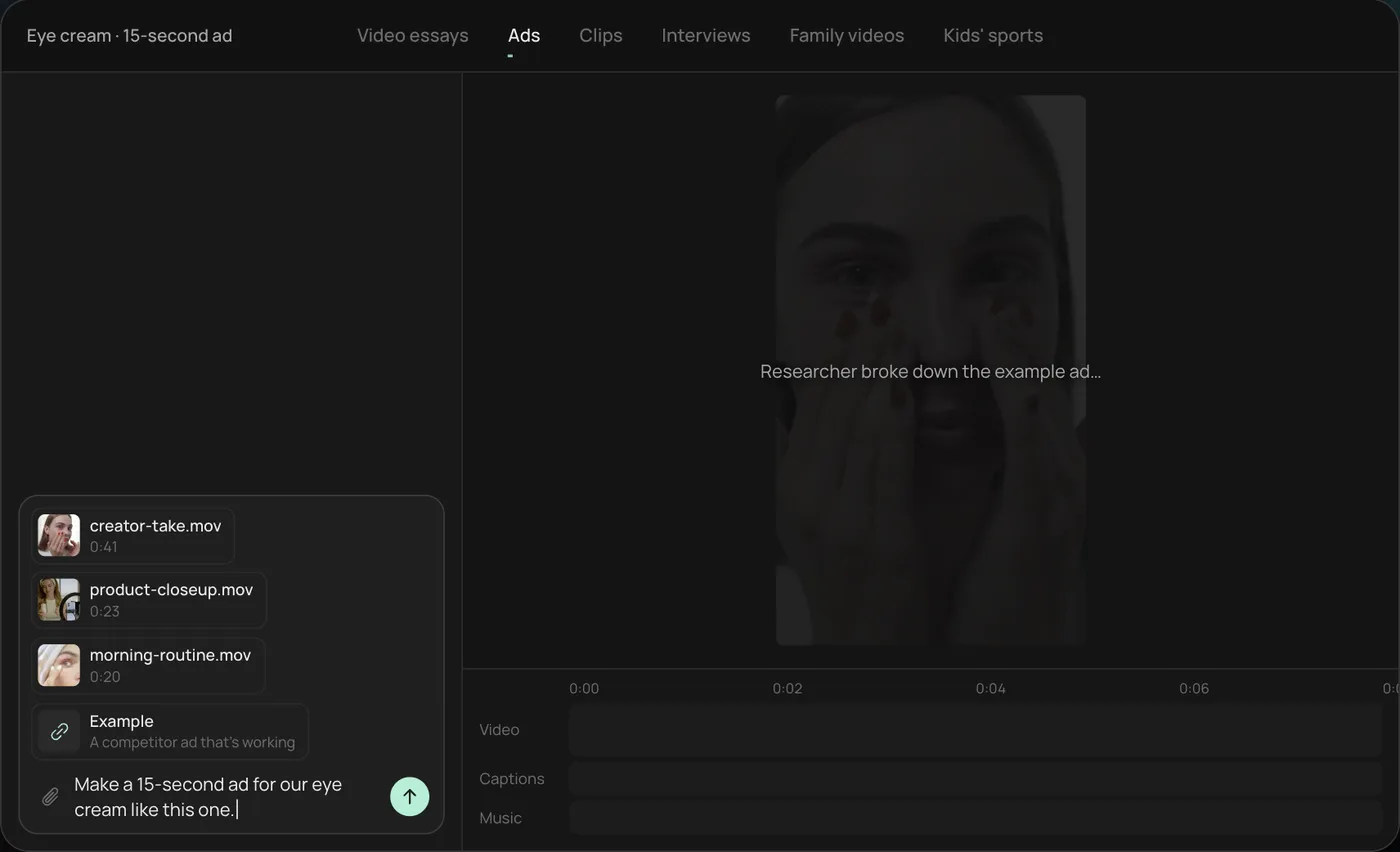
These screenshots are from Rend's demo of making a 15-second eye cream ad from phone clips and an example ad; your own project works the same way.
1. Drop your clips and an ad you like. Add your phone takes and a competitor ad as the example, then type the job in one line, like "Make a 15-second ad for our eye cream like this one."
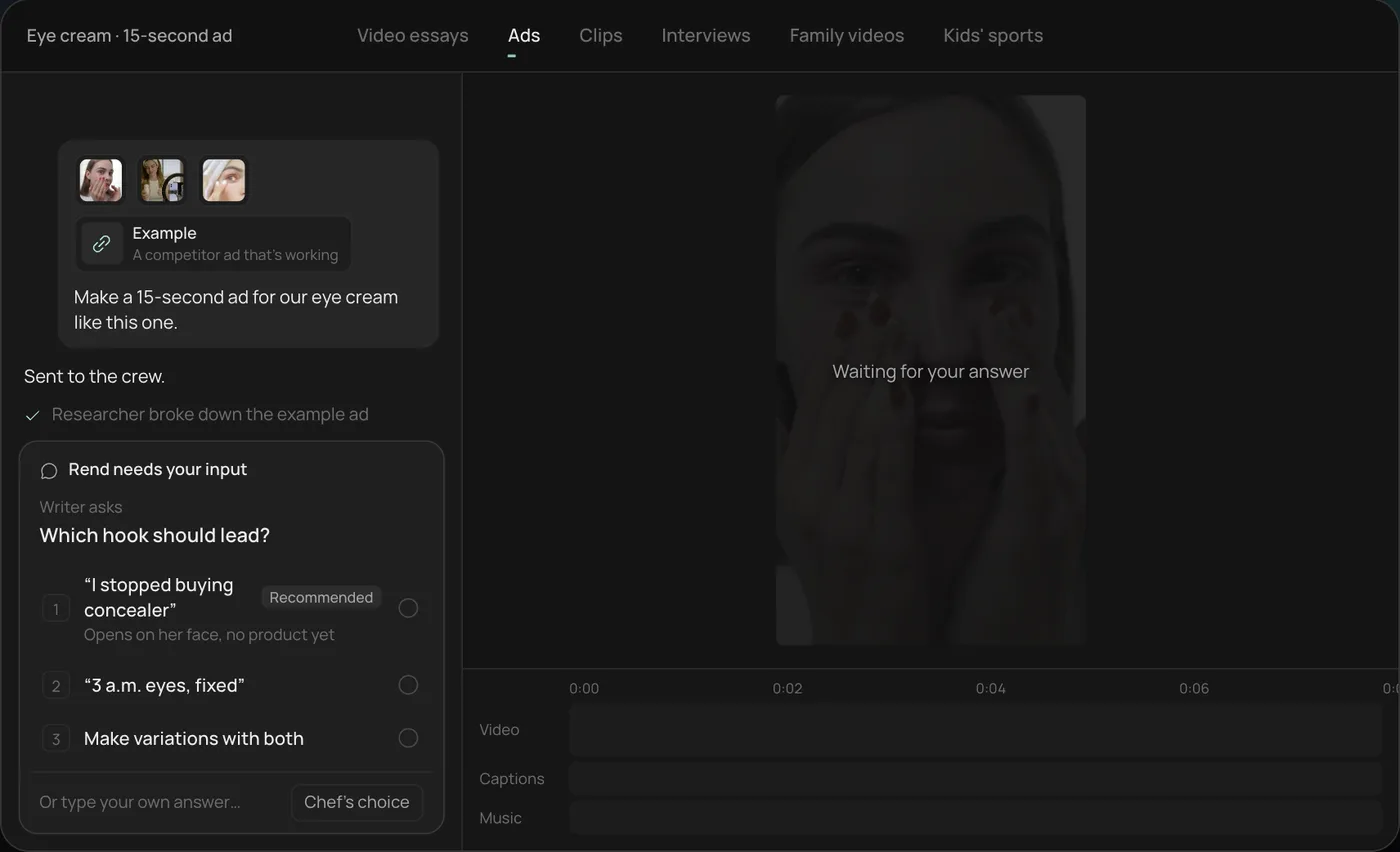
2. Pick the hook. Rend asks one question before it starts, here which hook should lead, with a recommended answer. You can also ask for variations with both.
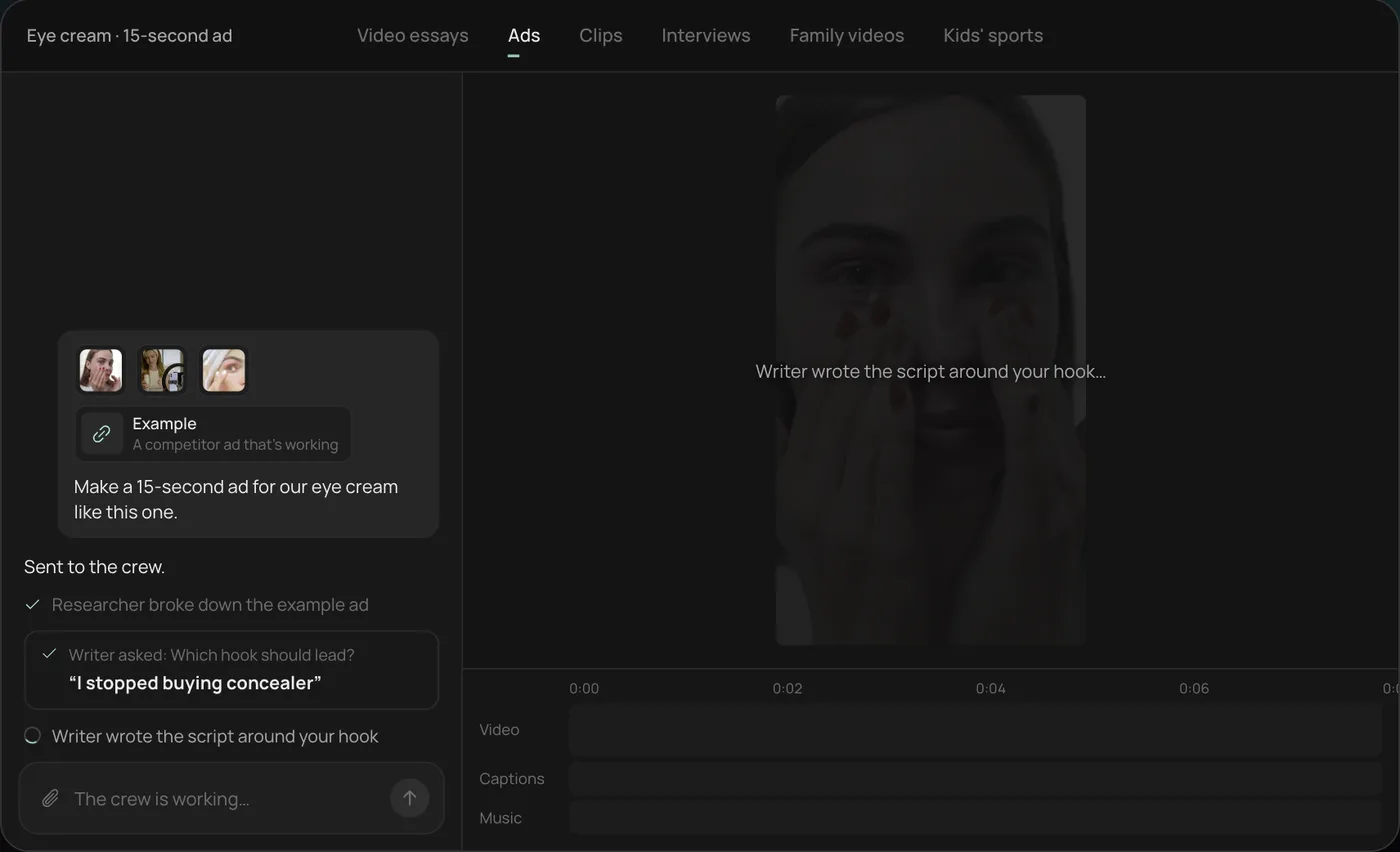
3. Let the crew work. The researcher breaks down the example ad and the writer builds the script around your hook, each step checked off in chat.
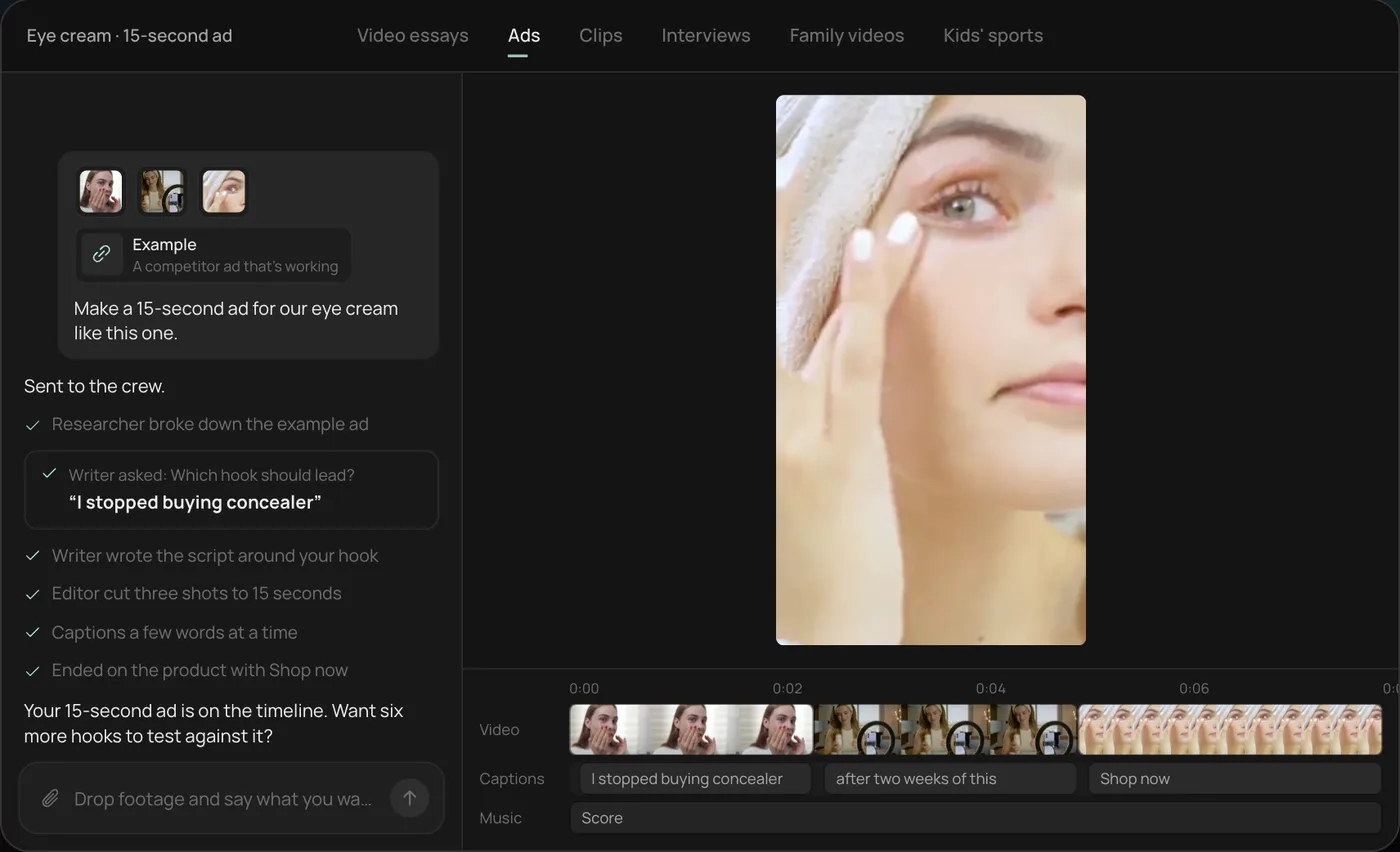
4. Review the finished ad. A 15-second vertical ad lands on a real timeline with video, captions and music on their own tracks, and Rend offers more hooks to test.
From there you can open the timeline and change anything by hand, share a review link for notes, or export. Start a free Rend project to try it on your own footage.
FAQ
What is the best free Runway alternative?
Google Flow and Kling both have free ways in, with limits. Runway itself gives 125 one-time credits. Rend's editing is free and you pay only when it renders or generates.
Is Kling better than Runway?
For long, single shots with keyframe control, Kling 4.0 goes further (up to 30 seconds per clip). Runway has a broader set of tools and models in one place. Many people use both.
Can I make a full video in Runway?
You can generate clips and do some editing, but for a script, voice, music, captions and a polished cut, most people finish in another editor. An agent like Rend does those steps for you.
Which Runway alternative is best for ads?
For ad variants at volume, Rend: bring one video and a brand, get new hooks, sizes, image ads and search ads. See video ad maker.
Does Rend let me choose the AI video model?
No. Rend picks how to generate each shot and checks the result; you direct by describing what you want and giving notes on the timeline or review link.
If you've got a folder of generated clips and no finished video, start free on Rend and tell it what the video is for.