AI Product Video Generator: What Works From a Product Page
An AI product video generator takes a product page, a few product photos or your own clips and produces short video ads: it writes a script, picks or generates shots, adds a voiceover, captions and music, and sizes the result for TikTok, Reels and Feed. The good ones are excellent at mood, b-roll and volume. They are still unreliable at the product itself: labels, logos, text on packaging, hands holding the item and exact shape all drift. The working approach is to generate everything around the product and keep the product shots real.
We build Rend, so weigh our view accordingly. Competitor prices below were checked on November 19, 2026.
What these tools actually do
Under the marketing, most AI product video generators follow the same pipeline:
- Read the input. A product URL (they scrape title, price, bullet points, photos and reviews) or uploaded images and clips.
- Write a script. Usually 15 to 45 seconds, structured as hook, benefit, proof, CTA.
- Build shots. Some combination of your photos animated (pans, zooms), stock footage, generated video clips, and in some tools an AI avatar presenter.
- Add sound. A synthetic voiceover, music and sometimes sound effects.
- Finish. Captions, text overlays, end card, resized versions.
Where tools differ is step 3, and how much you can change once it's done.
What generated shots do well
Being specific, from making a lot of these for real products:
| Shot type | How well generation handles it | Notes |
|---|---|---|
| Atmosphere and lifestyle b-roll (a kitchen at sunrise, rain on a window) | Very well | The best use of generation; no one checks the details |
| Problem scenes (tangled cables, a messy drawer, dry skin close-up) | Well | Keep them short, 1 to 2 s; they set up the product |
| Abstract motion (liquid splashes, particles, ingredient swirls) | Well | Classic for beauty and drinks ads; cheap to iterate |
| Your product photo animated (slow push, parallax) | Fine | Safe because the product is your real image; reads as a still |
| A person using a generic product (pouring coffee, running) | Mixed | Hands and faces have improved a lot; still check every frame |
| Your product, generated, in a new scene | Poor to mixed | Labels warp, logos melt, proportions change between shots |
| Text on screen inside generated footage | Poor | Add text as an overlay in the edit instead |
| Your product being used, with physical accuracy (a zipper, a pump, a lid) | Poor | Mechanics are the hardest thing to fake; film this |
The pattern is simple. Generation is great at anything a viewer won't scrutinize, and bad at the thing you are selling, which is the thing they will.
Where it goes wrong (and what it costs you)
Three failure modes we see over and over:
The product changes. A skincare jar that has a gold lid in shot one has a silver lid in shot three. The label text turns into gibberish. A customer who orders it and receives something different is a refund and a bad review. On some platforms it's also a policy problem: TikTok Shop's US Seller Center says the product shown must match the listing, and it prohibits filters or AI effects that fake results.
The "after" is invented. A generated before and after for a cleaning spray or a wrinkle cream is a false claim, full stop. Never generate a result shot.
It looks like every other AI ad. Animated product photos, a stock-sounding voice and an identical caption style read as a template within a second, and audiences scroll. Our guide on making AI videos that don't look like AI goes through the fixes, but the biggest one is mixing in at least some real footage.
The hybrid that works
What we do for most product videos now:
- Real: the product hero shot, the product in hand, the product working (the pump, the pour, the zip), and any result.
- Generated: the hook scene, the problem scene, lifestyle b-roll, transitions, abstract ingredient shots.
- Written by AI, checked by a person: the script, the hooks, the captions.
Ten minutes of phone footage of the product covers the real list for a whole month of ads. Here's the shot list we'd ask for: a slow pass around the product on a plain surface, the product picked up and turned in hand, the main mechanism working three times, the product next to a common object for size, and the result if there is one (a clean surface, a poured glass). If you want more on filming products, our ecommerce product video ads guide has a full shoot plan.
Four AI product video generators, compared
Brief and factual. Prices are list prices on the vendors' pages on November 19, 2026, and they change often.
| Tool | Main input | What you get | Editable after? | Starting price |
|---|---|---|---|---|
| Creatify | Product URL | Avatar and product-link video ads, in batches | Light edits in its editor | Free plan with 10 credits a month; Standard $15/mo monthly for 55 credits |
| Amazon Ads Video Generator | Product image or ASIN | Short video ads for Sponsored Brands video | Template choices | Free inside Amazon Ads |
| Pippit (from the makers of CapCut) | Product link, images | Product ads and avatar videos | In its editor | Free plan with daily credits; paid plan prices vary by region |
| Rend | Your clips, product page, a past ad | Hooks, sizes, image ads and search ads from one source | Yes, full timeline | Editing free; pay when it renders or generates (pricing) |
Creatify is the cheapest serious entry point for avatar ads from a link. Where it wins: a store with no video can have a first batch in an afternoon. Where it falls short: avatar ads have a recognizable look, and changing more than a script or a scene is limited. We compare it in depth in Creatify vs. Arcads vs. Rend.
Amazon's Video Generator is free and built for Sponsored Brands video. Amazon expanded it to nine marketplaces in November 2025. If you sell on Amazon and only need Sponsored Brands videos, start there before paying for anything. It's not built for TikTok or Meta. Our Amazon product video guide covers listing videos in more detail.
Pippit has a free tier and a lot of templates aimed at sellers. It's a reasonable choice if you already edit in CapCut. We couldn't confirm a single US price for its paid plans, so check its pricing page from your location.
Rend works differently from the others. It's an AI video agent: you send what you have (phone clips, a product page, an ad that worked, a competitor ad you like) and a crew of specialist agents writes the script, generates the shots and b-roll you don't have, cuts on exact transcript words, adds a voiceover in a voice you approve, original music and word-timed captions, and checks its own work. It can research competitors' Meta ads before it writes. Everything lands on a real timeline, so when a generated shot warps your label, you replace that one shot rather than regenerating the ad. A brand kit keeps fonts, caption style, voice and music bed consistent across every variant.
Where Rend falls short: if you have only a URL and want a finished avatar ad in five minutes, Creatify or Pippit get you there with fewer steps. And for Amazon Sponsored Brands specifically, Amazon's free tool is hard to argue with.
How to make a product video in Rend, step by step
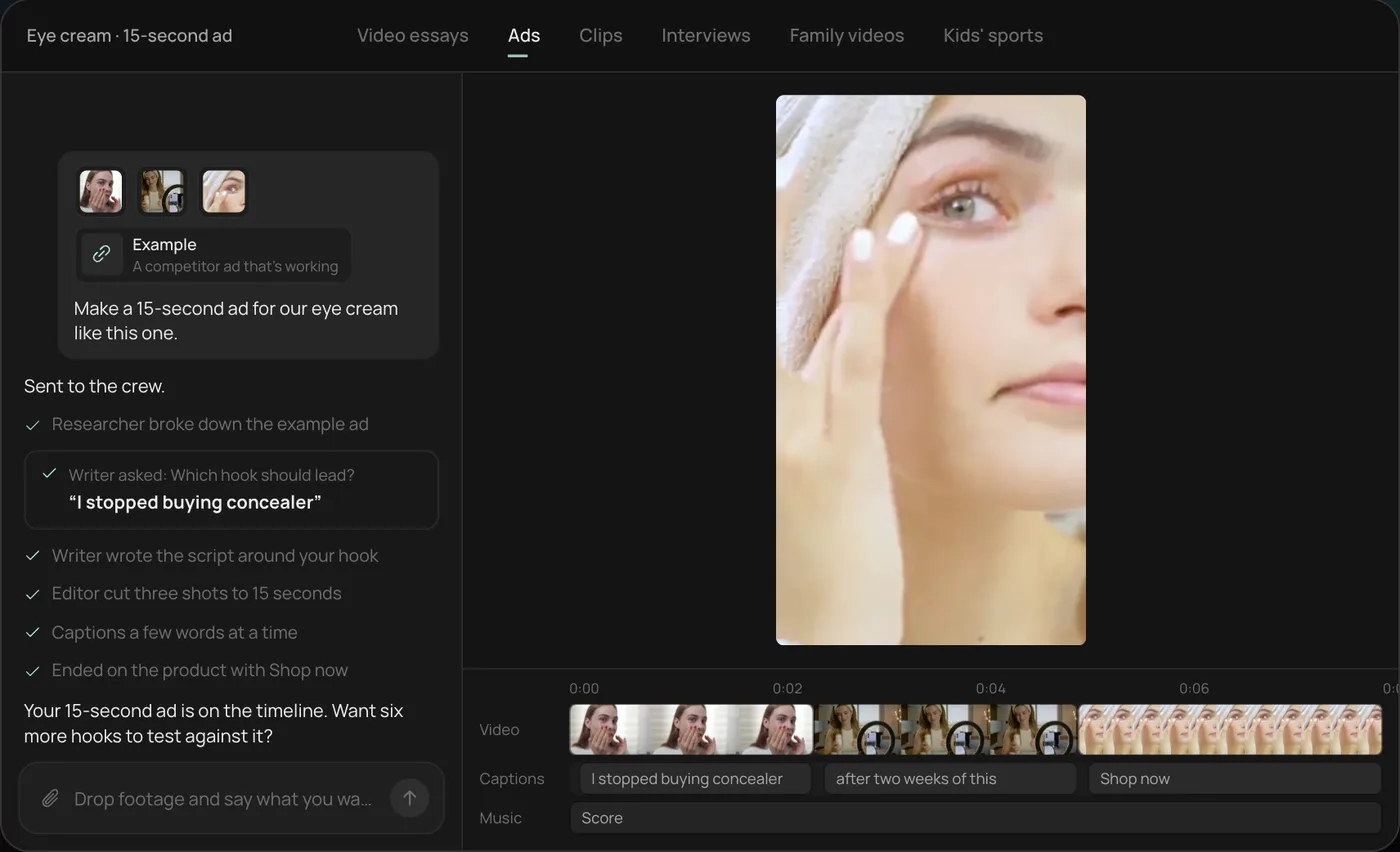
These screenshots come from Rend's demo of a 15-second eye cream ad built from three phone clips; a product video from your own clips or product page works the same way.
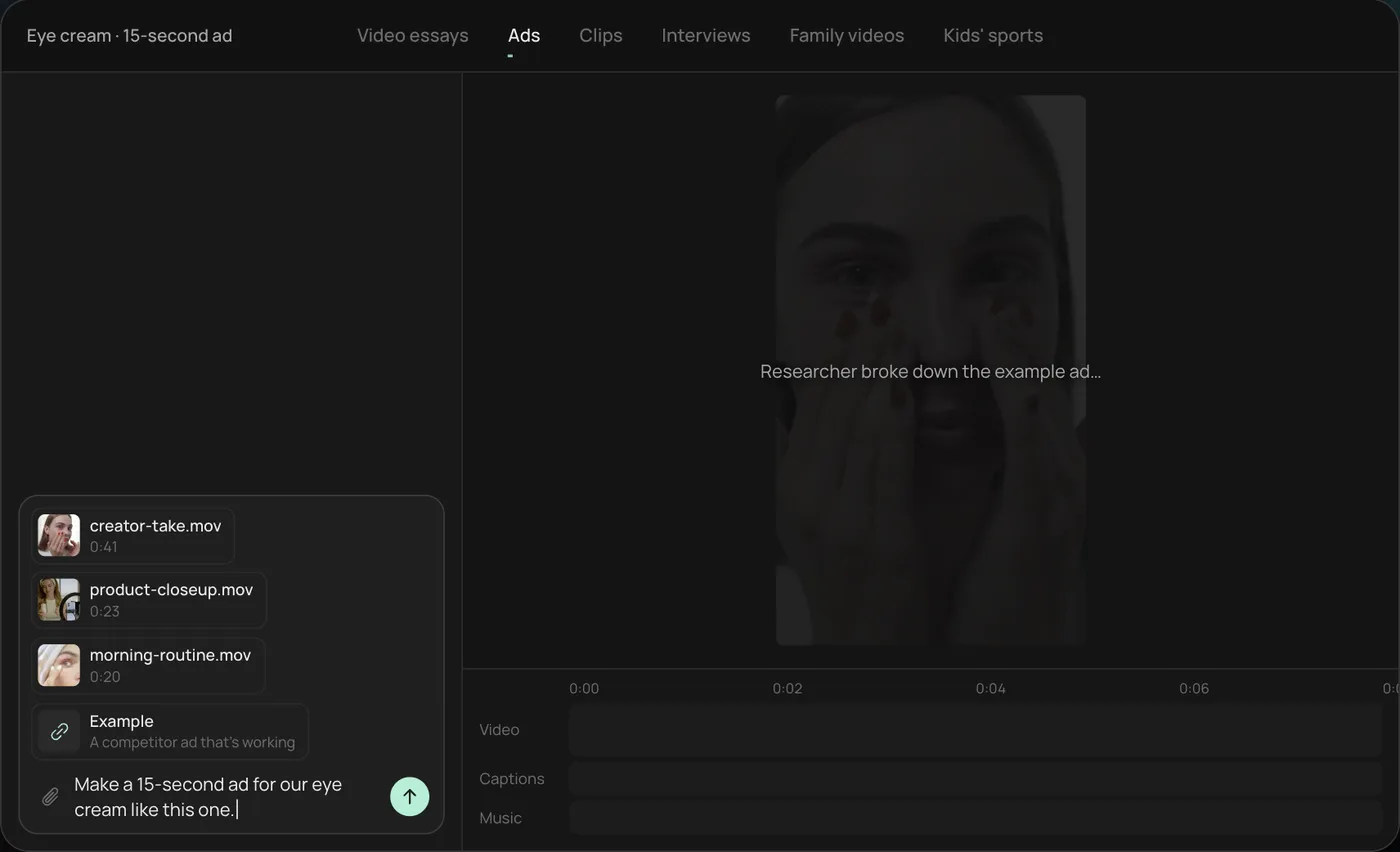
1. Drop your clips and an example. Add your phone clips (here a creator take, a product close-up and a morning routine) plus a competitor ad you like, then type what you want: "Make a 15-second ad for our eye cream like this one."
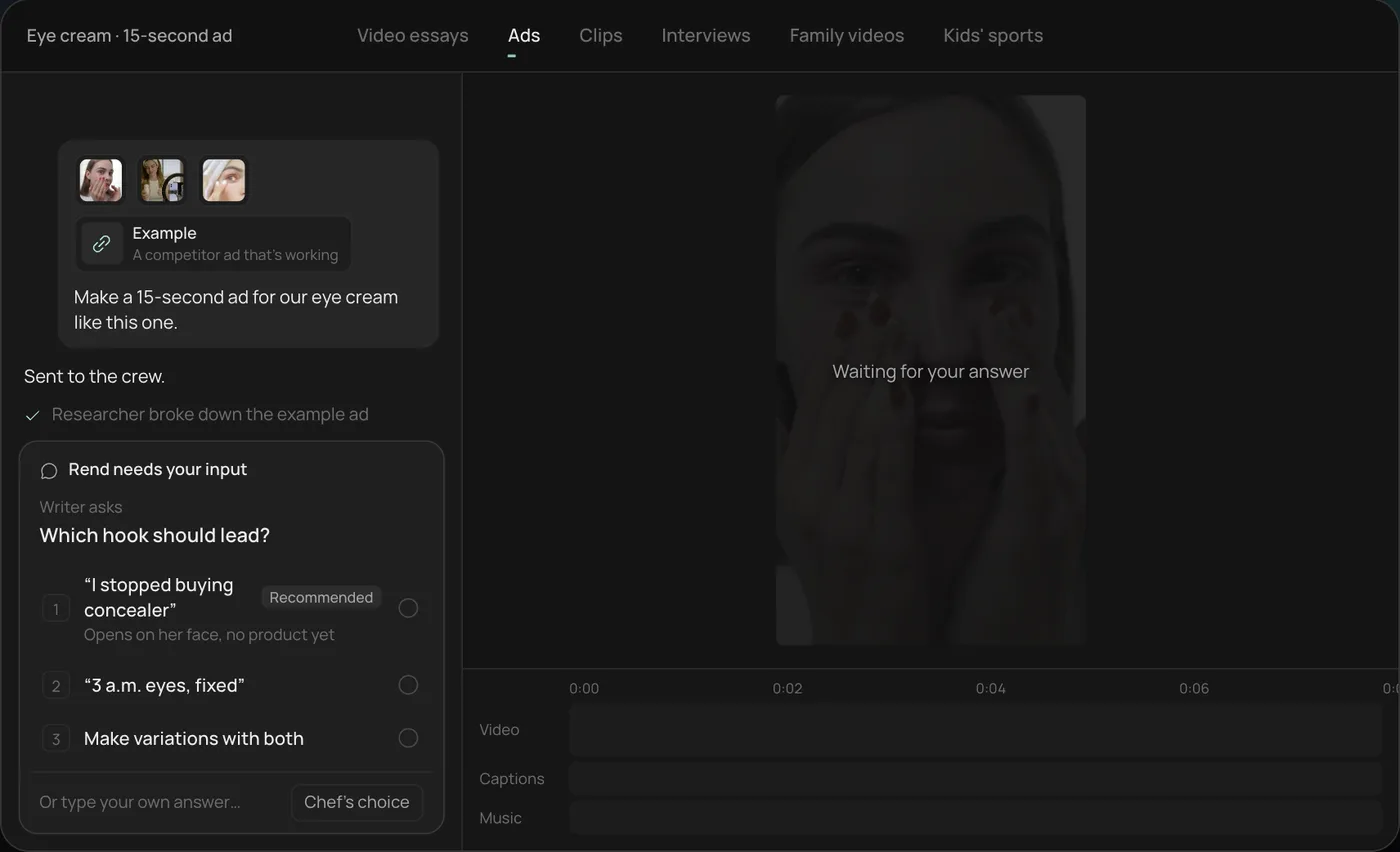
2. Answer the one question. Rend asks which hook should lead and marks a recommended answer. You can also ask it to make variations with both.
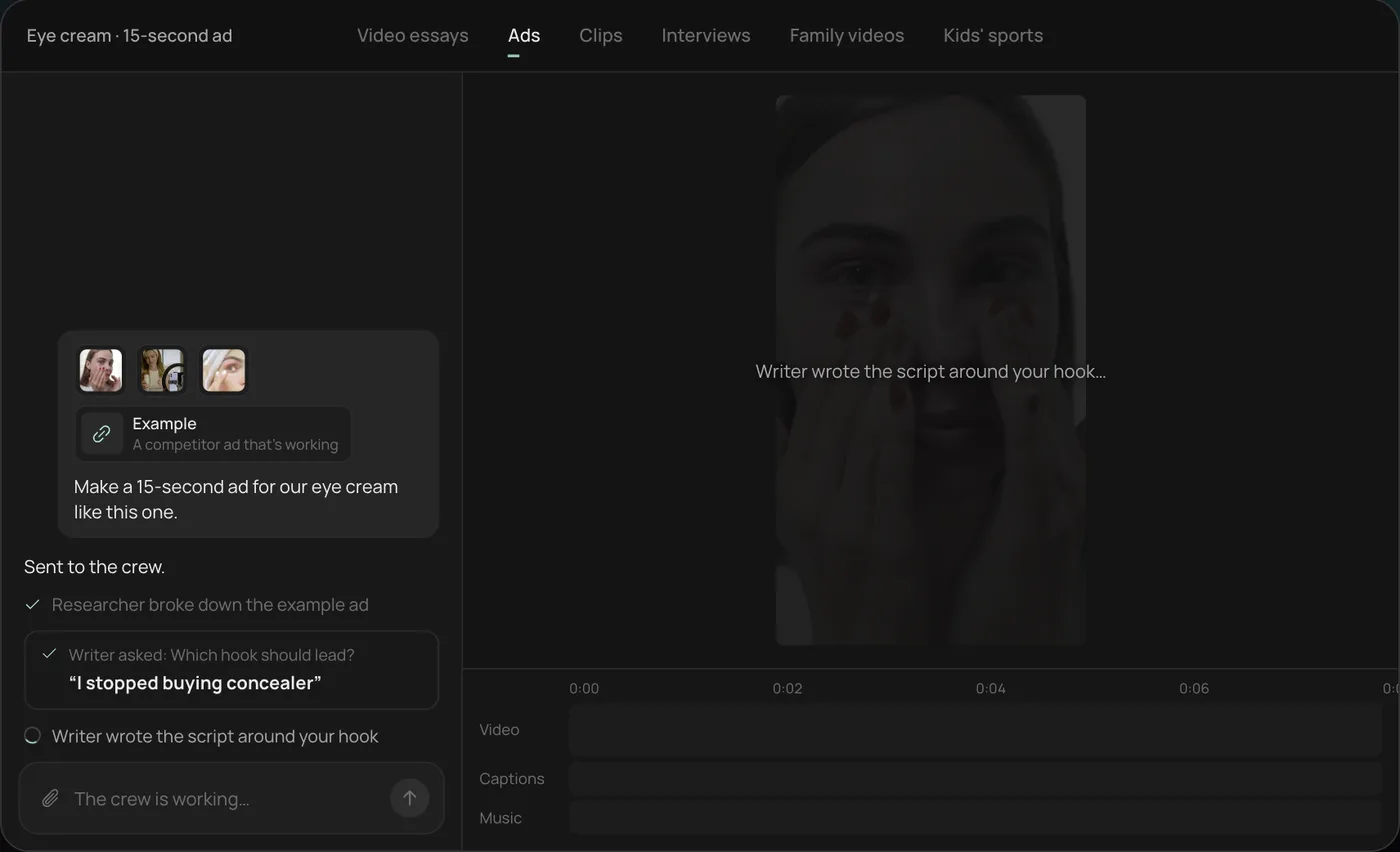
3. Let the crew work. The researcher breaks down the example ad and the writer builds the script around your hook, checking off each step in chat.
4. Open the finished ad. A 15-second vertical ad lands on a real timeline with captions and music on their own tracks, and Rend offers six more hooks to test.
From there you can open the timeline and change anything by hand, share a review link so your team can draw on the frame and leave notes, or export every size. Start a free Rend project to try it on your own product.
A checklist before you publish an AI product video
- The product in every shot matches what ships: color, size, label, lid, quantity.
- No generated result shots. Every "after" is real.
- No text inside generated footage; all text is an overlay you can edit.
- The claims in the voiceover match your product page word for word.
- Captions proofread, especially product names and numbers.
- The voice doesn't sound like the default voice everyone uses.
- At least one real shot of the product in hand or working.
- Sized for each placement, with text inside the safe zones (check with the video ad size checker).
Then test it against at least two other hooks. Our ad creative testing guide covers how.
FAQ
Can AI make a product video from just a product URL?
Yes. Most tools scrape the page for photos, bullets and reviews and build a script and video from them. Expect animated photos, stock or generated b-roll and an AI voice. It's a fast first draft, and better when you add real footage.
Are AI product videos good enough for ads?
For testing hooks and angles, yes. For your main ad, mix in real footage of the product, because generated products drift in shape and label, and audiences recognize template ads.
What's the best free AI product video generator?
Amazon's Video Generator is free for Sponsored Brands video. Meta Ads Manager offers built-in creative tools at no extra cost. Creatify and Pippit have free tiers with limits. In Rend, editing is free and you pay only for what it renders or generates.
Can AI generate my actual product accurately?
Not reliably yet. Logos, label text, small parts and exact proportions change between shots. Use your own product photos or footage for any shot where the product is the subject.
Do I need to disclose AI in product video ads?
Platforms vary. Meta may label ads made or edited with AI. TikTok Shop prohibits AI effects that fake results. Check each platform's current policy for your category.
If you have a product page and a few phone clips, make a free Rend account and ask for a 15-second ad with three hooks. You can see the cut before you pay to render it.