Auto Repair Shop Video Marketing: Diagnosis Videos That Win Trust
Auto repair shop video marketing works when it shows customers what they can't see for themselves: the worn brake pad next to a new one, the cracked serpentine belt, the scan tool reading the code. The three videos that pay off are short diagnosis walkthroughs (30 to 90 seconds, a tech pointing at the actual problem), tech and shop intros that put a face on the counter, and 15 to 20 second service-special ads for the slow weeks. Shoot all of it on a phone in the bay, put the walkthroughs on your Google Business Profile and social, and run the specials as Meta and YouTube ads inside your service area.
People don't distrust mechanics because the work is bad. They distrust what they can't see. Video closes that gap, and most of the footage is already in your techs' phones.
How to make an auto repair ad in Rend, step by step
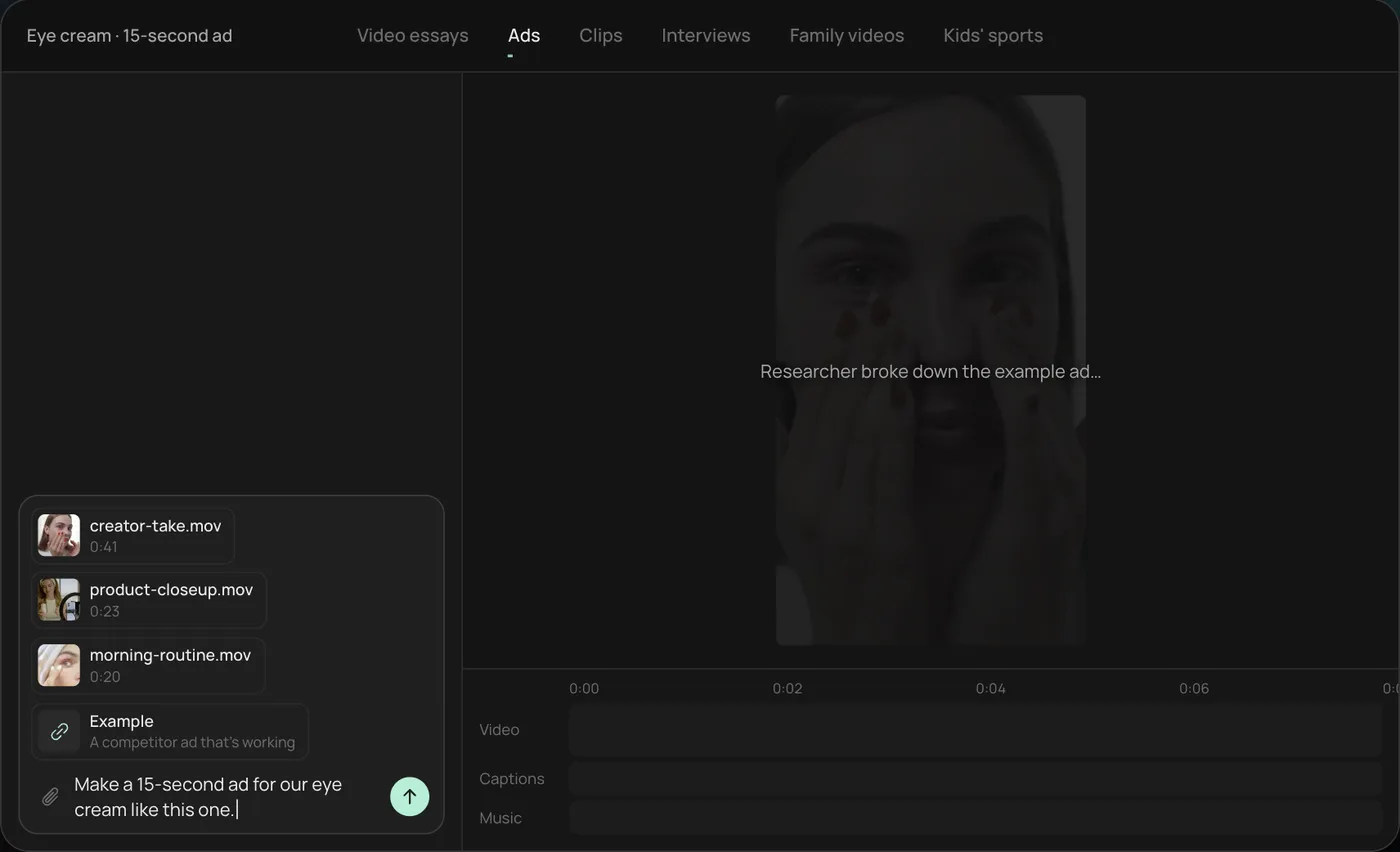
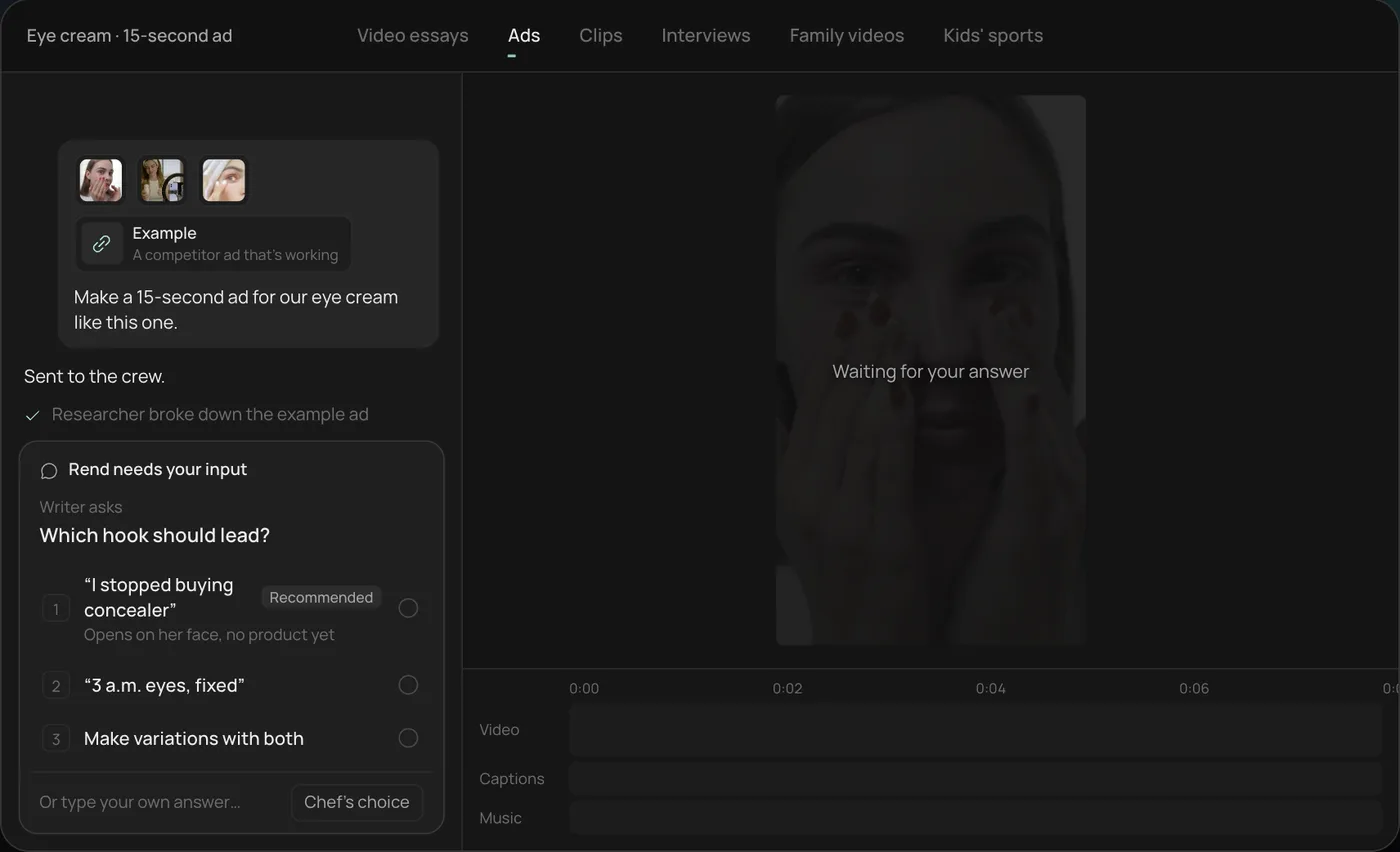
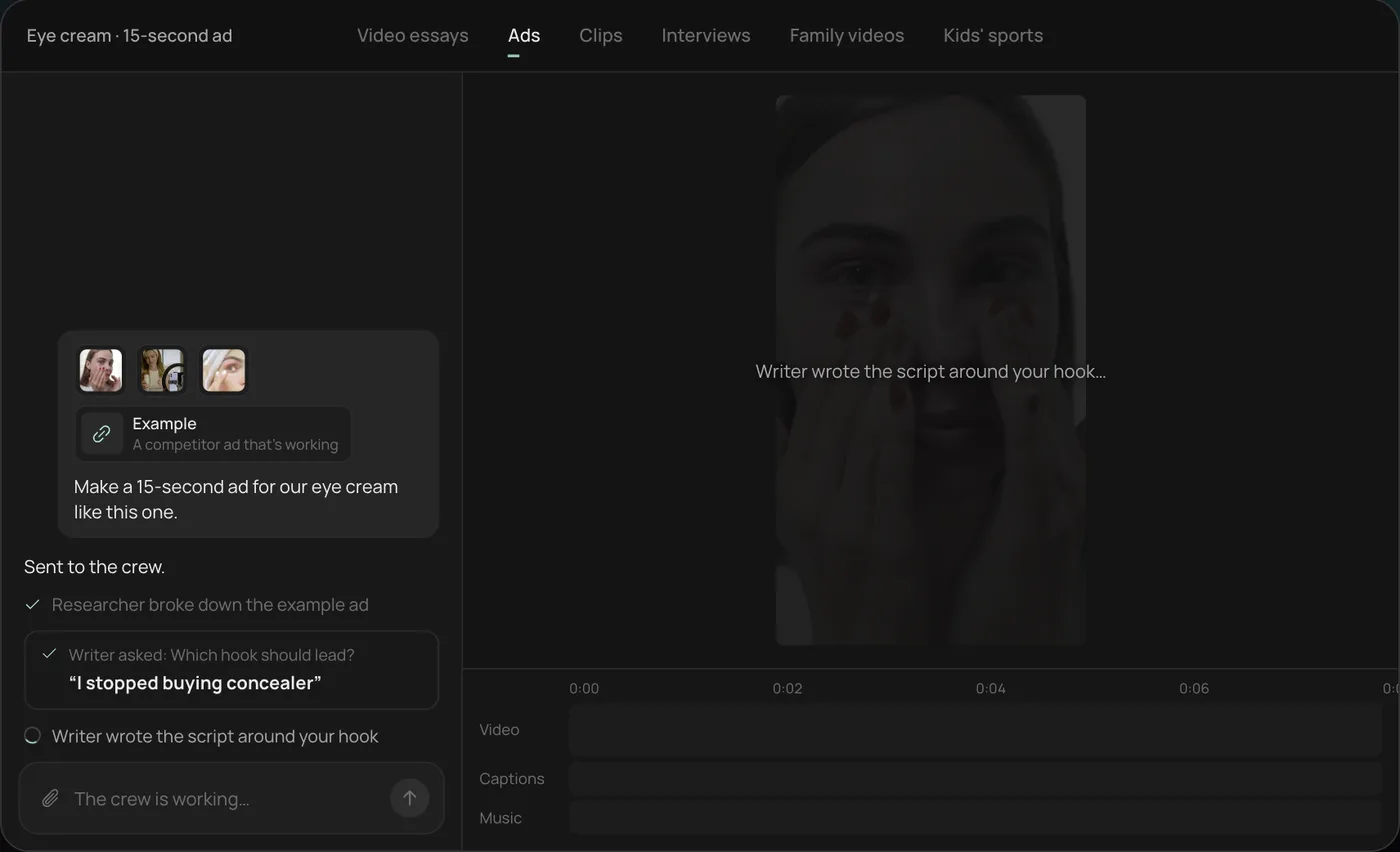
These screenshots come from Rend's demo of a 15-second eye cream ad made from phone clips; a service-special ad works the same way with clips from your bays.
1. Drop your clips and an example. Add your phone clips (here a creator take, a product close-up and a morning routine) plus a competitor ad you like, then type what you want: "Make a 15-second ad for our eye cream like this one."
2. Answer the one question. Rend asks which hook should lead and marks a recommended answer. You can also ask it to make variations with both.
3. Let the crew work. The researcher breaks down the example ad and the writer builds the script around your hook, checking off each step in chat.
4. Open the finished ad. A 15-second vertical ad lands on a real timeline with captions and music on their own tracks, and Rend offers six more hooks to test.
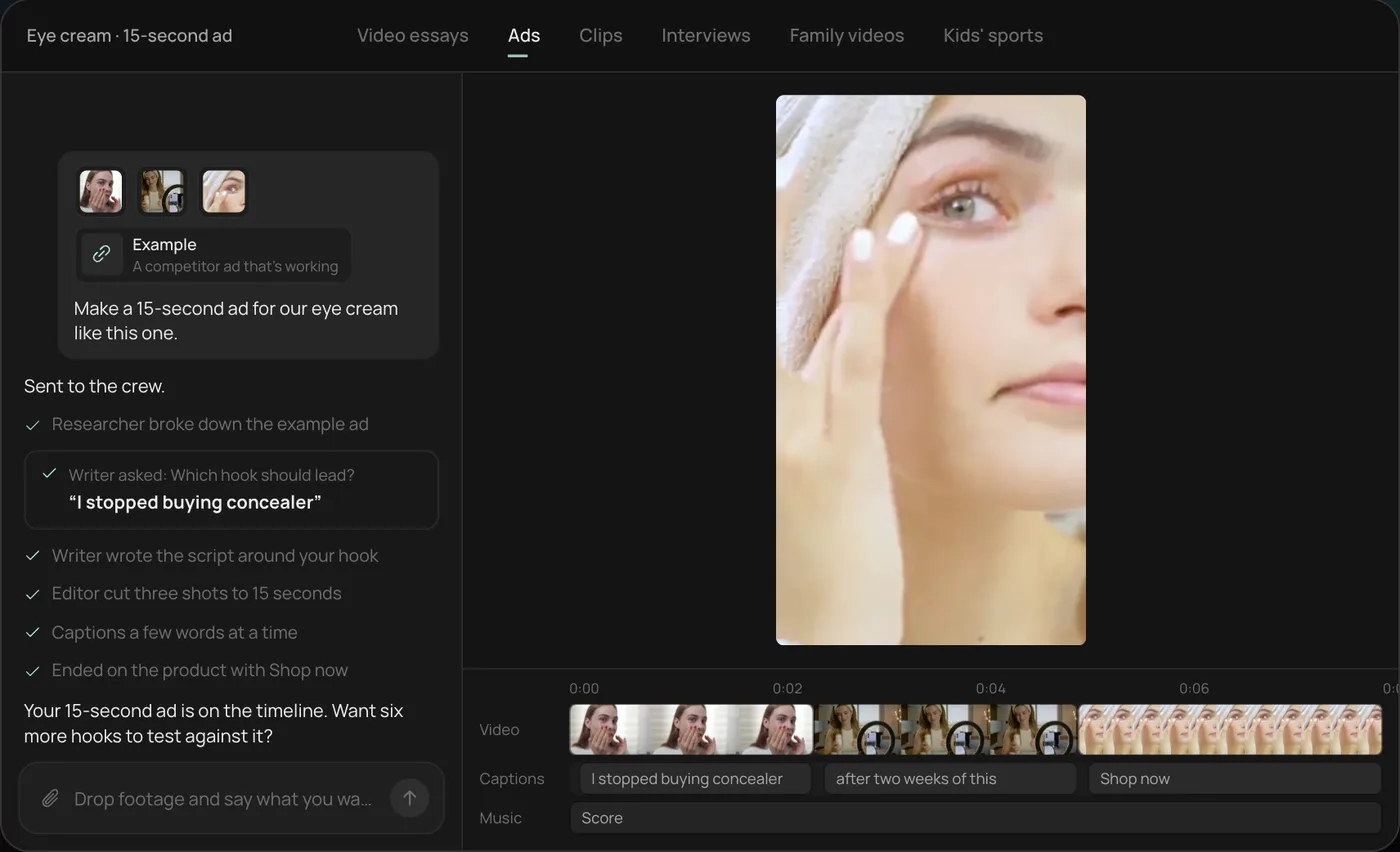
From there you can open the timeline and change anything by hand, share a review link, or export. For a shop, swap in a tech's bay clips and a line like "Make a 20-second brake inspection special with our phone number and hours on screen." Start a free Rend project to try it on your own footage.
The three videos every shop needs
| Video | Length | Where it runs | What it does |
|---|---|---|---|
| Diagnosis walkthrough | 30 to 90 s | Texted to the customer, Google Business Profile (30 s cut), Reels, Shorts | Shows the problem, builds trust, gets the repair approved |
| Tech and shop intro | 30 to 60 s | Website, Google Business Profile, pinned on social | Puts a face on the shop before the first visit |
| Service-special ad | 15 to 20 s | Meta, YouTube, Shorts | Fills slow weeks with a simple offer |
Start with walkthroughs. They are the cheapest to make, they double as sales tools at the counter, and they give you raw material for everything else.
Diagnosis walkthroughs
A walkthrough is a tech, a phone and the part. Nothing else. Many shops already text photos to customers through their shop management software; a 45-second video does the same job better because the customer hears a calm explanation instead of reading a line item.
Here's the structure we cut to, with times for a 60-second version:
- 0 to 5 s: the car and the complaint. "This is the Camry that came in with a grinding noise when braking."
- 5 to 25 s: the problem, close. Wheel off, caliper visible, a finger on the pad with 2 mm left. Hold each shot for at least three seconds so it reads on a small screen.
- 25 to 40 s: the comparison. Old pad next to a new one. Old belt flexed so the cracks open up. A test strip against the color chart.
- 40 to 55 s: what happens if they wait, in one sentence, with no scare tactics. "If this goes to metal, it starts cutting the rotor, and that doubles the job."
- 55 to 60 s: the recommendation. "We'd replace front pads and resurface the rotors."
Three things go wrong on almost every first attempt. The shop is loud, so the tech's voice disappears under an impact gun two bays over (film in a quiet moment or step away from the air line, and use a clip-on mic if you can). The lighting under a car is terrible, so hold a work light off to the side, not straight on, which flattens everything. And the tech says "as you can see" while pointing at something the camera can't see. Have them show the part to the lens and pause.
Never film a license plate, VIN or the customer's personal items in the cabin without asking. Blur or crop before anything goes public. The walkthrough you text to one customer and the clip you post on Instagram are different videos, and the public one needs the customer's yes.
Tech and shop intros
People pick a shop partly on whether they'd trust the person at the counter. An intro video answers that before they call.
Keep it to one person per video. A 40-second intro: name and years doing this (5 s), what they work on most and why they like it (15 s), a real B-roll moment of them at work (10 s), and one honest line about how the shop treats customers (10 s). If your techs hold ASE certifications, show the patch or certificate on screen rather than reading a list aloud. ASE's own Blue Seal of Excellence program recognizes shops where at least 75% of the technicians are ASE certified, according to ASE's program pages; if you qualify, it belongs in the intro and the ads.
Do not script it word for word. Write three questions on a card, ask them off camera, and cut the answers together. Rend cuts on exact transcript words, so you can drop your questions and the "ums" and keep only the answers.
Service-special ads
Specials fill the gaps in your schedule: a slow January, the week after a holiday, the stretch before winter when nobody is thinking about batteries yet.
A 15-second special, shot list:
- 0 to 2 s: the hook, shown not said. A tire tread gauge sinking into a bald tire. A battery tester reading weak.
- 2 to 9 s: the work happening in your bay, two or three quick shots.
- 9 to 13 s: the offer in one line on screen. "Brake inspection, free with any oil change this month."
- 13 to 15 s: phone number, address and hours, large, top third of the frame.
Keep the offer simple and make sure the front desk quotes it the same way. If the ad says a price, the counter says that price.
Seasonal ideas by month, for a northern US shop:
| Months | Special | Hook shot |
|---|---|---|
| January to February | Battery test, cooling system check | Tester reading a weak battery on a cold morning |
| March to April | Pothole damage, alignment check | Tire with uneven inner wear |
| May to June | AC performance check before summer | Vent thermometer reading too warm |
| July to August | Road trip inspection | Tech walking around a loaded SUV |
| September to October | Winter prep, wipers, tires | Wiper streaking across a windshield |
| November to December | Tire swap, holiday travel check | Tread gauge in a worn tire |
Shift it for your climate. A shop in Arizona sells AC checks most of the year.
What to film in every bay
Give techs a two-minute habit on any job with a visible fault:
- The problem before touching it, wide then close (5 to 10 s each).
- The old part next to the new one.
- The finished repair, one clean shot.
- Ten seconds to camera: what was wrong, in plain words.
Phone vertical, lens wiped (it will have grease on it), work light off-axis. After a month you'll have a library of real faults, and the strange ones (a mouse nest in an air box, a nail in a tire that held for 2,000 miles) are the clips people watch to the end. If you also do body work, our guide to contractor before and after videos covers how to structure a reveal.
Where each video should run
| Channel | Best video | Notes |
|---|---|---|
| Google Business Profile | 30 s walkthrough or shop tour | Google's help center allows videos up to 30 seconds and 75 MB, 720p or higher |
| Meta (Facebook, Instagram) | 15 to 20 s specials, walkthroughs as Reels | Target your service radius; keep the audience broad inside it |
| YouTube | Longer walkthroughs, 6 s bumpers, Shorts | Skippable in-stream ads show a skip button after 5 s, so the hook comes first |
| Your website | Shop intro, tech intros | Put one on the booking page |
| Text to the customer | Full walkthrough | Private, no consent issue, often the biggest return |
For the Google side, our Google Business Profile video guide explains the upload steps and why videos get rejected (mostly: stock footage and too much text). For the wider picture on paid local ads, read video ads for local businesses.
Turning a week of bay footage into ads with Rend
The filming is the easy part for a shop. The editing is what never happens, because the service writer is busy and nobody wants to sit in an app at 7 PM trimming a brake video.
Send Rend the clips from your phone, by chat, email or a web form. It cuts walkthroughs on exact words, adds word-timed captions in your look (shops are loud, so captions carry the explanation), and builds the ad set: several hooks from the same footage, in 9:16, 4:5 and 16:9, plus image ads and search ad copy. Set up a brand kit once (logo, colors, caption style, music bed) and every video matches. Rend can write original music, so you aren't guessing which songs are safe to put in an ad. Before you spend, share a review link with the owner or service manager; they draw on the frame where the phone number is too small, and the agent makes the fix. Our post on ad video review covers that step.
You download the set for your own ad accounts, or hand it to Rend Boost (early access), where Rend runs the ads on major networks and you pay per click. Editing is free; you pay when Rend renders or generates something, see pricing. The video ad size checker shows where platform buttons will cover your text.
Where Rend won't help: it can't answer your phone, fix your review score or make a dark bay look bright. Those things decide more of your car count than any ad. And for a quick private walkthrough texted to one customer, your phone's camera app is fine. Rend earns its place on the public videos and the ads.
FAQ
What videos should an auto repair shop post?
Diagnosis walkthroughs first, then tech and shop intros, then seasonal specials. Walkthroughs are cheap, they help sell the repair at the counter, and they show future customers how you treat people.
How long should an auto repair video be?
Walkthroughs run 30 to 90 seconds; post a 30-second cut to your Google Business Profile, which caps videos at 30 seconds. Ads work best at 15 to 20 seconds. Intros run 30 to 60.
Do I need the customer's permission to post a video of their car?
Ask, and get a yes in writing for anything public. Crop out the license plate, VIN and anything personal in the cabin. A private walkthrough texted to the owner of the car doesn't need the same care, but keep it professional.
Should my techs be on camera?
Yes, if they're willing. A tech explaining a fault in plain words builds more trust than a voiceover. Don't force it; some of your best techs will hate it, and a hands-only walkthrough with captions works too.
What should an auto repair ad say?
One problem, one offer, your number. "Brakes grinding? Free inspection this month" with real bay footage behind it beats a list of every service you offer.
Can I run auto repair video ads on Google?
On YouTube, yes, with in-stream ads, bumpers and Shorts. Google search ads are mostly text, so pair them with the walkthroughs on your profile and site. Rend can write the search ad copy alongside the videos.
If you have a phone full of bay clips and no time to edit, make a free Rend account and send in one week's worth.