AI TikTok Video Maker for Business: Hooks, Music and Labels
An AI TikTok video maker for business writes, edits and captions vertical videos from a topic, a product page, or clips you already shot. The ones worth using keep your real footage at the center, write a hook for the first second, time captions to each word, and give you music a brand account is allowed to post. TikTok asks creators to label realistic AI-generated content, so plan for that if the tool generates people or scenes that look real.
TikTok punishes anything that looks produced for TV. The goal of an AI tool here is speed, not polish: more tries at the hook, faster turnaround on trends, captions done for you. The video should still look like a person made it on a phone.
How to make TikTok videos in Rend, step by step
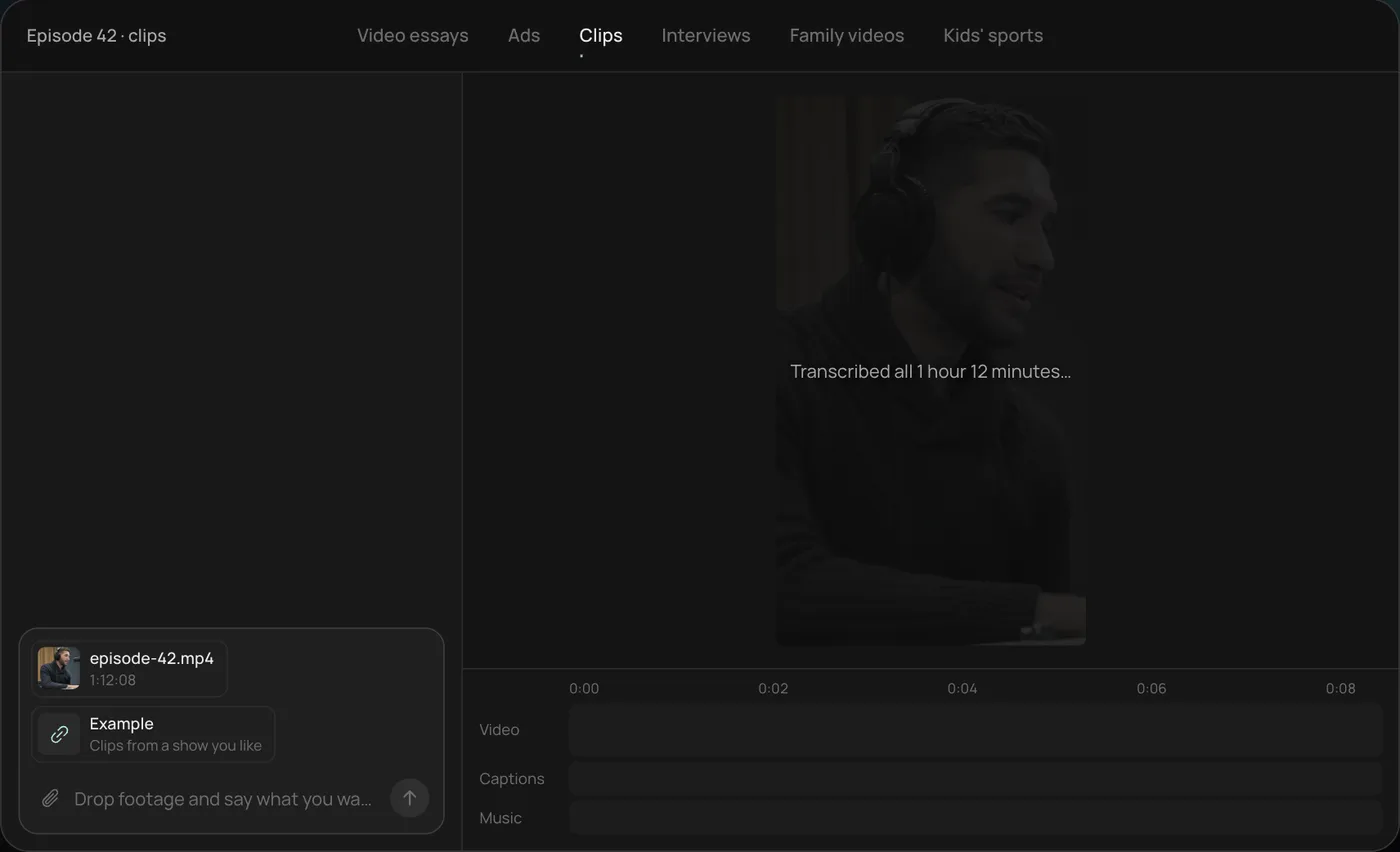
These screenshots are from Rend's demo of clipping a podcast episode; your own project works the same way.
1. Drop the episode and example clips. Add the long video (here a 1 hour 12 minute episode) and a few clips you like, then ask: "Find the best moments in this episode and clip them like these."
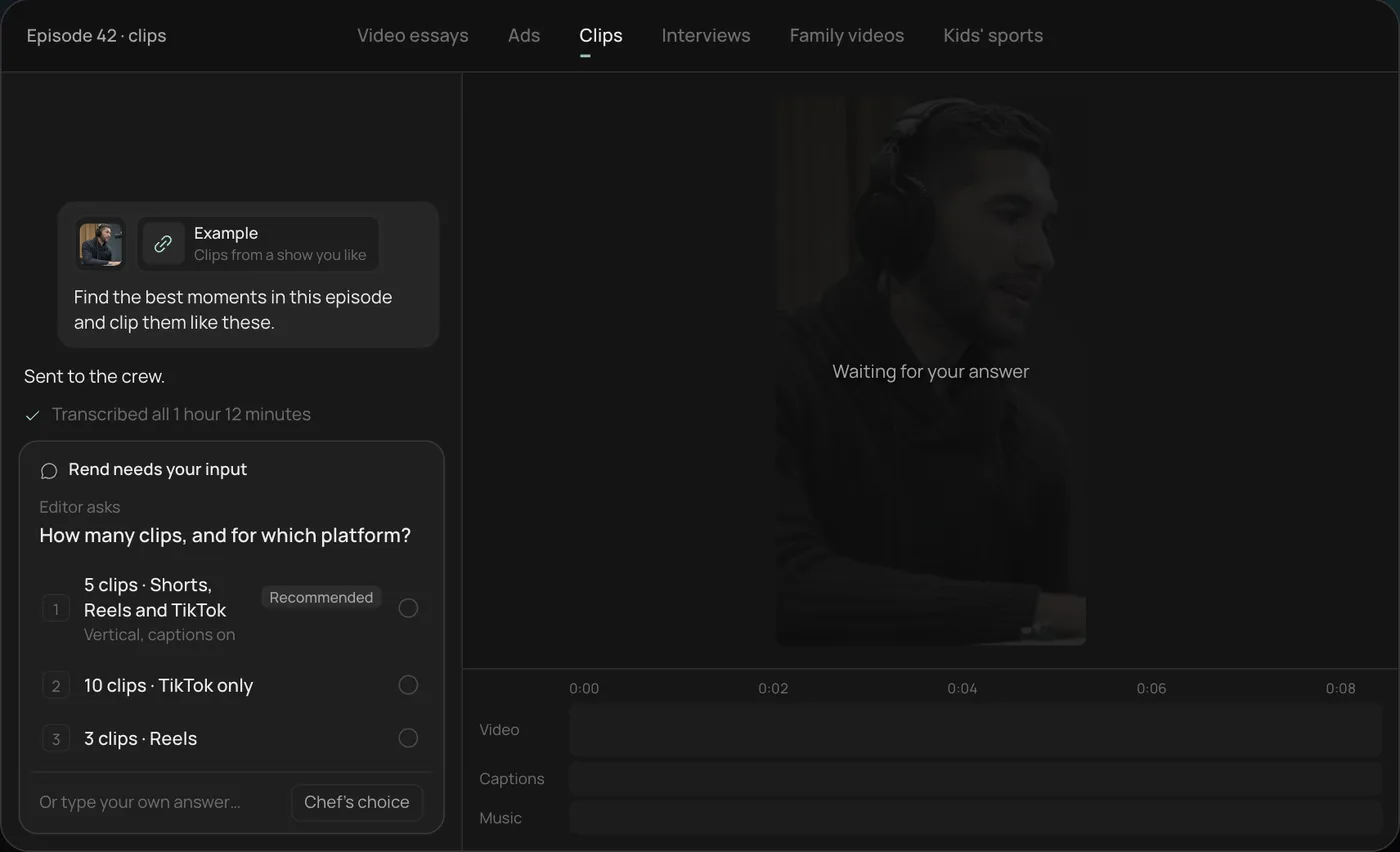
2. Answer the one question. Rend asks how many clips and for which platform. The recommended answer is 5 vertical clips for Shorts, Reels and TikTok.
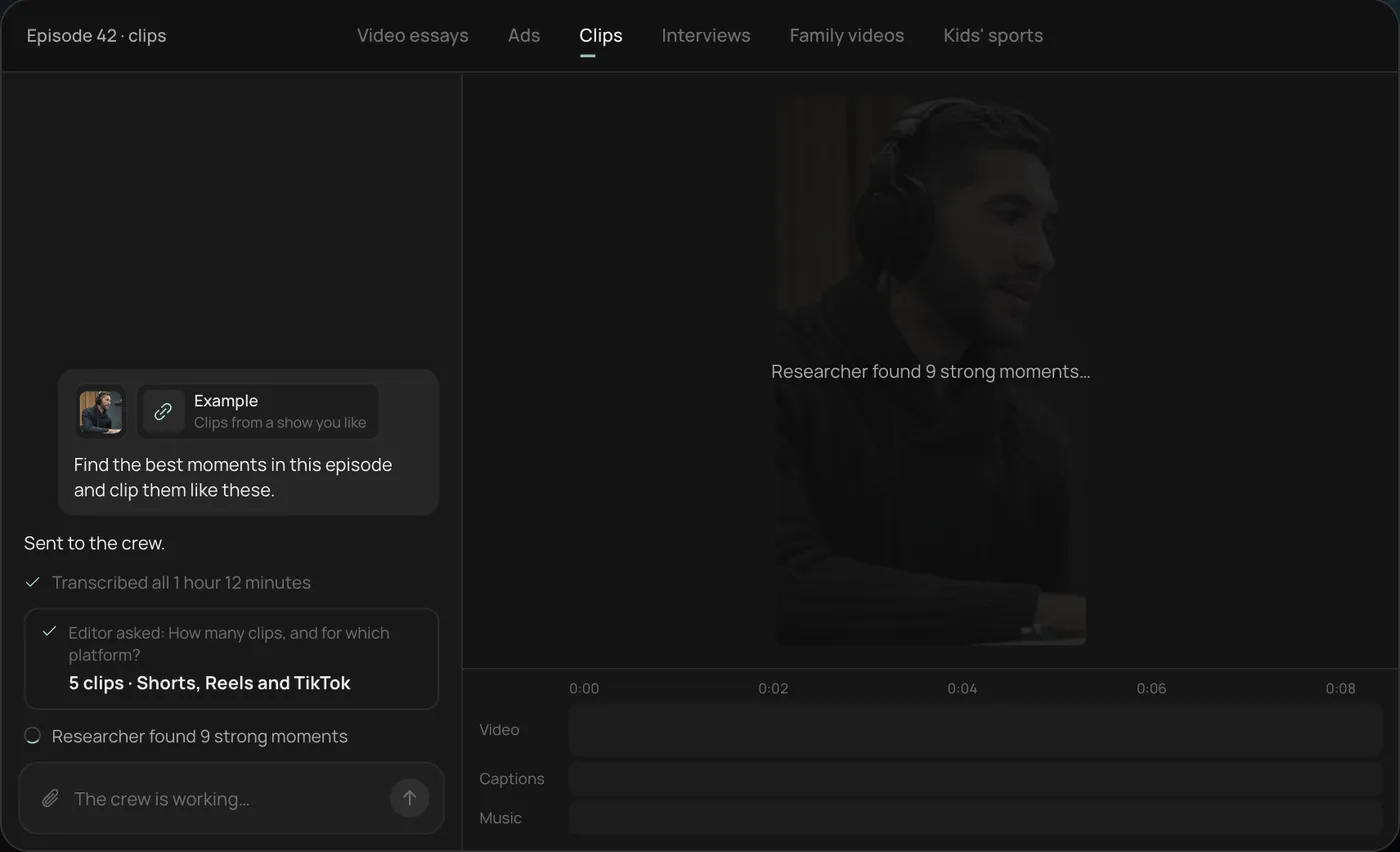
3. Let the crew work. Rend transcribes the episode and the researcher finds the strongest moments (9 in the demo), checking off each step in chat.
4. Open the finished clips. Five vertical clips of 28 to 55 seconds sit on a real timeline, with word-by-word captions on their own track that you can restyle or edit.
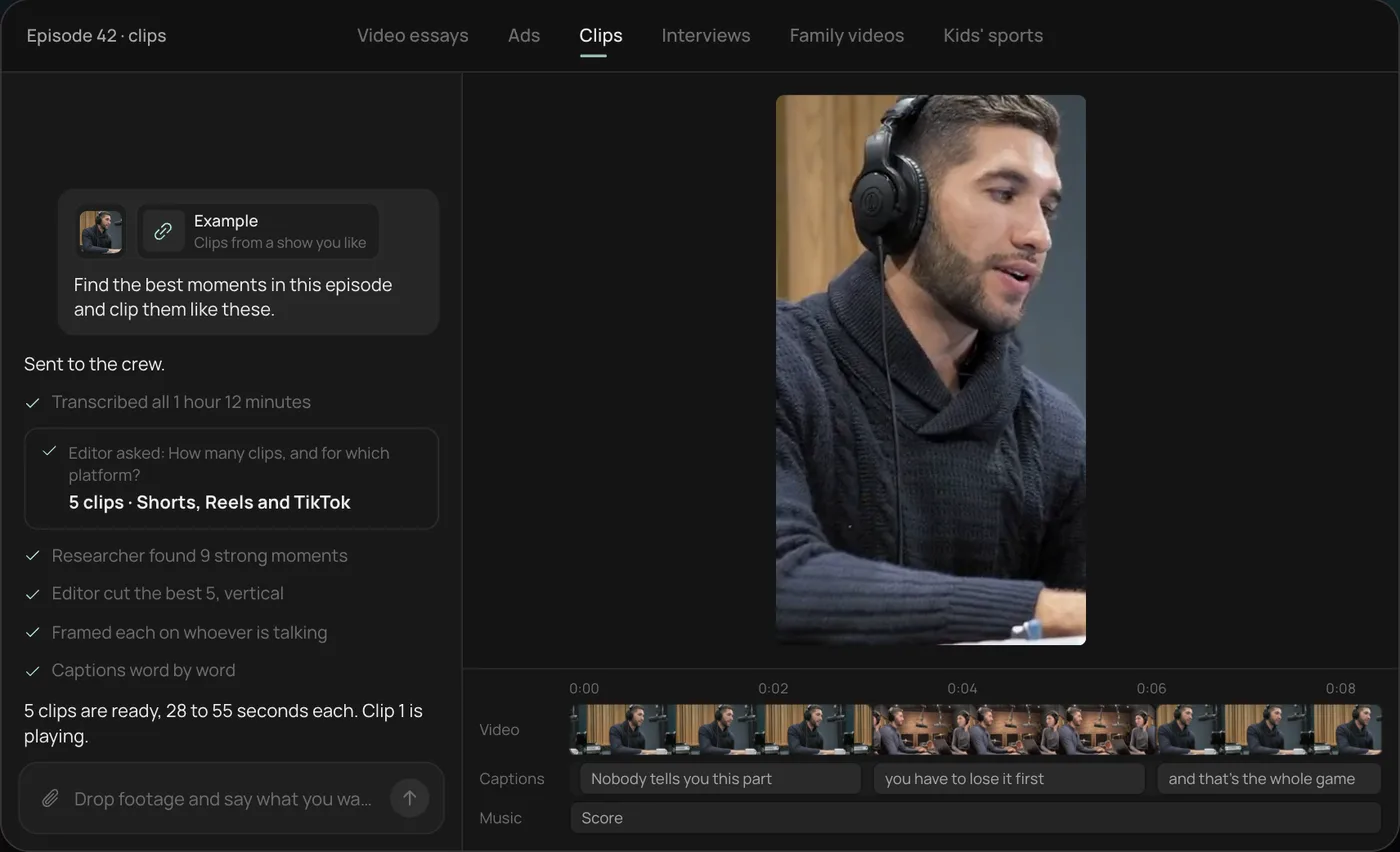
From there you can open the timeline and change anything by hand, share a review link, or export. Start a free Rend project to try it on your own footage.
Formats that work on TikTok, and how much AI helps
| Format | What it is | How AI helps | What must stay real |
|---|---|---|---|
| Talking to camera | You, one take, a point of view | Cuts the ums, captions, punch-ins | Your face and voice |
| Green screen reaction | You over a screenshot or article | Builds the background, captions | You |
| Faceless voiceover | Narration over b-roll | Script, voice, shots, captions | Nothing, but label realistic AI scenes |
| Listicle / tips | "3 things I wish I knew" | Script, on-screen numbers, pacing | Your product or examples |
| Before and after | A change, shown | Sequencing, the reveal, sound | The before and after footage |
| UGC-style product video | Someone using the product | Hook variants, cuts, sizes | The product, ideally a real person |
| Story time | One story told fast | Trims, captions, b-roll inserts | Your story |
The pattern: AI is excellent at everything around your footage and risky when it replaces the thing viewers came to see.
A 30-second TikTok template
| Time | Beat | Notes |
|---|---|---|
| 0 to 1 s | Visual hook | Movement or a surprising frame. No logo, no "hi guys". |
| 0 to 3 s | Spoken or on-screen hook | One line. Specific. |
| 3 to 20 s | The content | Cut every time the idea changes, not on a timer. |
| 20 to 27 s | The payoff | The result, the reveal, the punchline. |
| 27 to 30 s | Loop or ask | End on a line that makes the start make sense again, or ask a question people will answer in comments. |
About 75 spoken words fit in 30 seconds. If your script is 120 words, it's a 45-second video, and that's fine if it holds.
A hook bank to start from
Ask your AI maker for five versions of each and pick the one you'd actually say:
- "I tested [thing] for [time] so you don't have to."
- "Stop doing [common habit] if you [goal]."
- "This is what [price] gets you at [place]."
- "The [job] trick nobody told me about."
- "POV: you just found out [surprising fact]."
- "Here's why your [thing] keeps [failing]."
More, with examples by industry, in video ad hooks.
What to send an AI TikTok video maker
The more real material, the better the result.
- Your raw clips. Phone footage straight from the camera roll is perfect. Don't edit it first.
- The goal. Followers, comments, clicks to a shop, bookings.
- A reference. A TikTok that worked, yours or someone else's. Pace and caption style transfer far better from an example than a description. See recreate a video you like.
- What not to do. "No stock footage of people laughing at salads" saves a revision.
Captions and safe zones on TikTok
TikTok's interface covers the bottom of the screen (caption text, username, music) and the right edge (like, comment, share). Put captions in the middle third, a little above center. Big, bold, two to four words at a time, highlighted word by word, is the native look. Preview styles with the caption style previewer and check placement with the safe-zone checker.
Labeling AI content
TikTok's community guidelines and support pages ask creators to label AI-generated content that shows realistic scenes or people, and TikTok can apply labels itself. If your video uses generated people or lifelike generated scenes, turn on the AI-generated label when you post. Editing your own footage with AI (cuts, captions, music) is a different thing from generating a realistic person. Check TikTok's current AI-generated content page before posting anything borderline.
Music on a TikTok business account
This is the wall most brands hit in week one, and the AI TikTok tool pages never mention it. Switch to a business account and the trending song you planned to use is gone from the sound picker.
That's by design. TikTok's Ads help center says business accounts only see sounds from the Commercial Music Library when they tap Add Sound, while personal accounts see everything and have to pick Commercial Sounds from a dropdown. TikTok's business blog says the library holds more than 600,000 tracks pre-cleared for commercial use, that general library songs are not pre-cleared for brand content, and that promoting a business with them from a personal account puts you at risk of copyright infringement. Commercial Sounds can go on both organic posts and ads.
What that means for an AI-made TikTok:
- Don't build the edit around a trending song. If the cut only works on that track, a business account can't post it as is. Cut to the voice and the visuals first, then lay music under them.
- Borrow the trend's format, not its audio: the joke, the structure, the transition.
- Pick one music bed per series, from the Commercial Music Library or original music made for you, so the account sounds like one brand.
- Keep music on its own track, so swapping a song for another platform or a client's objection is one change, not a re-edit.
- Check before cross-posting. TikTok's pages describe clearance for content on TikTok. If the same cut goes to Reels or Shorts, confirm the track is cleared there too, or use music you own.
Rend can make original music for a project and keeps it on a separate track from the voice and sound effects, so points 3 and 4 come by default. A brand kit holds the music bed, and every video in the series reuses it.
Making TikToks with Rend
Rend is an AI video agent. You send what you have, in chat, by email or through a web form, and a crew of specialist agents takes it to an exported video on a timeline you can open and change.
For TikTok, send your phone clips and say what the video is for. Rend cuts on exact transcript words (so removing a stumble is precise), adds word-timed captions in your font and style that stay editable, and puts in music and sound effects on separate tracks with the mix ducked under your voice. Need a faceless video? It writes the script with its own writing model, rend-1, narrates in a voice you approve, and generates or finds the shots and b-roll.
For brands, the same video becomes a set: new hooks, sizes and cuts from one edit. Mass ad creation shows that workflow, and UGC ads without creators covers the product-video side.
Editing is free; you pay only when Rend renders or generates something. See pricing and the tools.
Testing hooks without reshooting
The cheapest growth lever on TikTok is the first three seconds, and you can test them without filming anything new. Take one good video and make three versions that differ only in the opening: a different first line, a different first shot, or the payoff moved to the front. Post them a few days apart, or run them as ads with a small budget, and compare how many viewers made it past the three-second mark.
An AI editor makes this practical because the rest of the edit stays identical. You aren't re-cutting three videos; you're swapping the opening clip and line on one timeline and exporting again. After a few rounds you'll know whether your audience responds to a bold claim, a question in the caption or a visual surprise, and every future video starts from that.
Mistakes that get swiped
A slow first second. Cut the breath, the setup, the walk into frame.
Footage that looks like an ad when it's meant to feel like a post. Keep it handheld and close.
Captions that block the product or your face.
Trending audio louder than your voice. If people can't hear you, the hook is gone.
Reusing a hook that already ran. Make five, test them, keep the winner.
FAQ
What is the best AI TikTok video maker?
For editing your own clips fast, pick a tool that cuts on transcript words and makes editable captions. For faceless videos, pick one that writes, voices and builds visuals. Rend does both on one timeline. Our CapCut vs Rend and Captions app alternatives posts compare the common picks.
Do I have to label AI videos on TikTok?
TikTok asks creators to label AI-generated content that shows realistic scenes or people. AI editing of your own real footage, like captions and cuts, is a different case. Read TikTok's current policy for edge cases.
Can a business account use trending sounds on TikTok?
Only if the sound is in TikTok's Commercial Music Library. Business accounts see just those tracks in the sound picker, and TikTok says general library songs aren't pre-cleared for brand content. Use the trend's format with a commercial or original track.
How long should a TikTok be?
Long enough to deliver the payoff and no longer. Many strong TikToks run 15 to 45 seconds. Watch where viewers drop off in your analytics and cut there next time.
Can AI make TikToks from my product page?
Yes. Send the product page URL and any real product clips. Real footage of the product usually performs better than generated versions. See ecommerce product video ads.
Can one video work on TikTok, Reels and Shorts?
Mostly, yes. All three use 9:16. Adjust captions for each app's covered areas and avoid another platform's watermark.
Start with clips already on your phone: make a free account, send them over, and say what you want the video to do.