CapCut Alternative for Commercial Use: 7 Editors Compared
We build Rend, so weigh our view accordingly. Competitor details were checked on November 18, 2026; prices and features change, so confirm on their sites.
The safest CapCut alternative for commercial use is any editor where you bring your own footage, music and fonts and know the license on each, because the risk in CapCut ads sits in its built-in asset library, not in the editing. For a free desktop editor with more control, use DaVinci Resolve. For iPhone-only editing, iMovie or VN. For transcript editing, Descript. For a professional ceiling, Premiere Pro. If you want ads or client videos built for you on a timeline you can still edit, with original music made for the project, use an AI video agent like Rend.
CapCut is hard to beat at what it's for: fast, phone-friendly editing with trending sounds, templates and effects that look like what's working on TikTok this week. Nothing on this list matches it on templates. People leave anyway, usually for one of four reasons.
Why people switch away from CapCut
Commercial use is complicated. CapCut's Materials License Agreement splits the assets CapCut provides (templates, music, stickers, effects) into non-commercial materials and dual-use materials. A paid plan doesn't change which category an asset sits in. If you make ads or client work, you have to check each asset, or avoid CapCut's library and use only your own footage and licensed music.
Features move behind the paywall. CapCut now has Free, Pro, Ultra and Teams tiers, and a lot of AI features use credits. Prices vary by country and by where you buy (app store, desktop, web), so check the price in your region.
Ownership and data questions. Some agencies and companies have policies about the tools staff can use. That's a call for your legal or IT team, not a blog post, but it's a real reason people switch.
You're tired of editing. CapCut makes editing faster. You're still doing all of it.
Quick comparison
| Tool | Platform | Free version | Best at | Where CapCut is better |
|---|---|---|---|---|
| Rend | Web, plus phone by chat or email | Editing is free | Building the whole video, ad variants | Trend templates, instant hands-on fiddling |
| DaVinci Resolve | Desktop | Yes | Color, finishing, pro editing | Ease, phone editing, templates |
| Premiere Pro | Desktop | No | Industry-standard pro work | Price, learning curve |
| iMovie | Mac, iPhone, iPad | Yes | Simple Apple-device edits, trailers | Effects, captions, trends |
| Descript | Desktop, web | Limited | Editing talking videos by transcript | Effects and social styling |
| VN | Phone, desktop | Yes | CapCut-like phone editing | Template library |
| Canva | Web, phone | Yes | Simple branded social video | Editing depth |
1. Rend: when you'd rather direct than edit
Rend is an AI video agent. You send what you have (camera roll clips, a product page, a TikTok whose pacing you want to copy) and say what you want. A crew of specialist agents scripts, cuts, captions, adds graphics, narration, music and sound effects, and leaves the result on a real timeline you can open and change.
Where it beats CapCut:
- You don't do the editing. "Make a 30-second Reel from these 14 clips, fast cuts, captions in our font, end on the logo" is the whole input.
- Captions are yours. Word-timed, always editable, in your own style. Brand kits reuse the same caption style, music bed and templates every time.
- Ads. Bring one video and your brand, and Rend makes new hooks, sizes, image ads and search ads. See how to make 100 ad variations from one video.
- No template library to audit. Rend makes original music and sound effects for the video instead of pulling from a shared asset library.
Where CapCut is better: when you want to sit on the couch and drag clips around with a trending sound in two minutes, CapCut is quicker. Rend is the better tool when the result has to look authored or there are many versions to make. Full side-by-side in CapCut vs Rend. Editing on Rend is free; you pay only when it renders or generates. See pricing.
2. DaVinci Resolve: the free desktop upgrade
Resolve's free version is a full professional editor with color grading, audio (Fairlight) and effects (Fusion). If you've outgrown CapCut desktop and want more control without paying, this is the jump. Expect a week of learning before it feels faster than CapCut.
3. Premiere Pro: when you work with other editors
Premiere is what agencies and post houses hand projects around in. Text-Based Editing (cut by editing the transcript) is built in now. It's paid and heavier than CapCut, and it's the right choice if you're editing for a living.
4. iMovie: simple, free, already on your iPhone
iMovie handles basic cuts, titles and music, plus trailer templates with their own scores. It feels dated next to CapCut and has no trend templates, but for family videos and quick edits it's free and private to your devices. If that's your use, see how to edit home movies.
5. Descript: when the video is mostly people talking
Descript turns your recording into a transcript and you edit the words. For podcasts, tutorials and talking-head videos, it's faster than any timeline. It's weaker at the flashy social styling CapCut is known for. Our Descript alternatives post covers its competitors too.
6. VN: the closest feel to CapCut
VN is a free phone and desktop editor with a multi-track timeline, keyframes and speed curves. It feels a lot like CapCut did before the AI features piled on. Its template library is far smaller.
7. Canva: when the video is a branded post
Canva's video editor is good for simple branded posts: text, brand colors, stock, a few clips. It's not built for heavy editing, but marketing teams who already design in Canva move fast in it. More in Canva video vs Rend.
What you can take with you when you leave CapCut
Every list of apps like CapCut skips this part, and it's the part that hurts. You can't move a CapCut project into another editor. CapCut's help center says it doesn't support importing or exporting project files to or from third-party editing software, and its suggested workarounds are exporting a rendered video or rebuilding the timeline from your original media.
So before you cancel a plan or delete the app, sort what you have into three piles.
| What | Does it come with you? | What to do |
|---|---|---|
| Finished videos | Yes, as rendered files | Export every one you might reuse at the highest resolution you have, without a watermark |
| Your original clips and photos | Yes, if you still have them | Find the camera roll originals or the files you imported, and keep them in one folder per project |
| Auto captions | Partly | CapCut can export captions as SRT or TXT, but only ones made with auto captions, not text you typed in yourself |
| The timeline, keyframes, effects and templates | No | Rebuild it, or start from the rendered export |
| CapCut library music, stickers and effects | No, and you shouldn't want them | Replace them with assets you license, which is the point if the video is an ad |
The SRT is worth the minute it takes. Whatever you rebuild in, it gives you a transcript you already corrected, so you can check names and product terms against it instead of fixing them twice.
For a working ad, the cleanest move is the rendered file plus the raw footage. Send both to the new editor: the export shows the pacing and hook you already know works, and the raw clips let you rebuild it with music and assets you're allowed to run in paid ads. That's the same workflow as recreating a video you like, with your own video as the reference.
A checklist before you use any editor for client or ad work
Run through this whatever you pick. It's the part people skip until a takedown arrives.
- Every music track: do you have a license that covers ads, not just personal posts?
- Every template, sticker and effect: is it cleared for commercial use under that tool's terms?
- Fonts: is the font licensed for video and commercial use?
- Stock footage and images: which license, and does it cover paid ads?
- People on camera: do you have their consent for the use you're making?
- Export: is it watermark-free at the resolution you need?
For ad sizes and safe zones once the edit is done, our video ad size checker shows where platform buttons cover your frame.
How to choose a CapCut alternative for PC, phone or business
- You want free and more control: DaVinci Resolve.
- You edit for a living: Premiere Pro.
- You only edit on iPhone, simply: iMovie, or VN for more control.
- Your videos are mostly talking: Descript.
- You make branded posts: Canva.
- You want the edit done for you, or need many ad versions: Rend.
How to make short captioned clips in Rend, step by step
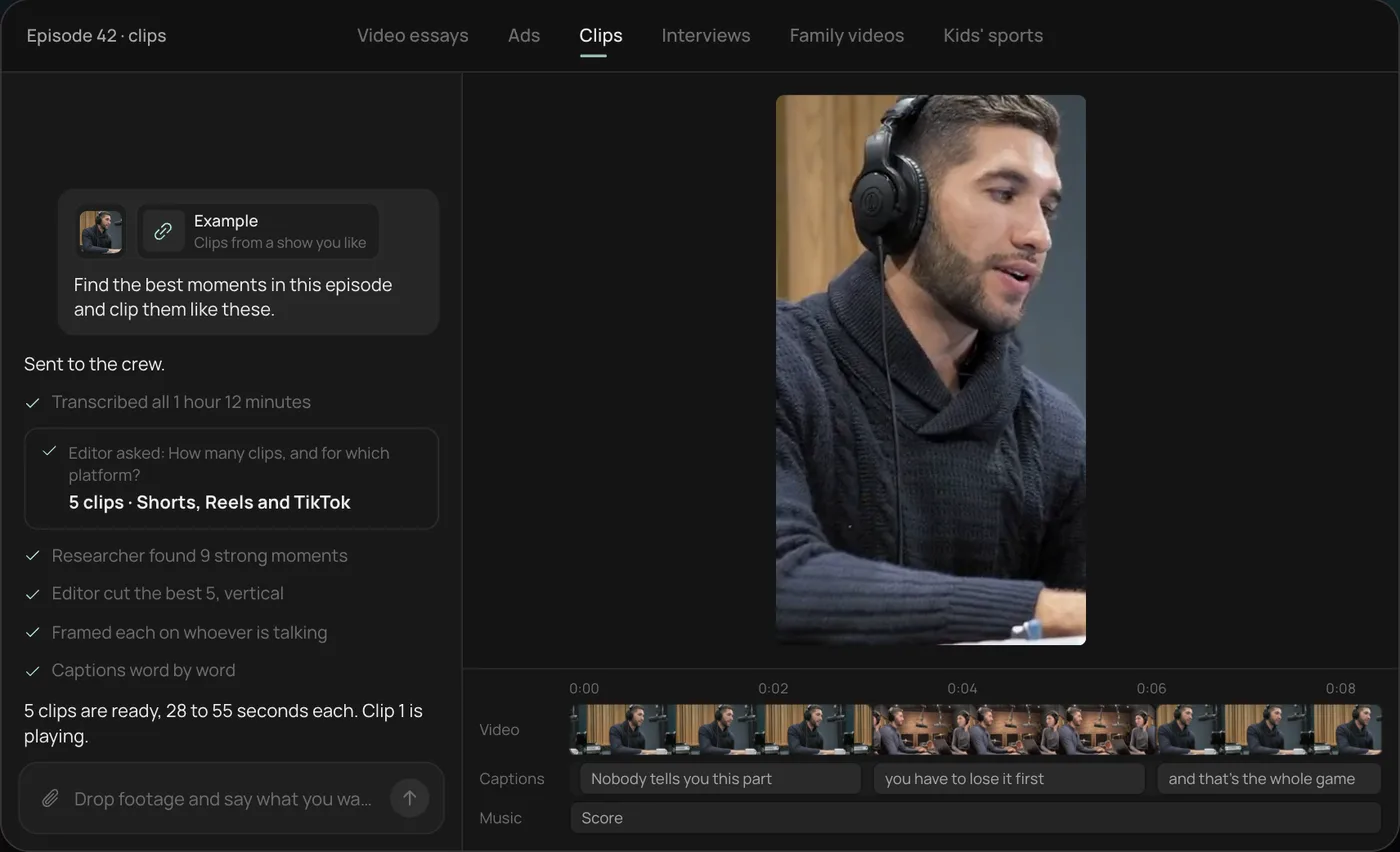
These screenshots are from Rend's demo of clipping a podcast episode; your own project works the same way.
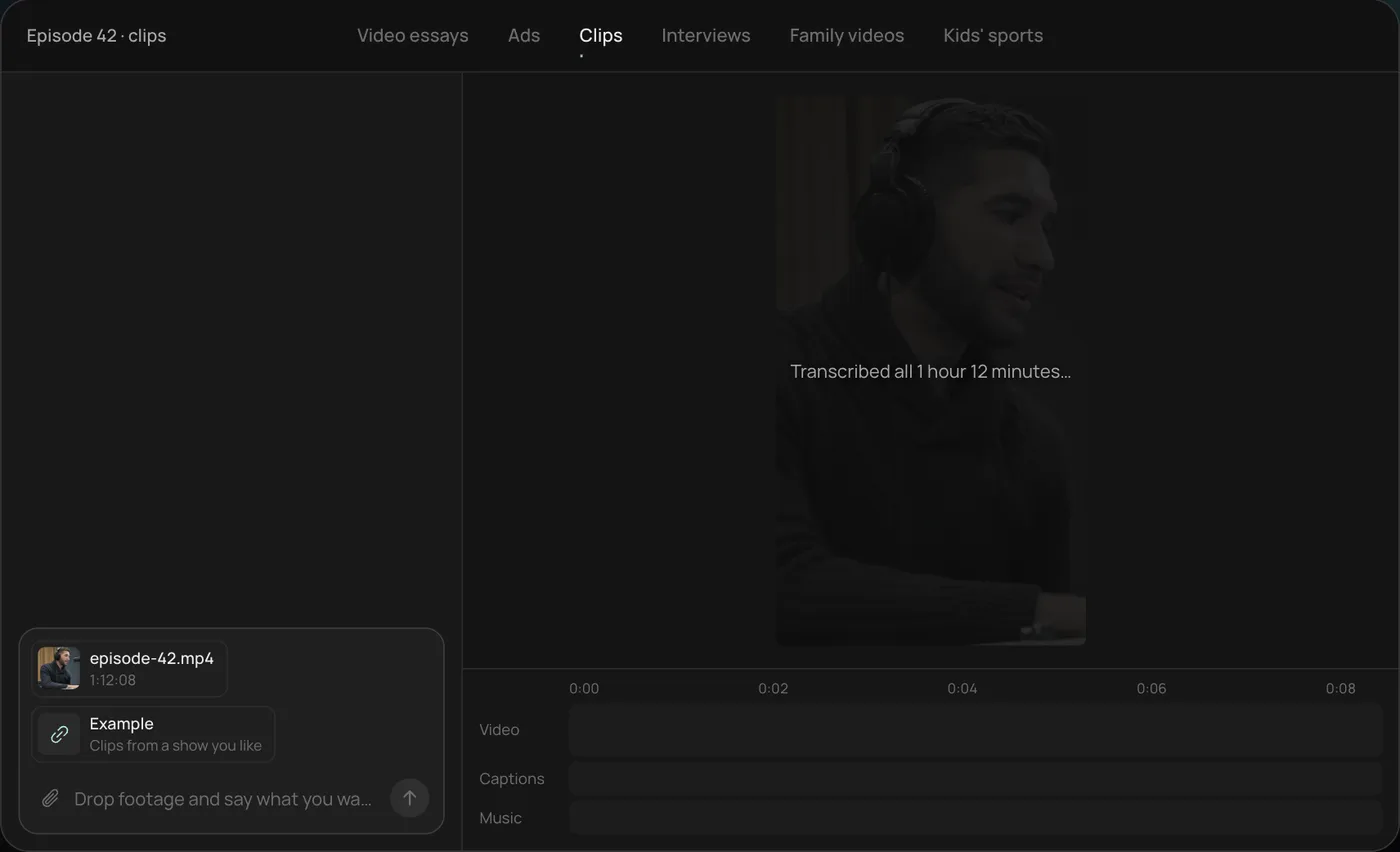
1. Drop the episode and example clips. Add the long video (here a 1 hour 12 minute episode) and a few clips you like, then ask: "Find the best moments in this episode and clip them like these."
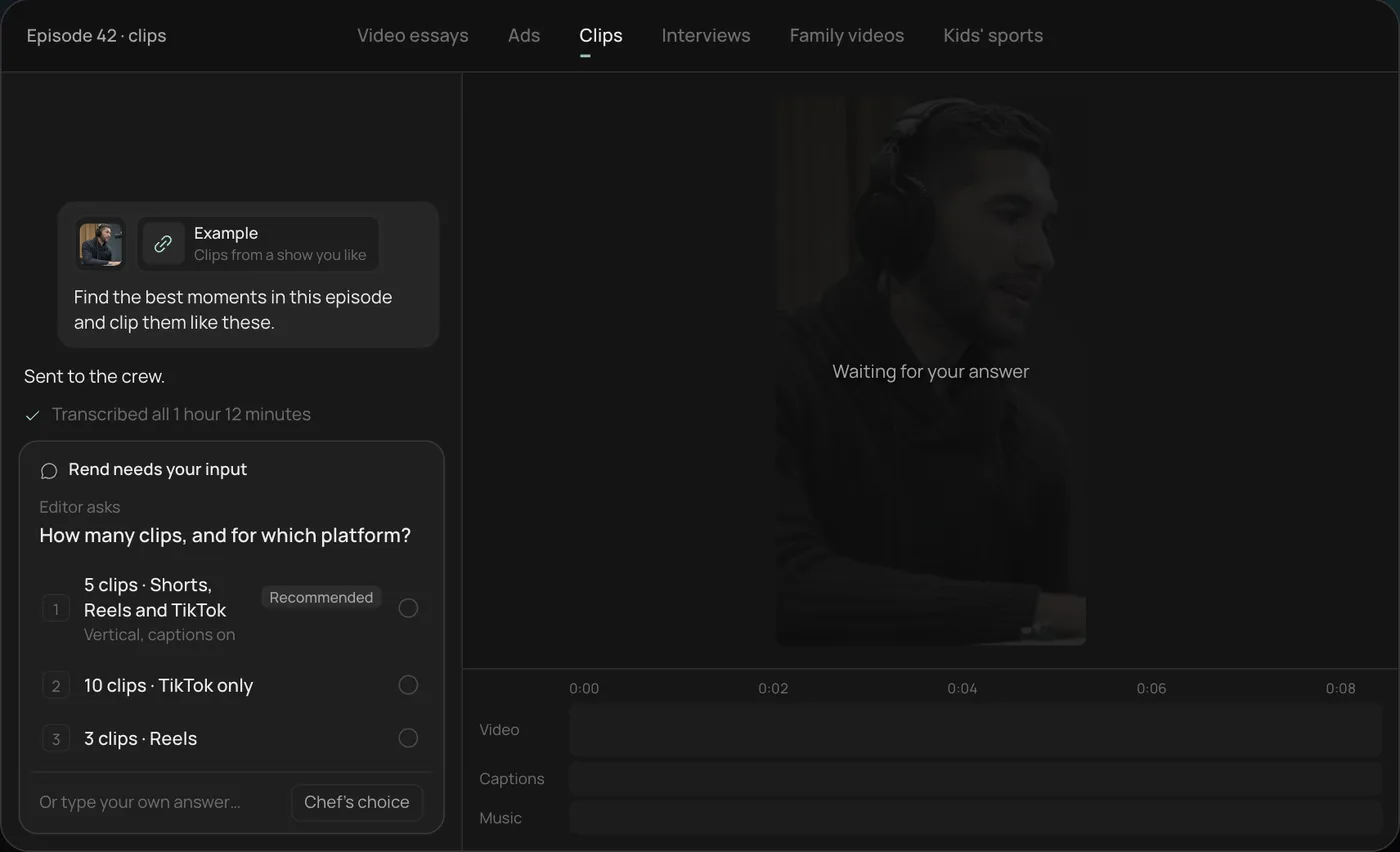
2. Answer the one question. Rend asks how many clips and for which platform. The recommended answer is 5 vertical clips for Shorts, Reels and TikTok.
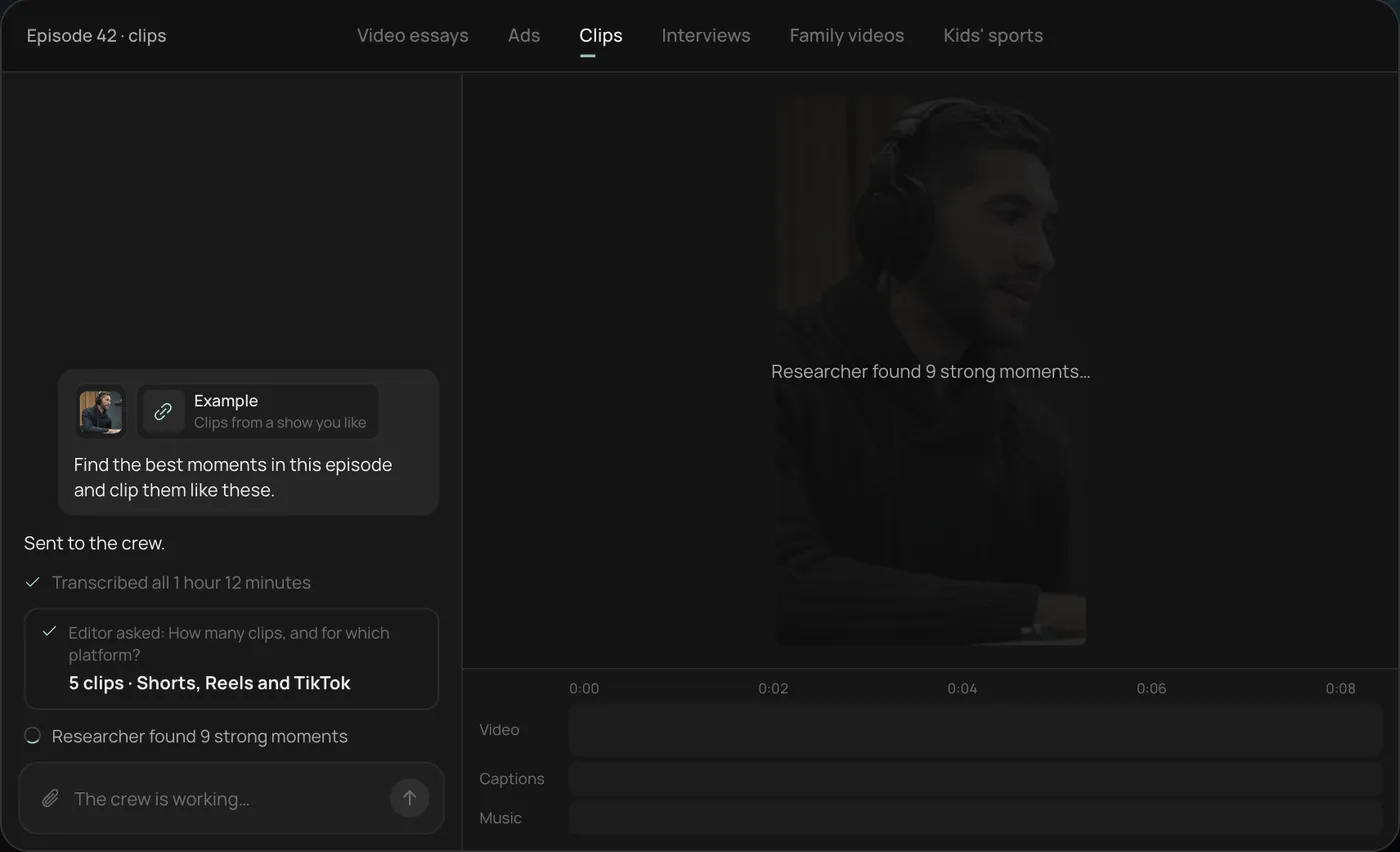
3. Let the crew work. Rend transcribes the episode and the researcher finds the strongest moments (9 in the demo), checking off each step in chat.
4. Open the finished clips. Five vertical clips of 28 to 55 seconds sit on a real timeline, with word-by-word captions on their own track that you can restyle or edit.
From there you can open the timeline and change anything by hand, share a review link, or export. Start a free Rend project to try it on your own footage.
FAQ
What is the best free alternative to CapCut?
DaVinci Resolve on desktop for control, VN on phone for a similar feel. iMovie if you're on Apple devices and want simple.
Can I use CapCut for commercial videos?
Your own footage, yes. CapCut's provided materials are split into non-commercial and dual-use categories under its Materials License Agreement, and the category, not your plan, decides what's allowed. Read the current terms before using CapCut assets in ads.
Can I move a CapCut project to Premiere Pro or another editor?
No. CapCut doesn't export project files to third-party editors. Export the finished video, keep your original clips, and export auto captions as SRT, then rebuild in the new editor.
Is there a CapCut alternative that edits for you?
Yes. Rend is an AI video agent: you describe the video, send your clips, and it builds the edit on a timeline you can change.
What CapCut alternative do YouTubers use?
Many use Premiere Pro, DaVinci Resolve or Final Cut Pro for long-form, and Descript for talking videos. For a channel workflow built around an agent, see making YouTube videos the easy way.
Does iMovie work as a CapCut alternative on iPhone?
For basic edits, yes. It lacks CapCut's trend templates, animated captions and most AI features.
If you'd rather describe the video than build it clip by clip, start free on Rend with a handful of phone clips and one sentence about what you want.