Descript Alternative for Video Editing: 6 Tools Compared
We build Rend, so weigh our view accordingly. Competitor details were checked on November 18, 2026; prices and features change, so confirm on their sites.
The best Descript alternative for video editing depends on where Descript stops working for you: usually visual depth, media hours, or the fact that you're still the one editing. If you want transcript editing inside a professional editor, use Premiere Pro's Text-Based Editing. If you record remote podcasts, Riverside now records and edits by text in one place. If you'd rather describe the video and have it built for you, an agent like Rend does the edit on a timeline you can still change. If you just want a free manual editor, CapCut.
Descript itself is still very good. Deleting a word in the transcript and watching the cut happen in the video is the right way to edit talking heads, and its AI co-editor, Underlord, handles a lot of the cleanup. Most people who switch aren't unhappy with the idea. They hit one of a handful of walls.
Why people look for a Descript alternative
From the forums and from cutting a lot of interview footage, these come up most:
- Media hours run out. Descript's paid plans are metered. The Hobbyist plan lists 10 media hours a month, which a weekly two-camera podcast burns through fast.
- The timeline feels thin for visual work. Once a video needs layered graphics, keyframed motion or a real color pass, a transcript-first editor starts fighting you.
- You don't want to edit at all. Some people bought Descript hoping it would make the video. It makes editing easier, but you're still the editor.
- Team pricing is per person. Descript prices per seat, so a three-person team pays three times.
Know which one is yours before you pick, because the alternatives below fix different walls.
Quick comparison
| Tool | Best for | Edits by transcript | Builds the video for you | Where Descript is better |
|---|---|---|---|---|
| Rend | Whole videos from a brief or raw clips | Yes, cuts land on exact words | Yes, an agent crew | Hands-on word-level polishing, mature recording tools |
| Premiere Pro | Pro editors who want text editing too | Yes (Text-Based Editing) | No | Ease, price, speed for non-editors |
| Riverside | Remote podcast recording plus edit | Yes | Partly (clips) | Depth of the editor |
| CapCut | Free manual editing, trends, effects | Limited | No | Transcript editing, dialogue cleanup |
| DaVinci Resolve | Color, finishing, a free pro NLE | Basic transcription | No | Learning curve |
| Kapwing | Browser editing for small teams | Yes | Partly | Audio cleanup depth |
1. Rend: when you want the video made, not just made easier
Rend is an AI video agent. You tell it what you want ("cut this 40-minute interview into a 6-minute explainer with chapter titles and b-roll") and send what you have: the recording, phone clips, a script, a link to a video whose pacing you like. A crew of specialist agents writes, cuts, adds graphics, narration, music and sound effects, checks its own work, and leaves you a real timeline.
That last part is the reason it belongs on a Descript list. Cuts sit on exact transcript words, captions are word-timed and always editable in your own font, and dialogue, narration, music and effects live on separate tracks with a ducked mix. You can open the timeline and change any of it by hand, or tell the agent "the second chapter drags, tighten it."
Where Rend is better than Descript:
- It produces the edit. Descript speeds you up; Rend does the first full pass, including scripting and missing b-roll.
- Visual work: titles, motion graphics, Lottie animations and 3D graphics are part of the build.
- Long videos are built in chapters in parallel, so a 30-minute essay isn't one long serial job.
- Review links: a client draws on the frame, the agent reads every note and makes the fix.
Where Descript is better: if you love hand-trimming every "um" yourself and want a polished recording studio built in, Descript has spent years on that loop. Full side-by-side in Descript vs Rend.
Editing on Rend is free; you pay when it renders or generates something. Details on pricing.
2. Premiere Pro: Descript's best idea inside a pro editor
Adobe added Text-Based Editing to Premiere: transcribe the footage, select and rearrange text, and the clips are trimmed in the timeline to match. It also detects and deletes pauses and can remove every instance of one speaker. For an editor who already lives in Premiere, that covers most of why they'd open Descript, and everything else (effects, color, multicam, After Effects) is right there.
The cost is the learning curve and a heavier app. If you've never used a pro NLE, Descript is much friendlier.
3. Riverside: if recording is the hard part
Riverside started as a remote recording studio (separate local tracks for each guest, high quality even on bad connections) and now edits by text too, plus Magic Clips for social cuts. For a podcast where the recording is the risky step, keeping both in one tool removes an export and upload.
Its editor is lighter than Descript's for heavy restructuring. People with complicated episodes still finish elsewhere.
4. CapCut: free and hands-on
CapCut is a manual editor with templates, effects, trending sounds and auto captions. If your problem with Descript is that it feels too much like a word processor, CapCut feels like an editor. It won't clean up dialogue the way Descript does, and transcript editing is not its core.
One thing to check before client work: CapCut's materials license splits its provided assets into non-commercial ones and dual-use ones, and paying for a plan doesn't change which is which. More in CapCut vs Rend and CapCut alternatives.
5. DaVinci Resolve: when the finish matters
Resolve is a full professional editor with the best color tools in the business, and the base version is free. It has transcription and some AI helpers, but nothing like Descript's word editing as the main way to work. Pick it when the video has to look graded and finished, and you're willing to learn.
6. Kapwing: browser editing for small teams
Kapwing is a browser editor with transcript-based editing, subtitles and collaboration. It's a reasonable middle ground if you want something lighter than Descript in a tab. We compared it directly in Kapwing vs Rend.
A worked example: one interview, three ways
Say you have a 42-minute two-person interview and want a 7-minute YouTube cut plus three Shorts.
In Descript: transcribe, read through, strike the slow parts, remove filler words, fix the audio with Studio Sound, pull clips. You're making every story decision. For a skilled editor that's maybe two to three hours, and the result is exactly what you chose.
In Premiere with Text-Based Editing: same text pass, then you have the full timeline for graphics and color. Longer, but the ceiling is higher.
In Rend: you write a brief like this:
Cut this interview to about 7 minutes for YouTube. Keep the story about the failed launch, lose the tangent about hiring. Chapter titles in our brand font. B-roll where she describes the warehouse. Then three vertical Shorts, under 45 seconds each, each starting on a strong line.
The agent proposes a plan, builds the cut, and you review it on a link. If the opening is wrong, you say so in a note on that frame. The story decisions start as the agent's and end as yours.
None of these is wrong. The question is which decisions you want to make by hand.
What survives when you move a project out of Descript
The roundups list where to go and never say what you can bring. Descript is better here than most editors: its Export panel has a Timeline tab that hands your edit to Premiere (XML, plus a .prproj option in beta), DaVinci Resolve (XML), Final Cut Pro (FCPXML), Audition, Reaper and Pro Tools or Logic. Two catches first. Descript's timeline export page says it needs a Creator, Business or Enterprise plan, and a lot of what makes a Descript video look finished doesn't make the trip.
| Carries over to Premiere, Resolve and Final Cut (XML) | Doesn't carry over |
|---|---|
| Your cuts and trims, with a folder of copied media | Titles, images and shapes |
| Audio and video clips, source timecode | Transitions, animation and effects |
| Markers, and unresolved comments if you turn that on | Speed changes and audio keyframes |
| Studio Sound | Scenes and sequences (only .prproj handles sequences) |
| Captions, to Final Cut and Resolve but not Premiere XML |
So the edit comes with you and the dressing stays behind. In practice that's fine for an interview: the story cut is the slow, valuable part, and graphics get rebuilt in the new editor anyway. It's a problem for a video built from scenes, layouts and title cards, which arrives as a bare stack of clips.
Three habits make the move easier. Export the timeline before you downgrade, since the Timeline tab needs a Creator plan or above. Export captions separately as SRT if you're going to Premiere, because the XML won't bring them. And if you're moving to an agent instead of another editor, you don't need the XML at all: send the raw recordings and the rendered Descript export as a reference for pacing, and let the new tool rebuild from source.
How to choose
| If your wall is... | Try |
|---|---|
| Media hours or per-seat cost | Rend (pay only for renders and generation) or Resolve (free) |
| Weak visual tools | Premiere Pro or Resolve |
| You don't want to edit at all | Rend |
| Remote recording quality | Riverside |
| Want free and manual | CapCut |
If you're weighing several AI editors at once, our roundup of the best AI video editing agents covers the agent side in more depth.
How to edit an interview in Rend, step by step
These screenshots come from Rend's demo of cutting an interview; your own project works the same way.
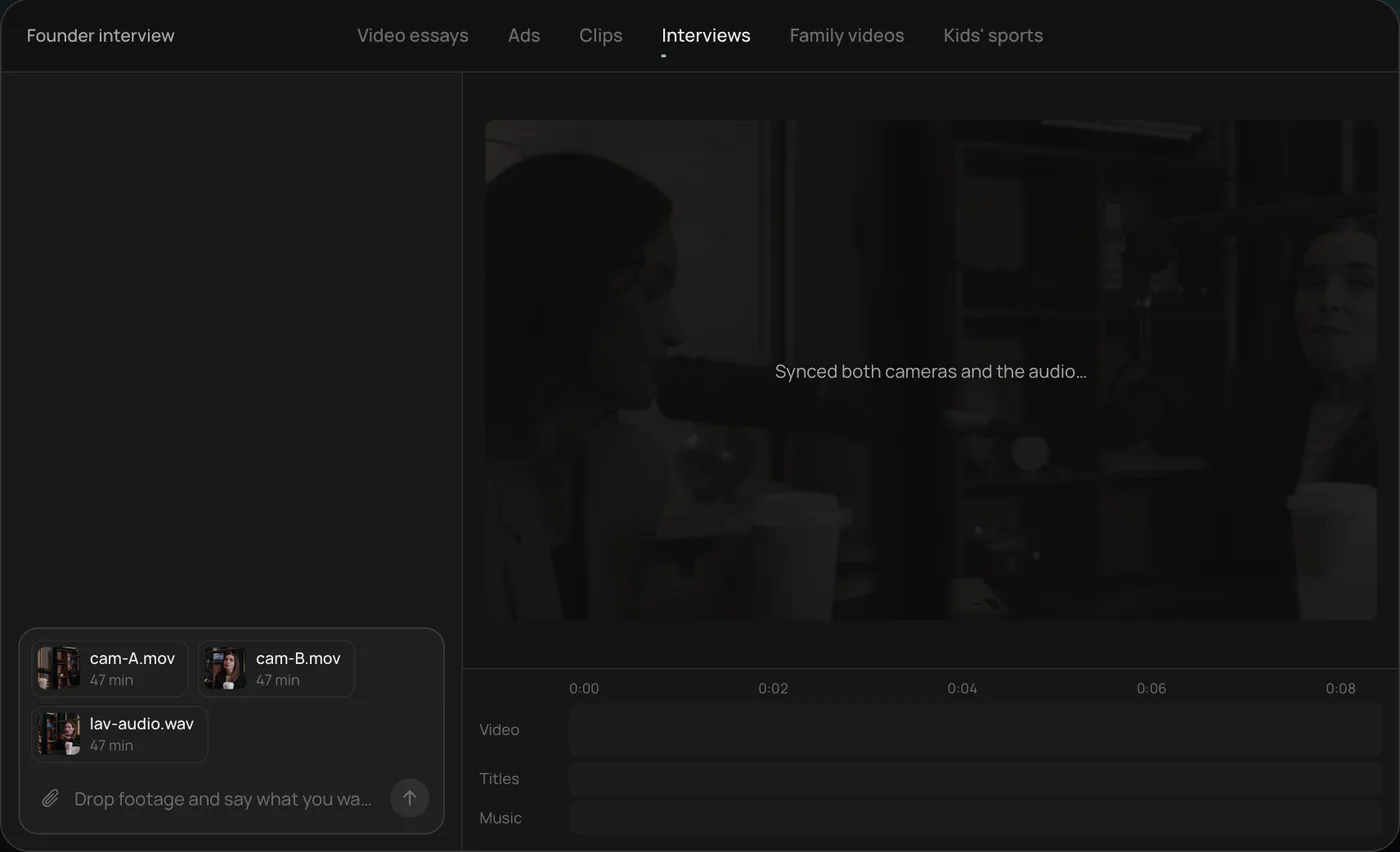
1. Drop in your footage. Add your files (here two camera angles and a lav mic recording) and say what you want: "Cut this interview into a 4-minute feature like this series."
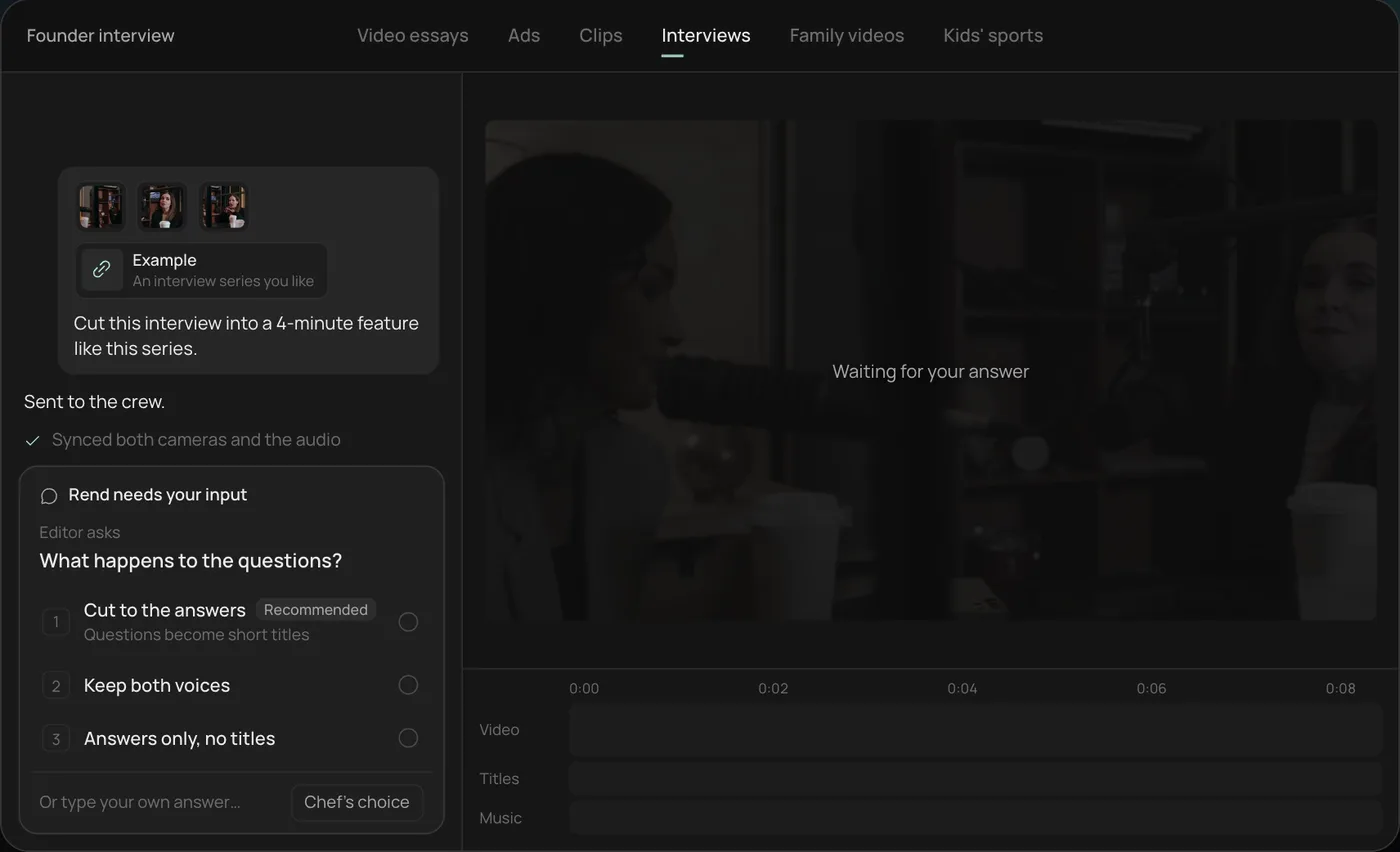
2. Answer one question. Rend asks what should happen to the interviewer's questions and recommends cutting straight to the answers.
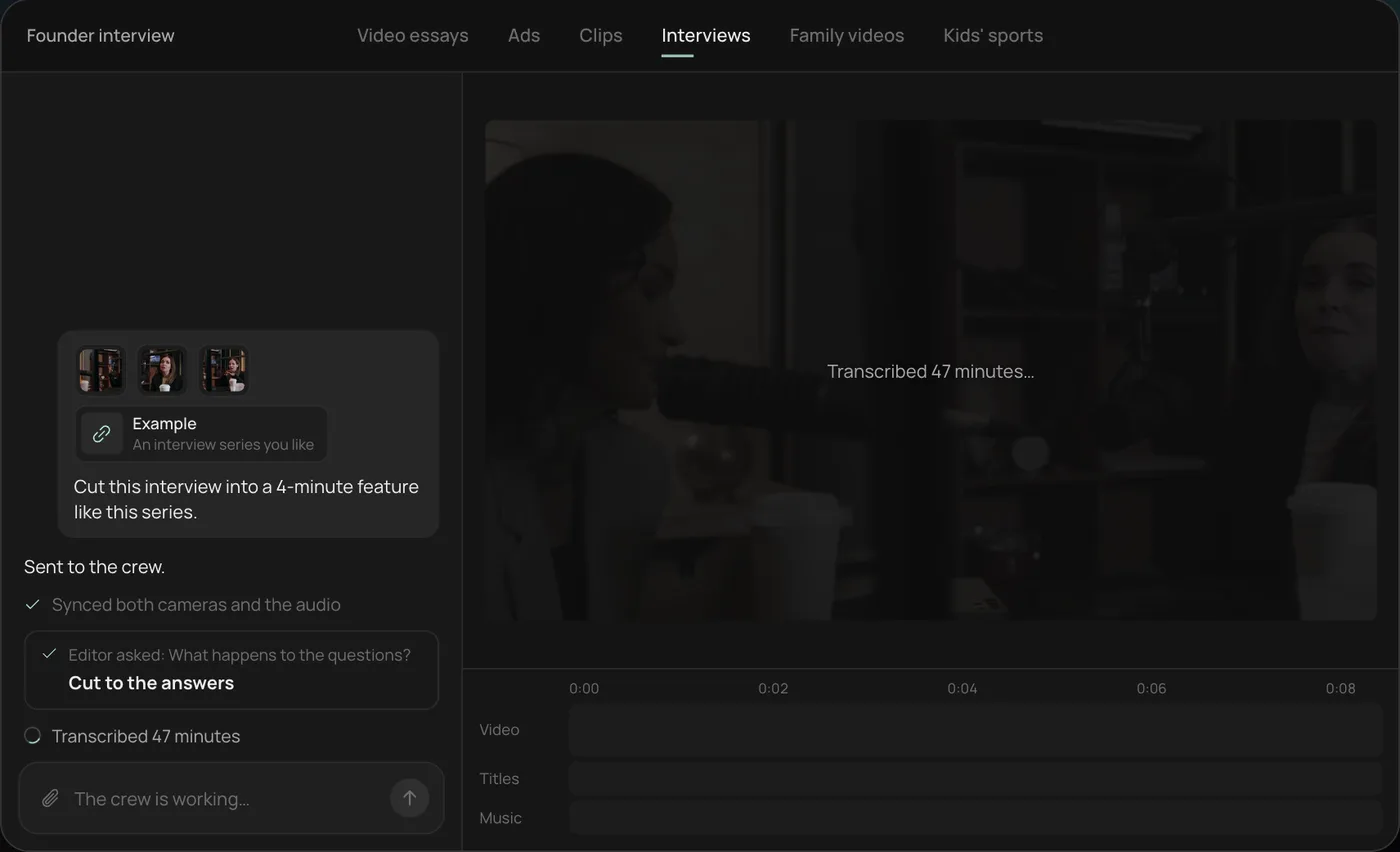
3. Watch the crew work. The crew syncs both cameras with the audio and transcribes all 47 minutes, each step checked off in the chat.
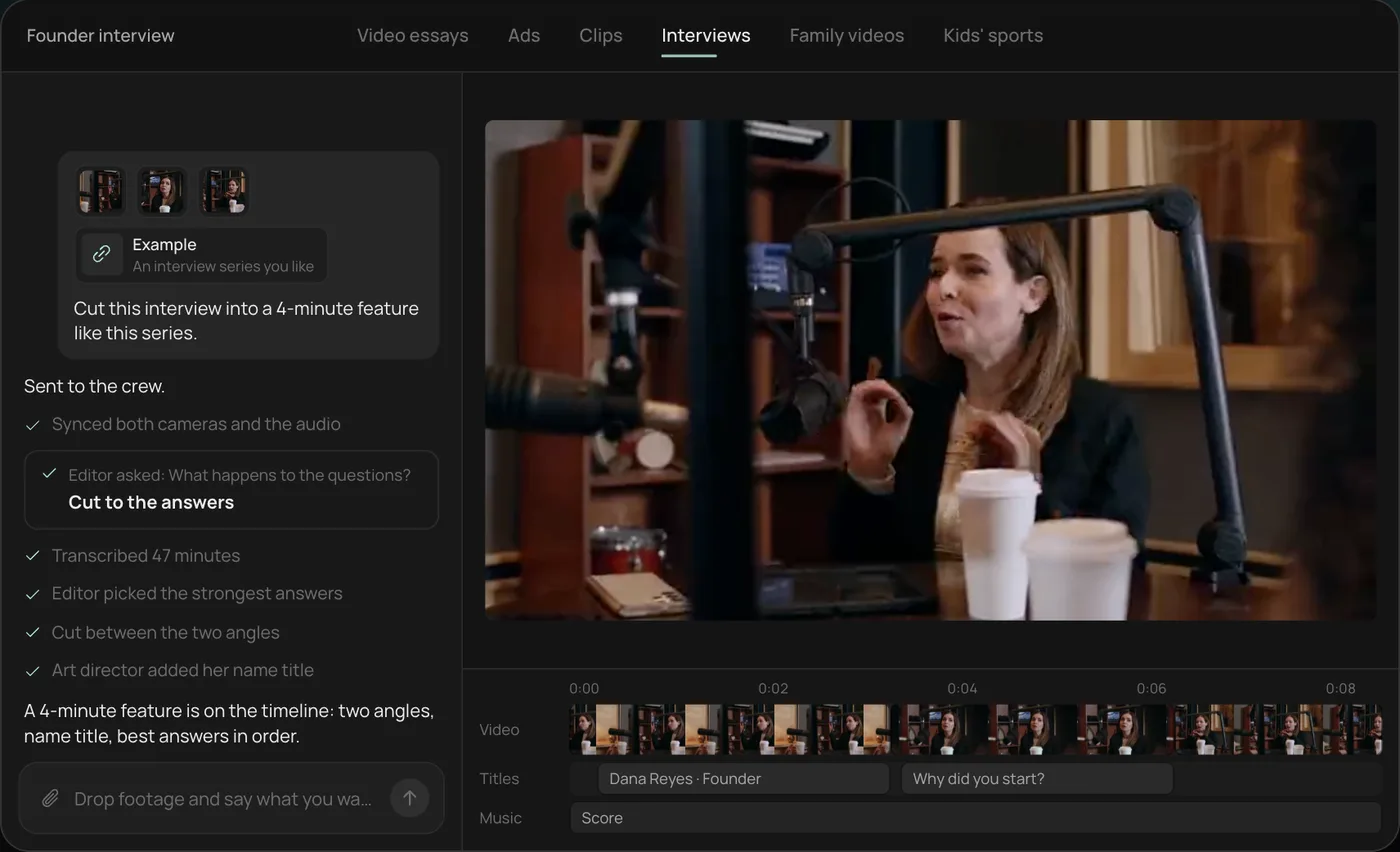
4. Get the finished cut. A 4-minute feature lands on a real timeline with both angles, a name title and the best answers in order, on separate tracks.
From there you can open the timeline and change anything by hand, share a review link for notes, or export. Start a free Rend project to try it on your own footage.
FAQ
What is the closest alternative to Descript?
For pure transcript editing, Premiere Pro's Text-Based Editing and Riverside's editor work the most like Descript. Kapwing is a lighter browser option.
Is there a free Descript alternative?
DaVinci Resolve and CapCut both have capable free versions, though neither centers on transcript editing. Rend's editing is free; you pay only when it renders or generates.
Which Descript alternative is best for podcasts?
Riverside if recording quality is your main worry, Descript itself if editing is. Rend if you'd rather hand over the whole cut and the clips.
Does Descript have an AI agent?
Yes. Underlord is Descript's AI co-editor and it handles many edits on request. You're still working inside Descript's editor; Rend's agents build the whole video, then hand you the timeline.
Can I export a Descript project to Premiere Pro?
Yes, on a Creator, Business or Enterprise plan. Descript's Timeline export sends cuts, media and markers to Premiere as XML (or .prproj in beta), but titles, transitions, effects and captions stay behind, so export captions as SRT separately.
Can I edit by transcript in Rend?
Yes. Cuts land on exact transcript words, transcripts include speakers, and you can tell the agent which lines to keep or drop.
If you want to see what an agent does with your own interview or clips, start free on Rend and send one video with a one-line brief.