HeyGen Alternatives in 2026: Avatar Tools and Beyond Compared
We build Rend, so weigh our view accordingly. Competitor details were checked on November 18, 2026; prices and features change, so confirm on their sites.
If you need a talking AI presenter, the main HeyGen alternatives are Synthesia (strongest for corporate training and security paperwork), Colossyan (training for smaller teams) and D-ID (cheapest way to test short avatar clips). If what you actually need is a finished marketing or YouTube video, and the avatar was just a way to get there, a video agent like Rend is a different and often better fit: it builds the whole edit around your footage, narration or generated shots.
HeyGen is very good at its core job. You type a script, a realistic presenter says it, lip sync holds up, and you can translate it into dozens of languages. Its current plans include a newer avatar engine (Avatar 6), a custom video avatar of yourself, and a Video Agent that drafts videos from a prompt.
What HeyGen costs today
From HeyGen's pricing page and FAQ on November 18, 2026:
| Plan | Price | Notable limits |
|---|---|---|
| Free | $0 | 3 videos a month, up to 1 minute, watermarked |
| Creator | $29/month, or $24/month billed yearly | 600 credits a month, videos up to 30 minutes, 1080p |
| Pro | $49/month | 1,000 credits a month, 4K |
| Business | $149/month plus $20 per extra seat | 1,500 credits, videos up to 60 minutes |
That's fair value for avatar video. The reasons people look elsewhere are usually about fit, not price.
Why people look for a HeyGen alternative
- Viewers can tell. Avatars have improved a lot, but on a feed full of real people, a presenter who never blinks wrong can still read as synthetic. For ads that depend on trust, that costs you.
- Training teams need different things. SCORM export, quizzes, enterprise security reviews. Some competitors focus there harder.
- The video is more than a talking head. Product demos, explainers and YouTube essays need b-roll, graphics, music and a real edit. An avatar on a background is one shot, not a video.
- Credits go fast on long or high-resolution renders.
Quick comparison
| Tool | Best for | Avatar presenter | Builds a full edit | Where HeyGen is better |
|---|---|---|---|---|
| Rend | Marketing videos, explainers, YouTube, ads | No stock avatar library | Yes, on an editable timeline | Talking-presenter realism, translation with lip sync |
| Synthesia | Enterprise training and internal comms | Yes | Template-based | Marketing flexibility, speed of new features |
| Colossyan | Interactive training for smaller teams | Yes | Template-based | Avatar variety, marketing use |
| D-ID | Cheap tests, API, short clips | Yes | No | Quality and length |
| Descript | Editing videos of real people | No (AI voice and regenerate) | You edit | Generating a presenter |
| Captions | Phone-first talking videos | AI creators | Light | Range of avatars |
1. Rend: when you need the video, not the presenter
Rend is an AI video agent. You describe the video and send what you have: a product page, phone clips, a script, a recording of yourself, a competitor ad that worked. A crew of specialist agents scripts it, generates the shots and b-roll you're missing, adds titles and motion graphics, narration, music and sound effects, and leaves a real timeline you can open and change.
Rend doesn't have a library of stock presenters. For narration you approve a voice, designed from a description or cloned from a recording with consent. For people on camera, the strongest results come from your own footage or UGC-style shots built around a reference. We covered that approach in UGC ads without creators.
Where Rend beats HeyGen:
- The output is a whole edit: cuts, b-roll, graphics, music, mix, captions. Everything is on separate tracks you can change.
- Ads at volume: one video and a brand in, new hooks, sizes, image ads and search ads out. See mass ad creation.
- Review links where clients draw on the frame and the agent makes each fix.
- Editing is free; you pay when it renders or generates. See pricing.
Where HeyGen is better: if the brief is literally "a presenter explains our policy update in 14 languages," HeyGen is faster and its lip-synced translation is the product. Full side-by-side in HeyGen vs Rend.
2. Synthesia: the corporate training pick
Synthesia is the most common choice for large-company training and internal communication. Reviewers consistently put it ahead on security and compliance paperwork, and it's built around structured, template-driven videos. It's less flexible for punchy marketing content.
3. Colossyan: training for smaller teams
Colossyan also targets learning and development, with conversational scenes and interactive elements. Teams that want training video without enterprise procurement often land here. For marketing, HeyGen has more range.
4. D-ID: the cheap way to test
D-ID animates a face from a photo and has an API developers use for short talking clips. It's the low-cost entry for experiments. Quality and length limits show on anything customer-facing.
5. Descript: when the person is real
If you can record yourself, even badly, Descript lets you edit that recording by text, regenerate flubbed lines in your cloned voice, and clean up the audio. Real faces with light AI repair often beat a fully synthetic presenter. See also Descript alternatives.
6. Captions: phone-first talking videos
Captions started as a captioning app for people talking to the camera and now includes AI creators and editing tools. It's a good fit for solo creators on their phone. We compared its rivals in Captions app alternatives.
Avatar or no avatar: a decision table
Use this before you pick a tool. It's the question that saves the most money.
| Your video | Avatar works? | Better approach |
|---|---|---|
| Compliance training, many languages | Yes, this is the best use | HeyGen, Synthesia, Colossyan |
| Internal update from leadership | Usually | Real recording if the leader can spare 10 minutes |
| Paid social ad | Risky | Real UGC or reference-led shots, many hooks |
| Product demo | Rarely needed | Screen recording plus narration and graphics |
| YouTube explainer or essay | Often hurts retention | Narration over b-roll, motion graphics, real footage |
| Personalized sales outreach | Yes | HeyGen or a custom avatar of the rep |
The pattern: avatars win when the message is the point and nobody is choosing to watch. When viewers are choosing to watch, a produced video usually wins. That's also why we wrote how to make AI videos not look like AI.
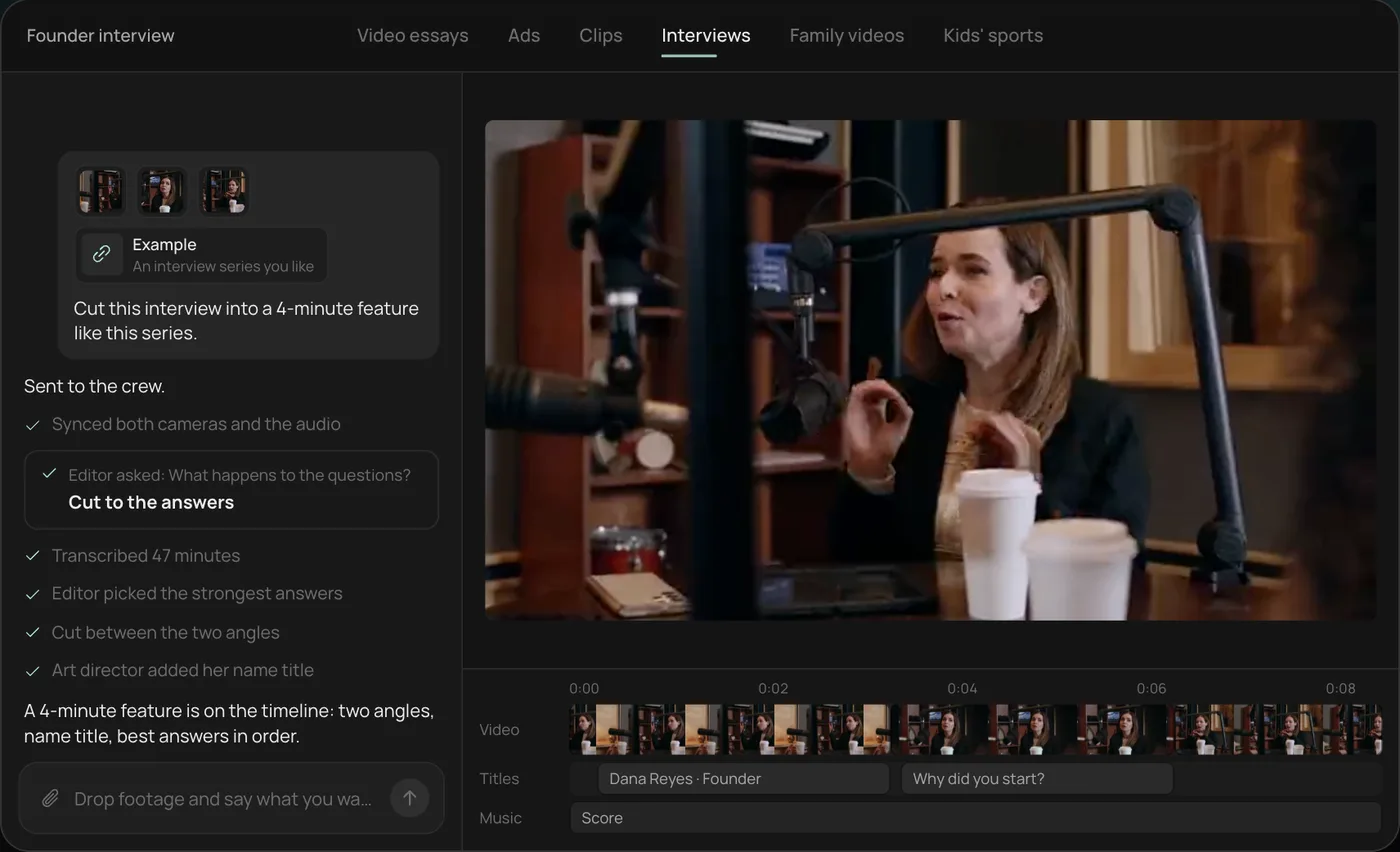
How to cut an explainer from real footage in Rend, step by step
These screenshots come from Rend's demo of cutting an interview; your own project works the same way.
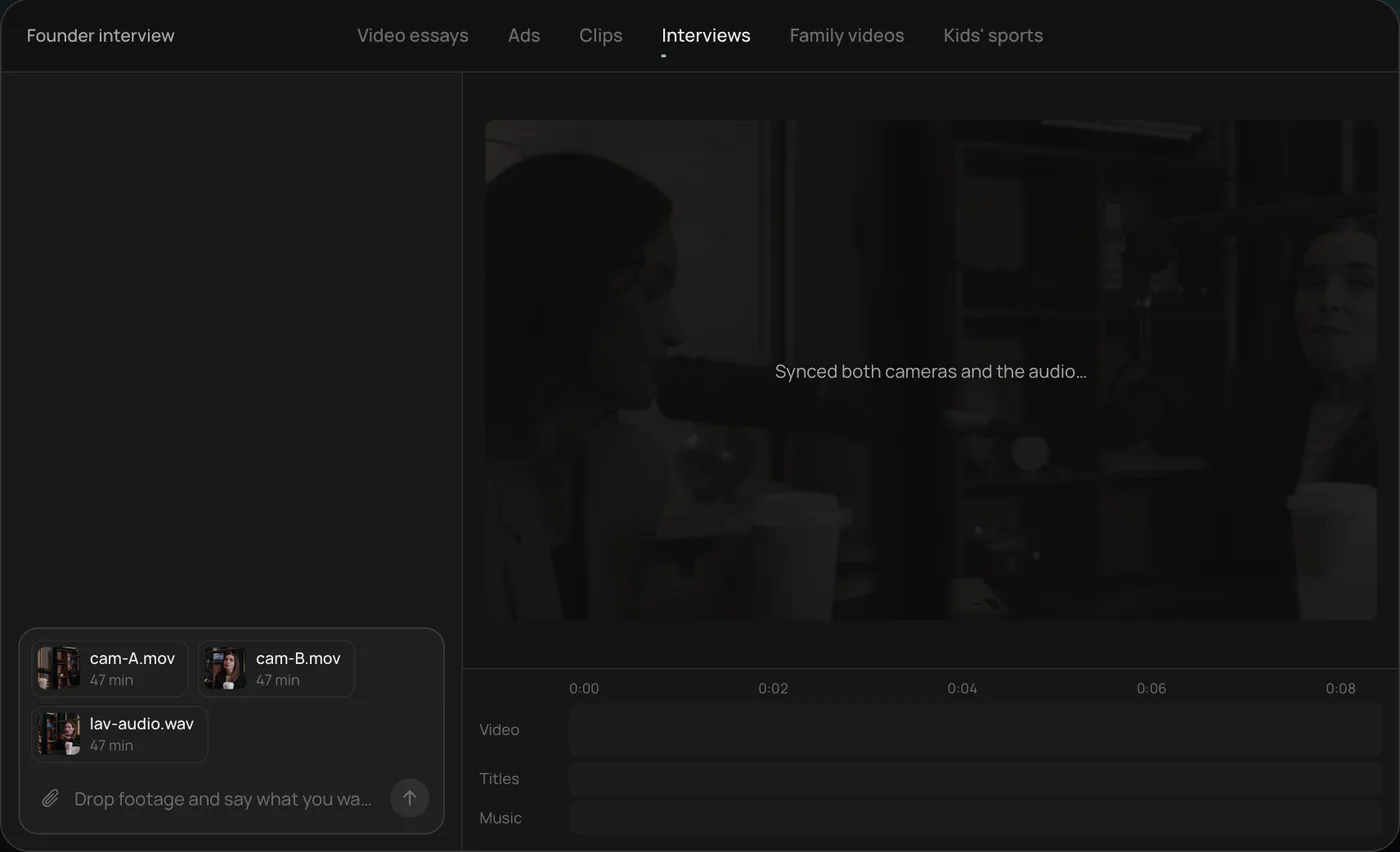
1. Drop in your footage. Add your files (here two camera angles and a lav mic recording) and say what you want: "Cut this interview into a 4-minute feature like this series."
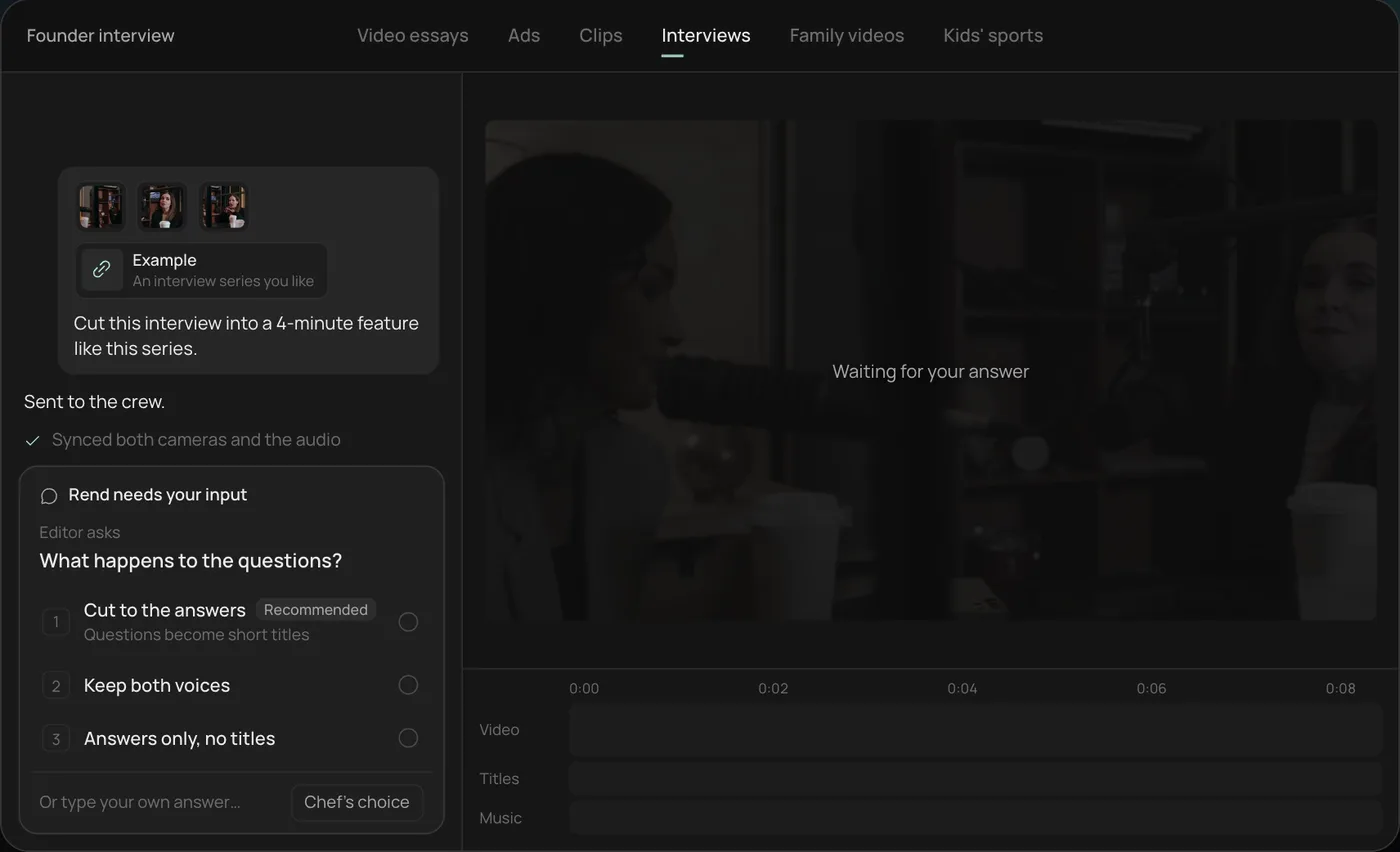
2. Answer one question. Rend asks what should happen to the interviewer's questions and recommends cutting straight to the answers.
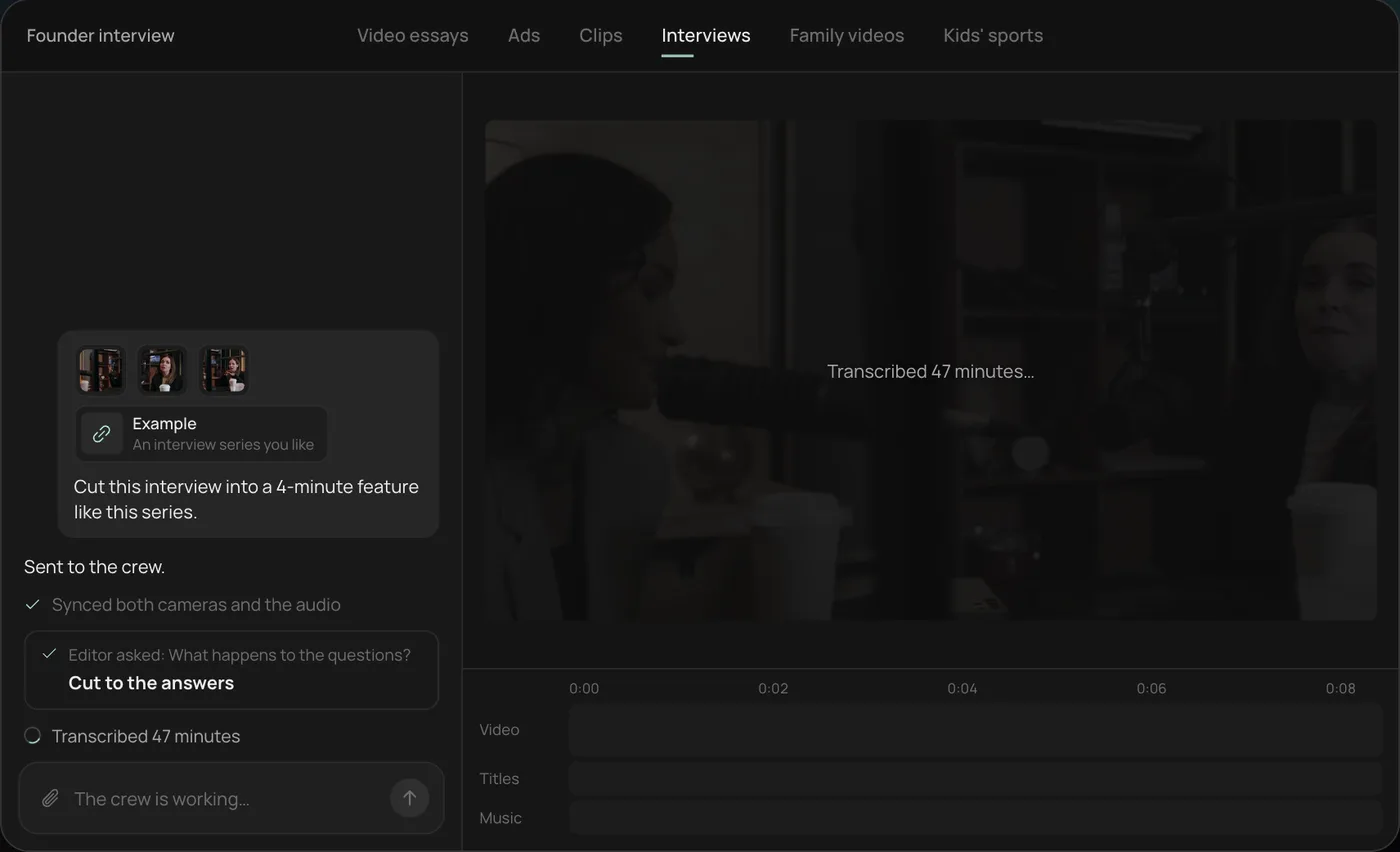
3. Watch the crew work. The crew syncs both cameras with the audio and transcribes all 47 minutes, each step checked off in the chat.
4. Get the finished cut. A 4-minute feature lands on a real timeline with both angles, a name title and the best answers in order, on separate tracks.
From there you can open the timeline and change anything by hand, share a review link for notes, or export. Start a free Rend project to try it on your own footage.
FAQ
What is the best free HeyGen alternative?
Most avatar tools have small free tiers with watermarks; HeyGen's own free plan allows 3 videos a month up to a minute each. If you don't need a presenter, Rend's editing is free and you pay only for renders and generation.
Which is better for training, HeyGen or Synthesia?
Synthesia is the usual pick for large companies with strict security reviews. HeyGen is more flexible and often preferred for marketing and translation.
Can I make a video with my own voice instead of an avatar?
Yes. Rend can clone your voice from a recording with your consent or design one from a description, then narrate over b-roll, footage and graphics.
Does Rend make AI avatars?
Rend doesn't offer a stock avatar library. It generates shots and b-roll, and it handles people on camera best from your footage or a reference image.
Is HeyGen good for YouTube?
For faceless channels it works, but a static presenter for ten minutes is hard to watch. Narrated b-roll and graphics tend to hold attention better; see faceless YouTube channels with AI.
If your avatar search was really a search for a finished video, start free on Rend with a script or a product link and see what the agent builds.