Best AI Video Generator for Long Videos in 2026: Picks by Job
The best AI video generator for long videos is one that builds the whole piece, not one that hands back a single clip. Shot generators like Runway make clips measured in seconds, so a five-minute video means dozens of generations you still have to order, voice and caption yourself. If you want a finished multi-minute video (script, shots, voice, music, captions) on a timeline you can still change, a whole-video agent like Rend fits better. For one striking shot, Runway is the most complete toolkit, and for a presenter reading a script in 40 languages, Synthesia is built for that.
We build Rend, so weigh our view accordingly. Prices below were checked on November 18, 2026, and every one of these products changes monthly, so confirm before you pay.
Why "best" splits three ways
People type "AI video generator" meaning three different things, and most roundups mash them together.
- Shot generators. You type a prompt or upload a still and get a 5 to 10 second clip. Great raw material, but a clip is not a video. Someone still has to cut it, score it and caption it.
- Presenter generators. A digital person reads your script on camera. Strong for training, onboarding and translated explainers. Weak for anything that needs a story.
- Whole-video agents. You describe the video, and the tool writes, sources or generates the shots, adds sound and hands back an edit. The question that matters here is whether that edit is a flat file or something you can open and fix.
Knowing which of the three you need cuts most of the list before you start.
The picks at a glance
| Tool | Type | Best for | Editable after? | Starting price (Nov 18, 2026) |
|---|---|---|---|---|
| Runway | Shot generator plus tools | Generated shots and effects for your own edit | You edit elsewhere | Free (125 one-time credits); Standard $12/mo yearly or $15 monthly |
| Synthesia | Presenter generator | Training and translated talking-presenter videos | Inside Synthesia's scene editor | Starter $19/mo billed monthly |
| CapCut | Editor with generation built in | Phone-first social edits with some generated clips | Yes, full CapCut timeline | Free; Pro $19.99/mo |
| Rend | Whole-video agent | Essays, explainers, ads, UGC, Shorts from a brief | Yes, every cut, caption, graphic and track | Editing free; pay when it renders or generates (pricing) |
Runway
Runway is where you go when the shot itself is the point: a product floating in a storm, a camera move through a scene you could never film. Its plans run on credits, and its pricing page shows how many seconds of each model a plan buys. Standard is $12 a month billed yearly ($15 monthly), Pro $28 ($35 monthly) and Max $76 ($95 monthly), with a free tier of 125 one-time credits.
Where it wins: control over generation. You get several video models in one place, image-to-video, and editing tools aimed at people who already know what a shot list is.
Where it falls short: you leave with clips. If you need a 90-second explainer, you still have the whole edit ahead of you. We go further in Runway vs. Rend.
Synthesia
Synthesia makes presenter videos: pick a stock avatar or make one of yourself, paste a script, choose a language. Its listed self-serve plans as of this fall are Starter at $19 a month billed monthly and Pro at $89, with a free tier and Enterprise above.
Where it wins: compliance-friendly training video at scale, translation, and a consistent face across hundreds of modules. Nothing on this list beats it for an HR team that needs 60 policy videos.
Where it falls short: the format is the format. A person talking in front of a background is the product. If your idea needs cutaways, b-roll and pacing, look elsewhere. See Synthesia vs. Rend.
CapCut
CapCut is a full editor first, now with generated clips, captions and templates bolted in. Pro lists at $19.99 a month in the US and includes monthly AI credits.
Where it wins: if you already shoot on your phone and want templates, trends and quick captions, it is hard to beat for speed and price. The timeline is real and familiar.
Where it falls short: you are still the editor. Generation helps fill gaps, but nobody plans the video for you. More in CapCut vs. Rend.
Rend
Rend is an AI video agent. You say what you want, and a crew of specialist agents takes it from idea to export: one writes, one handles the look, one does sound, and the work gets checked before you see it. It generates shots, images and b-roll where you have no footage, and it works with what you send: phone clips, a product page, a TikTok that worked.
What you get back is a real multi-track timeline. Captions are word-timed and always editable in your font. Narration comes in a voice you approve, designed from a description or cloned from your own recording with consent, with original music and a mix that ducks under speech. Long videos get built in chapters in parallel.
Where it falls short: if all you want is one gorgeous 8-second shot to drop into Premiere, a shot generator is the more direct tool. Rend shines when the job is a whole video. The full tool list is on /tools.
A worked example: one brief, three tools
Take a real brief: a 60-second explainer on why sourdough rises, for a bakery's Instagram.
- In a shot generator, you write maybe eight prompts (starter bubbling, dough stretching, oven spring), generate two or three takes of each, download the keepers, then build the edit, record a voiceover and caption it in another app. Two to four hours if you know what you are doing.
- In a presenter generator, you get a person explaining fermentation in front of a kitchen backdrop. Fast, accurate, and not something anyone stops scrolling for.
- In Rend, you send the brief and three phone clips of your own dough. It writes a script, uses your clips where they fit, generates the shots you don't have, voices it, scores it and captions it. You open the timeline and swap the one shot that looks off.
The right answer changes if you are a filmmaker hunting for a single shot. It doesn't change much for a bakery.
How long videos get made from short clips
Most roundups rank clip quality and stop there. Few do the math on length. Runway's help center lists 5 and 10 second outputs for its Gen-4 model, and most shot generators work in that range. A finished video is built from many shots, and the count climbs fast. Here is the arithmetic if you cut every 3 to 4 seconds and keep one generated take in two:
| Finished length | Shots needed | Generations to get them |
|---|---|---|
| 30-second ad | 8 to 10 | 16 to 20 |
| 3-minute explainer | 45 to 60 | 90 to 120 |
| 10-minute YouTube video | 150 to 200 | 300 to 400 |
Past about a minute, three other problems show up that a single clip never has. The same person or product starts to drift between shots. Narration and music have to run across every cut, and a clip generator gives you neither. And someone still has to decide the order, the pacing and where the captions sit.
So when you test a tool for long videos, look for these:
- It plans from an outline or script before it generates anything, so shots match lines.
- It uses your real footage where you have it, which means fewer generated shots and fewer chances to look fake.
- Voice, music and captions sit on their own tracks, so a script change doesn't mean a new video.
- You can regenerate one shot without rebuilding the rest.
- It builds in sections, so a 10-minute video isn't one giant all-or-nothing render.
Rend builds long videos in chapters in parallel, on one timeline you can open at any point. If your long video is a YouTube essay, our video essay guide walks through the structure.
How to judge any generator in 10 minutes
Run the same test on every trial:
- Ask for a 30-second video on a topic you know cold. Count the factual errors.
- Check hands, text on screen and faces in motion. These are where generated footage still breaks.
- Try to change one word of narration. If that means regenerating the whole thing, budget for it.
- Export and watch it on a phone with the sound off. Do the captions carry it?
- Look at what a minute of finished video actually costs once retries are counted, not the headline credit number.
Our guide to making AI videos that don't look like AI covers what to fix when step 2 fails.
Pick X if...
- Pick Runway if you are an editor or filmmaker who needs generated shots and will cut them yourself.
- Pick Synthesia if you need presenter-led training or translated explainers at volume.
- Pick CapCut if you edit on your phone, want templates, and are happy to do the editing.
- Pick Rend if you want the whole video made from a brief and still want to open the timeline and change anything.
How to make a finished video in Rend, step by step
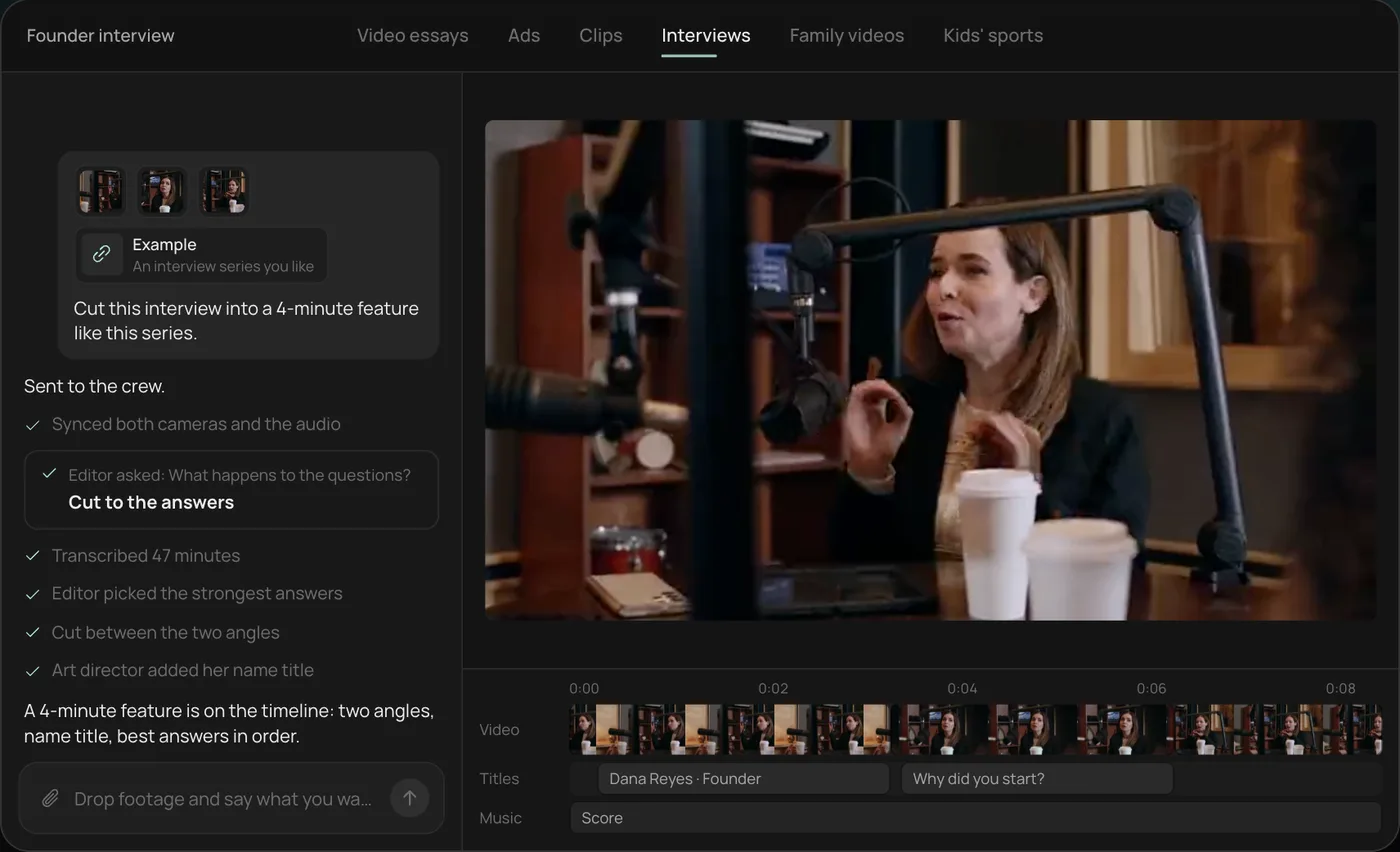
These screenshots are from Rend's demo of cutting an interview; your own project works the same way.
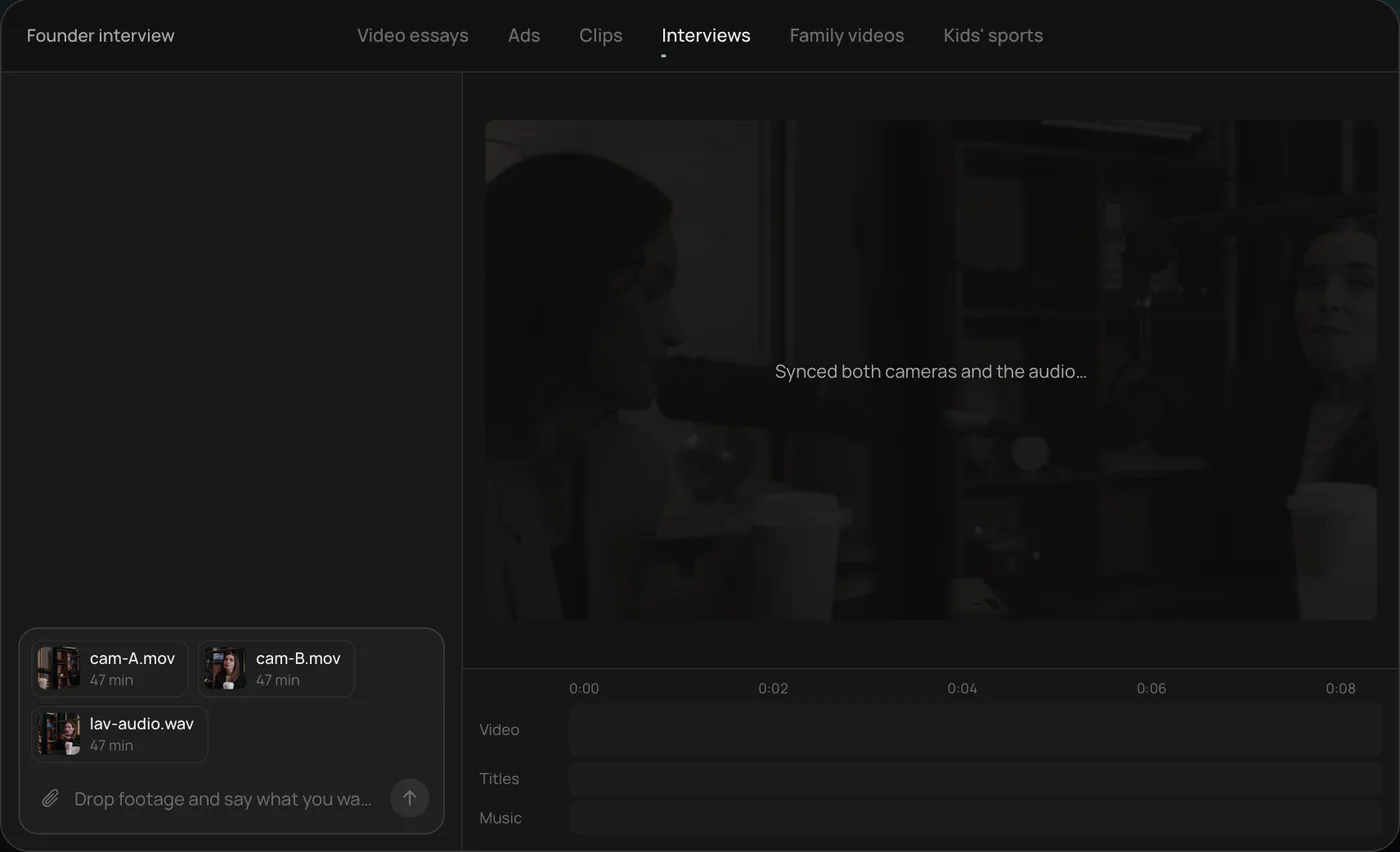
1. Drop your footage and an example. Add your files (here two camera angles and a lav audio track) and say what you want: "Cut this interview into a 4-minute feature like this series."
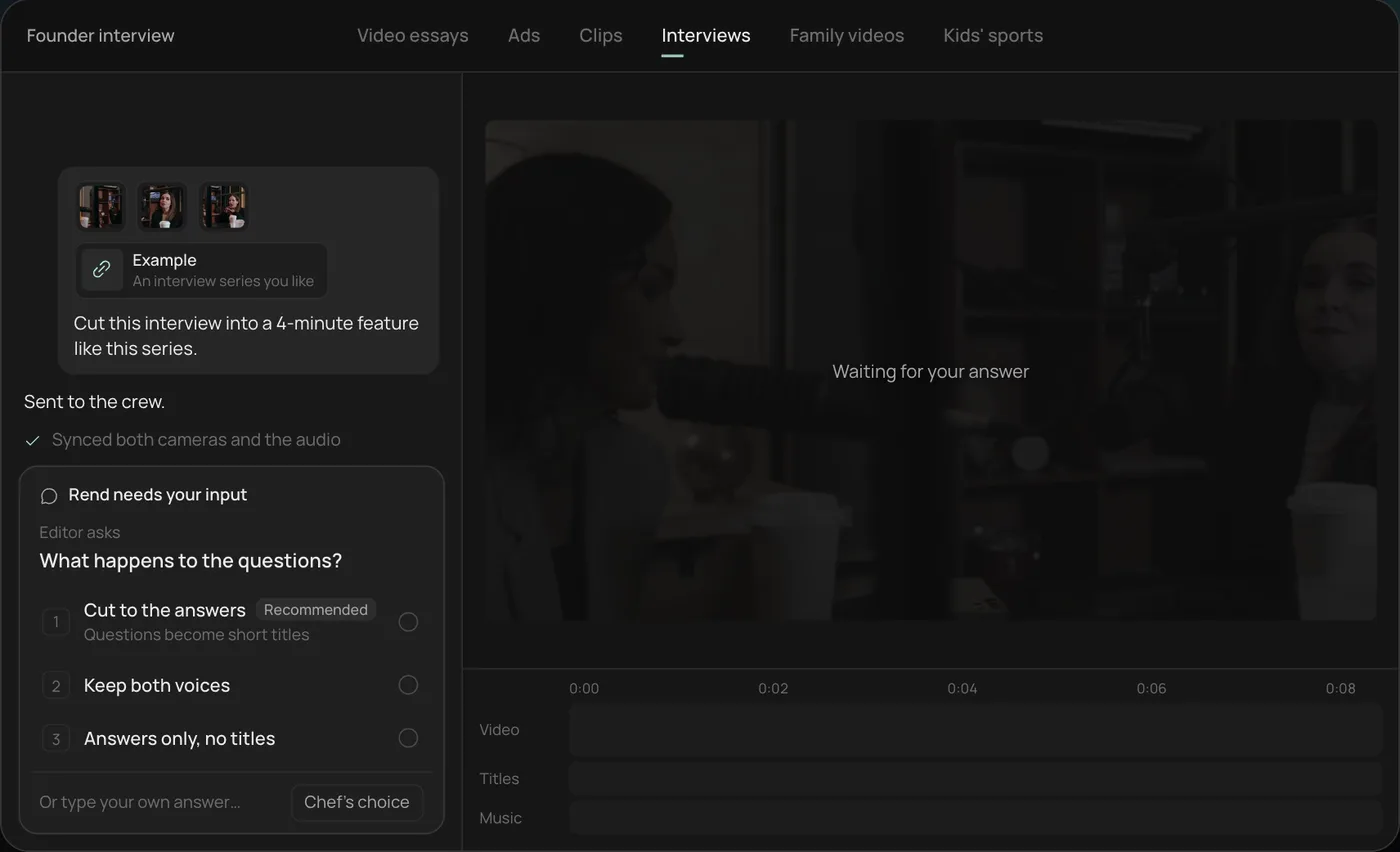
2. Answer the one question. Rend asks one question, here what should happen to the interviewer's questions, and recommends cutting straight to the answers.
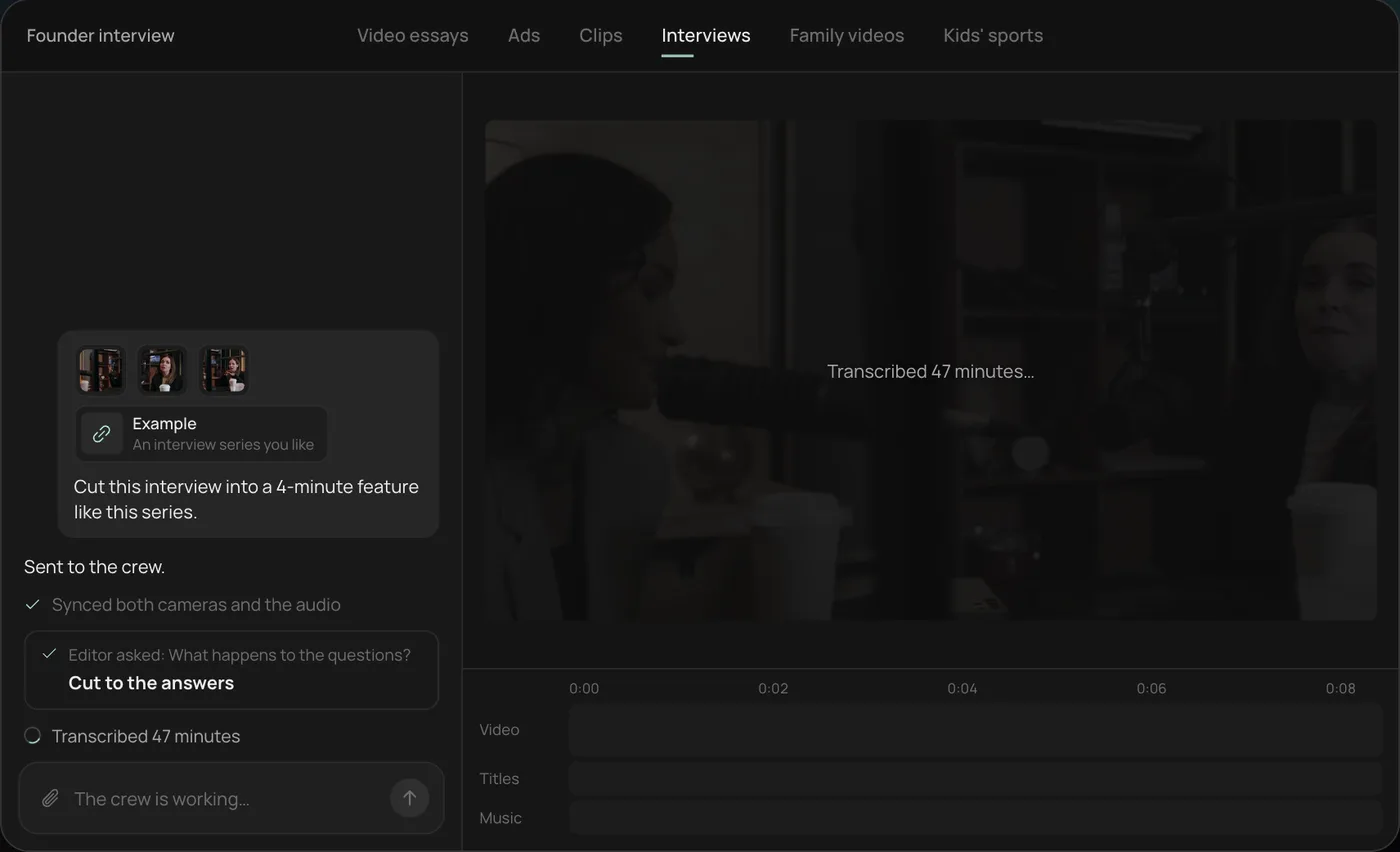
3. Let the crew work. The crew syncs both cameras with the audio and transcribes all 47 minutes, checking off each step in chat.
4. Open the finished cut. A 4-minute feature lands on a real timeline: two angles, a name title and the best answers in order, with titles and music on their own tracks.
From there you can open the timeline and change anything by hand, share a review link, or export. Start a free Rend project to try it on your own footage.
FAQ
What is the best free AI video generator?
For trying generation itself, Runway's free tier gives 125 one-time credits, and CapCut has a free plan with basic tools. Rend lets you edit for free and charges only when it renders or generates something, so you can see a full project before you pay.
Can AI generate a whole video from a text prompt?
Yes, but quality varies by type. Shot generators give clips, not finished videos. A whole-video agent like Rend writes, assembles, voices and captions the full piece, and hands back a timeline you can adjust.
Are AI-generated videos allowed on YouTube and TikTok?
Both platforms allow them, with disclosure rules for realistic synthetic content. Check each platform's current policy before you post, since they update these often.
What is the best AI video generator for YouTube videos?
For Shorts made of a few striking shots, a shot generator plus a quick editor works. For 8 to 20 minute uploads, use a whole-video agent that writes, narrates and builds in sections, then lets you fix single parts. Our guide to YouTube video agents covers the workflow.
How long can AI-generated videos be?
Single generated shots usually run seconds, not minutes. Longer videos are assembled from many shots. Rend builds long videos in chapters in parallel, so length is set by your script rather than a clip limit.
Do I own videos I make with an AI generator?
It depends on each tool's terms and your plan. Read the commercial-use section before running anything in ads.
You can try the whole-video approach without paying up front: start a free Rend account, send a brief and your clips, and open the timeline it hands back.