Best AI Tools for Small YouTubers in 2026: A Stack That Pays Off
The best AI tools for small YouTubers start with the free ones already in YouTube Studio (title and thumbnail testing, automatic dubbing), plus one paid tool for whichever job eats your week, which is usually editing. Most channels need three AI tools at most: one for ideas and titles, one for editing, and one for turning long videos into Shorts. As of November 2026, vidIQ is the strongest pick for research, Descript for hands-on talking-head editing, OpusClip for clipping, and Rend if you want an agent to edit the whole video (script, b-roll, graphics, captions, sound) and leave you a timeline to adjust.
We build Rend, so weigh our view accordingly. Prices were checked on November 18, 2026.
Where a YouTube week actually goes
Look at a solo creator posting one 12-minute video and three Shorts a week. The hours usually land like this: 2 on ideas and titles, 3 on scripting, 2 filming, 8 to 12 editing, 2 on thumbnails and clips. Editing is the giant. A tool that shaves 20 minutes off title brainstorming is nice; one that gives back 6 hours of editing changes whether the channel survives.
So rank tools by the hours they actually return, not the length of their feature list.
Free AI already inside YouTube Studio
The lists ranking for this jump straight to paid apps. A small channel should use what YouTube already gives it first, because it costs nothing and runs on YouTube's own viewer data.
Title and thumbnail testing. YouTube's A/B testing lets you test up to three titles, thumbnails or combinations on one video. When the test ends, the version with the highest watch time is shown to everyone. Watch time, not click-through rate, so a clickbait thumbnail that people abandon loses. It runs only in YouTube Studio on a computer, and not on Shorts, scheduled lives or premieres.
Automatic dubbing. YouTube's dubbing feature is on by default for eligible creators and makes translated audio tracks of your videos. Turn on "Publish manually" if you want to review dubs before they go live; previewing and publishing individual dubs happens in Studio on a computer, under Content, then Languages. Videos over 120 minutes, with little speech, very fast speech or copyright claims aren't eligible.
What doesn't need a label. YouTube's disclosure page says using AI to draft scripts, titles or thumbnails, or to make captions, doesn't need disclosure. Realistic generated scenes or people do.
| Job | Free in Studio | When a paid tool earns its place |
|---|---|---|
| Picking a title | A/B test on long videos | Ideas before you film (vidIQ) |
| Thumbnails | A/B test up to three | Making the thumbnails in the first place |
| Other languages | Automatic dubbing | Your own voice or a custom voice in each language |
| Editing | Not covered | The biggest time saver for most channels |
| Shorts from long videos | Not covered | Clippers or an editing agent |
Start every upload with a thumbnail test, since it costs only the time to make two extra images.
The stack at a glance
| Job | Tool | What it does well | Price (Nov 18, 2026) |
|---|---|---|---|
| Ideas, titles, SEO | vidIQ | Niche trends, keyword data, title ideas | Free; Boost $19/mo or $199/yr; Max $49/mo |
| Talking-head editing | Descript | Edit by transcript, filler removal, audio cleanup | Hobbyist $16/mo yearly ($24 monthly), 10 media hours |
| Phone-first editing | CapCut | Templates, captions, quick social cuts | Free; Pro $19.99/mo |
| Long video into Shorts | OpusClip | Finds clip moments, reframes, captions | Free 60 credits/mo with watermark; Starter $15/mo |
| Whole-video editing agent | Rend | Script to export on an editable timeline | Editing free; pay for renders and generation (pricing) |
vidIQ for ideas and titles
vidIQ reads YouTube data and tells you what is working in your niche. Its free plan includes 150 AI credits a month; Boost is $19 a month or $199 a year, and Max is $49 a month. It also offers an MCP connection so Claude or ChatGPT can query it.
Use it for: picking the next topic and pressure-testing a title before you film. Pair it with our free YouTube title tester and the video ideas by niche list.
Skip it if: you already know your next ten videos. Data won't fix a weak script.
Descript for talking-head edits
Descript turns your recording into a document: delete a sentence in the transcript and it disappears from the video. Hobbyist is $16 a month billed yearly ($24 monthly) with 10 media hours; Creator is $24 yearly ($35 monthly) with 30. Underlord, its AI co-editor, handles filler words, clips and rough structure.
Use it for: podcasts, commentary and tutorials where the edit is mostly removing things.
Skip it if: your videos lean on b-roll, motion graphics and pacing. You'll do that part by hand. More in Descript vs. Rend.
CapCut for fast phone edits
CapCut's free plan is genuinely usable, and Pro at $19.99 a month adds AI credits and more effects. Its templates follow trends closely, which matters for Shorts.
Use it for: vlogs and quick Shorts shot on a phone.
Skip it if: you want somebody else to do the edit. CapCut speeds up your hands; it doesn't replace them.
OpusClip for Shorts from long videos
OpusClip finds the strongest moments in a long video, reframes them vertically and captions them. Free gives 60 credits a month with a watermark; Starter is $15 a month for 150 minutes; Pro is $29 monthly or $14.50 a month billed yearly.
Use it for: podcasts and streams where you need 10 clip candidates from every episode. Our guide on repurposing a long video into Shorts walks through the workflow.
Skip it if: you need narrative Shorts with a script and b-roll, which a clipper can't invent.
Rend for the whole edit
Rend is an AI video agent. You send your footage (or a script, or just the idea) and a crew of specialist agents takes it to export: it cuts on exact transcript words, adds word-timed captions in your look, titles, motion graphics, generated b-roll where you need it, narration in a voice you approve, original music and a mix that ducks under speech. Long videos are built in chapters in parallel. A brand kit keeps your intro, caption style and music bed the same every episode.
The result is a real timeline you can open and change. That matters for YouTube, where one wrong graphic in minute 7 shouldn't mean starting over.
Where it falls short: if your edits are 90% deleting ums from a podcast, Descript's transcript editor is more direct. And Rend won't pick your niche for you; vidIQ is better at that. See YouTube video agent for how a full episode runs.
A sample week with the stack
- Monday: vidIQ suggests three topics; you test titles and pick one.
- Tuesday: you film 25 minutes of talking head on your phone.
- Wednesday: send it to Rend with a note: "Tighten to 12 minutes, b-roll every claim, my brand kit." Open the timeline that evening, swap two shots, change one caption.
- Thursday: run the episode through a clipper for Shorts, or ask Rend for three Shorts cut from the same timeline.
- Friday: publish.
That plan replaces the 8 to 12 hour editing block with roughly an hour of review. Your own numbers will differ, but that block is where to look first.
Pick X if...
- Pick vidIQ if your problem is not knowing what to make.
- Pick Descript if you make dialogue-heavy videos and like editing yourself.
- Pick CapCut if you shoot and edit on your phone on a tight budget.
- Pick OpusClip if you have long recordings and need many Shorts quickly.
- Pick Rend if editing is eating your week and you want the whole video done, with a timeline you can still change.
How to make a YouTube video in Rend, step by step
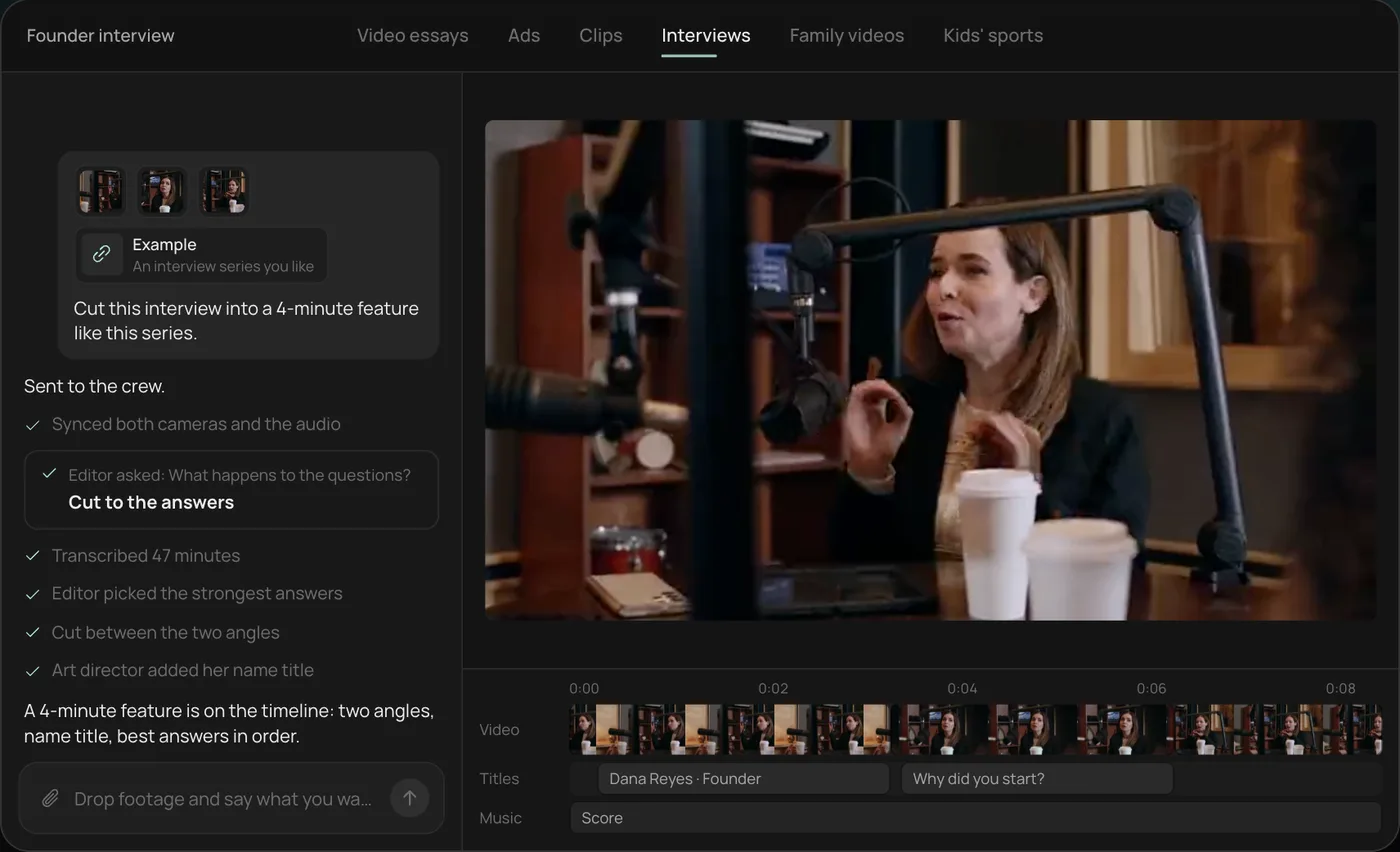
These screenshots are from Rend's demo of cutting an interview; your own project works the same way.
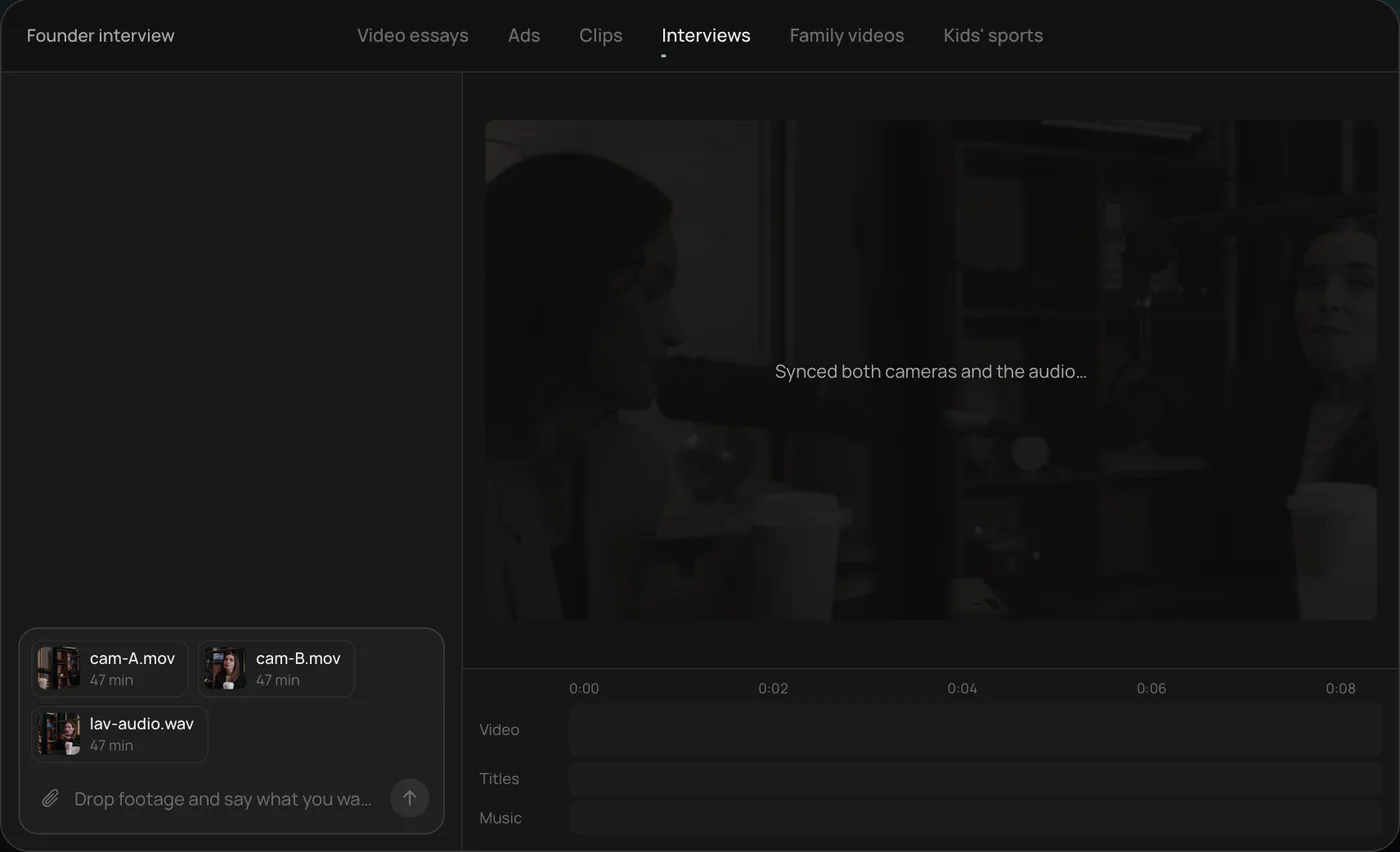
1. Drop your footage and an example. Add your files (here two camera angles and a lav audio track) and say what you want: "Cut this interview into a 4-minute feature like this series."
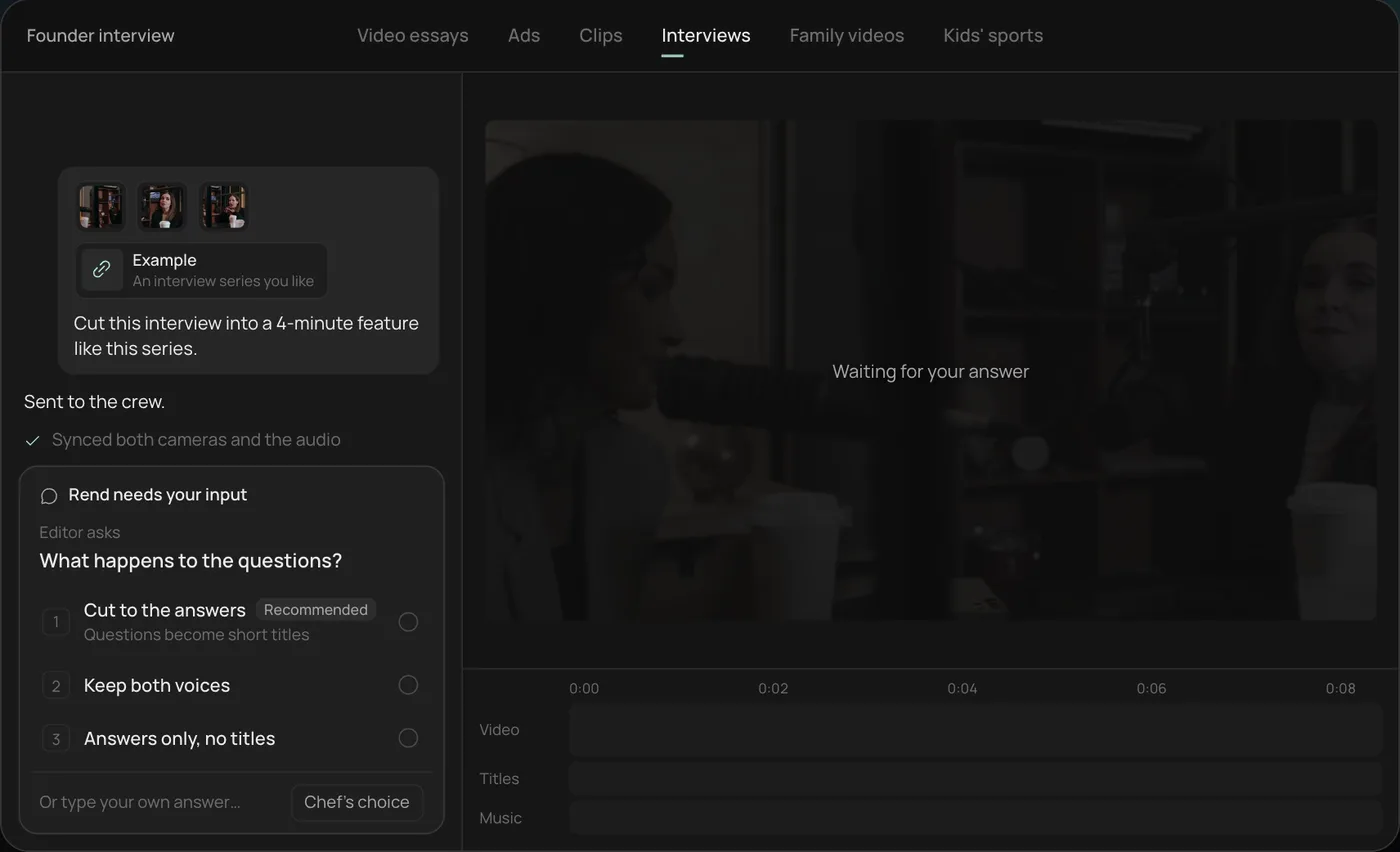
2. Answer the one question. Rend asks one question, here what should happen to the interviewer's questions, and recommends cutting straight to the answers.
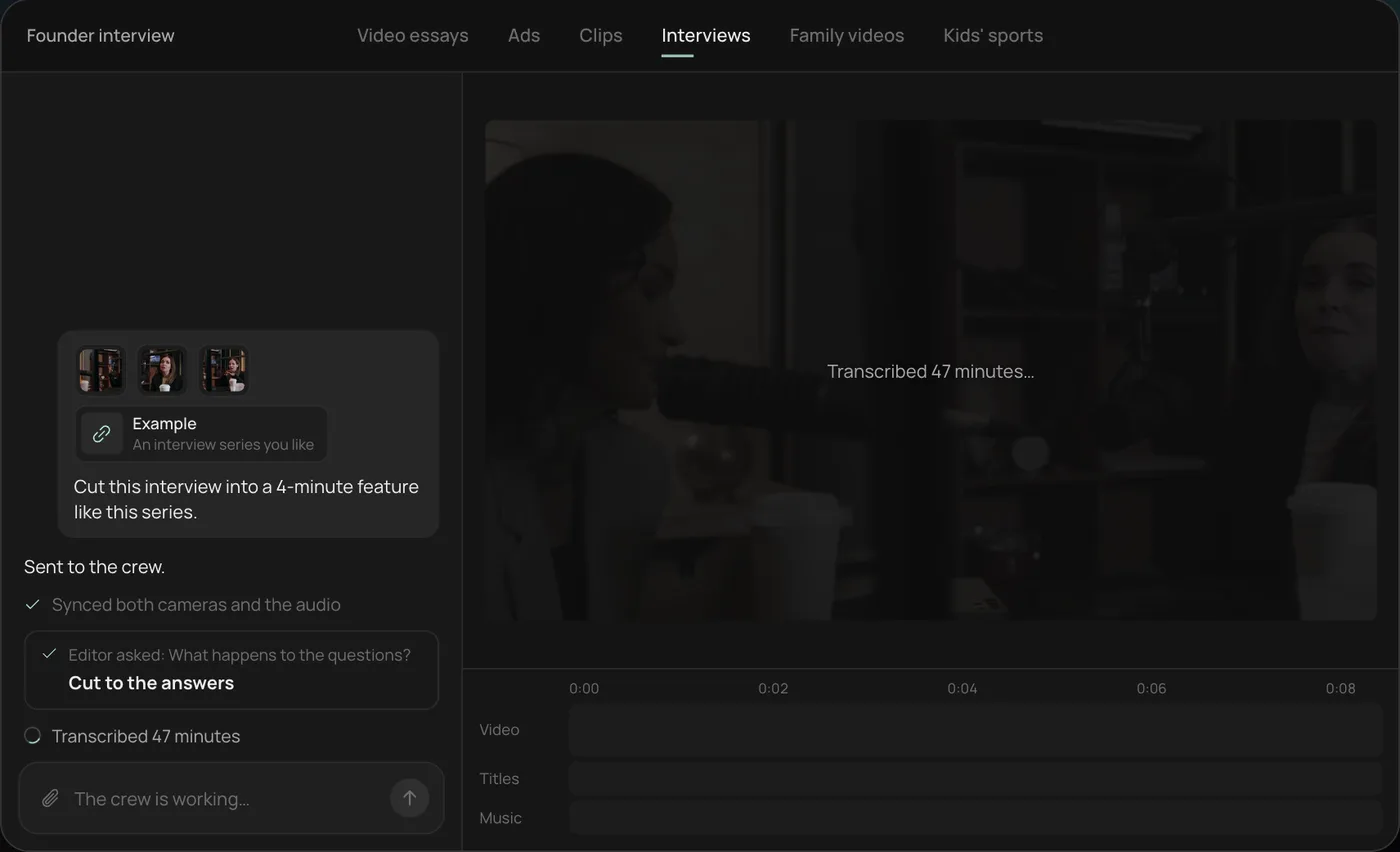
3. Let the crew work. The crew syncs both cameras with the audio and transcribes all 47 minutes, checking off each step in chat.
4. Open the finished cut. A 4-minute feature lands on a real timeline: two angles, a name title and the best answers in order, with titles and music on their own tracks.
From there you can open the timeline and change anything by hand, share a review link, or export. Start a free Rend project to try it on your own footage.
FAQ
What AI tools do YouTubers use most?
Research tools like vidIQ, editors like Descript and CapCut, and clipping tools like OpusClip are the common ones. Editing agents like Rend are newer and cover the full edit.
Can AI edit a whole YouTube video?
Yes. An editing agent can cut, caption, add b-roll, graphics and sound from your footage and a short brief. Check that you get back an editable project, not just a file.
Will YouTube demonetize AI-edited videos?
AI editing on its own isn't a problem. YouTube's concern is mass-produced, repetitive content and undisclosed realistic synthetic media. Original videos edited with AI are fine.
Is there a free AI tool for YouTube?
YouTube Studio itself has free title and thumbnail testing and automatic dubbing for eligible creators. vidIQ, CapCut and OpusClip all have free tiers. Rend lets you edit for free and charges only when it renders or generates.
What AI tools should a small YouTube channel start with?
Use Studio's free testing and dubbing first, then add one paid tool for your slowest job. For most small channels that's editing, so an editor or editing agent returns the most hours. Add a research tool once you run out of ideas, not before.
What's the best AI tool for a faceless channel?
You need narration, visuals and editing in one place. Our faceless YouTube channel guide covers the setup.
If editing is the part of the week you dread, try Rend free on your next upload and see how much of it comes back.