Best AI Video Ad Generators for Ecommerce Brands in 2026
For Shopify and DTC brands that need many product video ads for Meta, TikTok and YouTube without a video team, the best all-around pick is a tool that turns one winning ad into dozens of variations and matches your input type, whether that is a product URL, raw footage or a script. If you mainly want AI actors reading a script with no footage of your own, Creatify and Arcads are stronger at that specific job than most editors, so this guide says plainly where each tool wins instead of pretending one tool does everything.
If you want a broader list across every kind of ad, see the best AI ad generators; this one is only about ecommerce product video.
This is a working comparison of seven tools: Rend, Creatify, Arcads, HeyGen, Synthesia, Higgsfield and CapCut. Rend makes this list and we also build it, so we have tried to be fair and to point you elsewhere when another tool fits your situation better. Pricing and features are as of early 2026. Plans change often, so confirm current pricing on each vendor's site before you commit.
What an AI video ad generator actually does for a product catalogue
An AI video ad generator takes an input about your product and produces finished short video ads, usually in several aspect ratios, with captions and a voice track already in place. The input is the first thing that separates these tools. Some start from a product URL and scrape your images, price and copy. Some start from a script you paste. Some start from real footage you upload, such as phone clips of the product in use. A few generate the visuals from scratch.
For a catalogue, the point is volume and consistency. You are not making one hero film. You are making ten or twenty versions of an ad so you can test hooks, formats and audiences on Meta and TikTok, keep what works and kill what does not. A good generator keeps your logo, colours and fonts the same across every version through a brand kit, and exports each one at the size each platform wants.
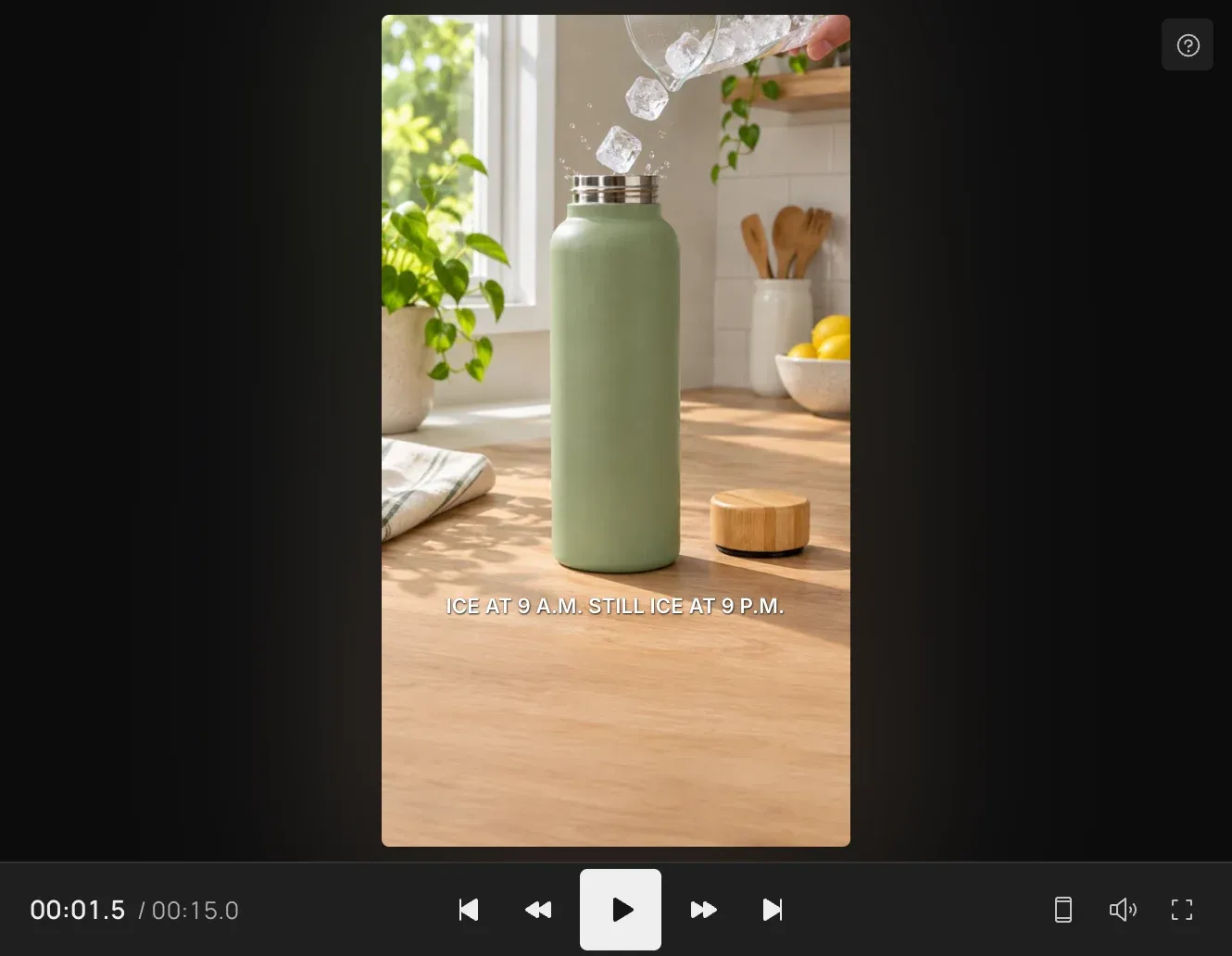
The first three seconds are the part you test: one claim, one clear picture of the product, readable with the sound off.
How to judge one
Use these criteria. They matter more than a slick demo reel.
- Input type: Product URL, uploaded footage, or script. Match this to what you already have. If you have real product clips, a tool that only generates AI avatars will waste them.
- UGC and avatar options: Some tools specialise in AI actors who look like real people holding your product. Others give you avatars for a spokesperson or explainer. These are different looks and perform differently per niche.
- Variations at scale: Can you make twenty versions from one ad in a few clicks, or do you rebuild each one by hand? This is the whole game for paid testing.
- Brand kit: One place to store logo, colours and fonts so every variation stays on brand.
- Aspect ratios: 9:16 for TikTok and Reels, 1:1 and 4:5 for the feed, 16:9 for YouTube. You want all of them from one project.
- Captions: Auto captions that are accurate and styled, since most feed views are muted.
- Export to ad platforms: Clean file exports at minimum. A few tools can push the ad live for you.
- Price per video: Work out the real cost of a finished, exported ad under your expected volume, not the headline monthly fee. Credit-based tools can be cheap at low volume and expensive at high volume, or the reverse.
The seven tools compared
| Tool | Best for | Main input | UGC / avatar | Variations at scale | Pricing model (early 2026) |
|---|---|---|---|---|---|
| Rend | Brands with real footage plus ads they want to scale and run | Footage, product URL, or request to an agent | Edits real footage, adds voice and captions | Mass variations from one video, built in | Editing is free; you pay when it renders or generates (plans) |
| Creatify | Pure AI UGC ads from a product link, no footage | Product URL | AI UGC actors and avatars | Batch mode for many link-to-video ads | Subscription with monthly credits, verify current tiers |
| Arcads | High-volume AI actor UGC for ad testing | Script | Large library of realistic AI actors | Generate many actor reads of one script | Subscription, verify current tiers |
| HeyGen | Spokesperson and talking-head product videos | Script | Strong AI avatars, voice cloning, translation | Variations by swapping script and avatar | Subscription with credits, verify current tiers |
| Synthesia | Explainer and training video with avatars | Script | Enterprise-grade avatars and voiceover | Template reuse, less ad-specific | Seat and subscription based, verify current tiers |
| Higgsfield | Generative, cinematic b-roll and motion | Text or image prompt | Generated scenes, not UGC actors | Prompt variations, manual assembly | Credit-based, verify current tiers |
| CapCut | Manual editing and templates on a budget | Footage | Templates and effects, no true AI actors | Duplicate and edit by hand | Free tier plus Pro subscription |
Rend
Rend is an AI video editing agent. You say what you want, and a crew of agents writes, voices, scores, edits and exports the video on a timeline you can still change by hand. It edits real footage, which most tools on this list cannot do, and it makes ads, YouTube videos and video essays rather than one narrow format. For ecommerce, the useful part is turning one ad that works into new hooks, sizes, image ads and search ads from a single brand kit. See our mass ad creation guide for how that works step by step.
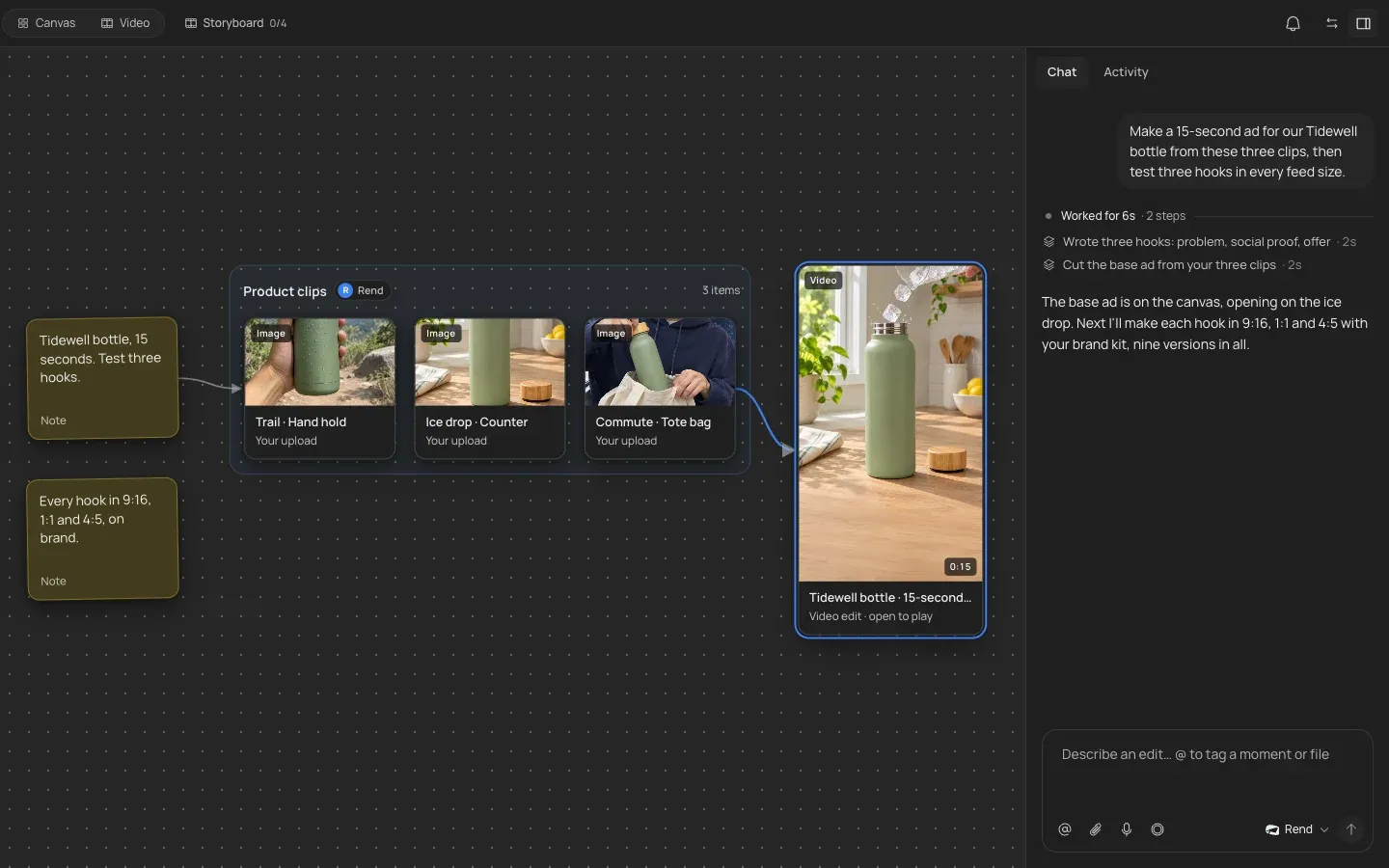
Three phone clips and a two-line brief are enough for the base ad; the hooks and sizes come from it.
Rend also has Rend Boost, in early access, which puts your ad live on Facebook, Instagram and Threads from Rend's own ad accounts, and you pay for clicks. Editing is free and you pay only when Rend renders or generates; see pricing for current plans. For more on turning one ad into many, read mass ad creation and UGC ads without creators.
Where Rend is weaker: if you have no footage at all and you only want an AI actor holding your product and reading a hook, a dedicated UGC generator will get you there faster. Rend's strength is editing and scaling real material and running it, not generating a synthetic spokesperson from nothing.
Creatify
Creatify is built for one job and does it well: paste a product URL and get UGC-style video ads with AI actors, often in batches. If you are a DTC store with good product photos but no video and no time, this is one of the quickest paths to many ad concepts. See our honest take in Creatify alternatives.
Where it is stronger than Rend: link-to-UGC speed from a cold start with zero footage. Where it is weaker: it is a generator more than an editor, so fine control over a timeline and editing your own real clips are limited.
Arcads
Arcads focuses on realistic AI actors reading your script, with a large roster of faces. For performance marketers who live on UGC hook testing, generating twenty actor reads of one script is its core strength. See Arcads alternatives for a side by side.
Where it is stronger than Rend: depth and realism of the AI actor library for script-driven UGC. Where it is weaker: it is not a general editor, so blending AI actor clips with your own product footage and broader formats is not its focus.
HeyGen
HeyGen is the go-to for avatar and talking-head video. It has strong avatars, voice cloning and translation, which makes it good for a spokesperson explaining a product or for localising one ad into many languages. It is less of a native UGC-ad tool and more of an avatar studio.
Where it is stronger: avatar quality and multi-language versions of a spokesperson video. Where it is weaker for ecommerce ads: it leans to presenter-style video rather than scrappy UGC that often wins on TikTok and Reels.
Synthesia
Synthesia is an avatar video platform aimed mostly at corporate training, onboarding and explainer content. The avatars and voiceovers are polished and it scales well across an organisation. For scroll-stopping product ads it is usually the wrong shape, since the output reads as formal and studio-like rather than native-feeling social content.
Where it is stronger: enterprise explainer and training video at scale with consistent avatars. Where it is weaker: it is not built for paid social ad testing.
Higgsfield
Higgsfield sits in generative video, good for cinematic shots, motion and b-roll created from a prompt or an image. For a brand that wants striking generated visuals or dreamlike scenes, it can produce footage you could not film. It is not a UGC-actor tool and it does not assemble a finished, captioned, multi-ratio ad for you on its own.
Where it is stronger: generating original cinematic visuals and motion. Where it is weaker: you still need an editor to turn those clips into a complete ad with hook, captions and sizes.
CapCut
CapCut is a capable editor with a huge template library, strong captions and a free tier, which is why so many TikTok creators use it. It is manual, so you edit each ad yourself, and it has editing-assist features rather than a true AI agent or AI actors. For a tight budget and a willingness to do the work by hand, it is hard to beat on price.
Where it is stronger: free and low-cost manual editing with templates and polished captions. Where it is weaker for a catalogue: there is no agent making twenty variations for you, so volume is down to your own hours. Note that terms of use and commercial rights have shifted over time, so check the current license before running ads.
A short workflow: 20 ad variations from one product
Here is a practical way to get from one product to twenty testable ads.
- Pick your winner or your best raw clip. Start with one ad that already performs, or the single best piece of footage you have of the product in use.
- Load your brand kit. Logo, colours and fonts in one place so every version stays consistent.
- Write three hook angles. For example, a problem hook, a social-proof hook and a price or offer hook. These drive the biggest performance differences.
- Generate variations per hook. For each of the three hooks, make versions at 9:16, 1:1 and 4:5. That is already nine. Add a couple of alternate opening lines or captions and you are past twenty.
- Add captions and check the mute test. Watch each with the sound off. If the message is not clear in the first two seconds, fix the opening frame.
- Export per platform. 9:16 for TikTok and Reels, 4:5 or 1:1 for the Meta feed, 16:9 for YouTube.
- Launch and read the data. Put them live, let spend decide, keep the two or three that beat your baseline and cut the rest.
In Rend this collapses into one request to the agent off a single source video, which is the point of mass ad creation. In a manual tool like CapCut, the same twenty variations are twenty rounds of hands-on editing.
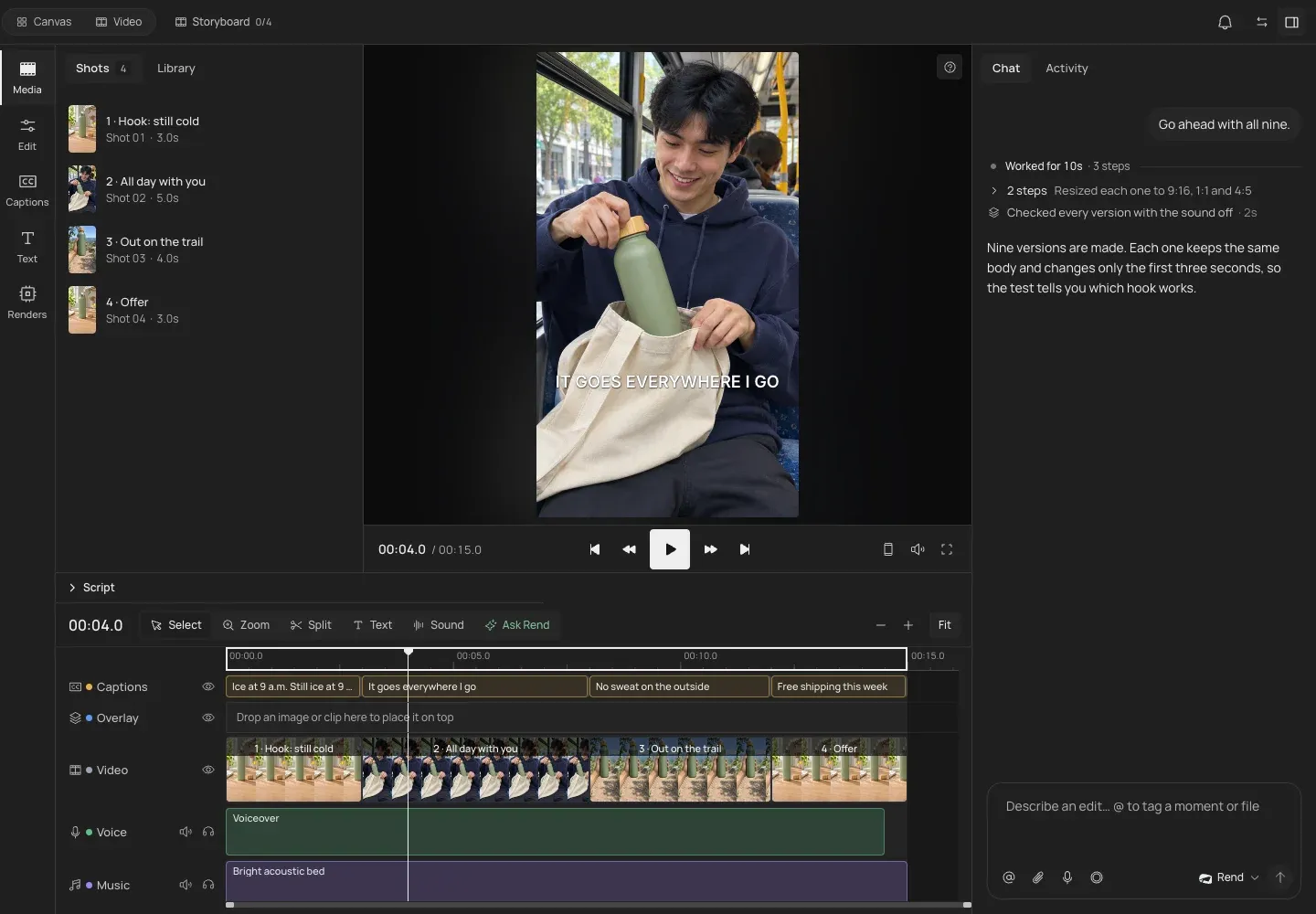
One request turned the base ad into nine versions that change only the opening, so the test measures the hook.
FAQ
What is the best AI video ad generator for ecommerce in 2026? There is no single best for everyone. If you have real footage and want to scale and run ads, Rend fits. If you have only a product link and want AI UGC fast, Creatify fits. If you want high-volume AI actor reads of a script, Arcads fits. Match the tool to your input and your goal.
Can I make video ads from just a product URL, with no footage? Yes. Creatify is built around exactly that. Rend can also start from a product URL or a request to its agent, and it adds value when you have some real footage to mix in.
Which tool is best for AI UGC ads with realistic actors? Arcads and Creatify specialise in AI actor UGC. If that look is the whole point of your campaign, start there rather than with a general editor.
How many ad variations do I actually need? Most DTC brands test in batches of ten to twenty per round, varying the hook first, then format and aspect ratio. The hook drives the largest swings, so change that before anything else.
Can any of these run the ads for me, not just make them? Rend Boost, in early access, puts your ad live on Facebook, Instagram and Threads from Rend's own ad accounts, and you pay for clicks. Most other tools on this list produce the file and you upload it to your own ad manager.
What will a finished ad really cost? Do the math at your volume. Subscription tools can look cheap monthly but gate exports or credits. Credit-based tools like Rend charge when you render or generate, and editing itself is free, so cost scales with how much you actually export. Confirm current pricing on each vendor's site, since plans change often.
Is a free tool like CapCut good enough? For a small budget and manual editing, yes. The trade-off is your time, since there is no agent making the variations for you. If your bottleneck is hours rather than dollars, a tool that batches variations will usually pay for itself.
Bottom line
Choose by input and intent, not by hype. Have footage and want to scale and run ads: look at Rend. Have only a product link and want UGC fast: Creatify. Want many AI-actor script reads: Arcads. Need a spokesperson or many languages: HeyGen. Enterprise explainers: Synthesia. Generated cinematic visuals: Higgsfield. Low budget and happy to edit by hand: CapCut. Pick one this week, make twenty variations from one product, and let the ad data decide the rest.
Comparison reflects publicly known positioning as of early 2026. Verify current pricing and features on each vendor's site before purchasing.