Best AI Ad Generator for Facebook Ads in 2026: Static, Video, UGC
The best AI ad generator for Facebook ads is the one that makes the format you actually run on Meta, and beats what Ads Manager already generates for free. For static image ads in bulk, AdCreative.ai is the most established option. For avatar-led video ads from a product link, Creatify is the cheapest serious entry point. For AI actors reading UGC-style scripts, Arcads is the specialist. If you want one tool that turns a single video and brand into new hooks, sizes, image ads and search ads, all editable, that is what Rend is built for.
We build Rend, so weigh our view accordingly. Every competitor price here was checked on November 18, 2026.
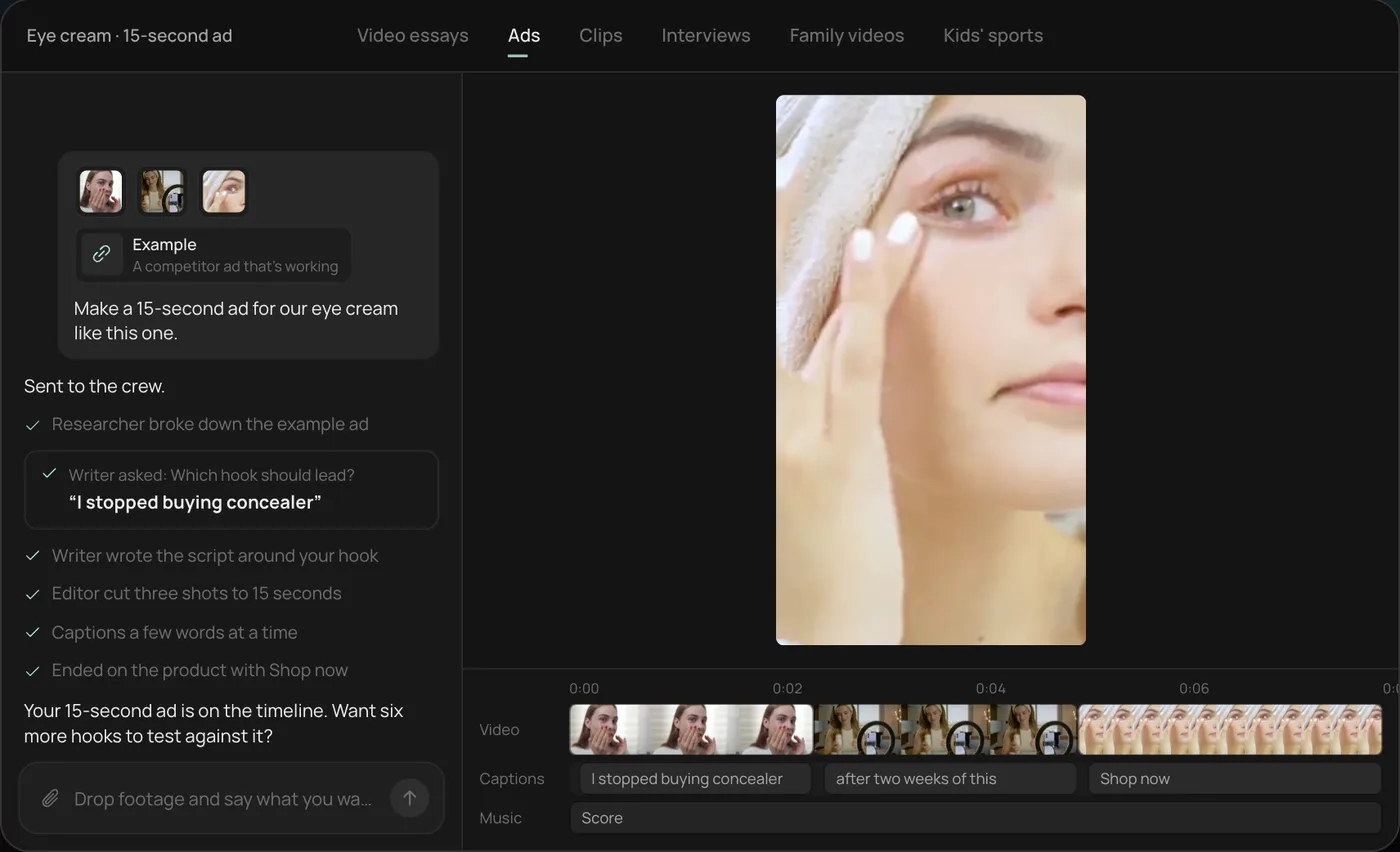
What an ad generator should hand you
An ad that wins on Monday is tired by the following Friday. So the useful question is how many credible variations a tool gives you per hour of your time, and whether you can fix the one line that is wrong without regenerating the whole ad.
Three things separate the tools:
- Format. Static images, avatar video, UGC-style actor video, or edits of your own footage.
- Variation. One ad per prompt, or a matrix of hooks, sizes and angles from one source.
- Editability. A flat export, or a project where a word, a caption or a shot can change.
The picks at a glance
| Tool | Main format | Variation model | Editable after? | Entry price (Nov 18, 2026) |
|---|---|---|---|---|
| AdCreative.ai | Static image ads | Many designs per brief, scored | Inside its editor | Paid plans charge per downloaded ad; see its site for current prices |
| Creatify | Avatar and product-link video ads | Batches of scripts and avatars | Light edits in-app | Standard $15/mo monthly, 55 credits that expire after two months |
| Arcads | AI actor UGC-style video | Many actors reading your script | Regenerate to change | Credit plans from 8,000 credits a month; no public price page |
| Rend | Video, image and search ads from your footage and brand | New hooks, sizes, image ads and search ads from one video | Yes, full timeline | Editing free; pay when it renders or generates (pricing) |
AdCreative.ai
AdCreative.ai generates static ad designs from your brand and copy, and its plans charge per downloaded ad. Check its site for current plan prices; there are much bigger tiers for agencies.
Where it wins: if your account lives on static Meta and display ads, it produces a lot of on-brand layouts quickly, and the scoring helps a junior team triage.
Where it falls short: it is image-first. Video ads, and ads built from your own footage, are not its strength. Twenty downloads also go quickly once you start testing sizes.
Creatify
Creatify takes a product URL and turns it into short video ads with AI avatars, voiceover and stock or generated shots. Standard lists $15 a month on monthly billing for 55 credits, about 30% less billed yearly, and Creatify says those credits expire after two months.
Where it wins: price of entry and speed. For a Shopify store that has never run video, getting a first batch of avatar ads in an afternoon is real progress.
Where it falls short: avatar ads have a look, and audiences learn it. Editing beyond swapping scripts and scenes is limited. We compare it head to head in Creatify vs. Arcads vs. Rend.
Arcads
Arcads specializes in AI actors who read your script like a creator filming on a phone. It has no public pricing page; its help center lists credit plans from Starter at 8,000 credits a month up to Business at 192,000, and its talking-actor video spends credits by the minute.
Where it wins: the actor library and the delivery. For hook testing (the same script, 20 faces, 20 first lines) it is very good at its one job.
Where it falls short: price transparency, and anything beyond a person talking. If you want to change a single word, you are regenerating the clip. For more on this format, see UGC ads without creators.
Rend
Rend starts from what you already have: a video that worked, your product page, your brand. Its ad crew spins new hooks, cuts for every size, makes image ads and writes search ads, using rend-1, Rend's own writing model for hooks and ad copy, with live search. It can research what competitors are running in Meta ads and what people say on X before it writes.
Everything comes back on a timeline. Captions are word-timed and editable, sound sits on separate tracks, and your brand kit (fonts, voice, music bed, caption style) carries into every variant. Share a review link and your team or client can draw on the frame; the agent reads every note and makes the fix.
You download the set for your own ad accounts, or hand it to Rend Boost, where Rend runs the ads live on major networks and you pay per click (early access).
Where it falls short: if you have no footage, no product and want a stranger's face reading a script today, an actor tool like Arcads gets you there with fewer steps. And for pure static layouts at volume, AdCreative.ai has a longer track record.
What Meta already generates for free
None of the roundups ranking for this mention the baseline: Meta's own ad tools already generate creative inside Ads Manager, with no separate fee. Meta's developer documentation lists three generative features. Text generation writes variations of your primary text, inspired by that text, your previous ads or your Page. Image expansion stretches an image to fit more placements. Background generation makes new backgrounds for eligible product images, currently in catalog ads on mobile feed.
These sit inside Advantage+ creative, Meta's set of automatic edits. Meta's help page says enhancements depend on format and placement, that some may be on by default, and that you can turn any of them off.
So a paid ad generator has to beat that baseline to earn its fee. A quick way to check:
| Job | Meta's built-in tools | Where a paid tool earns its place |
|---|---|---|
| Rewording your primary text | Covered | Hooks written from research, in your brand voice |
| Fitting one image to Stories and Reels | Covered by image expansion | New layouts made for 9:16, not stretched |
| New product backgrounds | Covered for eligible catalog ads | Full scenes and ad layouts for non-catalog ads |
| New video hooks, cuts and sizes from your footage | Not among the three | The main reason to pay |
| UGC-style or avatar video | Not among the three | Actor and avatar tools |
Before you buy anything, run one ad set with Meta's enhancements on and one with them off, same budget, for a week. If the free version wins, spend your tool budget on new video made from your own footage. Check each automatic edit in preview before it runs, since Meta can change wording or crop the frame. Our Facebook video ad maker guide covers the settings in more detail.
A variant matrix you can copy
Here is the grid we give Rend (or any tool) when one video is working. Twelve ads, one afternoon:
| Hook A: the problem | Hook B: the result | Hook C: the objection | |
|---|---|---|---|
| 9:16 Reels/TikTok, 15 s | 1 | 2 | 3 |
| 4:5 Feed, 15 s | 4 | 5 | 6 |
| 1:1 Feed, 30 s | 7 | 8 | 9 |
| Static image ad | 10 | 11 | 12 |
Keep the body of the ad identical so the test is about the hook. Swap only one row variable per round. Our video ad hooks post has first lines to fill column headers, and the video ad size checker shows the safe zones for each row. For the full 100-variant version, read how to make 100 ad variations from one video.
Pick X if...
- Pick AdCreative.ai if static image ads are most of your spend.
- Pick Creatify if you sell online, have no video yet, and want cheap avatar ads from a product link.
- Pick Arcads if your whole strategy is AI actors reading many hooks.
- Pick Rend if you have one ad or video that works and want editable hooks, sizes, image ads and search ads from it, with an option to have them run for you.
How to make a video ad in Rend, step by step
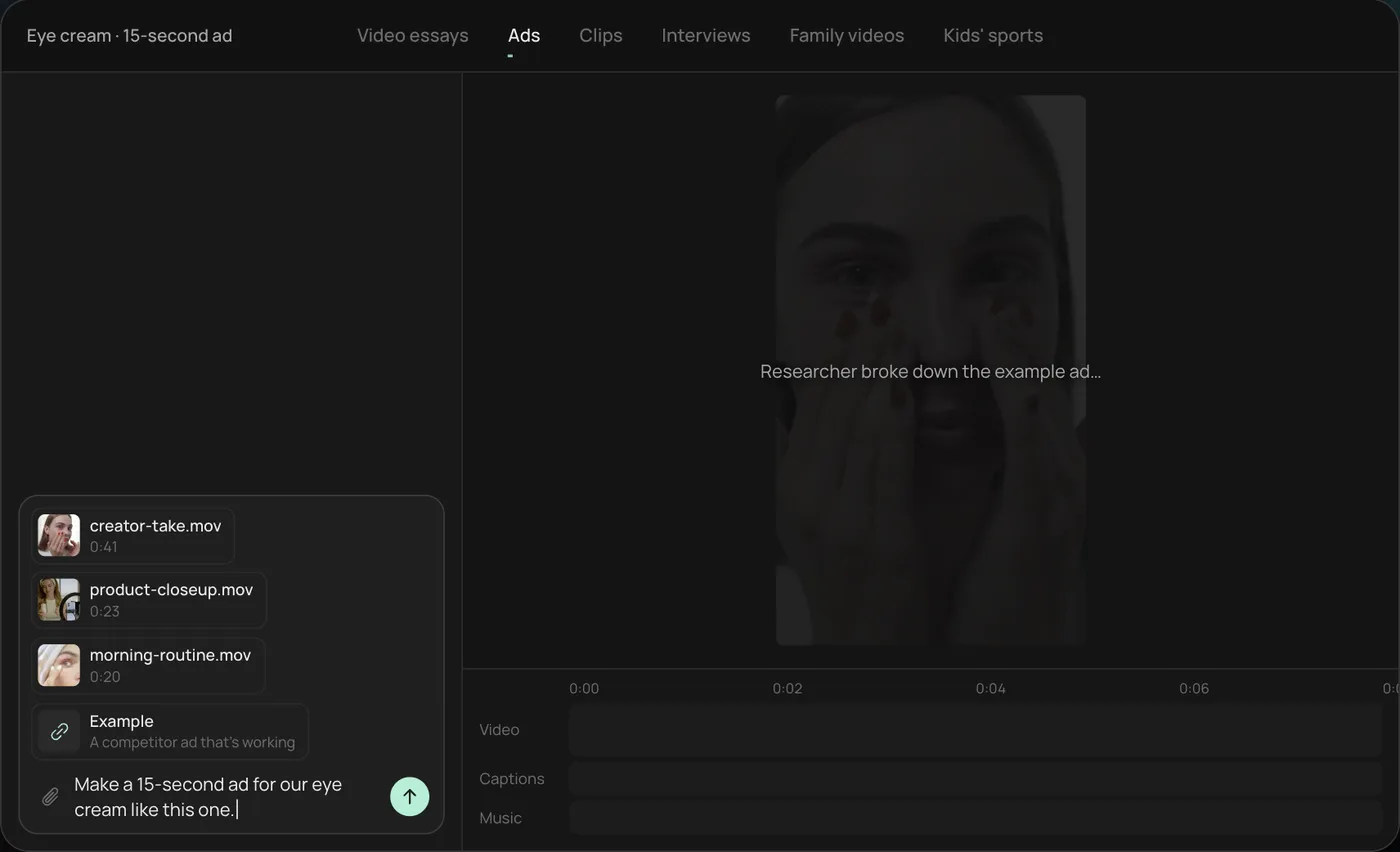
These screenshots are from Rend's demo of a 15-second eye cream ad; your own project works the same way.
1. Drop your clips and an example. Add your phone clips (here a creator take, a product close-up and a morning routine) plus a competitor ad you like, then type what you want: "Make a 15-second ad for our eye cream like this one."
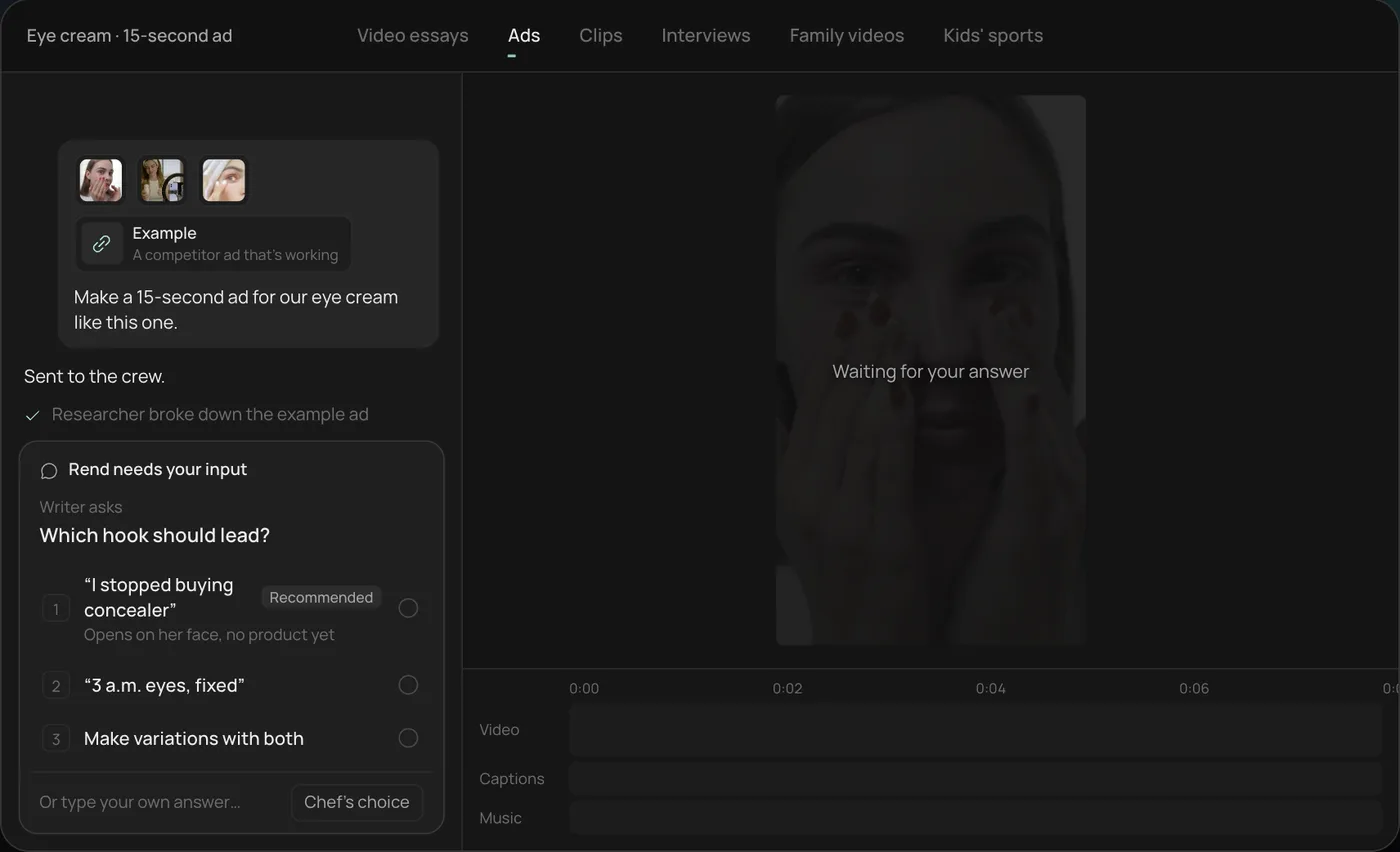
2. Answer the one question. Rend asks which hook should lead and marks a recommended answer. You can also ask it to make variations with both.
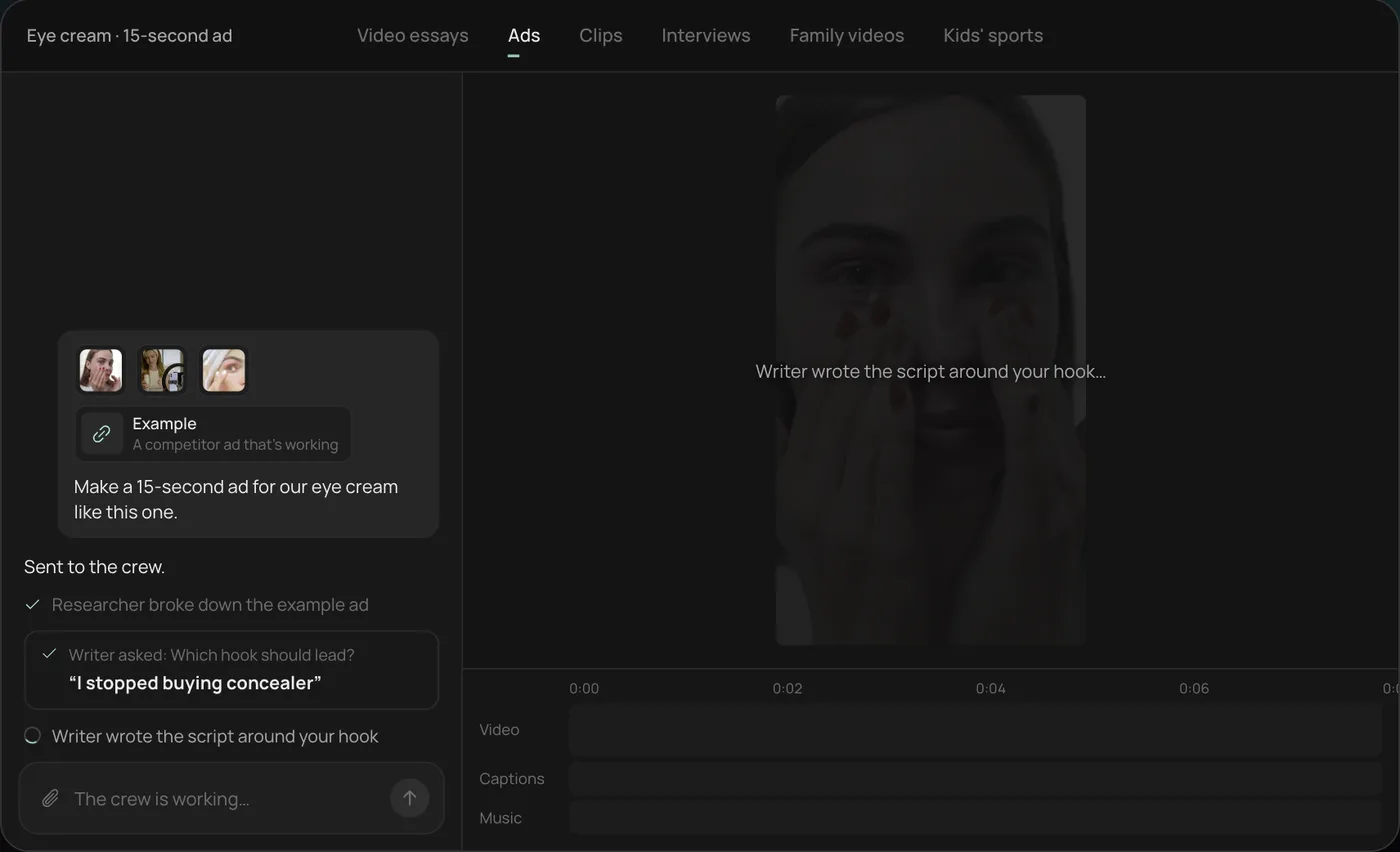
3. Let the crew work. The researcher breaks down the example ad and the writer builds the script around your hook, checking off each step in chat.
4. Open the finished ad. A 15-second vertical ad lands on a real timeline with captions and music on their own tracks, and Rend offers six more hooks to test.
From there you can open the timeline and change anything by hand, share a review link, or export. Start a free Rend project to try it on your own footage.
FAQ
Which AI ad generator is best for Facebook and Instagram?
It depends on format. For static ads, AdCreative.ai. For avatar video, Creatify or Arcads. For variations of your own winning video across every Meta size, Rend. Test any of them against Meta's free Advantage+ creative first.
Does Facebook have its own AI ad generator?
Yes. Ads Manager can write text variations, expand images to fit more placements and generate backgrounds for eligible catalog product images, as part of Advantage+ creative. For new video hooks and cuts made from your own footage, you still need a separate tool.
Are AI-generated ads allowed on Meta?
Yes. Meta may label ads made or edited with AI, and realistic synthetic people in political or social issue ads need disclosure. Check Meta's current ad policies for your category.
How many ad variations should I test?
Enough that each hook gets meaningful spend. Many teams test three to five hooks per round with the body held constant, then iterate on the winner. Testing 50 at once on a small budget spreads spend too thin to learn anything.
Can I edit an AI-generated ad after it's made?
In some tools, only by regenerating. In Rend, every ad is a timeline, so you can change a word, a caption or a shot directly.
Do AI ad generators work for local businesses?
Yes, if the tool uses your real footage and location. See video ads for local businesses for formats that work.
If you have one ad that works and want a dozen more from it, make a free Rend account and send it in.