Facebook Video Ad Maker for Small Business: Sizes and Rules
For a small business, a Facebook video ad maker is any tool that turns the footage, photos or product page you already have into video ads sized for Meta's placements, without hiring an editor for every round. Meta's own Ads Manager can do a basic version for free (it can turn product images into a short multi-clip video with text and music). Template editors like Canva give you more design control. AI video agents like Rend take your existing footage and produce a set of editable variations with different hooks and sizes. Whatever you use, make two masters, 9:16 for Reels and Stories and 4:5 for Feed, and test three to five hooks at a time.
We build Rend, so weigh our view accordingly. Meta specs and competitor prices below were checked on November 19, 2026.
How to make a Facebook video ad in Rend, step by step
These screenshots come from Rend's demo of a 15-second eye cream ad; your own Facebook ad works the same way.
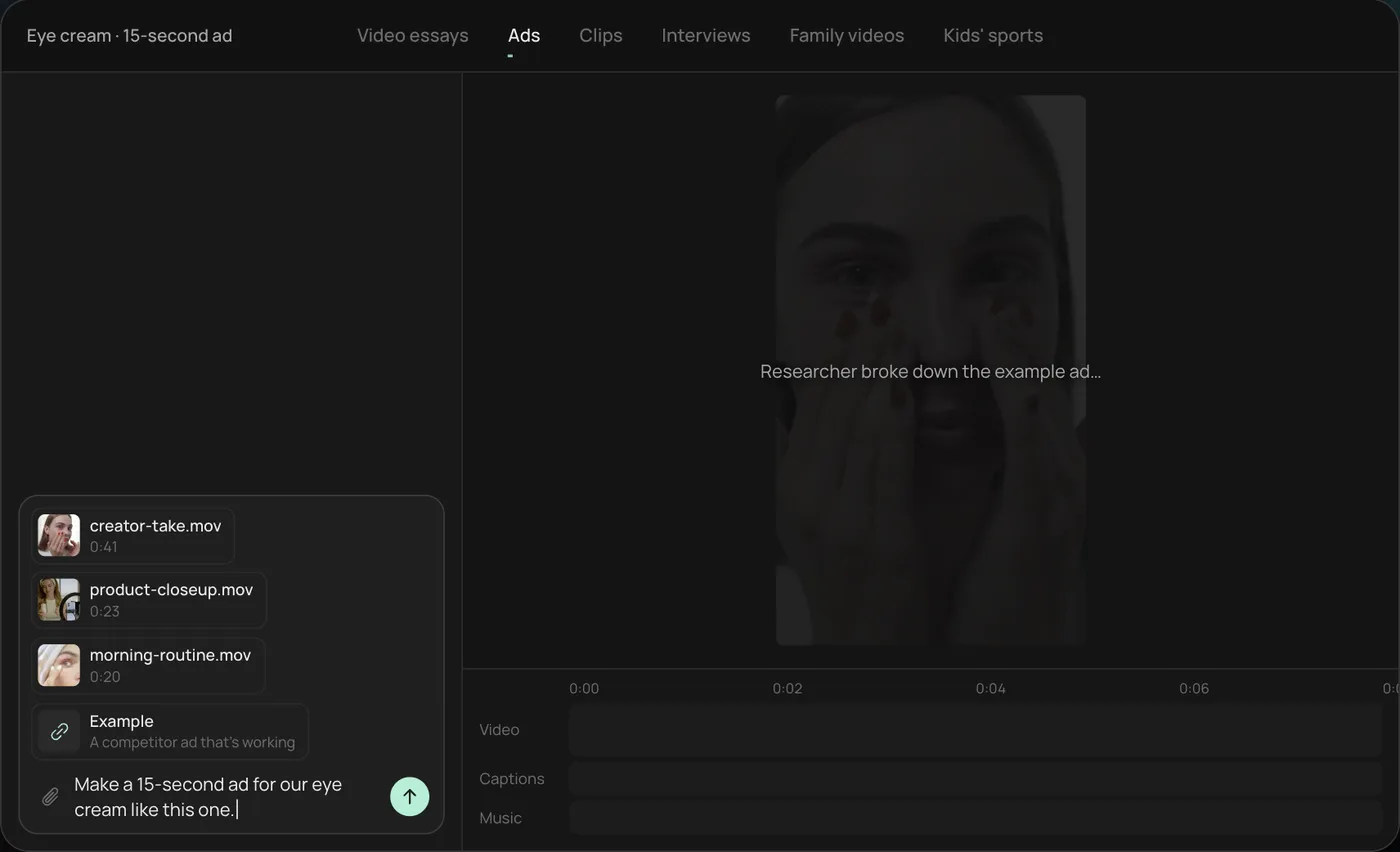
1. Drop your clips and an example. Add your phone clips (here a creator take, a product close-up and a morning routine) plus a competitor ad you like, then type what you want: "Make a 15-second ad for our eye cream like this one."
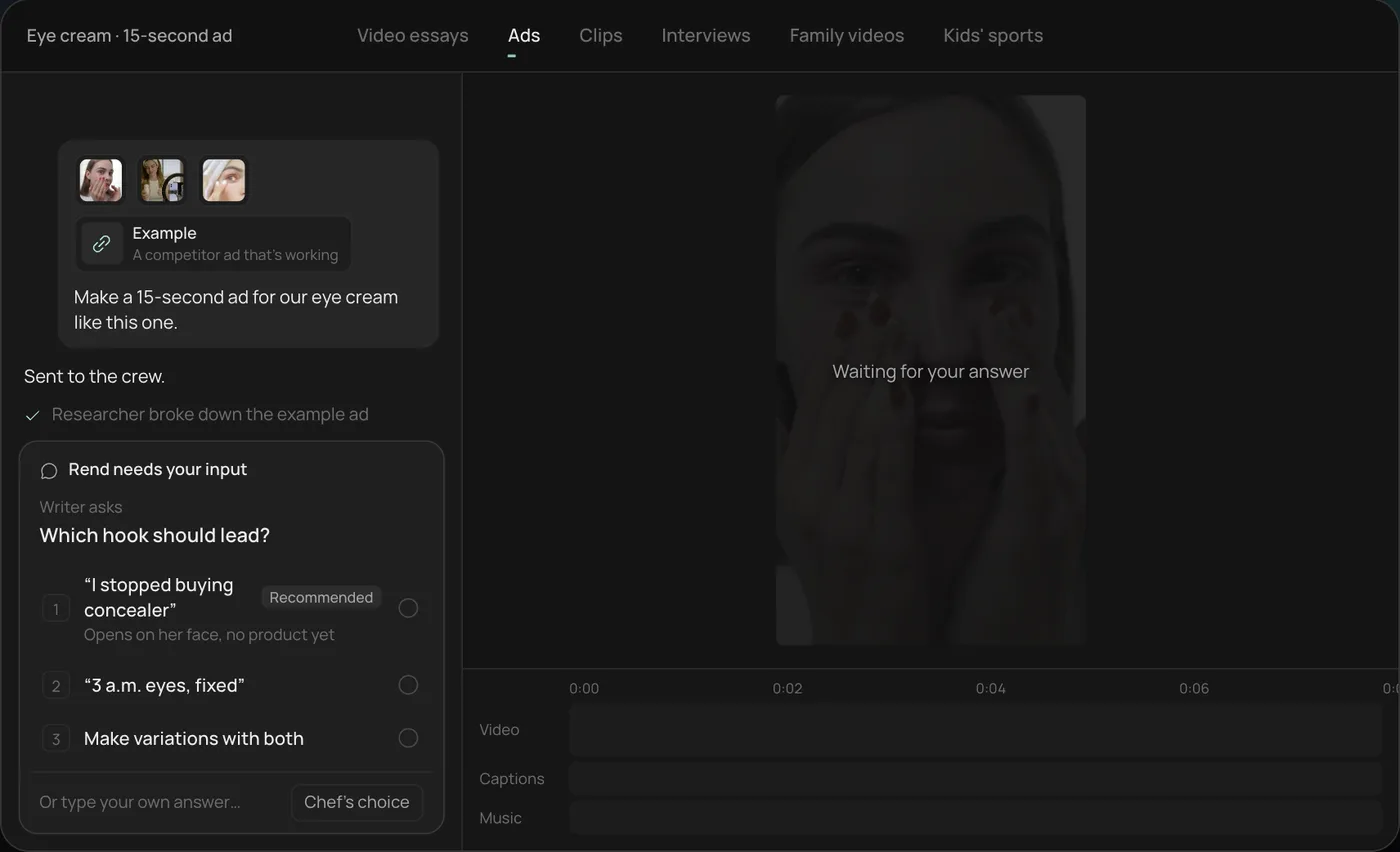
2. Answer the one question. Rend asks which hook should lead and marks a recommended answer. You can also ask it to make variations with both.
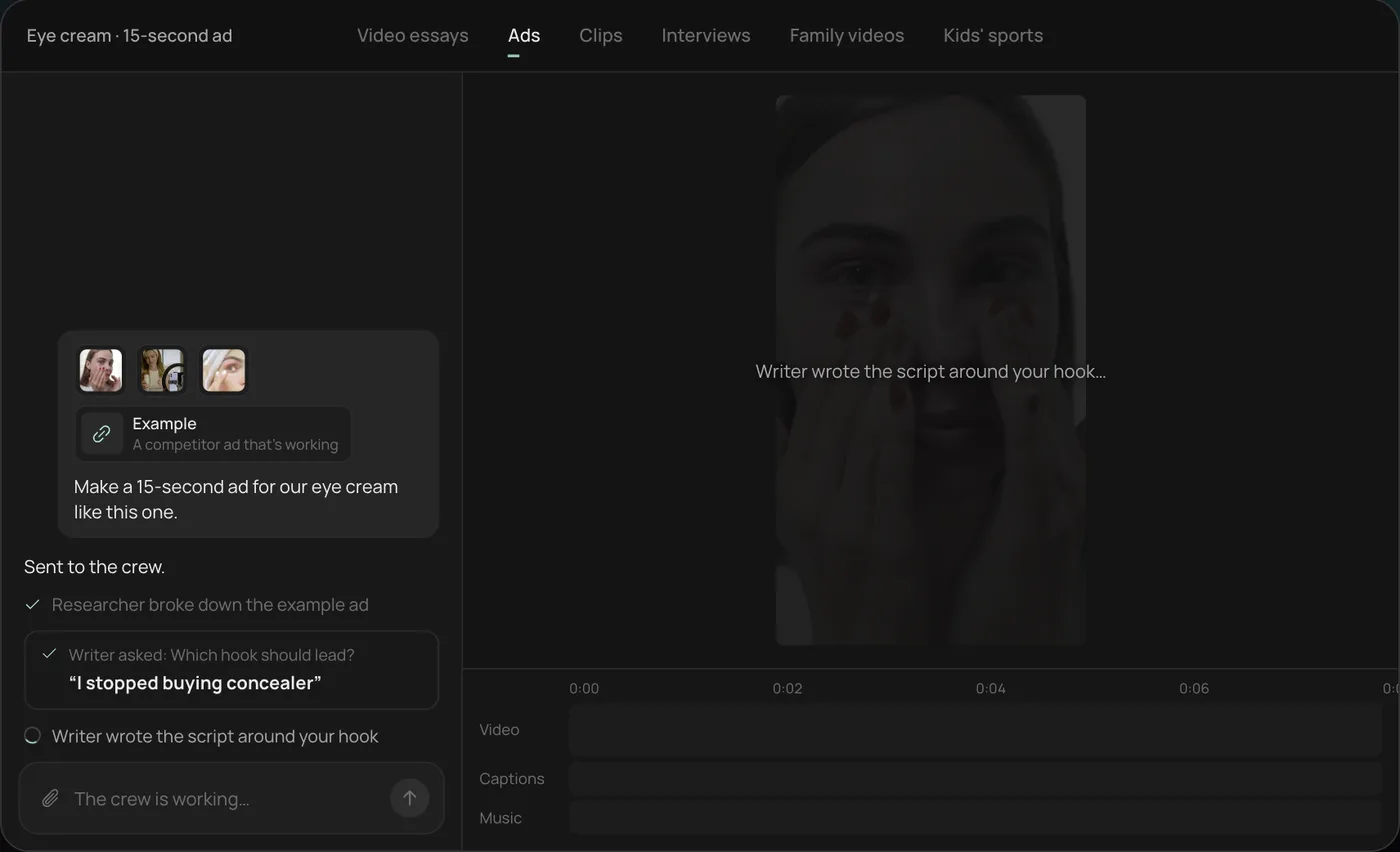
3. Let the crew work. The researcher breaks down the example ad and the writer builds the script around your hook, checking off each step in chat.
4. Open the finished ad. A 15-second vertical ad lands on a real timeline with captions and music on their own tracks, and Rend offers six more hooks to test.
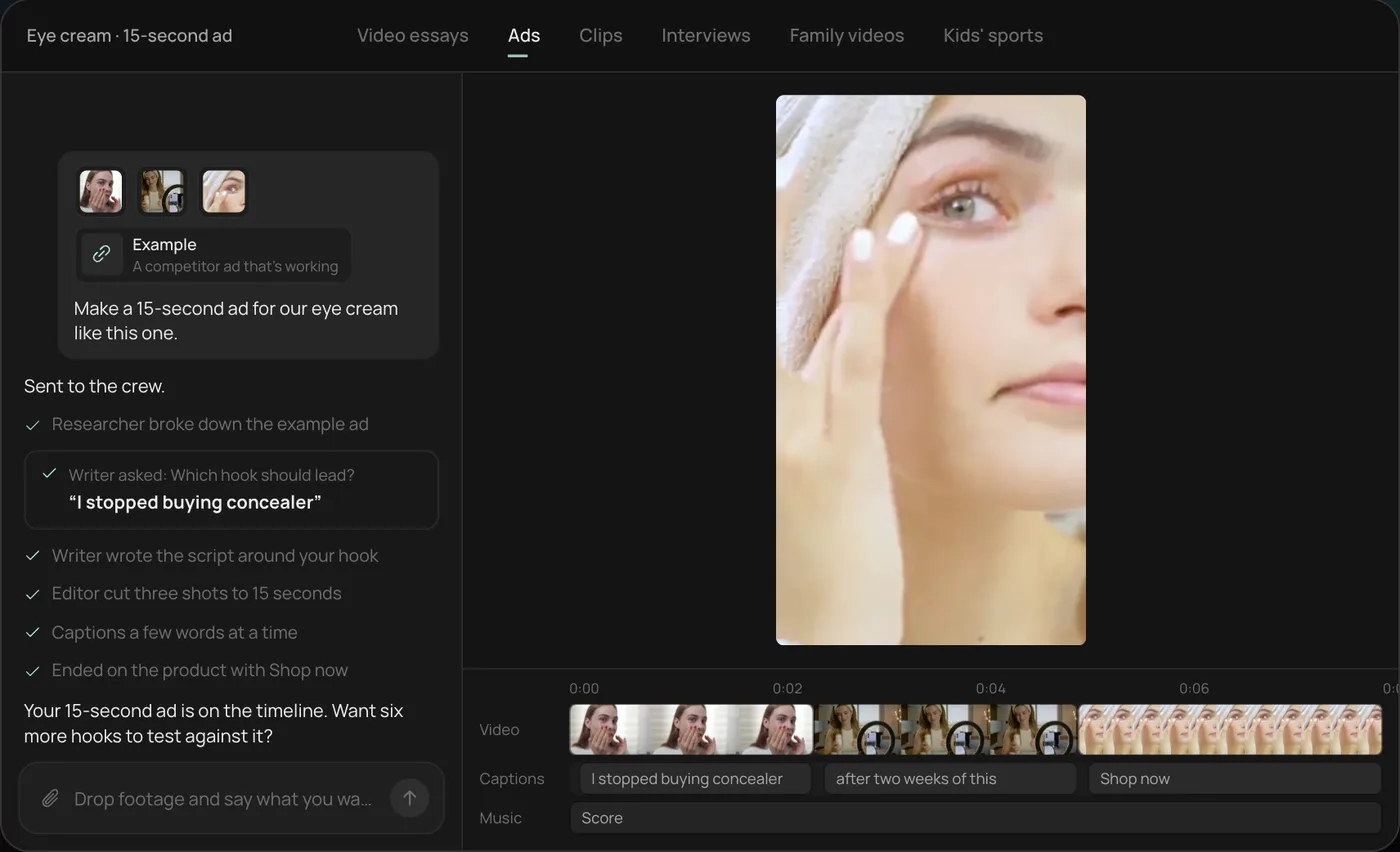
From there you can open the timeline and change anything by hand, share a review link, or export a 4:5 Feed version alongside the vertical one. Start a free Rend project to try it on your own footage.
Meta placements and sizes
Meta video ads can run in a dozen places, but three shapes cover nearly all of them. The table below follows Meta's Ads Guide and its help page on aspect ratios by placement (cross-checked with a third-party summary dated October 25, 2026, because Meta's pages occasionally disagree with each other).
| Placement | Shape to upload | Recommended size | Length allowed | Keep clear |
|---|---|---|---|---|
| Facebook Feed | 4:5 | 1440 x 1800 | 1 s to 241 min | Desktop shows it closer to square, so keep the message central |
| Instagram Feed | 9:16 or 4:5 | 1080 x 1920 (Ads Guide) | Up to 60 min | Bottom and side edges; 9:16 follows the Reels safe zone |
| Facebook and Instagram Stories | 9:16 | 1440 x 2560 | Facebook: Ads Guide says up to 3 min, Help Center says 120 s | Top 14%, bottom 35%, 6% each side |
| Instagram Reels | 9:16 | 1440 x 2560 | Up to 15 min | Top 14%, bottom 35%, 6% each side |
| Facebook Reels | 9:16 | 1440 x 2560 | No stated max | Top 14%, bottom 35%, 6% each side |
| Marketplace, Search | 1:1 | 1080 x 1080 or larger | 1 s to 241 min | Not specified |
Meta allows files up to 4 GB and recommends MP4 or MOV with H.264 video and stereo AAC audio. Its Reels ad specs also say Reels ads should not contain licensed music, so use original audio or tracks from Meta's Sound Collection.
The allowed lengths are ceilings, not targets. For prospecting, we cut 15 second and 30 second versions of every ad and rarely go past 45.
The practical setup: make a 9:16 master with all text inside the safe zone, then make a 4:5 version by reframing, not by letterboxing. Upload both to the same ad and use placement asset customization so Feed gets 4:5 and Reels and Stories get 9:16. The video ad size checker shows each safe zone on your own frame, and our video ad sizes guide covers every network.
What Advantage+ creative will change
Advantage+ creative is Meta's set of automatic edits to your ad. Meta's help page says enhancements depend on format and placement, that some may be on by default, and that you can turn any of them off. Third-party trackers counted about 30 enhancements on Meta's list this fall, roughly half tagged as AI.
The ones that touch video ads:
| Enhancement | What it does | Our default |
|---|---|---|
| Video touch-ups | Crops or expands your video to 9:16 or 4:5 with generated pixels | Off if you supplied both sizes |
| Add video effects | Raises contrast and color | Off for skin, food and fashion; colors shift |
| Video subtitles | Generates subtitles from English voiceover | Off if your captions are burned in (you'd get two sets) |
| Text generation | Writes up to five variations of primary text and headline | On for testing, read them before launch |
| Text improvements | Moves phrases from your copy into overlays and headlines | Off; it can cover the product |
| Translations | Translates text, voice and overlays | Only for markets you can check |
| Show summaries | Writes a summary of selling points under the ad | Check it; Meta lists it among those that may start on |
Meta also has a video generation feature in Advantage+ creative that turns several product images into a multi-clip video with text overlays and music. It's free and fine for a catalog of products with no footage. It's also a slideshow, and it looks like one.
Our rule: switch off anything that changes your picture until you've seen the preview in every placement, and recheck after duplicating an ad, because settings copy along with it.
Picking a Facebook video ad maker for a small business
Four realistic routes, depending on what you start with.
| Tool | Starts from | Good at | Weak at | Price (checked Nov 19, 2026) |
|---|---|---|---|---|
| Meta Ads Manager | Product images, existing video | Free, built in, auto-sizing | Generic look, little control | Free (you pay for ad spend) |
| Canva | Templates, your clips | Branded layouts, fast text animation | Editing talking footage, captions timed to speech | Pro $18/mo monthly or $144/yr in the US |
| Creatify | A product URL | Avatar ads from a link, quickly | Avatars read as avatars; limited deep edits | Standard $15/mo monthly for 55 credits |
| Rend | Your footage, a product page, a past winning ad | Hooks, sizes and variations from one source, all editable | Needs some material from you; not a template library | Editing free, pay when it renders (pricing) |
Canva is the better pick if your ads are mostly motion graphics over product photos and you want to drag things around yourself. Creatify is quicker if you have no footage at all and are fine with an avatar presenter; we compare it in detail in Creatify vs. Arcads vs. Rend. Meta's built-in tools are worth using for catalog breadth even if you make your hero ads elsewhere.
Rend fits when you already have something: phone clips, a creator video, an ad that worked last quarter. You send it, and its ad crew writes new hooks (using rend-1, Rend's own model for hooks and ad copy), cuts the body on exact transcript words, sizes it for Feed and Reels, and can research what competitors run in Meta ads before writing. Everything lands on a timeline with word-timed captions and sound on separate tracks, and a brand kit keeps fonts, caption style and music bed the same across every variant. You download the set for your ad account, or hand it to Rend Boost, where Rend runs the ads on major networks and you pay per click (early access).
How many variations to test
Fewer than you think per round, more than you think per month.
Meta's built-in creative test, per its help center as summarized by several ad agencies this fall, runs 2 to 7 test ads inside a live campaign and suggests giving the test no more than 20% of the budget. Its A/B test tool runs 1 to 30 days and recommends 7. Both point the same way: a handful of variants per round, each with enough spend to mean something.
What we run on a modest account ($50 to $150 a day):
- Round 1, hooks: one body, three to five different first three seconds. Seven days.
- Round 2, the winning hook with two or three different bodies (demo, testimonial, problem then fix).
- Round 3, the winner in two lengths (15 s and 30 s) and with two CTAs.
- Then refresh: three new hooks on the winning body every two to three weeks, before frequency climbs and click-through falls.
That's 12 to 15 ads a month, which is a lot to edit by hand and is where an ad maker earns its keep. Our guide to ad creative testing has the sample size math, and video ad hooks has first lines to start from.
A 15-second Facebook ad structure that works
| Time | What's on screen | Why |
|---|---|---|
| 0 to 3 s | The hook: the result, the problem, or a line to camera | Most people decide here |
| 3 to 9 s | The product doing the thing, close up | Proof, not adjectives |
| 9 to 13 s | One reason to believe: a number, a review, a before and after | Handles the main doubt |
| 13 to 15 s | Product and offer, CTA in the copy and the button | Don't make the CTA the only reason to watch to the end |
Captions on, in large type, inside the safe zone. Logo small or not at all for the first three seconds; a big logo up front reads as an ad and gets scrolled.
Why small business video ads get rejected or restricted
The ad maker pages show you templates. None of them warn you that a perfectly good video can be rejected, or quietly restricted, because of one line of copy or the kind of business you run. Three rules catch local businesses most.
Don't say what you think the viewer is. Meta's personal attributes policy bars ads that assert or imply a viewer's personal attributes, health or finances. The classic hook fails it: "Do you have diabetes?" and "Are you bankrupt?" are Meta's own examples of disallowed text, while "Depression counseling" is allowed. Spoken lines and on-screen text count too, so rewrite the hook about the problem, not the person: "Back pain that won't quit after a long shift" instead of "Is your back killing you?"
Before and after has limits. Meta's health and wellness policy prohibits side-by-side before and after comparisons for weight loss and wrinkle treatments, requires weight loss and cosmetic procedure ads to target people 18 and older, and bans messaging that makes people feel bad about how they look. Gyms, med spas and clinics should cut the transformation reveal and show the class, the room or the process instead. General cosmetic before and afters are allowed.
Some businesses get fewer targeting options. Ads for housing, employment and financial products and services have to be declared as a special ad category when they reach the US, Canada or Europe. Realtors, property managers, mortgage brokers, lenders and anyone posting a job opening are in. Those campaigns can't target by gender, ZIP code or lookalikes, ages are fixed at 18 to 65+, and in the US a location radius has to be at least 15 miles. So the video has to do the targeting: name the neighborhood, show the street, describe the job and the shift so the right people self-select.
Before you upload, read every hook variation with these three in mind. An ad maker that writes ten hooks can write ten rejections just as fast. Our ad video review guide has a fuller pre-launch checklist.
FAQ
What's the best size for a Facebook video ad?
Make a 9:16 vertical version at 1440 by 2560 for Reels and Stories and a 4:5 version at 1440 by 1800 for Feed. Those two cover most of Meta's placements; add 1:1 if you run Marketplace or Search.
How long should a Facebook video ad be?
Meta allows up to 241 minutes in Feed, but most performing ads run 15 to 30 seconds. Test a 15 and a 30 of your winner.
Is Meta's own video ad maker good enough?
For catalog products with only photos, it's a fine free start. For a hero ad you'll spend real money behind, you want control over the hook, the captions and the cut, which means a separate editor.
Should I turn on Advantage+ creative?
Turn on text variations if you'll read them. Be cautious with enhancements that change the picture (touch-ups, video effects, text overlays) and check previews in every placement first.
How many Facebook video ads should I run at once?
Three to five variations in a test round is a good default for small and mid budgets. Running 20 at once on $50 a day spreads spend too thin to learn anything.
Can I use AI-made video in Facebook ads?
Yes. Meta may label ads made or edited with AI, and some categories (like political or social issue ads with realistic synthetic people) need disclosure. Check Meta's current policies for your category.
If you have one Facebook ad that works, make a free Rend account and ask for three new hooks in both sizes. You can check every one before you pay to render.