How Do You Make a Product Video With Your Phone? Shot List
To make a product video with your phone, set the product near a large window with the light coming from the side, put a plain background behind it, lock focus and exposure, and shoot eight short clips: a hero shot, a slow push-in, a macro of the texture, the product in a hand, the product in use, the packaging, a scale shot and a "result" shot. Hold each one for 5 to 8 seconds without moving, or move once, slowly, on a tripod or a flat surface. Then cut the best 15 seconds into an ad with the hook up front. A recent phone is good enough. Light and steadiness decide whether it looks professional.
Below is the setup, the shot list, the settings, the stabilization tricks that cost nothing, and the edit, with the mistakes we see most when people send us product footage.
How to make a product video ad in Rend, step by step
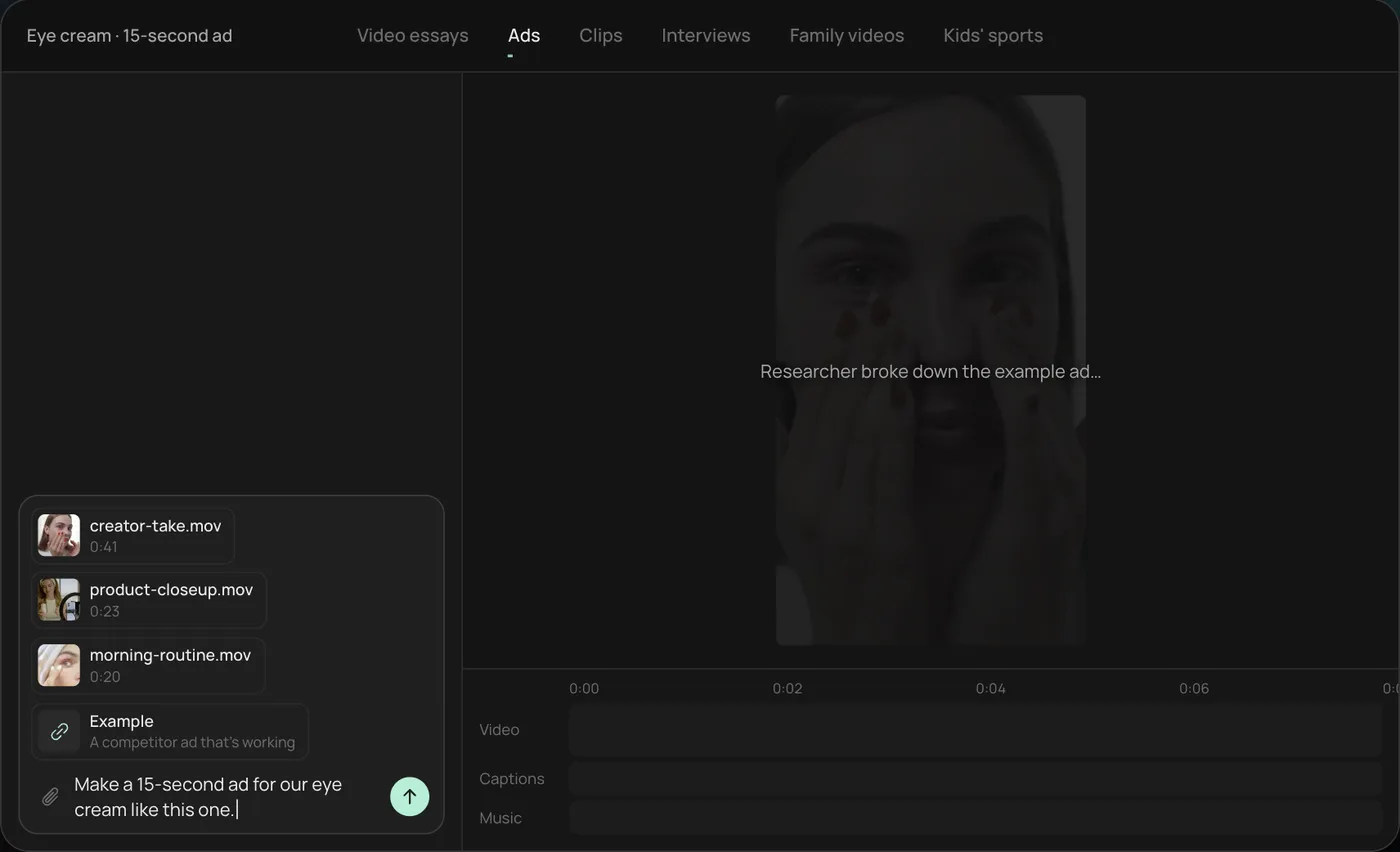
These screenshots come from Rend's demo of a 15-second eye cream ad made from three phone clips; your own product works the same way.
1. Drop in your clips and an example ad. Add your phone clips (here a creator take, a product close-up and a morning routine) plus an ad you like, then type what you want: "Make a 15-second ad for our eye cream like this one."
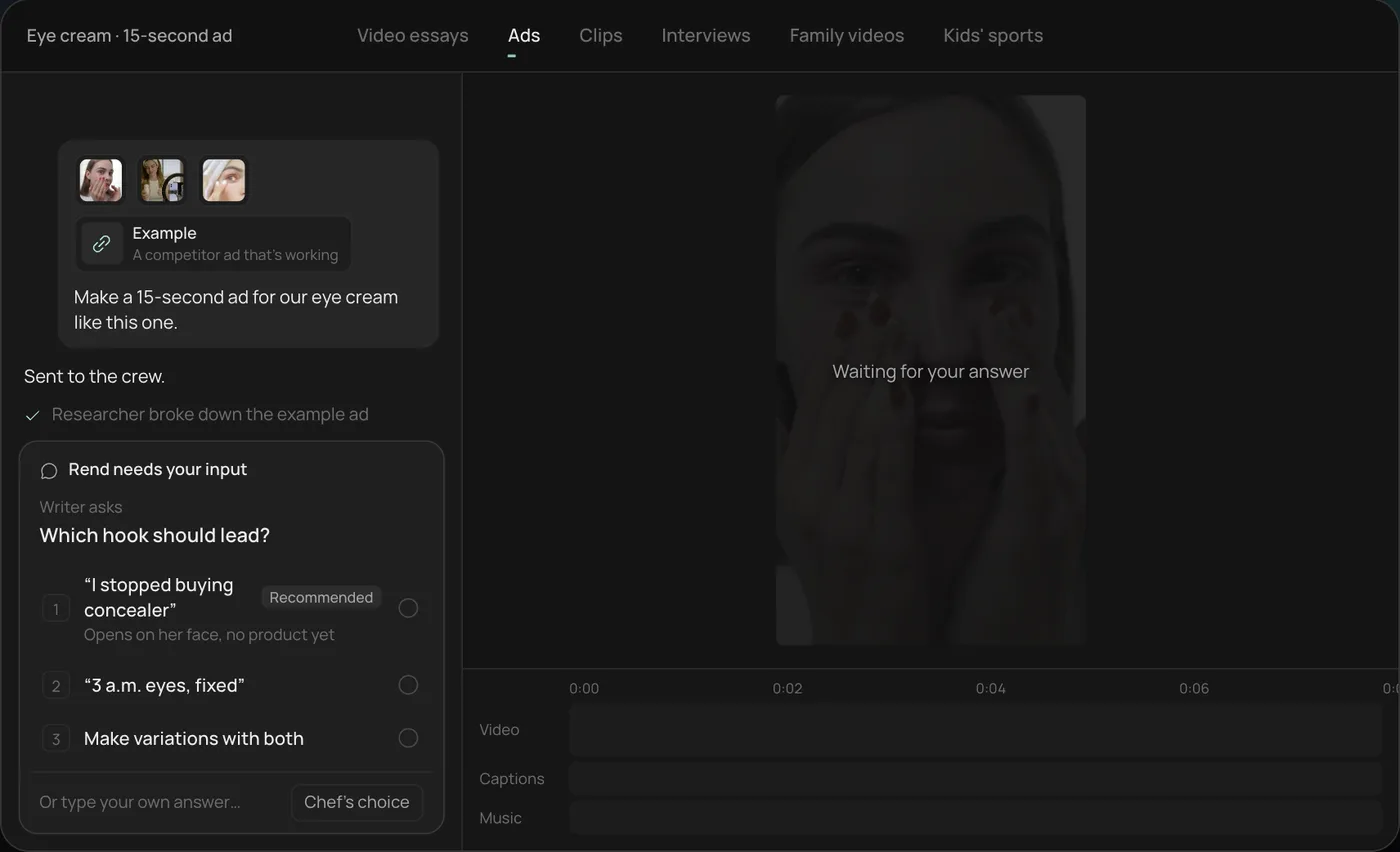
2. Answer one question. Rend asks which hook should lead and marks the one it recommends. You can also ask for variations with both.
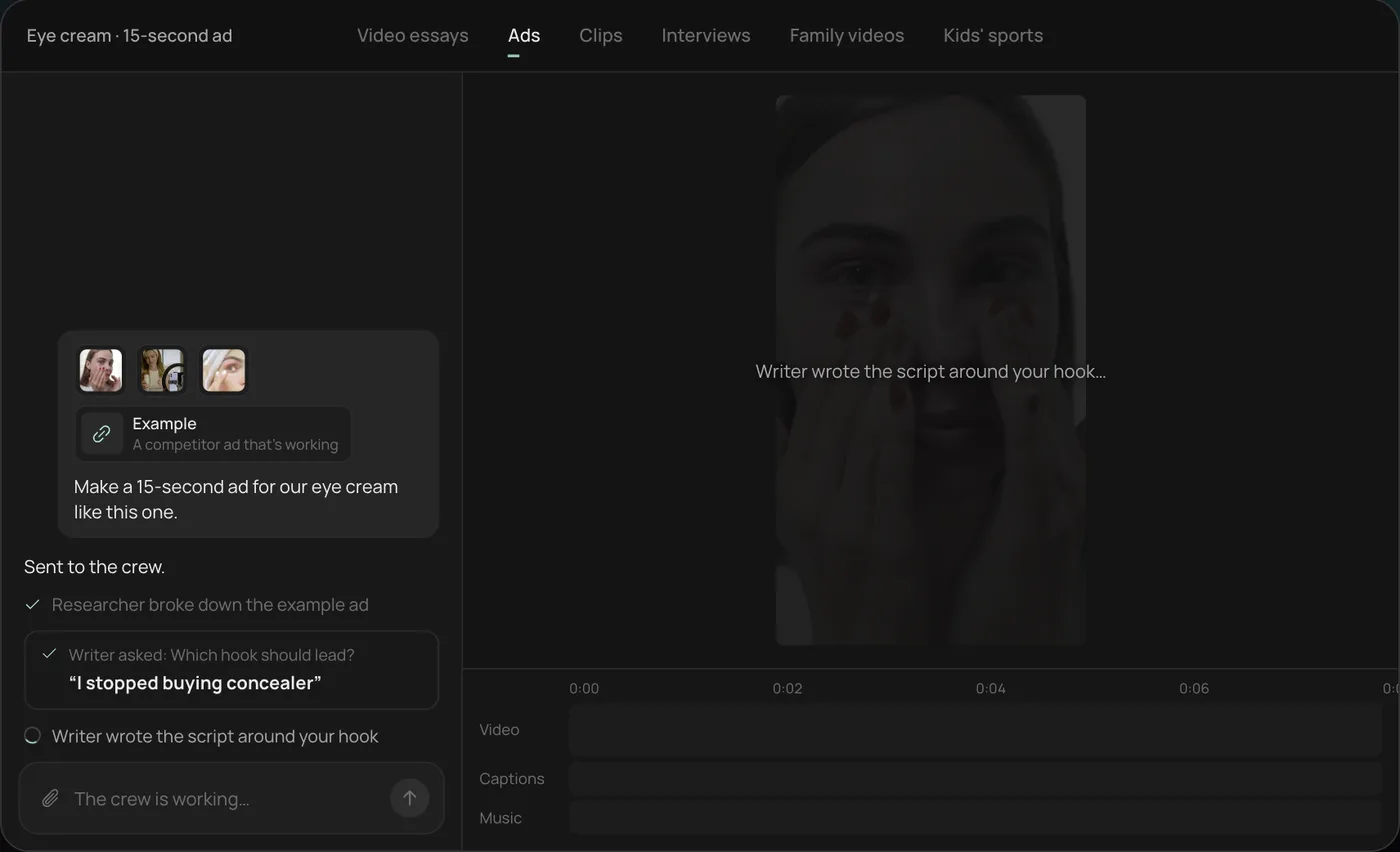
3. Watch the crew work. A researcher breaks down the example ad and a writer builds the script around your hook, each step checked off in the chat.
4. Get the finished ad. A 15-second vertical ad lands on a real timeline with captions and music on their own tracks, and Rend offers more hooks to test.
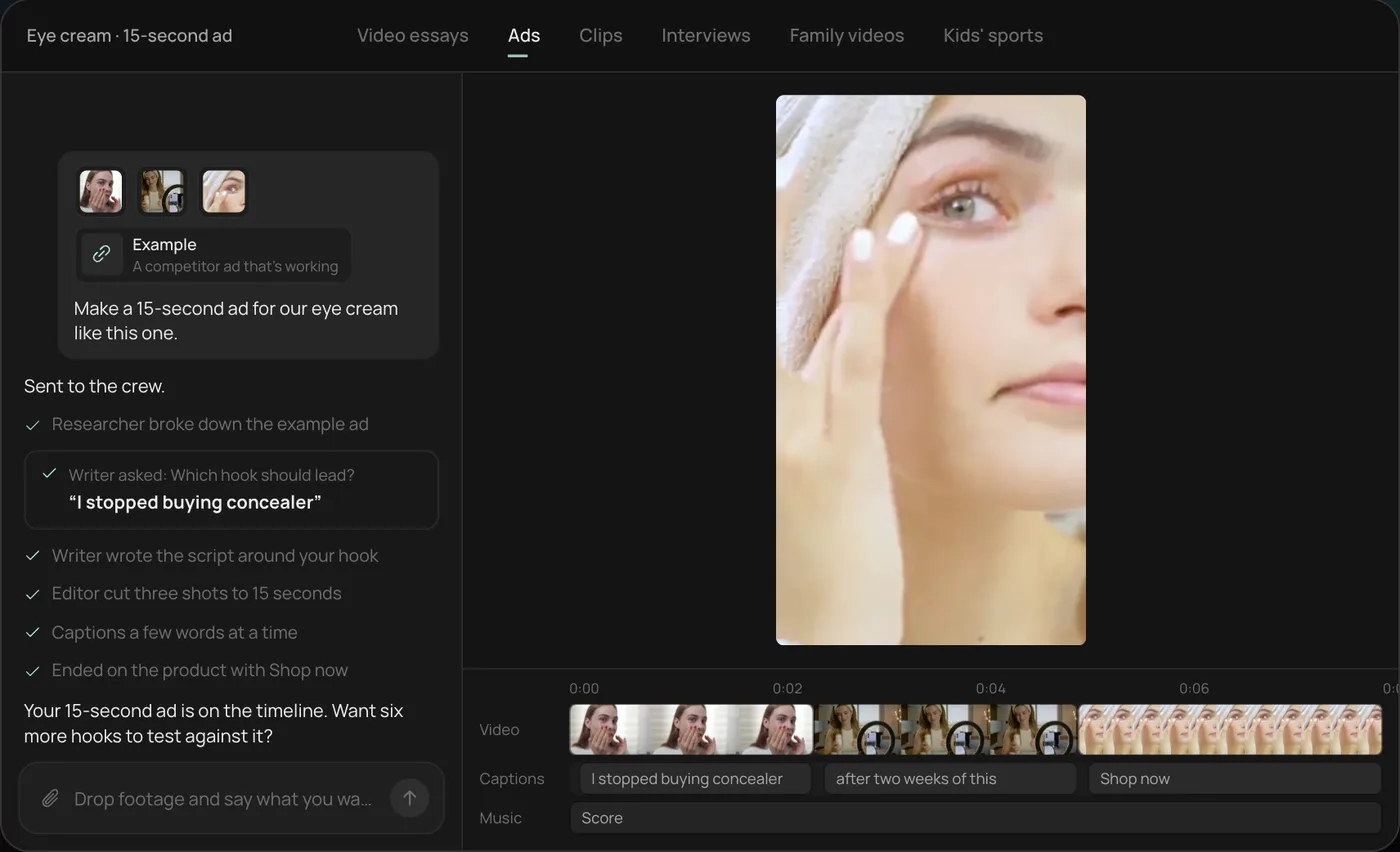
From there you can open the timeline and change anything by hand, share a review link for notes, or export. Start a free Rend project to try it on your own footage.
What you need (and what you can skip)
| Item | Need it? | Cheap version |
|---|---|---|
| A recent phone | Yes | Whatever you have; clean the lens first |
| Window light | Yes | Any large north-facing or shaded window |
| Plain background | Yes | A sheet of poster board, curved up behind the product |
| Tripod or phone stand | Strongly recommended | A stack of books and a binder clip |
| White bounce card | Recommended | The other half of the poster board |
| Diffusion | If the sun hits the window | A white shower curtain or baking parchment taped over the glass |
| Gimbal | Optional | Only for walking shots or lifestyle clips |
| Ring light | Skip it | It flattens products and puts a donut in anything shiny |
| External mic | Only if someone talks | A clip-on mic for the creator take |
The single most common reason a phone product video looks cheap is overhead room light. Turn the ceiling lights off. Mixed light (warm bulbs plus cool daylight) gives you two colors on the product and the phone cannot correct for both.
Set up the light
Put the table about an arm's length from the window, with the window to the side of the product, not behind it and not behind you. Side light shows texture and shape. Light from behind the camera flattens everything, and light from behind the product turns it into a silhouette.
Then put the white card on the opposite side, just out of frame, angled toward the product. Watch the shadow side lift. That is the whole studio. For glossy packaging, move the product until the window's reflection lands as a clean stripe down one edge rather than a blob in the middle.
If direct sun is hitting the glass, diffuse it or wait. Hard sun moves as you shoot, and clips filmed 20 minutes apart will not cut together.
Phone settings before you press record
- Clean the lens with a soft cloth. Pocket lint is the reason half of phone product clips look hazy.
- Use the main (1x) lens for most shots. Ultra-wide distorts products near the edges. Use the telephoto for tighter shots if your phone has one; it flattens perspective in a way that looks expensive.
- Shoot 4K at 30 fps for most clips. Switch to 60 fps for anything you might slow down, like pouring, spraying or a cap twist.
- Lock focus and exposure on the product. On an iPhone, press and hold on the product until AE/AF Lock appears, then drag the sun icon down a little so the highlights keep detail. Most Android camera apps offer a similar lock with a long press.
- Turn on the grid and keep the product off dead center for lifestyle shots, centered for the hero.
- Put the phone in airplane mode so a notification does not end a perfect take.
- If cheap LED bulbs are on in the room and you see flicker bands, turn them off.
Shoot vertical (9:16) if the video is going to Reels, TikTok, Shorts or Stories, which is where most product ads run. If you also want a horizontal version for a product page, leave space around the product so you can crop either way. Our video ad size checker shows where each platform's buttons sit so you know what to keep clear.
The eight-shot product list
Every clip runs 5 to 8 seconds, so you have room to trim. Shoot three takes of each.
| # | Shot | How to film it | What it does in the edit |
|---|---|---|---|
| 1 | Hero | Product centered, phone locked off, eye level with the label | Opening or closing frame |
| 2 | Slow push-in | Slide the phone toward the product along the table, 3 to 4 seconds | Adds motion without effort |
| 3 | Texture macro | Phone very close (use macro mode if it switches automatically), cream on a finger, fabric weave, wood grain | Makes people want to touch it |
| 4 | In hand | A hand enters frame, picks it up, turns it once | Shows real size |
| 5 | In use | The product doing its job: applied, poured, worn, plugged in | The proof |
| 6 | Packaging | Unboxing or the box next to the product | Signals what arrives |
| 7 | Scale | Next to something everyone knows: a phone, a coffee mug, a hand | Answers "how big is it" |
| 8 | Result | After use: the glow, the clean counter, the filled glass | The payoff for the hook |
If you can, add one creator take: a person holding the product saying one sentence about why they use it. Even a team member works. A face and a voice in the first two seconds usually carry an ad further than a perfect pack shot, which is why UGC-style ads do so well.
Stabilization without a gimbal
Shaky handheld footage is the second giveaway after bad light. Free fixes, in order of how much they help:
- Do not move the camera at all. Lock the phone on a stand and let the product or the hand move. Most of the best product shots are static.
- Slide instead of carry. For a push-in, rest the phone flat on a book and slide the book along the table. It is smoother than any hand.
- Turn the product, not the camera. A lazy Susan or a turntable gives you a slow 360 with a locked phone.
- If you must go handheld, hold the phone with both hands, elbows tucked against your ribs, and move from your knees and hips. Walk heel to toe.
- Leave the phone's built-in stabilization on. It crops a little, but on a phone that is a fair trade.
A gimbal is worth it for lifestyle shots where someone walks with the product. For tabletop work, a stand and a slide beat it.
Edit the clips into an ad
A product ad that works on a phone screen has a simple shape. Here is the 15-second version:
| Time | What is on screen | Text or voice |
|---|---|---|
| 0 to 2 s | The creator take or the most surprising shot (often the result) | The hook, one line |
| 2 to 7 s | In use, texture macro | The one reason it works |
| 7 to 11 s | In hand, scale, result | Proof: a number, a before and after, a review line |
| 11 to 15 s | Hero with the brand | Offer and call to action |
Rules that save most edits:
- Cut every 1 to 2 seconds in the first five seconds, then let shots breathe.
- Put the hook in the first two seconds, both on screen and spoken if there is a voice. Our list of video ad hooks has 70 to adapt.
- Add word-timed captions. A lot of people watch with the sound off.
- Keep on-screen text out of the bottom fifth and the right edge where the app's buttons are.
- End on the product, not the logo alone.
Make at least three versions with different hooks before you spend money. The footage is the same; the opening two seconds are what you are actually testing. How to make 100 ad variations from one video shows how far you can take that.
Common mistakes
The product is too small in frame. On a phone screen, the product should fill a third of the frame or more in most shots. The label is unreadable. Turn it toward the light and shoot one clip where it fills the frame. The background is busy. A kitchen counter with a fruit bowl and a toaster pulls the eye away; clear everything. And the clips do not match: half shot at noon in sun, half at dusk under a lamp. Shoot the whole list in one 30-minute session.
Where Rend fits
Rend is an AI video agent. Send your clips through chat, email or the web form, along with a product page or an ad you like, and say what you want: "Three 15-second vertical ads from these clips, different hooks, our brand colors." A crew of specialist agents writes the hooks, cuts the ad on a real, editable timeline with word-timed captions and music on their own tracks, and checks its own work. It can generate b-roll or a shot you missed, research competitors' ads, and spin new hooks, sizes and image ads from one video. Download the set for your own ad accounts, or hand it to Rend Boost to run live on major networks, paying per click (early access).
Where you might not need it: if you are posting one organic clip, the phone's own editor or CapCut is quick and free. Rend helps when you want several tested versions and a consistent brand look. For storefront-specific advice, see Shopify product videos, Amazon product video specs and ecommerce product video ads. Editing is free; you pay only when Rend renders or generates something. Pricing has the plans.
FAQ
Can you make a professional product video with just a phone?
Yes. Recent phones shoot sharp 4K video. What separates a professional result from an amateur one is soft side light, a clean background, a locked or slowly moving camera, and a tight edit.
What is the best lighting for product videos at home?
A large window with the light coming from the side, diffused if the sun hits it directly, plus a white card on the other side to fill shadows. Turn off overhead room lights so the colors stay clean.
Should I shoot product videos vertical or horizontal?
Vertical (9:16) for social ads, Reels, TikTok and Shorts. Horizontal for some product pages and YouTube. If you need both, shoot vertical with space around the product, or shoot each orientation separately for your hero shots.
What frame rate should I use?
30 fps for normal clips, 60 fps for anything you want to slow down, like pouring or spraying.
How long should a product video ad be?
15 seconds is a solid default for social ads, with the hook in the first two seconds. Make a 6-second cut for short placements and a 30-second version if the product needs explaining.
Do I need a gimbal?
Not for tabletop shots. A stand, a sliding book and a turntable cover most product footage. A gimbal helps only for walking or lifestyle clips.
Shoot your list this afternoon
Set up by a window, shoot the eight shots, send them to Rend and ask for three 15-second ads with different hooks. You can do it on the free plan and check every cut before you pay to render.