How Do You Make a YouTube Ad? Formats, Lengths and Scripts
To make a YouTube ad, decide where it runs first, then build to that format's rules: a skippable in-stream ad can be any length but viewers can skip after 5 seconds, a bumper ad is 6 seconds and cannot be skipped, a standard non-skippable ad is 7 to 15 seconds, and a Shorts ad should be vertical 9:16 and is best under 60 seconds. Write the first five seconds so they work on their own, show your brand early, upload the finished video to your YouTube channel as public or unlisted, and build the campaign in Google Ads. Most advertisers should start with one 15 to 30 second skippable cut, a 6-second bumper and a vertical Shorts version, all from the same footage.
Every spec below comes from Google Ads Help pages, checked in November 2026. Google changes these, so check the linked format pages again before you build.
How to make a YouTube ad in Rend, step by step
These screenshots come from Rend's demo of a 15-second eye cream ad from phone clips; a YouTube ad from your own footage works the same way.
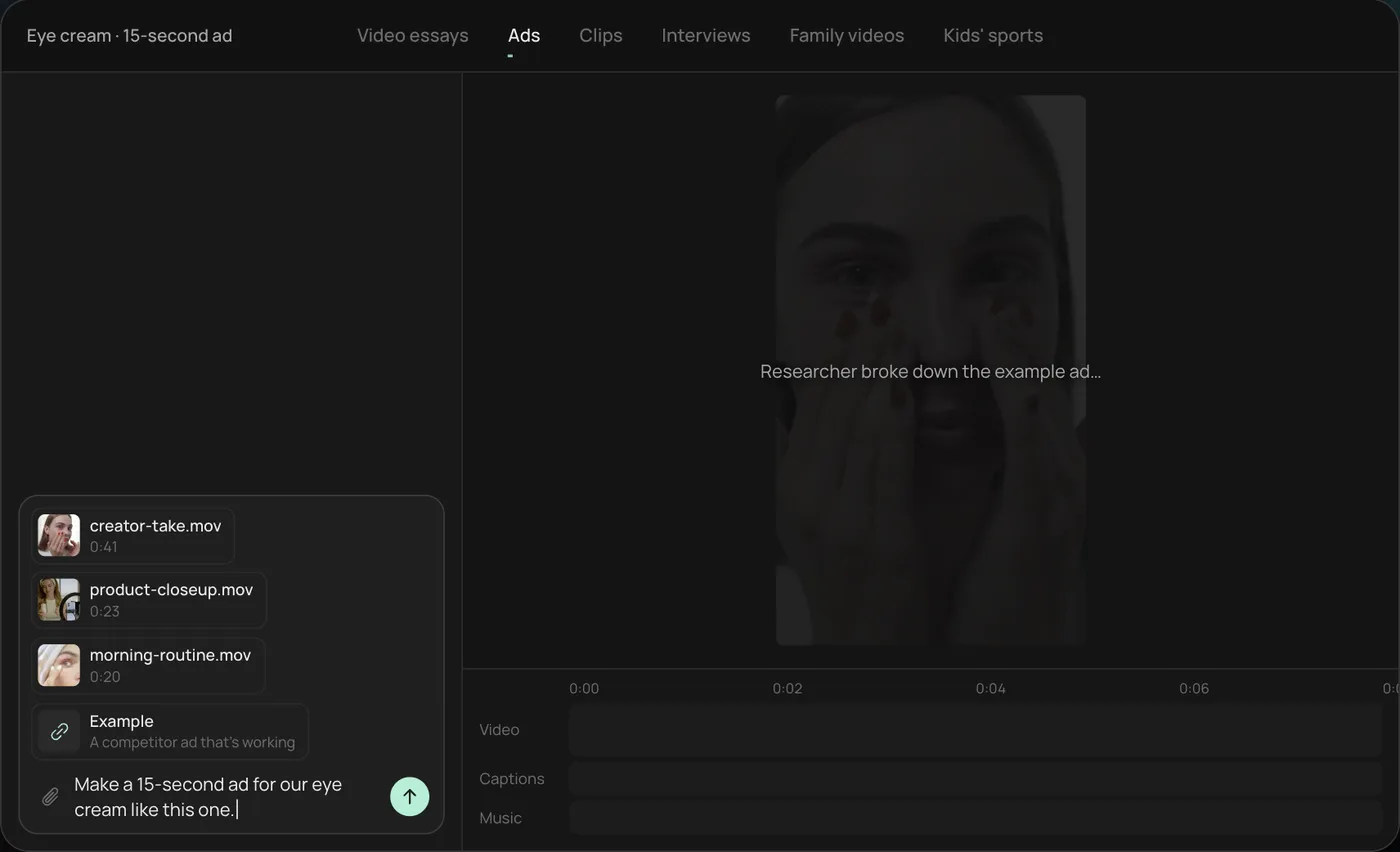
1. Drop in your clips and an example ad. Add your phone clips (here a creator take, a product close-up and a morning routine) plus an ad you like, then type what you want: "Make a 15-second ad for our eye cream like this one." For YouTube, ask for a horizontal in-stream cut and a vertical Shorts cut in the same message.
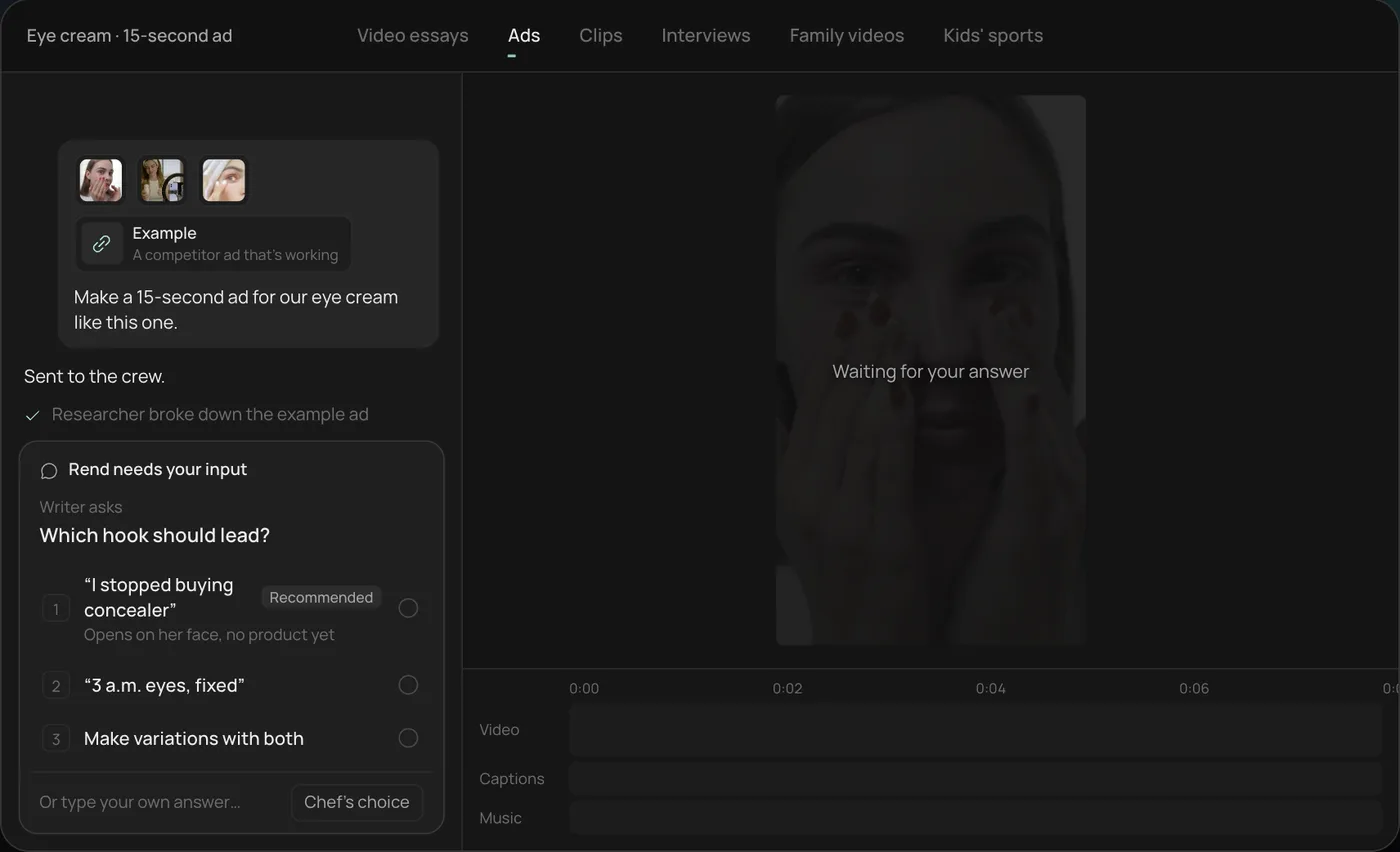
2. Answer one question. Rend asks which hook should lead and marks the one it recommends. You can also ask for variations with both.
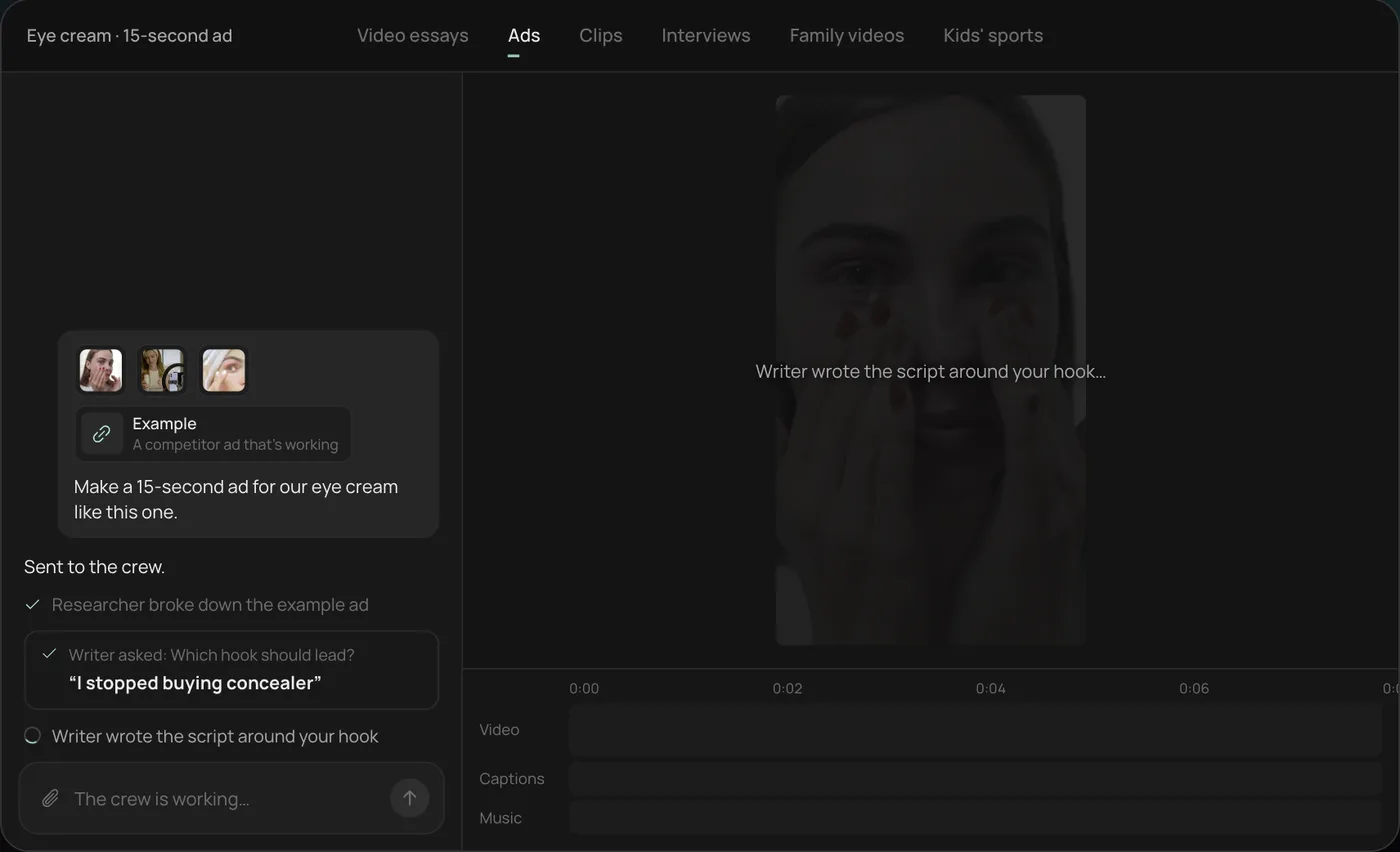
3. Watch the crew work. A researcher breaks down the example ad and a writer builds the script around your hook, each step checked off in the chat.
4. Get the finished ad. A 15-second vertical ad lands on a real timeline with captions and music on their own tracks, and Rend offers more hooks to test.
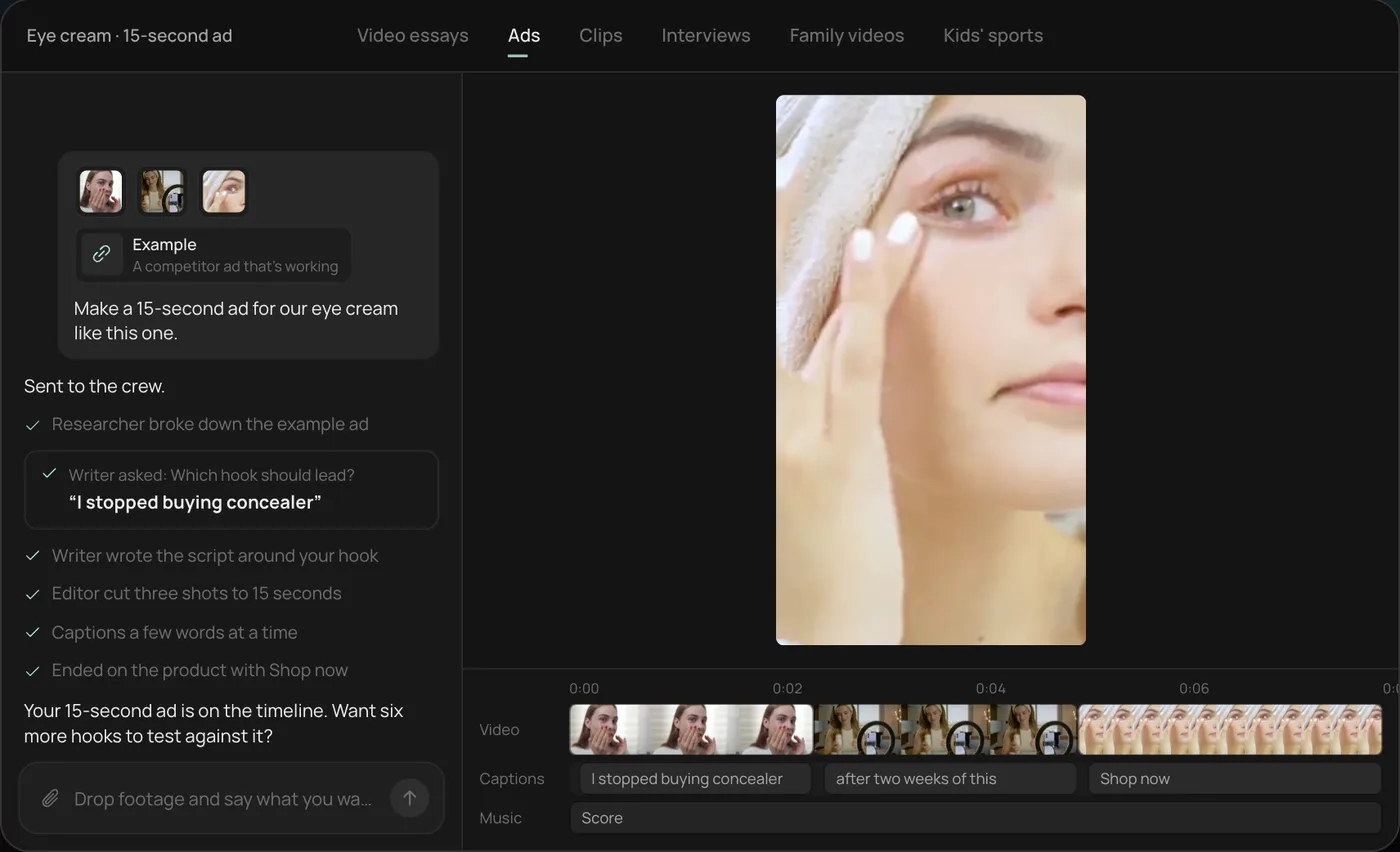
From there you can open the timeline and change anything by hand, share a review link for notes, or export. Start a free Rend project to try it on your own footage.
YouTube ad formats and their length rules
| Format | Where it plays | Length rule (Google Ads Help) | Skippable? | What it is good for |
|---|---|---|---|---|
| Skippable in-stream | Before, during or after videos | No fixed minimum or maximum; Google suggests about 15 to 20 s for awareness and action, 2 to 3 min for consideration | After 5 s | Most advertisers' main ad |
| Non-skippable in-stream | Before, during or after videos | 7 to 15 s standard; 16 to 30 s only on connected TV, horizontal | No | A complete short message |
| Bumper | Before, during or after videos | Up to 6 s | No | Reach and reminders |
| Shorts ads | Between Shorts in the Shorts feed | Up to 3 min, only the first 60 s play in the feed; under 60 s recommended | Swipe away | Vertical, mobile-first audiences |
| In-feed | Search results, Home feed, next to related videos | No max length | Viewer clicks to watch | Longer demos and tutorials |
Three things in Google's fine print matter for how you cut.
First, on skippable in-stream ads with cost-per-view bidding, you pay when someone watches 30 seconds (or the whole ad if it is shorter) or interacts with it, according to Google's skippable in-stream page. A 20-second ad that people finish is billed differently from a 2-minute ad most people skip at 0:06.
Second, Google's Shorts ad specs page sets different minimums by campaign type: Video Reach campaigns take 6 to 60 seconds, and Video Action, App and Performance Max take 10 to 60 seconds. For ads aimed at an action, Google recommends 10 to 30 seconds of vertical video.
Third, the Shorts call-to-action button appears at 3 seconds for Performance Max, App and Demand Gen, and at 10 seconds for video view and video reach campaigns. Put your offer on screen after the button shows, not before.
The first five seconds of a skippable ad
On a skippable ad, the first five seconds are the ad everyone sees. Everything after that is for people who chose to stay. Write those five seconds to work alone:
- Something moving or a face in the first frame. A logo on black is the most skipped opening there is.
- The problem or the promise in the first sentence, spoken and on screen.
- Your brand visible or said by second five. If they skip, they skip knowing who you are.
Google's own creative guidance (its ABCDs of effective video ads: Attention, Branding, Connection, Direction) says much the same, and in our experience the brand-early part is the one most ads miss because it feels like it will drive skips. It usually doesn't. A skip with a brand impression still counts for something; a skip with no brand counts for nothing.
A 30-second skippable script
| Time | Picture | Words |
|---|---|---|
| 0 to 2 s | Close-up of the problem, or a face mid-sentence | Hook: "Most dog shampoos dry out his coat in a week." |
| 2 to 5 s | Product in hand, logo on the bottle | "This one's made by two vets in Denver." |
| 5 to 15 s | The product in use, two or three quick shots | The one reason it works, with a specific detail |
| 15 to 25 s | Result: shiny coat, happy owner, a review line on screen | Proof |
| 25 to 30 s | Product and logo, URL | "Get your first bottle at half price." |
Cut a 15-second version by dropping the middle proof section, and a 6-second bumper with just the hook, product and logo. That is three ads from one shoot.
Bumper ads: one idea in six seconds
A bumper cannot tell a story. It can make one point. The bumpers that work are usually a single visual and a single line: "Same coffee. Half the price. Joe's." Shoot or cut them as their own thing rather than trimming a 30-second ad down to its first six seconds, which usually leaves you with an intro and no point.
Bumpers suit reach and frequency: reminding people who already saw your longer ad, or running alongside a launch. They are a poor fit for anything that needs explaining.
Shorts ads: build vertical, not cropped
Google's Shorts ad specs page says vertical 9:16 is the best fit for Shorts. Horizontal and square videos still serve, but in the vertical Shorts player they show with blurred bars above and below, which reads instantly as an ad someone did not make for this feed.
For Shorts, the right side of the screen carries the like, comment and share buttons, and the bottom carries the channel name, the description and the CTA. Keep your text and faces in the middle. Our video ad size checker shows the safe zone, and the full spec list is in our video ad sizes guide.
Shorts ads also take their name and description from your channel, and Google caps the description at 90 characters, with anything past one line on mobile cut off. Write it like a headline. Google's page also notes ads with sound do better on Shorts, so use voiceover, music or both.
Before you upload: a checklist
- The video is on your YouTube channel, public or unlisted. Google Ads pulls YouTube ads from YouTube, so it has to be there.
- The file is a separate upload for each version (horizontal, vertical, bumper), with clear names.
- Brand shown or said in the first five seconds.
- Captions burned in or a caption file uploaded, since many people watch with the sound low or off.
- No text under the Shorts buttons or the skip button area.
- The ending tells people exactly what to do, and the landing page matches the offer.
- If any part was made or edited with AI, check whether you need a label. Google's Shorts specs page points out that AI-generated or edited assets may need labels to meet regional rules.
Then build the campaign in Google Ads, pick the goal, choose the formats and add the videos. For a deeper pass on checking the creative itself, read how to review ad videos before you spend.
How many versions to make
YouTube ads are cheap to test and expensive to guess. Start with:
- One 15 to 30 second skippable cut, horizontal.
- The same cut reframed vertical for Shorts.
- A 6-second bumper.
- Two more hooks on the skippable cut, changing only the first five seconds.
That is five or six files from one shoot. Run them for a week, keep what holds viewers past five seconds and drives clicks, and retire the rest. How to make 100 ad variations from one video shows how to scale that once you know what works, and our list of video ad hooks gives you openings to try.
Where Rend fits
Rend is an AI video agent. Send your footage, product page or an ad you like through chat, email or the web form, and ask: "A 30-second skippable YouTube ad, a 6-second bumper and a vertical Shorts version, brand in the first five seconds." A crew of specialist agents writes the hooks (with rend-1, Rend's own writing model for ad copy, with live search), cuts each version on a real, editable timeline with word-timed captions and music on their own tracks, and checks its own work. It can generate shots and b-roll you are missing, and spin new hooks and sizes from the same video. Download the set to upload to your own channel and Google Ads account, or hand it to Rend Boost to run live on major networks, paying per click (early access).
What Rend does not do: build or manage your Google Ads campaign settings for you if you run your own account. That part happens in Google Ads. And if you want a free option for simple cuts, the Asset Library in Google Ads has free templates that turn product shots and a logo into a simple video ad, and for a first test that may be all you need. Rend is better when you want custom edits from your own footage and several versions to test. For more on product ads, see ecommerce product video ads and how to make a product video with your phone. Editing is free; you pay only when Rend renders or generates something. Pricing has the plans.
FAQ
How long should a YouTube ad be?
It depends on the format. Bumpers run up to 6 seconds, standard non-skippable ads 7 to 15 seconds, and skippable in-stream ads have no fixed limit, though Google suggests about 15 to 20 seconds for awareness and action goals. Shorts ads are best under 60 seconds, since only the first 60 play in the feed.
When can viewers skip a YouTube ad?
After 5 seconds on skippable in-stream ads, according to Google Ads Help. Bumper and non-skippable ads cannot be skipped.
Do I need to upload my ad to YouTube first?
Yes. Google requires the ad video to be on YouTube, as public or unlisted, before you can use it in a campaign.
What size should a YouTube Shorts ad be?
Vertical 9:16. Horizontal and square videos serve on Shorts too, but they appear with blurred bars, so build vertical when you can.
How much does a YouTube ad cost?
There is no fixed price. You set a budget and bid in Google Ads. With cost-per-view bidding on skippable ads, you pay when someone watches 30 seconds (or the full ad if shorter) or interacts.
Can I make a YouTube ad with my phone?
Yes. A recent phone, good light and a steady camera are enough. Our phone product video guide covers the setup.
Make your first three cuts
Send Rend the footage you have and ask for a 30-second skippable ad, a bumper and a Shorts version. You can do it on the free plan and check every cut before you pay to render.