Instagram Reels Ads for Small Business: Specs, Safe Zones, Tips
For a small business, Instagram Reels ads are the place to start: one 9:16 video of your real product or service, 15 to 30 seconds, built to work on mute, with text kept out of the edges Instagram covers. If a local creator already posts about you, running their reel as a partnership ad is worth testing before you make your own. Instagram video ads also run in Stories and Feed (plus Explore and search results). For Reels and Stories, Meta's Ads Guide asks for 9:16 video at 1440 x 2560, with the top 14%, bottom 35% and 6% on each side kept clear of text and logos. For Feed, the Ads Guide currently recommends 9:16 at 1080 x 1920, and Meta's aspect ratio page says Instagram Feed accepts everything from 1.91:1 to 9:16. In practice, one 9:16 master with everything important in the centre, plus a 4:5 version for Feed, covers almost every Instagram placement. Keep ads to 15 to 30 seconds, design them to work on mute, and don't use licensed music.
This guide is the Instagram-specific part. If you're running across Facebook too, our Facebook video ad maker covers Advantage+ creative and the full Meta placement table, so we won't repeat it here.
How to make an Instagram video ad in Rend, step by step
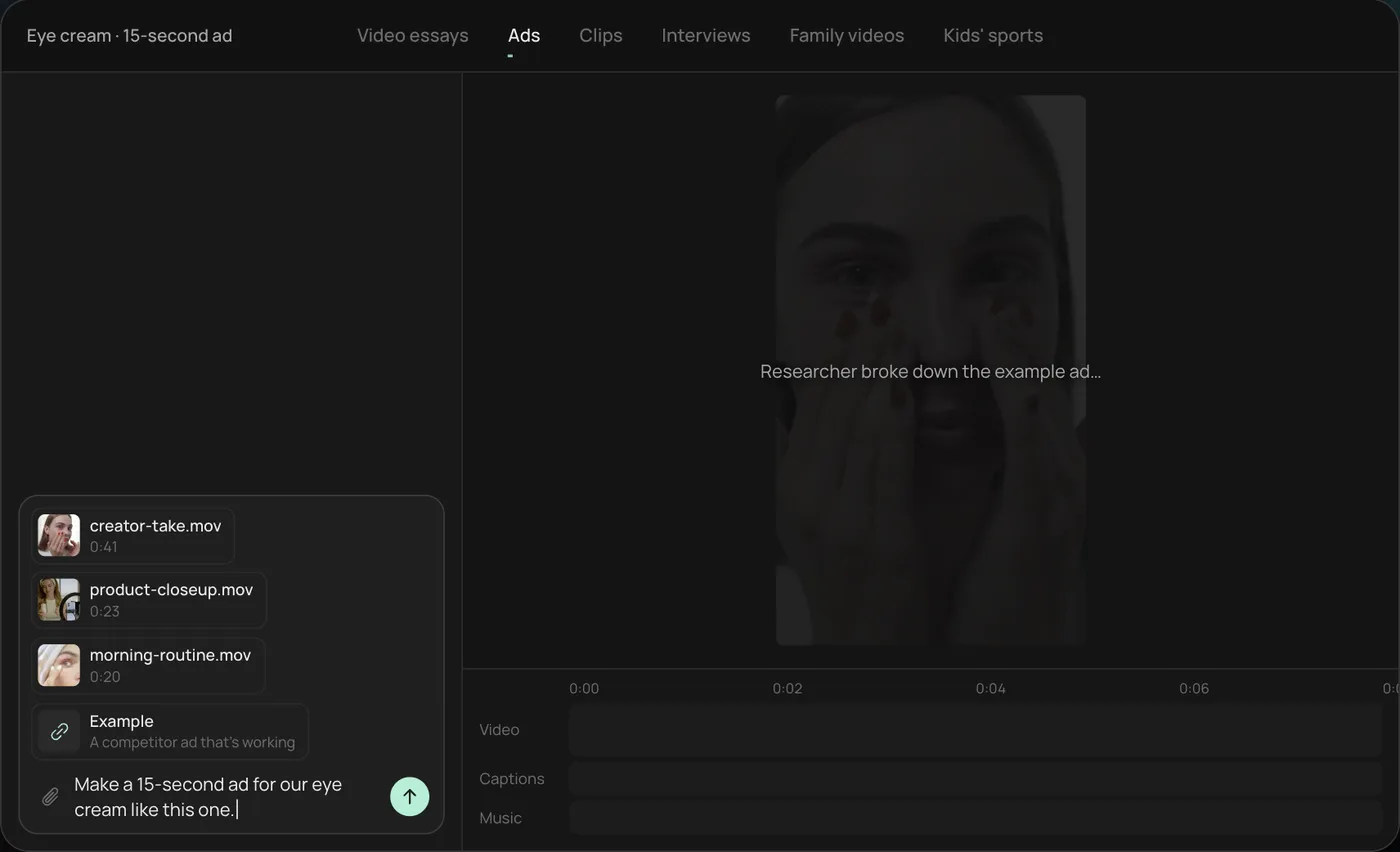
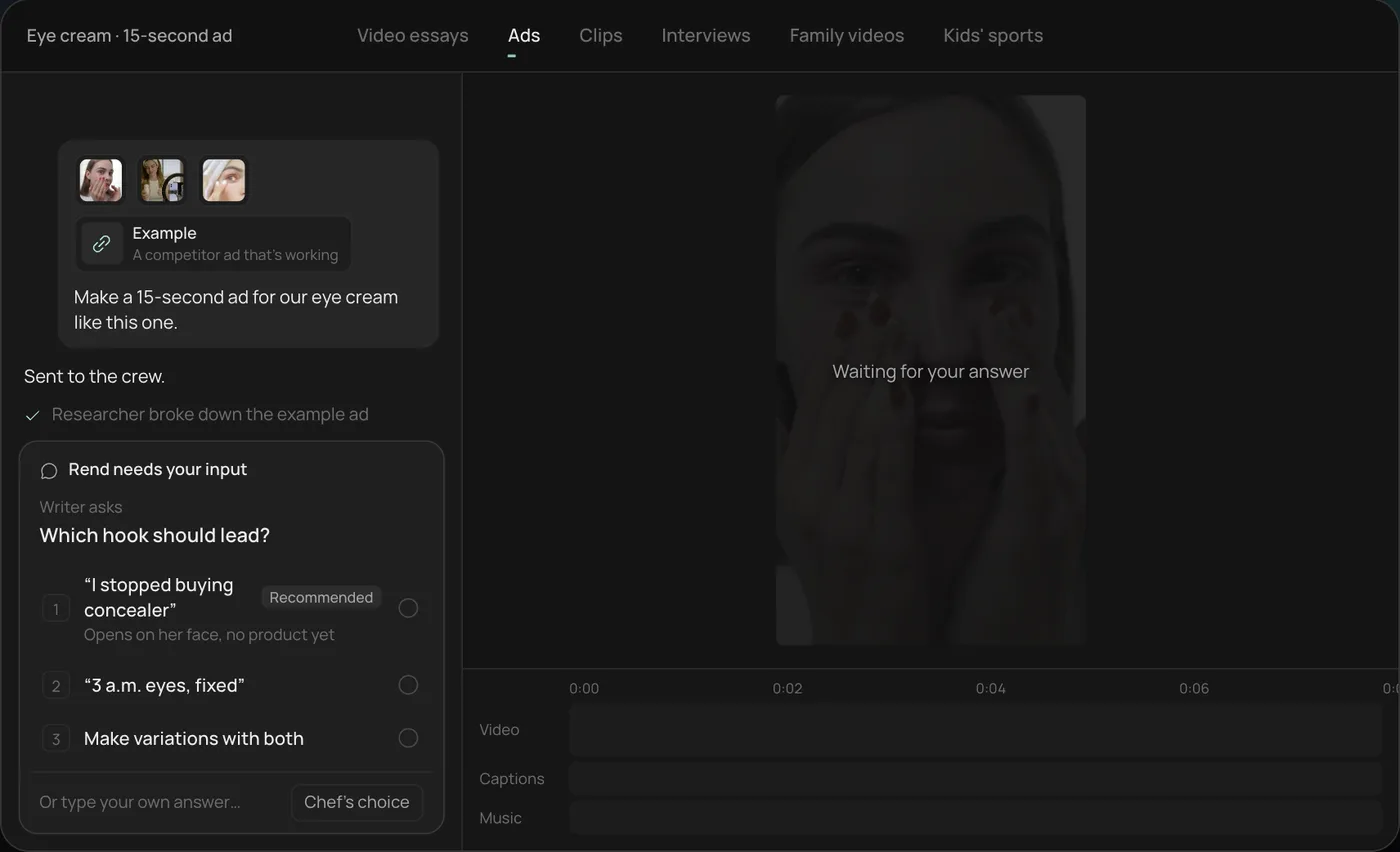
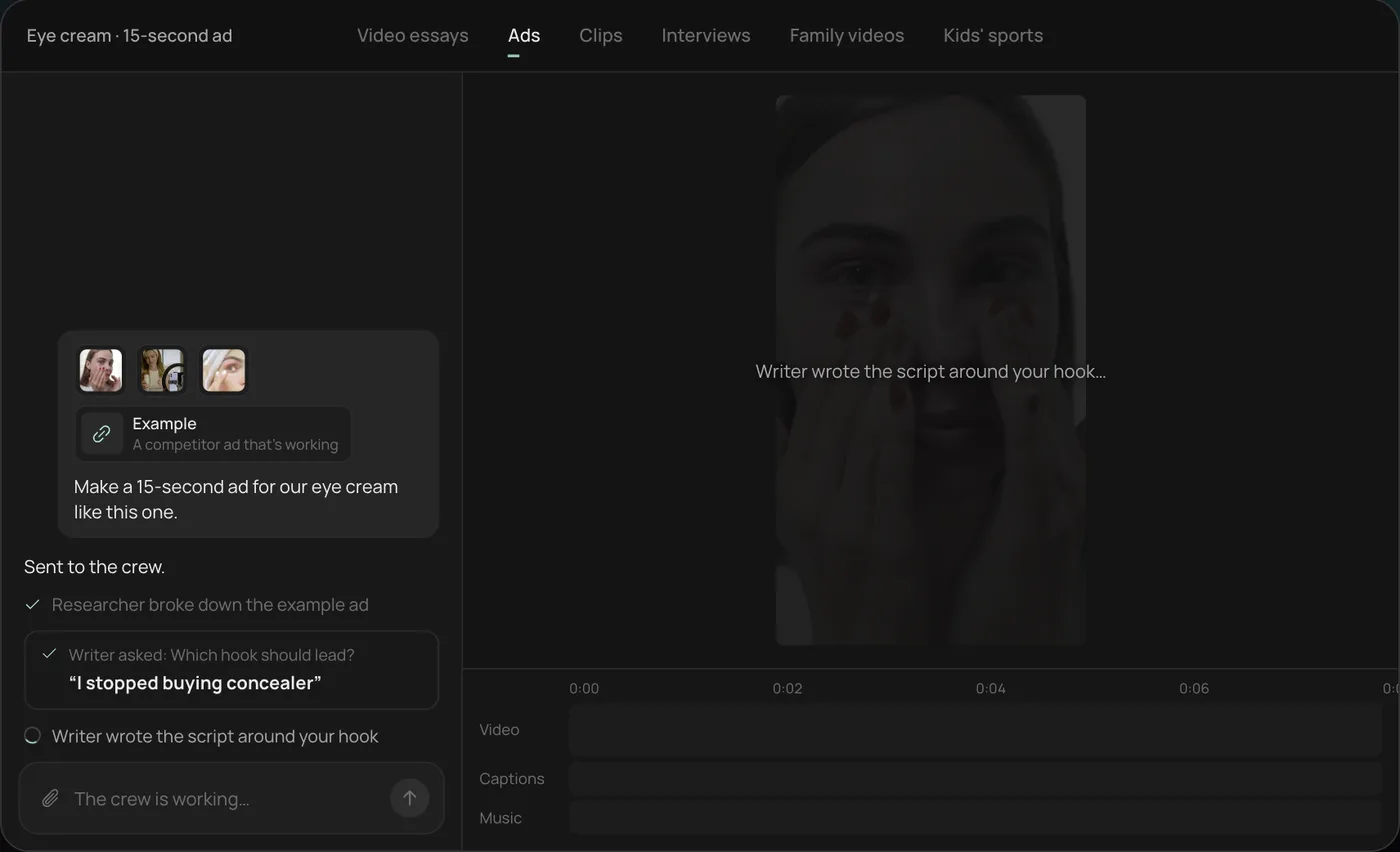
These screenshots come from Rend's demo of a 15-second eye cream ad built for Reels; your own project works the same way.
1. Drop your clips and an example. Add your phone clips (here a creator take, a product close-up and a morning routine) plus a competitor ad you like, then type what you want: "Make a 15-second ad for our eye cream like this one."
2. Answer the one question. Rend asks which hook should lead and marks a recommended answer. You can also ask it to make variations with both.
3. Let the crew work. The researcher breaks down the example ad and the writer builds the script around your hook, checking off each step in chat.
4. Open the finished ad. A 15-second vertical ad lands on a real timeline with captions and music on their own tracks, and Rend offers six more hooks to test. Ask for a 4:5 version for Feed next.
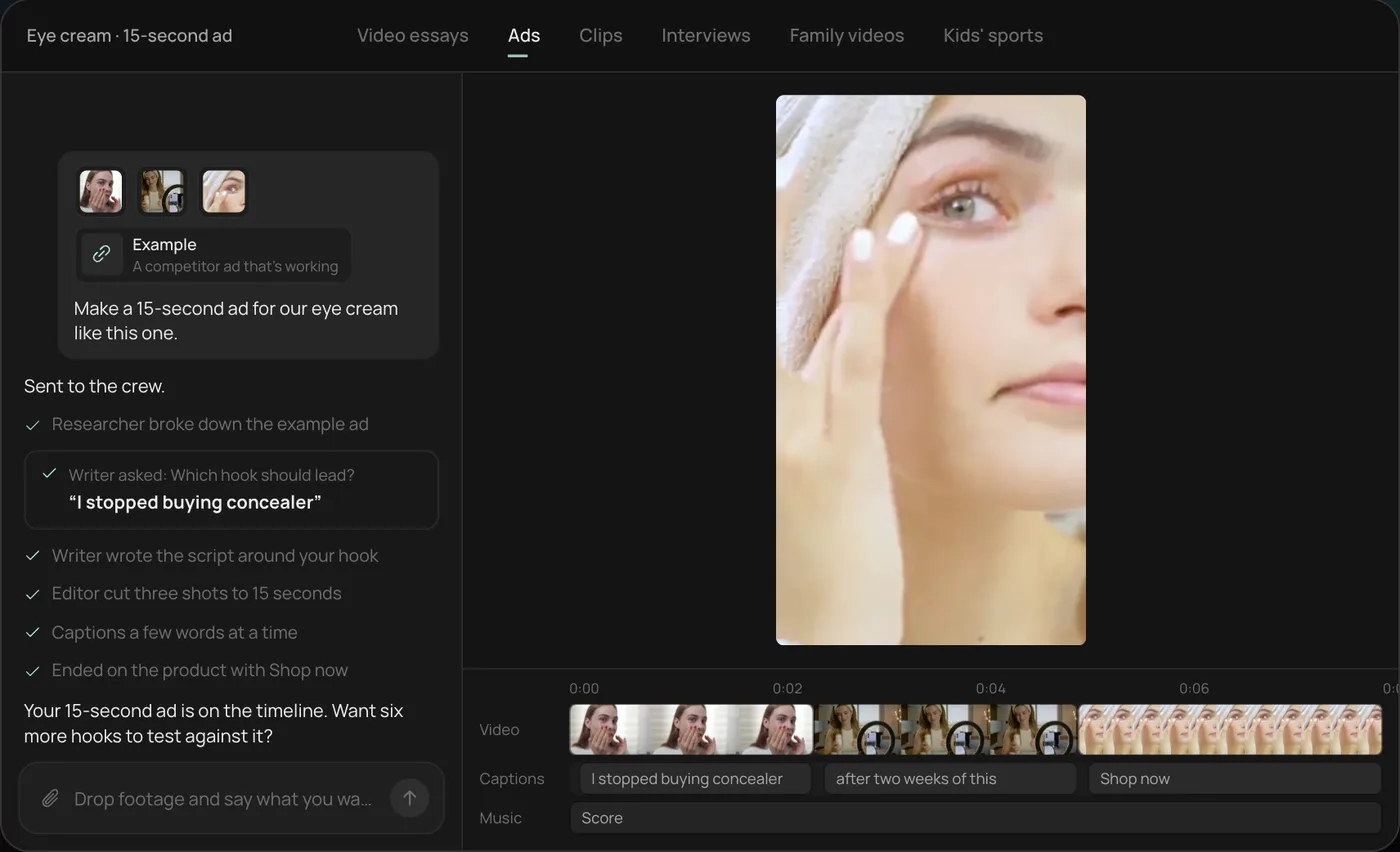
From there you can open the timeline and change anything by hand, share a review link, or export.
Instagram ad specs by placement
We read these from Meta's Ads Guide pages for Instagram Reels, Stories and Feed, and Meta's Business Help Center page on aspect ratios by placement, on November 19, 2026. Meta's pages don't always agree with each other, so where they differ we say so.
| Placement | Shape | Recommended size | Length (Ads Guide) | Keep clear |
|---|---|---|---|---|
| Reels | 9:16 | 1440 x 2560 | Up to 15 min | Top 14%, bottom 35%, 6% each side |
| Stories | 9:16 | 1440 x 2560 | 1 s to 60 min | Top 14%, bottom 35%, 6% each side |
| Feed | 9:16 recommended, all ratios from 1.91:1 accepted | 1080 x 1920 | 1 s to 60 min | Not stated; we keep text central |
| Explore home | 1.91:1 or 16:9 (Help Center) | Not stated | Not stated | Not stated |
Shared across them: MP4 or MOV (Stories and Feed also list GIF), up to 4 GB. The Reels guide lists a minimum width of 250 px for ads under 30 seconds and 500 px for longer ones, which you'll never hit with a phone clip.
The length ceilings are huge and irrelevant. Nobody watches a 15-minute Reels ad. For prospecting, cut 15 and 30 second versions. For retargeting people who visited your site, 6 to 10 seconds is often enough.
On Feed: the Ads Guide's 9:16 recommendation is newer than a lot of advice online, which still says 4:5. We upload both and let placement customization pick. A 9:16 video in Feed can take more screen, but if it's shown cropped, a 4:5 file you framed yourself beats a crop Meta chose. Our video ad sizes guide covers what each crop does.
The safe zone, in pixels
On a 1080 x 1920 frame, Meta's Reels and Stories safe zones work out to:
| Edge | Percent | Pixels on 1080 x 1920 |
|---|---|---|
| Top | 14% | about 270 px |
| Bottom | 35% | about 670 px |
| Left and right | 6% each | about 65 px each |
That leaves a box roughly 950 px wide and 980 px tall, starting 270 px from the top. Your hook text, the offer, faces and the product all go in there. The bottom 670 px is where Instagram puts the account name, caption, CTA button and music line. Burned-in captions at TV-subtitle height will sit right under them.
The fix most people need: move captions up to about 55 to 65% of the frame height. Drop a frame into our video ad size checker to see the zones on your own shot, and use the ad preview generator to mock it up in Reels, Stories and Feed before you upload.
Boost or Ads Manager
There are two ways to run an Instagram video ad, and they suit different people.
Boosting from the app. Instagram's help center says you can boost a reel to turn it into an ad, and boosted reels can appear in the Reels tab, Explore, Feed and Stories. It's quick and you keep the post's likes and comments. Two catches: you get much less control over targeting and testing, and Instagram's help center notes that adding funds in the iOS app may carry an Apple service fee of 30% in most regions. Pay from a computer or the web to avoid it.
Ads Manager. More setup, but you can run several videos against each other, choose placements, upload separate 9:16 and 4:5 files, and see results by creative. If you're spending more than a small test budget, use it.
Our habit: post organically first, boost the reels that already do well with followers for a small spend, and rebuild the winner properly in Ads Manager with three hooks. Ad creative testing covers how to run that test.
Partnership ads: running a creator's reel as your ad
The spec guides skip the format that suits small businesses best. If a local creator, a regular or a happy client has posted a reel about you, you can run that reel as an ad instead of rebuilding it. Meta calls these partnership ads (they used to be branded content ads). Instagram's creator page says reels, stories, static posts and carousels can all run this way, the ad can appear across Instagram and Facebook, and it reaches beyond both accounts' followers. Meta's developer docs say the ad shows both accounts in the header, and that a creator can generate an ad code for a post so the brand can use it in Ads Manager, including archived posts.
How it works for a bakery, a gym or a salon:
- Ask the creator to tag your account when they post, or to send you an ad code for the reel.
- In Ads Manager, create the ad as a partnership ad with that code, or with the creator's permission to run ads from their handle.
- Run it next to your own ad with the same budget and compare.
- Agree in writing on how long you can run it and what you'll pay. The creator can switch the code off, and they should know their face is now in an ad.
The catch is that you don't control the edit. If the creator's reel opens slowly or has text in the bottom third, you can't fix it in Ads Manager. The workaround is to ask for the raw clips too, cut your own versions with a sharper hook and safe-zone captions, and run those from the creator's handle once they approve the cut. That's the UGC ads workflow with a real person instead of a generated one.
Music and sound rules
Instagram's help center says Reels ads can't use licensed music, so a song from the app's music library on an organic reel may not carry over into an ad. Use original audio, royalty-free tracks, or Meta's Sound Collection. Instagram also recommends that Reels ads include music or sound, which tells you how Meta expects people to watch them.
So build for both:
- Reels: a voice or a strong track carries the ad. Captions still help, but sound does real work.
- Stories: people tap fast. Get the point across in the first card of motion.
- Feed: many people scroll on mute. The ad must make sense with no sound, from the captions and on-screen text alone.
That's one more reason to keep captions as their own layer rather than burned in. If you want to compare caption looks before you pick one, the caption style previewer shows a few on a sample frame.
A 15-second structure for Instagram
| Seconds | What happens | Notes |
|---|---|---|
| 0 to 2 | Hook: the problem, the result or a surprising shot, with text on screen | Motion in frame one. No logo |
| 2 to 6 | Show it: the product or service in use | Close, bright, real hands |
| 6 to 11 | Proof: a result, a number, a customer line | Reviews work well here |
| 11 to 15 | Offer and CTA, said and shown | Inside the safe zone, above the button |
The CTA button already says "Shop now" or "Learn more", so the spoken CTA should add something the button doesn't: "Free shipping this week" or "Book this Saturday." Our video ad hooks list has first lines by industry.
Mistakes specific to Instagram
- Reposting a TikTok with its watermark. It looks like a repost, and people notice. Export a clean file.
- A 16:9 video in Reels. It becomes a small box in a black screen. Always reframe.
- Text in the bottom third. Covered by the caption and button on Reels and Stories.
- Licensed music from an organic reel. It may be muted or rejected in the ad.
- One ad for every placement. A 4:5 Feed cut and a 9:16 Reels cut of the same edit cost almost nothing extra and usually look better.
- Polishing too much. In our experience, Reels ads that look like the content around them hold attention better than glossy TV spots.
Where Rend fits
Rend is an AI video agent. Send it your clips (from your phone, by email or a web form) and a reel or ad you like, and its crew makes the ad on a real timeline: the hook, word-timed captions placed inside the safe zone, music on its own track, and the 9:16 and 4:5 versions. It writes hooks and ad copy with rend-1, Rend's own writing model, and can research what competitors are running in Meta ads first. Ask for three hooks and you have a test ready for Ads Manager. Your brand kit (fonts, caption style, music bed) carries into every version.
You download the files for your own ad account. Rend Boost, where Rend runs ads live and you pay per click, is in early access. If you only need to boost a reel you already posted, you don't need Rend for that; the app does it. Editing in Rend is free and you pay when it renders or generates; see pricing.
FAQ
What size should an Instagram video ad be?
For Reels and Stories, 9:16 at 1440 x 2560 per Meta's Ads Guide (1080 x 1920 works fine too). For Feed, the Ads Guide recommends 9:16 at 1080 x 1920, and 4:5 is still widely used. Make a 9:16 master and a 4:5 version.
How long can an Instagram video ad be?
Meta's Ads Guide allows up to 15 minutes for Reels ads and up to 60 minutes for Stories and Feed. Those are ceilings. Most ads that work are 15 to 30 seconds.
Can I use music from Instagram's library in an ad?
Not licensed music. Instagram's help center says Reels ads can't use licensed music. Use original audio, a royalty-free track or Meta's Sound Collection.
Should I boost a reel or use Ads Manager?
Boost for a quick push on a reel that's already doing well. Use Ads Manager when you want to test several videos, upload separate sizes or control placements. If you boost from the iOS app, Instagram says an Apple service fee may apply when adding funds, so pay on the web.
What's the Instagram Reels ad safe zone?
Meta's Ads Guide says to keep the top 14%, bottom 35% and 6% on each side free of text, logos and other key elements. On a 1080 x 1920 frame that's about 270 px at the top and 670 px at the bottom.
Do Instagram video ads need captions?
They should have them. Feed is often watched on mute, and captions help Reels and Stories viewers who have sound off. Keep them above the bottom 35%.
If you have one video and want Reels, Stories and Feed versions with a few hooks to test, start a free Rend project and send it in.