How Long Should an Etsy Listing Video Be? Specs and Shot Plan
An Etsy listing video is a short, silent clip of your product that sits in the listing's photo gallery. Etsy's help center says each listing can have up to two videos, each 3 to 15 seconds long (its listing guide says 5 to 15, so aim for that), up to 100 MB, at least 500 px and ideally 1080 px or more, and that Etsy removes the sound when you upload. The video that works best is about 10 seconds of the product moving in a hand: picked up, turned, used, and shown next to something that gives it scale.
That last part matters more than any setting. A photo can't show weight, drape, sparkle or how big a mug is in a real hand. Ten seconds of video can, and Etsy says listing videos can also help how a listing appears in search.
How to make an Etsy listing video in Rend, step by step
These screenshots come from Rend's demo of a 15-second eye cream ad made from phone clips; an Etsy listing video works the same way, just shorter and silent.
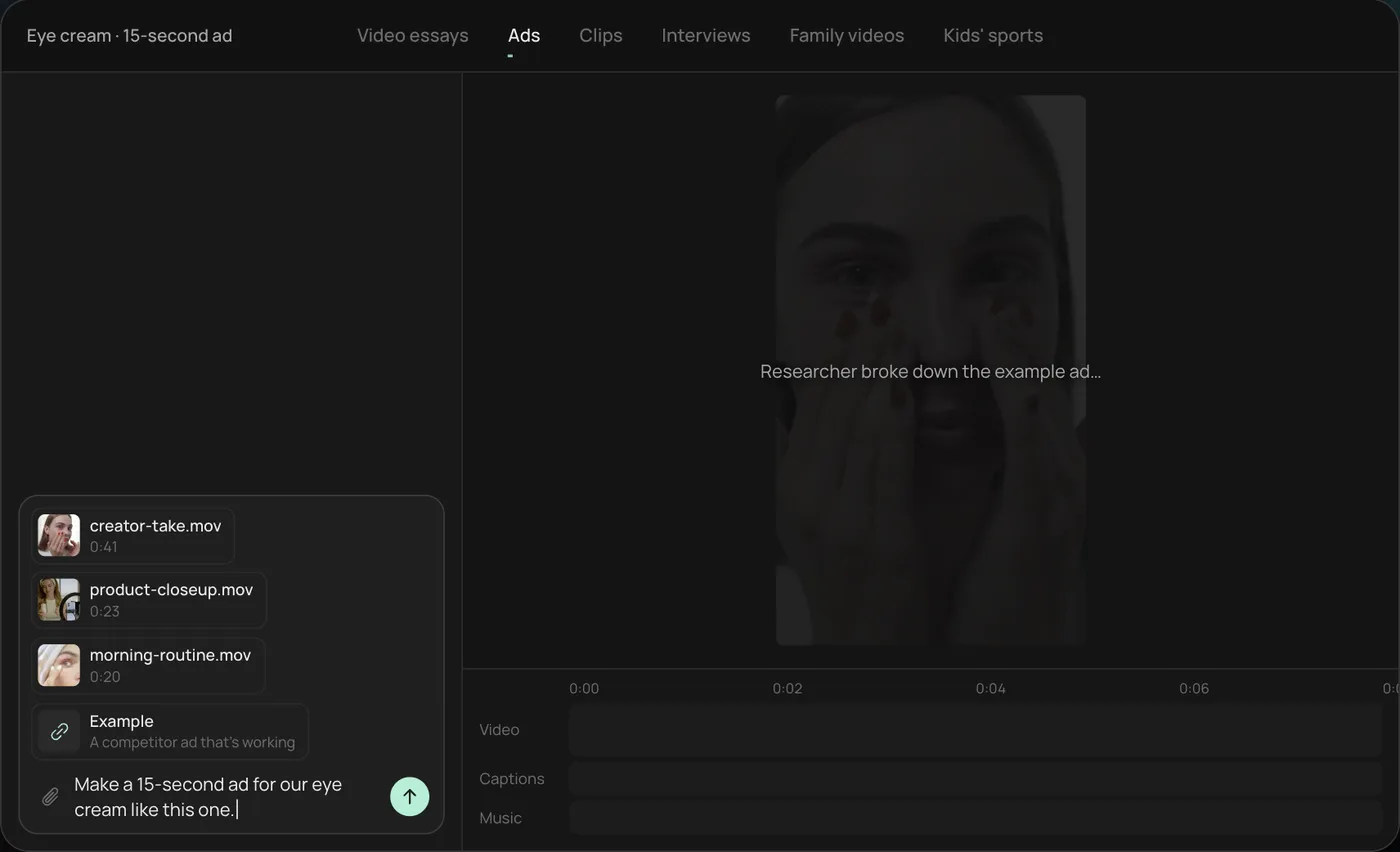
1. Drop your clips and an example. Add your phone clips (in the demo, a creator take, a product close-up and a morning routine) plus a video you like the look of, then type what you want. For Etsy: "Make a 10-second silent listing video from these, product centred, no text."
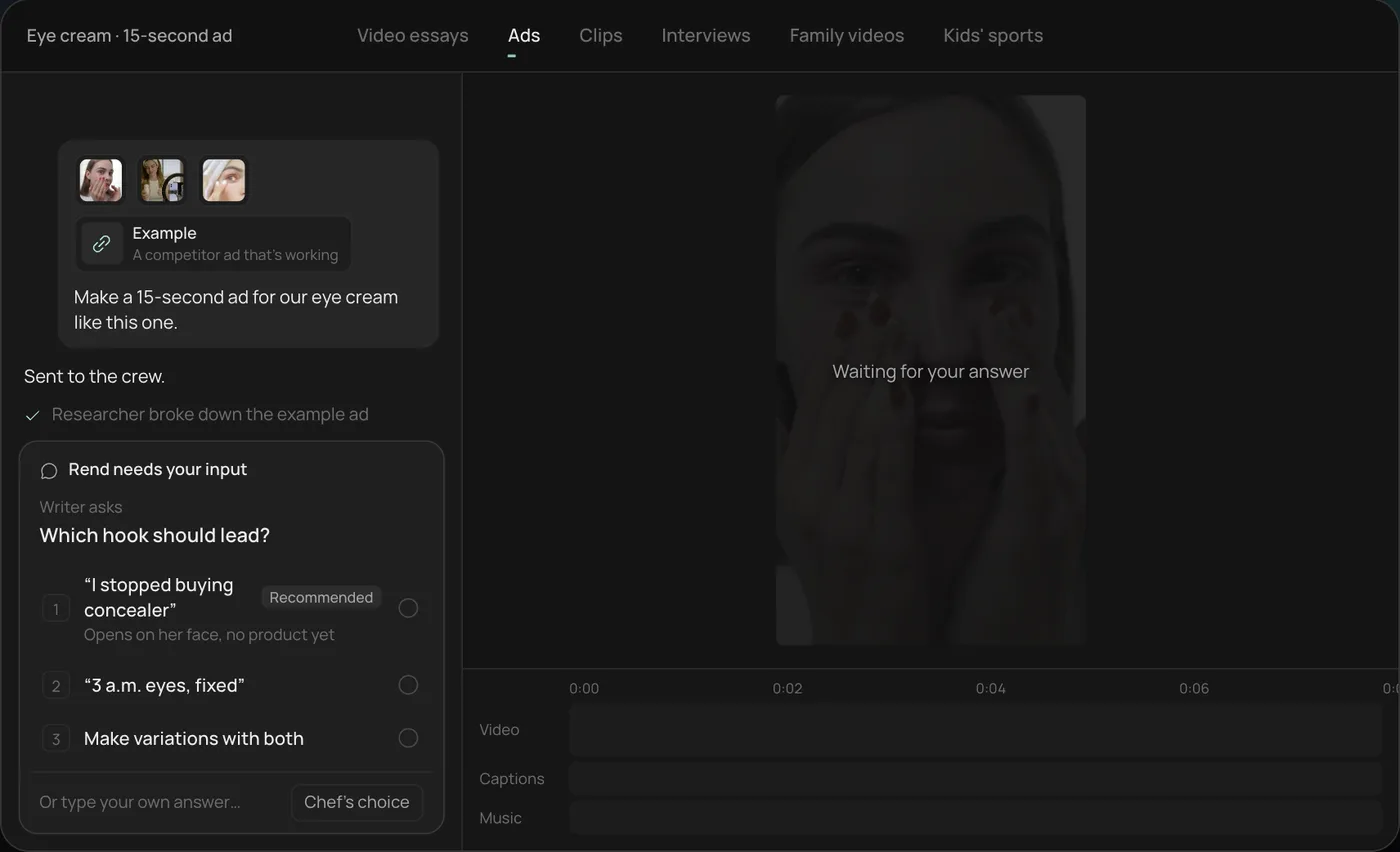
2. Answer the one question. Rend asks which hook should lead and marks a recommended answer. You can also ask it to make variations with both, which is handy when you want one clip for the listing and one for ads.
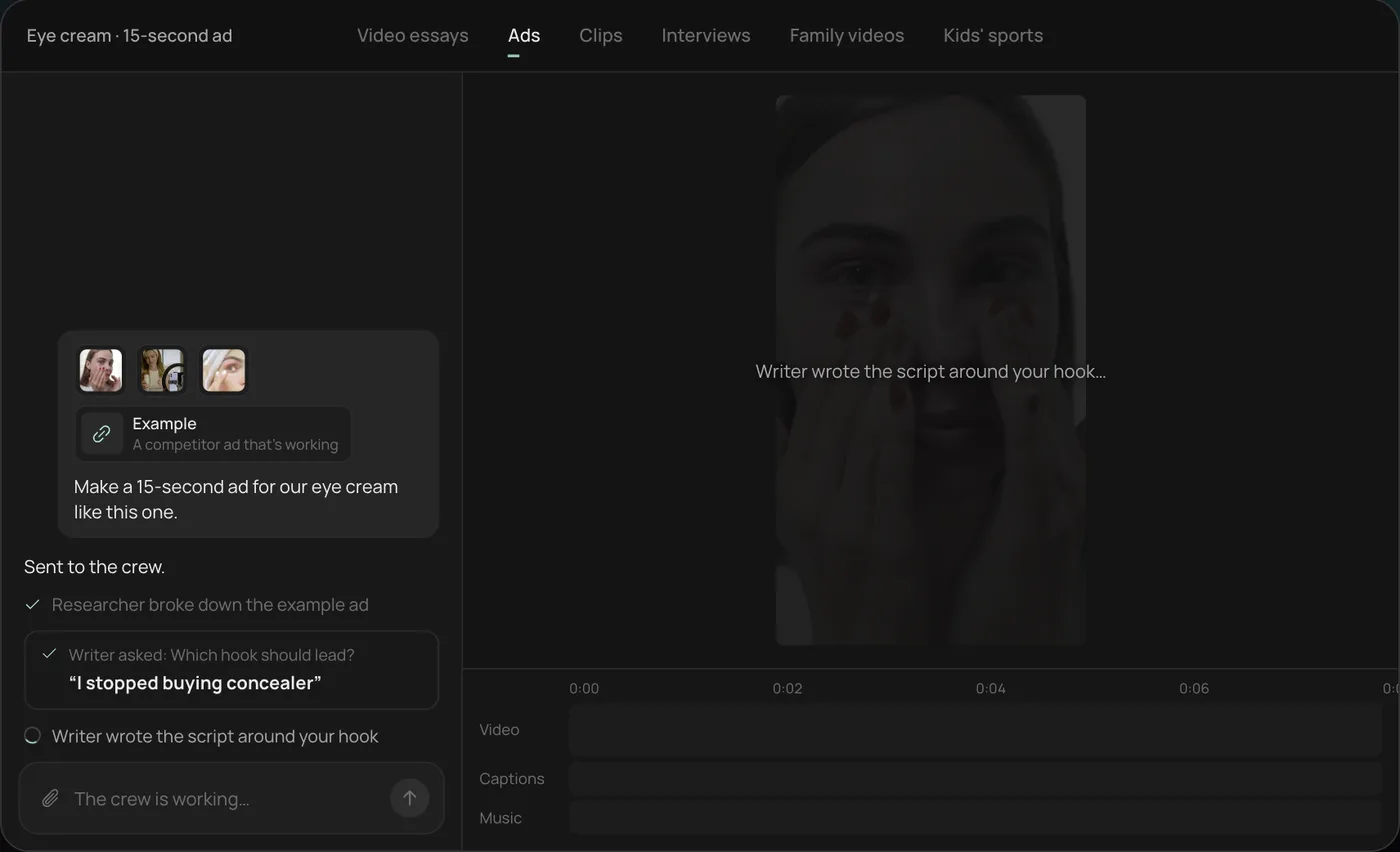
3. Let the crew work. The researcher breaks down the example and the writer builds the plan around your pick, checking off each step in chat.
4. Open the finished video. The demo's 15-second vertical ad lands on a real timeline with captions and music on their own tracks. For Etsy you would mute or drop the music track and trim to length, since Etsy strips sound anyway.
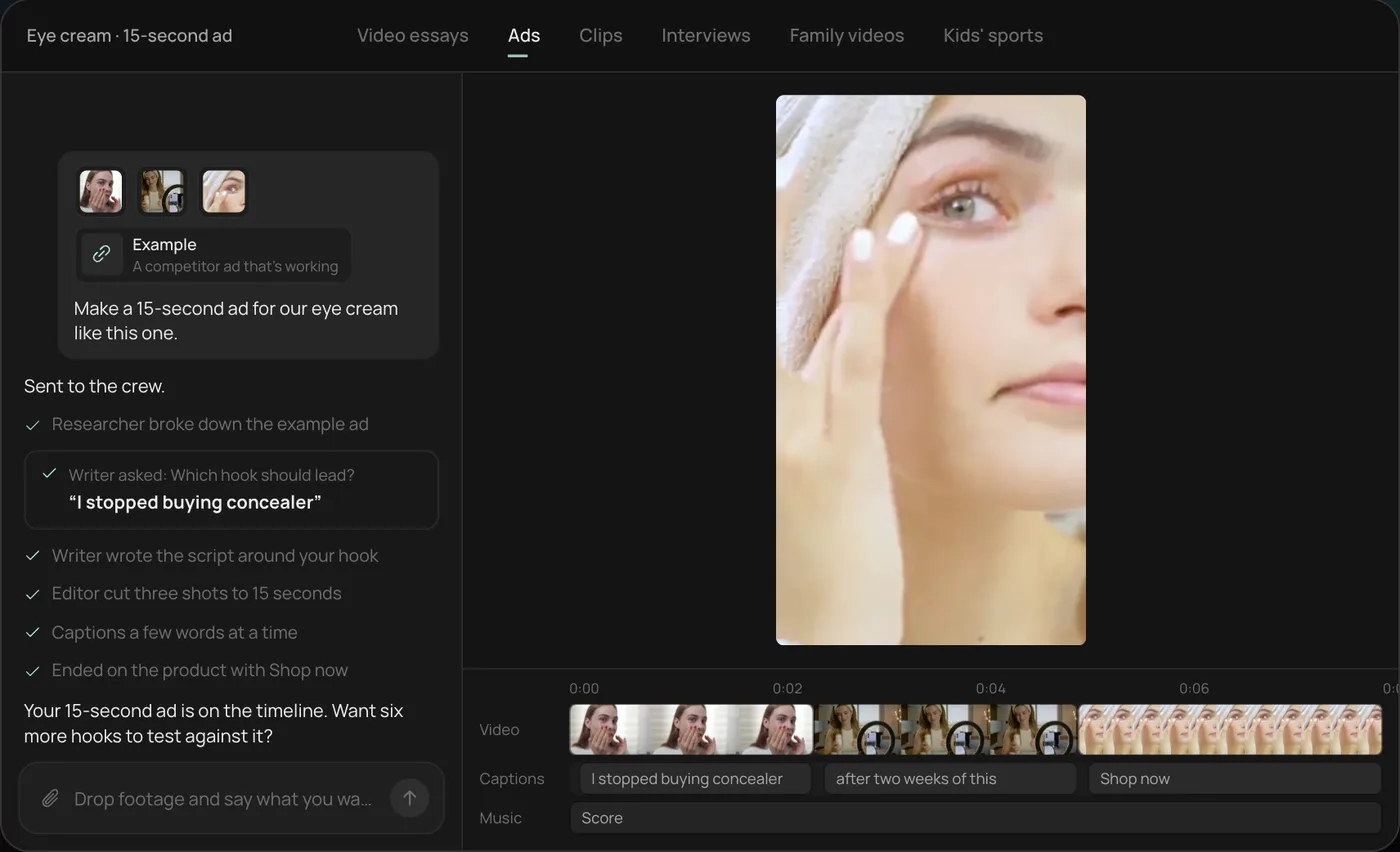
From there you can open the timeline and change anything by hand, share a review link, or export. The rest of this guide covers what to film and the mistakes that make listing videos look worse than the photos.
Etsy's listing video specs
These come from Etsy's help center articles "How to Add Listing Videos" and "How to Create a Listing", checked on November 19, 2026. Etsy changes these occasionally, so look again if you are reading this much later.
| Spec | What Etsy says | What we do |
|---|---|---|
| Videos per listing | Up to 2 | Use both: one product-in-hand, one in use or worn |
| Length | 3 to 15 seconds (listing guide says 5 to 15) | 8 to 12 seconds |
| File size | Up to 100 MB | A 12-second 1080p phone clip is well under this |
| Resolution | At least 500 px, 1080 px or more recommended | Shoot 1080p or 4K, export 1080p |
| Aspect ratio | Etsy's help page gives 2:1 or 1:2 | Keep the product in the centre so any crop still works |
| Formats | MP4, MOV and other common formats | MP4 |
| Sound | Removed on upload | Plan the video to make sense with no sound at all |
The silent part changes how you edit. No voiceover, no music, no "listen to this click." If the selling point is a sound (a music box, a chime, a crunchy slime), Etsy video can't carry it, so show the action that makes the sound and say it in the listing text.
On the aspect ratio: Etsy's own wording has varied between articles. In practice the safest file is one where the product sits in the middle third of the frame with plain space around it, so it looks right whether a page shows it tall, wide or cropped toward square. Shooting vertical on a phone and keeping the product centred covers it.
The 10-second shot plan
Most good listing videos are two or three shots. Here is the plan we give sellers, by second:
| Seconds | Shot | Why |
|---|---|---|
| 0 to 2 | The product at rest, already in frame, sharp | Etsy may show the first frame before anyone presses play, so it has to look like a good photo |
| 2 to 6 | A hand picks it up and turns it slowly, 90 to 180 degrees | Shows the back, depth and finish that photos flatten |
| 6 to 9 | It in use: worn, poured, opened, held against a wall | Answers "what will this look like in my life" |
| 9 to 11 | Next to a scale reference (a hand, a coin, a mug, a sleeve) | Cuts the "smaller than I expected" returns |
By category, the middle shot changes:
- Jewelry: a slow tilt under a window so stones and metal catch light, then on a wrist or neck.
- Clothing and knits: a hand pulling the fabric to show stretch and weight, then a person turning once.
- Prints and wall art: a hand flexing the paper to show stock, then the print in a frame on a wall.
- Candles: lit, with the flame steady, filmed somewhere with no draft.
- Ceramics and mugs: poured into, then lifted by the handle so the size reads.
- Digital downloads: a screen recording scrolling through pages, or a printed copy being flipped.
Keep each move slow. Phone video at 30 fps blurs a fast spin, and a blurry turn looks cheap next to sharp photos.
How to film it on a phone
You don't need a camera. A recent phone, a window and something to steady it is enough.
- Set the phone to 1080p at 30 fps (Etsy's Seller Handbook suggests the same). 4K is fine if you have room, but it makes bigger files for no gain at Etsy's display size.
- Use the back camera, not the selfie camera.
- Shoot next to a window with indirect light, product facing the window. Turn off overhead lights so colours don't mix.
- Use the same background as your photos. A listing where the photos are on white linen and the video is on a kitchen counter looks like two different shops.
- Lock focus and exposure (on most phones, press and hold on the product) so the picture doesn't pulse when your hand enters.
- Film each shot three times. Pick the steadiest.
- Leave a second of stillness at the start and end of every clip. It gives you clean cut points.
What goes wrong most often: hands in frame with chipped nail polish or a smartwatch that steals attention, auto-exposure flicker as a hand moves through, and the product drifting out of the centre during the turn.
Editing: what to do and what to skip
Do:
- Trim hard. Two to three shots, no more.
- Match the colour to your photos. If the photos are warm, warm the video. A cold video next to warm photos makes buyers doubt which is true.
- Stabilise the handheld turn if it wobbles.
- Keep cuts on motion (cut as the hand starts to lift, not before) so the video feels continuous.
Skip:
- Music. It's removed.
- Long text overlays. They're hard to read at gallery size and they cover the product. One small line ("Shown in Sage, 11 oz") at most.
- Logo intros. Two seconds of your logo is two seconds of not seeing the product.
- Slideshows of your photos. The buyer already has the photos. The video is for motion.
Reuse the same footage for ads and other shops
The clips you shot for Etsy are the raw material for social ads, as long as you shot a little extra. When filming, also grab a 20 to 30 second version of the in-use shot and one shot of you making the item. Handmade process footage is the most persuasive thing a small shop has, and Etsy listing videos are too short for it.
From one shoot you can make:
| Output | Length | Shape | Sound |
|---|---|---|---|
| Etsy listing video 1 | 8 to 12 s | Centred, any | None |
| Etsy listing video 2 | 8 to 12 s | Centred, any | None |
| Reels or TikTok ad | 15 to 20 s | 9:16 | Voice or music, captions |
| Instagram Feed ad | 15 s | 4:5 | Captions for sound-off |
| Pinterest pin | 6 to 15 s | 2:3 or 9:16 | Optional |
If you also sell on your own store, our Shopify product videos guide covers where video goes on a product page, and Amazon product video covers Seller Central's rules, which are stricter than Etsy's. For turning the extra footage into ads, ecommerce product video ads has formats and hooks, and the video ad size checker shows each platform's safe zones on your own frame.
Where Rend fits
Rend is an AI video agent. You send it your phone clips (from the chat, by email or a web form) and say what you want, and its crew cuts the video on a real timeline you can open and change. For an Etsy seller, the useful part is doing the listing video and the ad versions in one go: ask for a silent 10-second listing cut plus a 9:16 ad with captions and music, and both land as editable projects. Your brand kit (fonts, caption style, music bed) carries into every one, so 40 listings look like one shop.
Where it's overkill: if you only need to trim one clip to 10 seconds, your phone's built-in editor does that in a minute. Rend earns its place when you have many listings or want ads from the same shoot. Editing is free and you pay only when Rend renders or generates something; see pricing.
FAQ
Does an Etsy listing video have sound?
No. Etsy's help center says uploaded listing videos won't contain any audio. Plan every video so it makes sense on mute, and put anything that needs explaining in the listing text.
How long should an Etsy listing video be?
Etsy allows 3 to 15 seconds on its video help page and 5 to 15 in its listing guide. We aim for 8 to 12. That's enough for a turn, a use and a scale shot without the buyer getting bored.
Can I add more than one video to an Etsy listing?
Yes, up to two per listing. Use them for different jobs: one close-up turn, one worn or in use.
What's the best aspect ratio for an Etsy video?
Etsy's help page lists 2:1 or 1:2. Because pages can crop, the practical rule is to keep the product in the centre with space around it. A vertical phone clip with a centred product works.
Do I need a professional camera?
No. A recent phone at 1080p, 30 fps, next to a window, holds up at Etsy's display size. Steadiness and light matter far more than the camera.
Can I use AI to make an Etsy product video?
Yes, for the editing. Etsy's rules on how items are described still apply, so the video should show your real product. Use AI to cut, colour-match and resize your own footage rather than to invent how the item looks.
If you have a folder of product clips and a shop full of listings without video, start a free Rend project and send the clips in.