Turn Reviews Into Video Ads: Formats, Permission and FTC Rules
To turn reviews into video ads, pick a review that names a specific problem and result, put its exact words on screen over footage of the product in use, credit the reviewer the way they agreed to, and cut it to 15 seconds in 9:16 and 4:5. The strongest version uses video the customer filmed themselves, with their permission. And the review has to be real, typical of what customers say, and used with any connection (a free product, a discount) disclosed. In the US, the FTC's Endorsement Guides and its Consumer Reviews and Testimonials Rule both apply once a review appears in an ad.
You probably have dozens of reviews already sitting on your site, Google profile or Amazon listing. Most of them aren't ad material. A few are excellent. This guide is about finding those, getting the right to use them and cutting them into ads that don't look like a slideshow of stars.
How to turn a review into a video ad in Rend, step by step
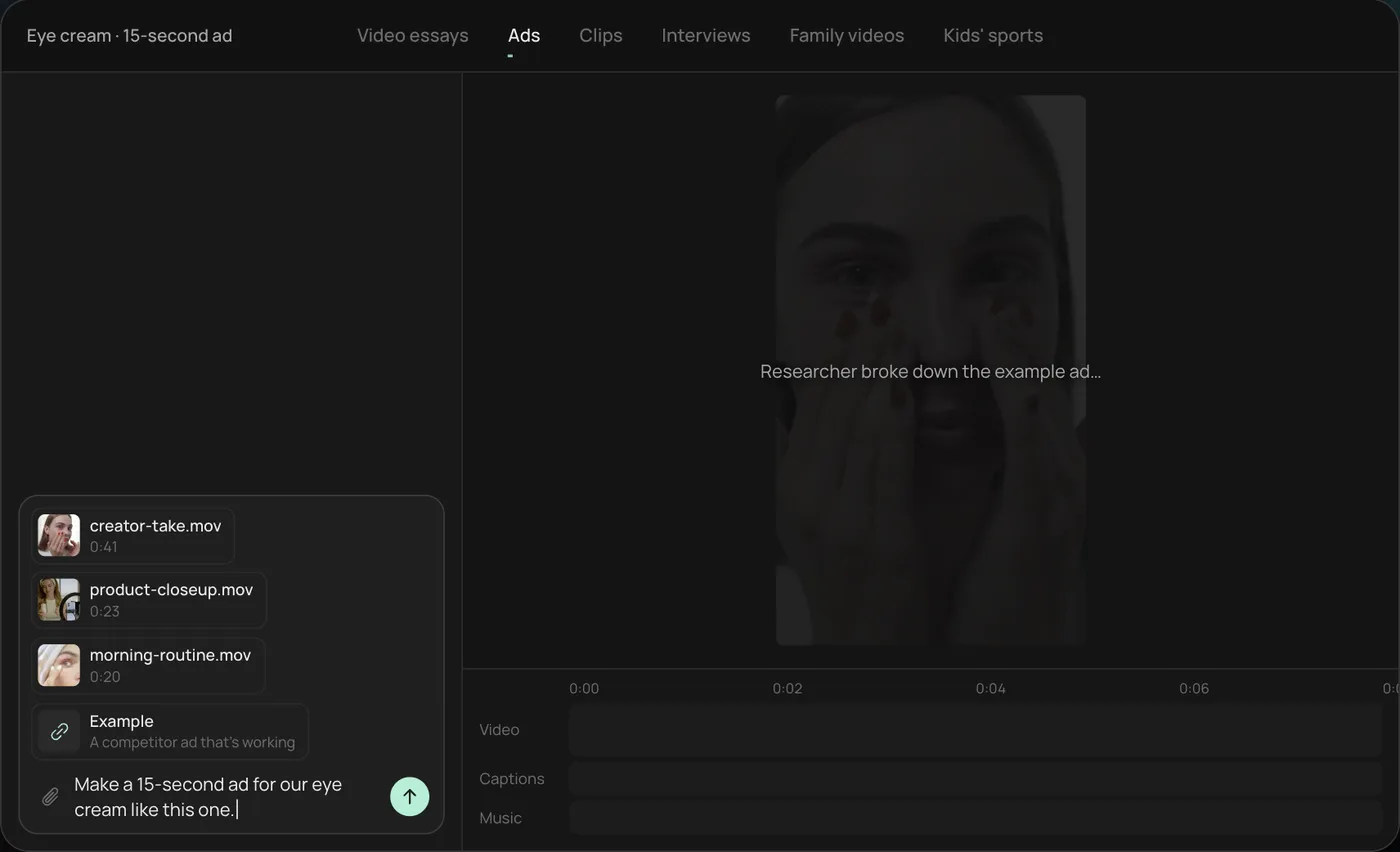
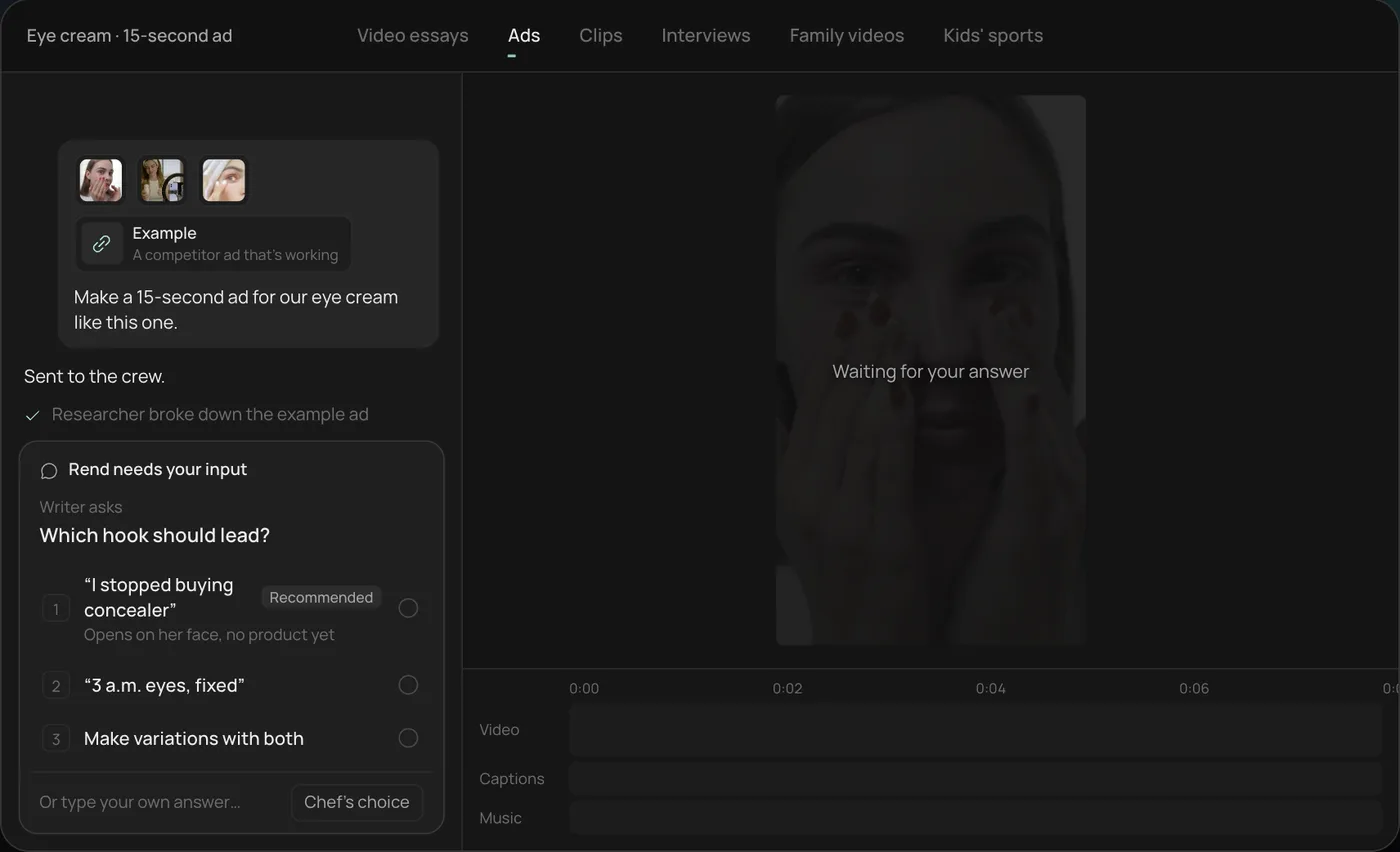
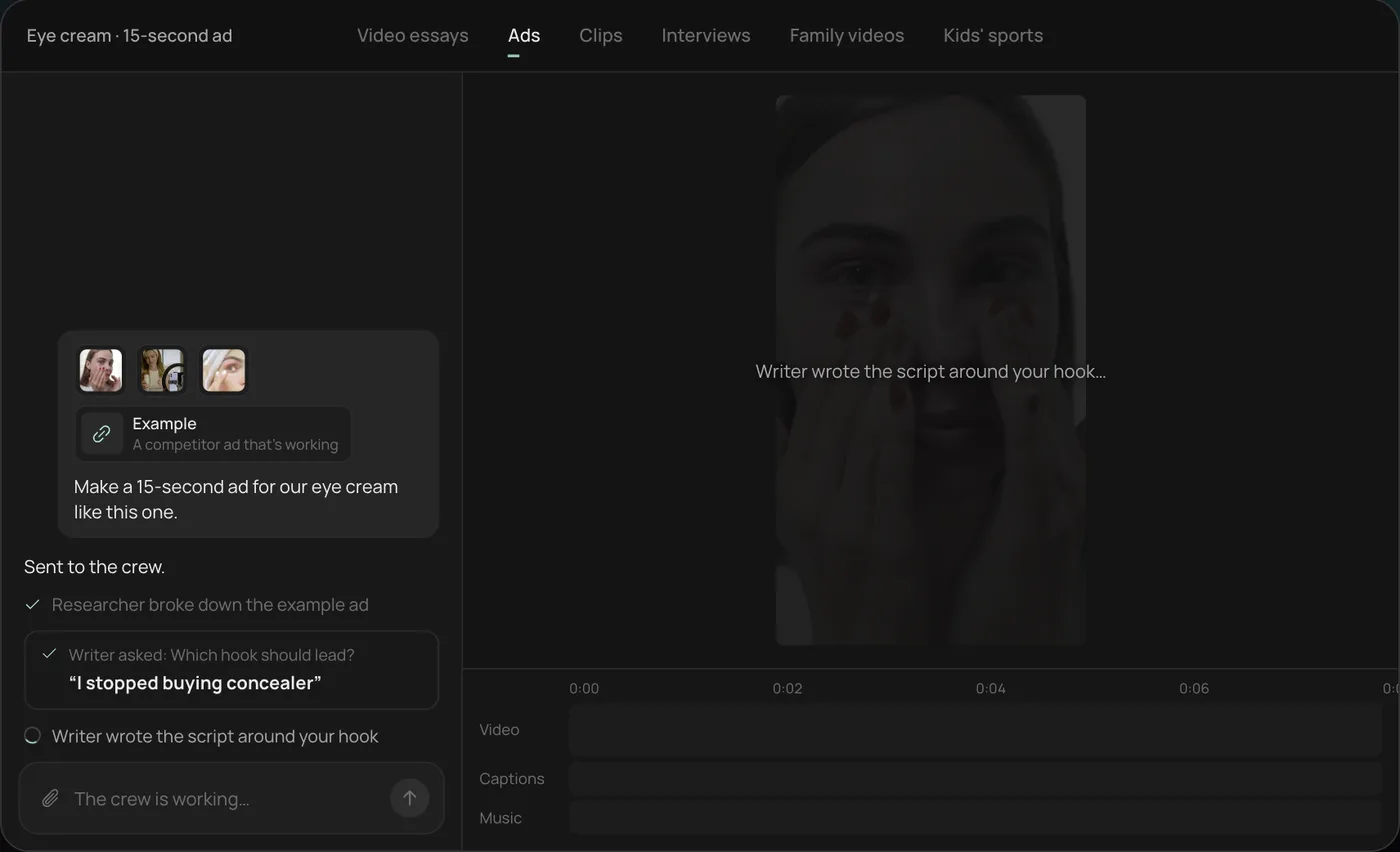
These screenshots come from Rend's demo of a 15-second eye cream ad from phone clips and a competitor ad; a review ad works the same way.
1. Drop your clips and an example. Add your phone clips (in the demo, a creator take, a product close-up and a morning routine) plus an ad you like, then type what you want. For a review ad, paste the review too: "Make a 15-second ad with this review on screen."
2. Answer the one question. Rend asks which hook should lead and marks a recommended answer. With reviews, the hook is usually the review's best line, so you can ask for variations with two different lines.
3. Let the crew work. The researcher breaks down the example ad and the writer builds the script around your hook, checking off each step in chat.
4. Open the finished ad. A 15-second vertical ad lands on a real timeline with captions and music on their own tracks, and Rend offers six more hooks to test.
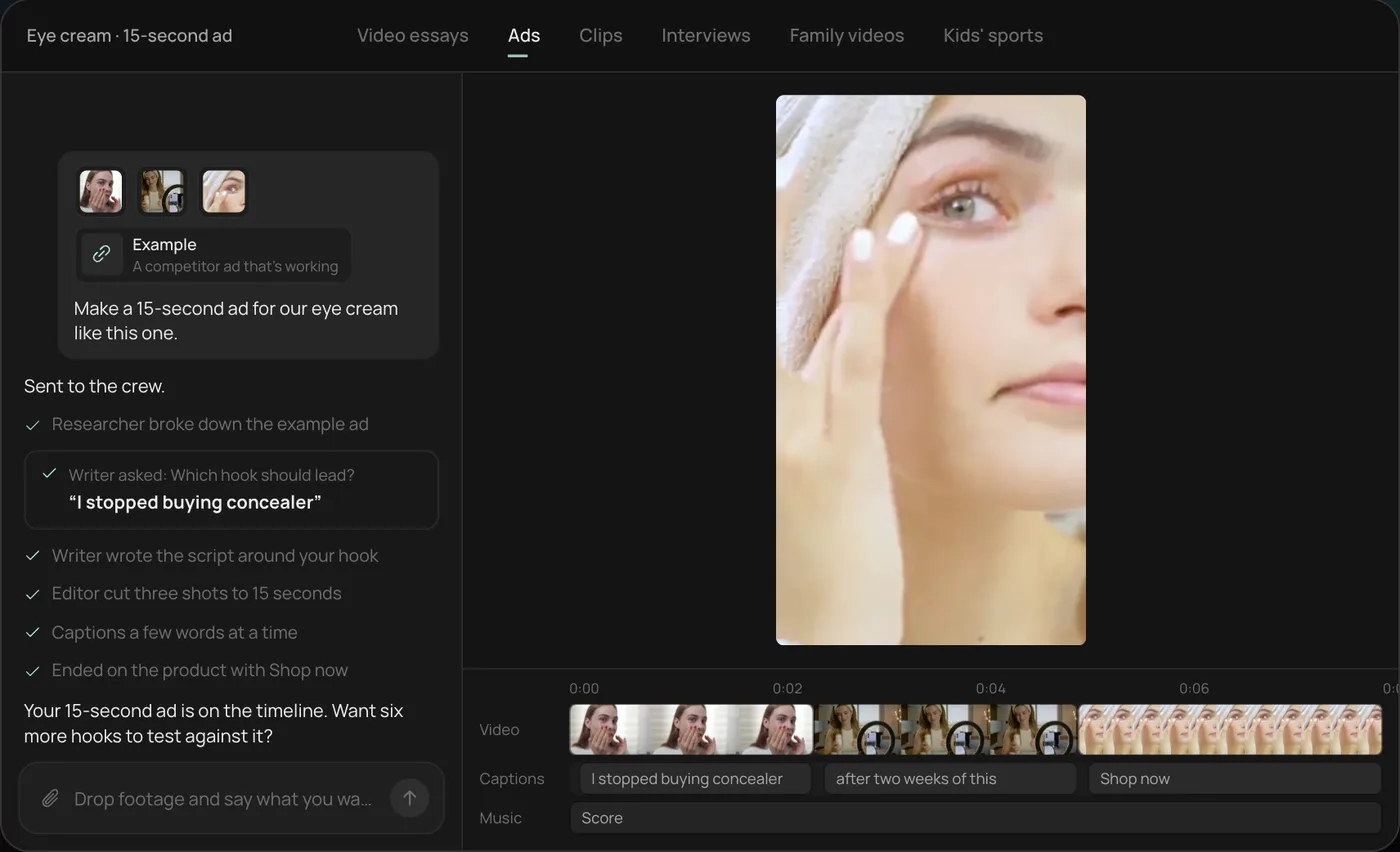
From there you can open the timeline and change anything by hand, share a review link, or export. Below is how to choose the review and stay on the right side of the rules.
Which reviews make good ads
Sort your reviews by usefulness, not star rating. A five-star "Love it!!" is worthless in an ad. A four-star review that says "I was skeptical because the last three didn't work, but after two weeks the dark circles are visibly lighter" is a ready-made script.
What we look for:
| Good ad review | Weak ad review |
|---|---|
| Names the problem before the product | Starts with "Great product" |
| Has a number: days, uses, sizes, dollars | Vague praise |
| Mentions an objection and answers it ("I thought it'd be greasy, it isn't") | Only says it's good |
| Sounds like a person talking | Reads like marketing copy |
| Describes a result most customers get | Describes a one-off miracle |
| Under 40 words, or has a 15 to 25 word stretch that stands alone | Long and needs context |
That fifth row is a legal point as well as a creative one. More on it below.
A quick way to find them: export your reviews to a spreadsheet and search for "but", "skeptical", "finally", "tried", "after", "weeks" and "days." Reviews with those words usually have a before-and-after built in.
Four formats that work
1. Review text over product footage
The simplest and most common. The review's words appear on screen, a phrase at a time, over 3 to 5 shots of the product being used. Star rating and first name (with permission) at the top. Music under it.
Timing for 15 seconds: 0 to 2 s the strongest phrase as the hook, 2 to 11 s the rest of the review in two or three chunks, 11 to 15 s the product, offer and CTA. Keep each on-screen chunk to 6 to 10 words; people need about a second per four or five words to read on a phone.
2. Customer's own video
If a customer sent you a video (an unboxing, a before-and-after, them using it), that's the best ad material you have. It's real UGC, and it looks like the content around it in Reels and TikTok. Trim to the best 10 to 20 seconds, add word-timed captions, and add your offer at the end. Don't over-polish it; heavy graphics on top of a phone video make it look like an ad pretending not to be.
3. Review stack
Three short reviews in quick succession, each about 3 seconds, each answering a different objection: "it actually works", "no smell", "arrived in two days." Good for products where buyers have several worries. Keep the footage under each one different.
4. Creator reads the review
You or someone on your team holds the phone and reads a real review aloud, then shows the product. "This is what Dana wrote after two weeks." It works well for small brands where the founder is the face. The key is that the person on camera is clearly reading someone else's words, not claiming them.
If you want scripts for the other UGC formats, our UGC ad script templates has eight, with timings.
Getting permission and getting UGC
A review on your website, your Google profile or a marketplace is not automatically yours to put in a paid ad. Your site's terms may give you some rights to reviews posted there, and marketplaces have their own rules about reusing their content. The simple, safe habit: ask the reviewer.
A short permission message that works:
Hi Dana, thank you for the review. Would you be OK with us using it in an ad on Instagram and Facebook, with your first name and last initial? If you'd also be up for sending a 15-second phone video of you using it, we'd send you [a thank-you]. No pressure either way.
Keep the reply. Note which name format they agreed to. If they send video, our testimonial video guide covers the release form and what it should cover, plus how to film a proper interview if they're local.
To get more customer video without asking one by one:
- Put a line in the post-purchase email asking for a short video, with three prompts ("Show us the first time you used it", "Show the before and after", "Tell us what you'd say to a friend").
- Offer a thank-you that doesn't depend on what they say. A discount for sending a video is fine. A discount for sending a positive video is not (see the next section).
- Make the upload easy: a link that opens on a phone.
The FTC rules, in plain words
This is general information, not legal advice; if you're in a regulated category (supplements, health, finance), get advice for your case.
Two sets of US rules matter here, both from the Federal Trade Commission:
- The Endorsement Guides, updated in June 2023, cover any ad that uses someone's opinion or experience. A customer review used in an ad counts as an endorsement.
- The Rule on the Use of Consumer Reviews and Testimonials, in effect since October 21, 2024, lets courts impose civil penalties for knowing violations.
What they mean for review ads, based on the FTC's own guidance pages:
- The review must be real. No made-up reviews, no reviews written by staff posing as customers, no buying fake ones. The FTC's Q&A notes the rule doesn't ban AI avatars in marketing as such, but an avatar delivering a testimonial that's fake or false is a problem. If an actor or avatar reads a real customer's words, don't make it look like they're the customer.
- It must reflect what customers usually experience. The FTC's Q&A says that once a review is featured in marketing it becomes a testimonial, and showing non-representative reviews could be deceptive. If one customer lost 30 pounds and most lose 5, the 30-pound review needs context, or pick a different one.
- Disclose connections. If the reviewer got the product free, got paid, got a discount for the review, works for you or is related to you, say so clearly in the ad. The FTC says these disclosures should be clear and conspicuous; a line on screen ("Received a free sample") beats a hashtag buried in the caption.
- Don't pay for a particular opinion. Offering something in exchange for a review is allowed only if it doesn't depend on the review being positive. The FTC's Q&A is direct that paying for five-star reviews violates the rule, even with a disclosure.
- Don't edit the meaning. Shortening a review is fine. Cutting "it worked, but only after I stopped using it daily" down to "it worked" is not.
- Results claims need support. If the review says "cleared my acne in a week," you're now making that claim. You need evidence for it, the same as if you wrote it yourself.
Outside the US the details differ, but the same habits (real, typical, disclosed, unedited in meaning) keep you safe in most places.
Making it look like an ad people stop for
A review ad lives or dies on the first two seconds, like any other. What helps:
- Start on motion, not a static star rating. The product being used, with the best phrase on screen.
- Use the reviewer's exact words for the hook. "I stopped buying concealer" from a real customer beats any line a copywriter writes.
- Keep text inside the safe zone. On 9:16 placements, Meta asks you to keep the bottom 35% clear. Our video ad size checker shows where.
- Make three versions with three different reviews as the hook, same body. That's a clean hook test; ad creative testing explains how to read it.
- Review the ad with someone who didn't write it before you spend. Our ad video review checklist covers what to look for.
Where Rend fits
Rend is an AI video agent. Paste in a review and send your product clips or the customer's video, and its crew builds the ad on a real timeline: the review's words as word-timed captions in your caption style, the shots around them, music on its own track, and sizes for each placement. Ask for three versions with three different reviews and you get a hook test. Because everything is editable, if a reviewer asks you to change their name format or you need to add a disclosure line, it's a quick change, not a remake.
Rend won't decide whether a review is typical or whether you have permission. That part is yours. And if you have no customer footage at all, our post on UGC ads without creators covers the options and their tradeoffs. Editing in Rend is free; you pay when it renders or generates. See pricing.
FAQ
Can I use Google reviews in my ads?
Ask the reviewer first. The review is their words, and putting it in a paid ad is a different use from it sitting on your profile. Keep their reply, and use the name format they agreed to.
Do I need to say a review was incentivized?
If the customer got something for it (a free product, a discount, a gift card), disclose that clearly in the ad. The FTC says failing to disclose incentives can be deceptive, and the offer itself must not depend on the review being positive.
Can I edit a customer review for an ad?
You can shorten it, as long as you don't change what it means. Don't remove a "but" that changes the point, and don't combine sentences from different reviews into one quote.
Can an AI voice or actor read a customer review?
The FTC has said there's no blanket ban on AI avatars in marketing, but the testimonial must be real and the ad shouldn't make it look like the reader is the customer. A line like "Dana's review, read by our team" handles it.
How many reviews should go in one ad?
One for a 15-second ad, three for a quick review stack. More than three and none of them land.
What's better, review text or customer video?
Customer video, when you have it and permission to use it. Text over product footage is the fallback that works for almost any product.
If you have a few great reviews and some product clips, start a free Rend project and turn them into your first review ads.