Video Ads for Plumbers and HVAC: Seasonal, Emergency and Local
The video ads that work for plumbers and HVAC companies are 15 to 30 seconds long, shot on a phone by a tech on a real job, and tied to the season: AC tune-ups in spring, no-cool calls in summer, furnace checks in fall, frozen pipes and water heaters in winter. Run emergency-call ads year round with your phone number on screen the whole time. Put the money where people are already looking (Google Local Services Ads for calls today, Meta and YouTube for the tune-up and replacement jobs you want next month), and post a 30-second clip to your Google Business Profile.
Most shops already have the footage. It is sitting in the techs' camera rolls. The work is turning it into ads, and that is what the steps below show.
How to make a plumbing or HVAC ad in Rend, step by step
These screenshots come from Rend's demo of a 15-second eye cream ad made from phone clips; a service ad works the same way with your job-site clips.
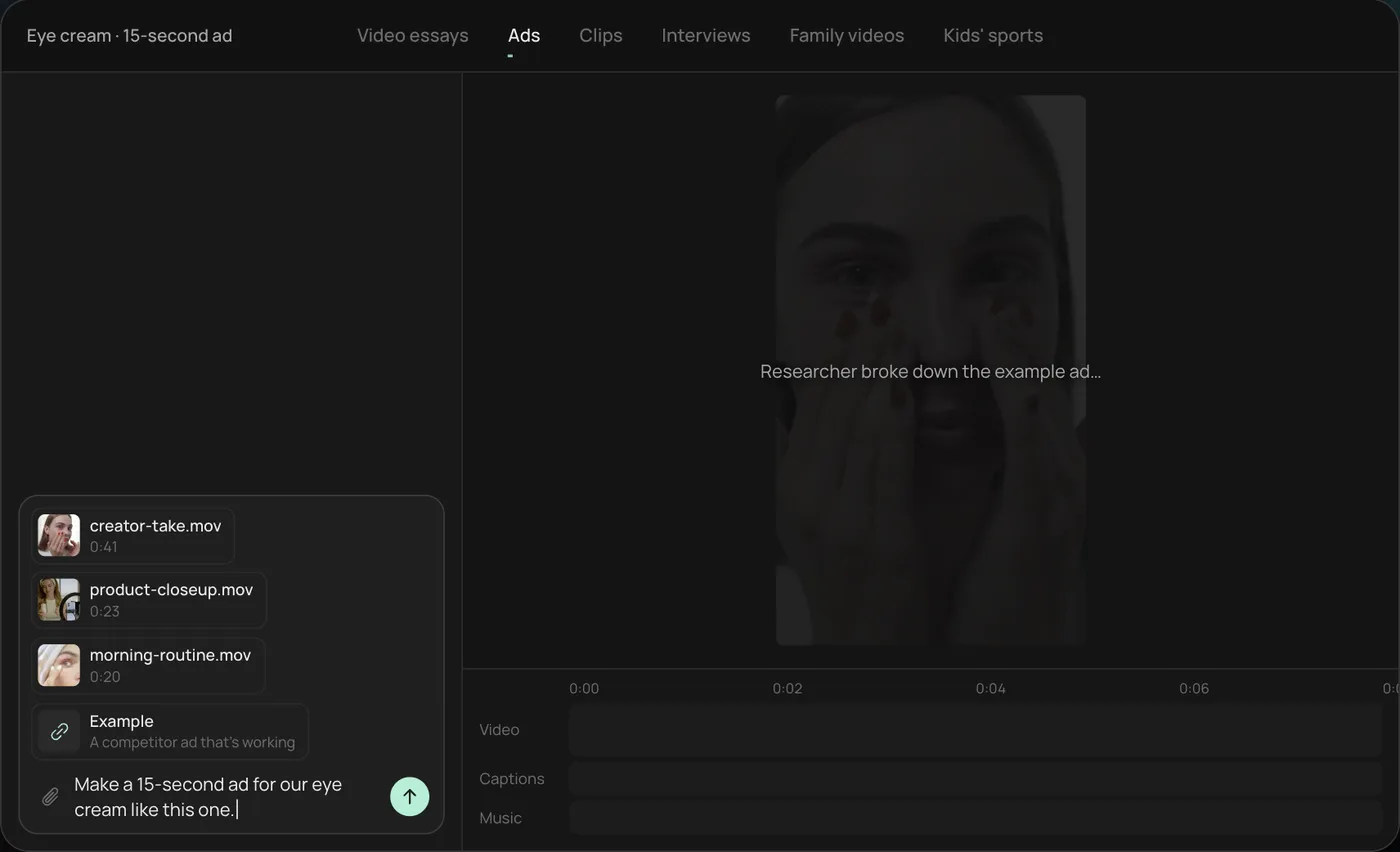
1. Drop your clips and an example. Add your phone clips (here a creator take, a product close-up and a morning routine) plus a competitor ad you like, then type what you want: "Make a 15-second ad for our eye cream like this one."
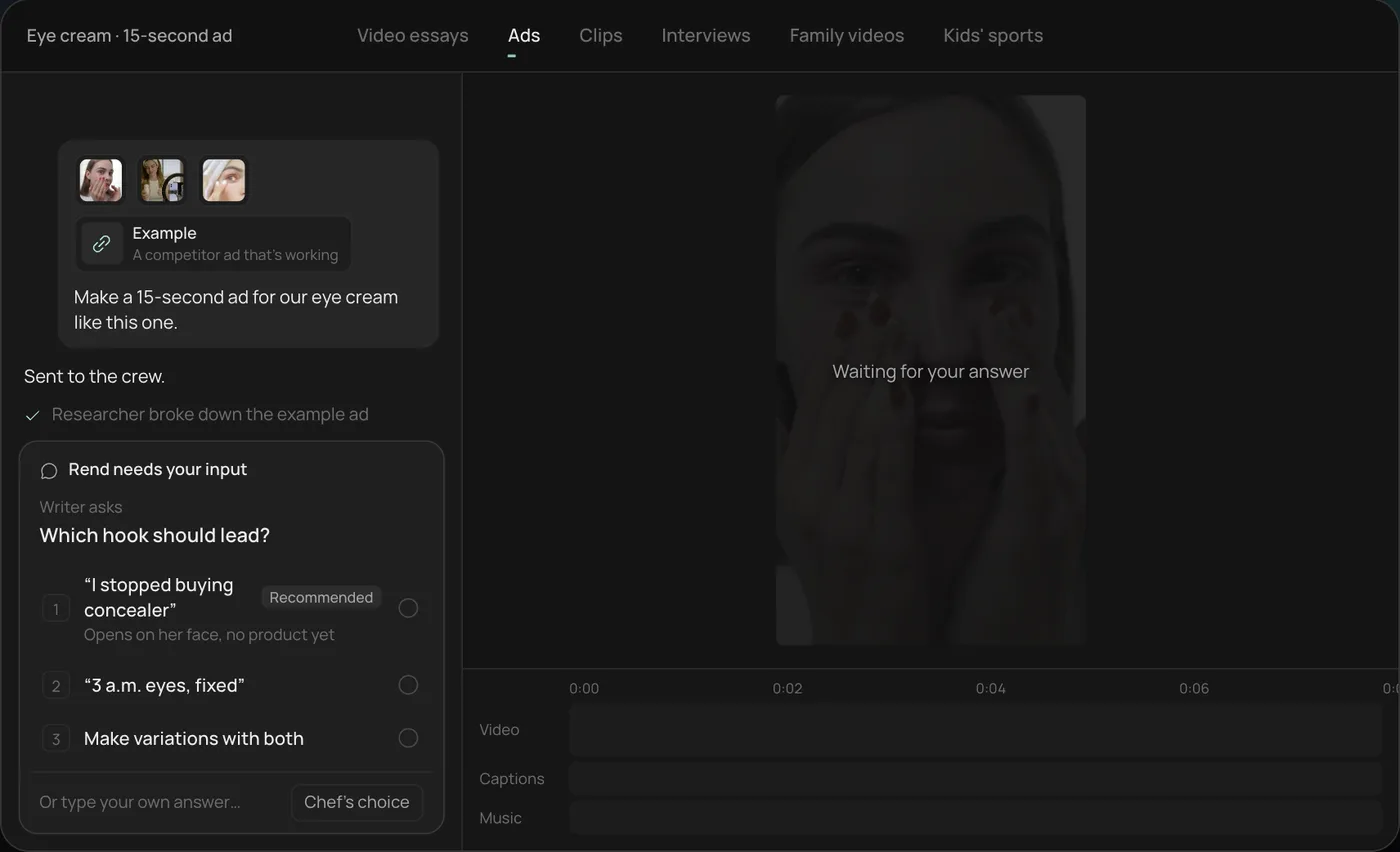
2. Answer the one question. Rend asks which hook should lead and marks a recommended answer. You can also ask it to make variations with both.
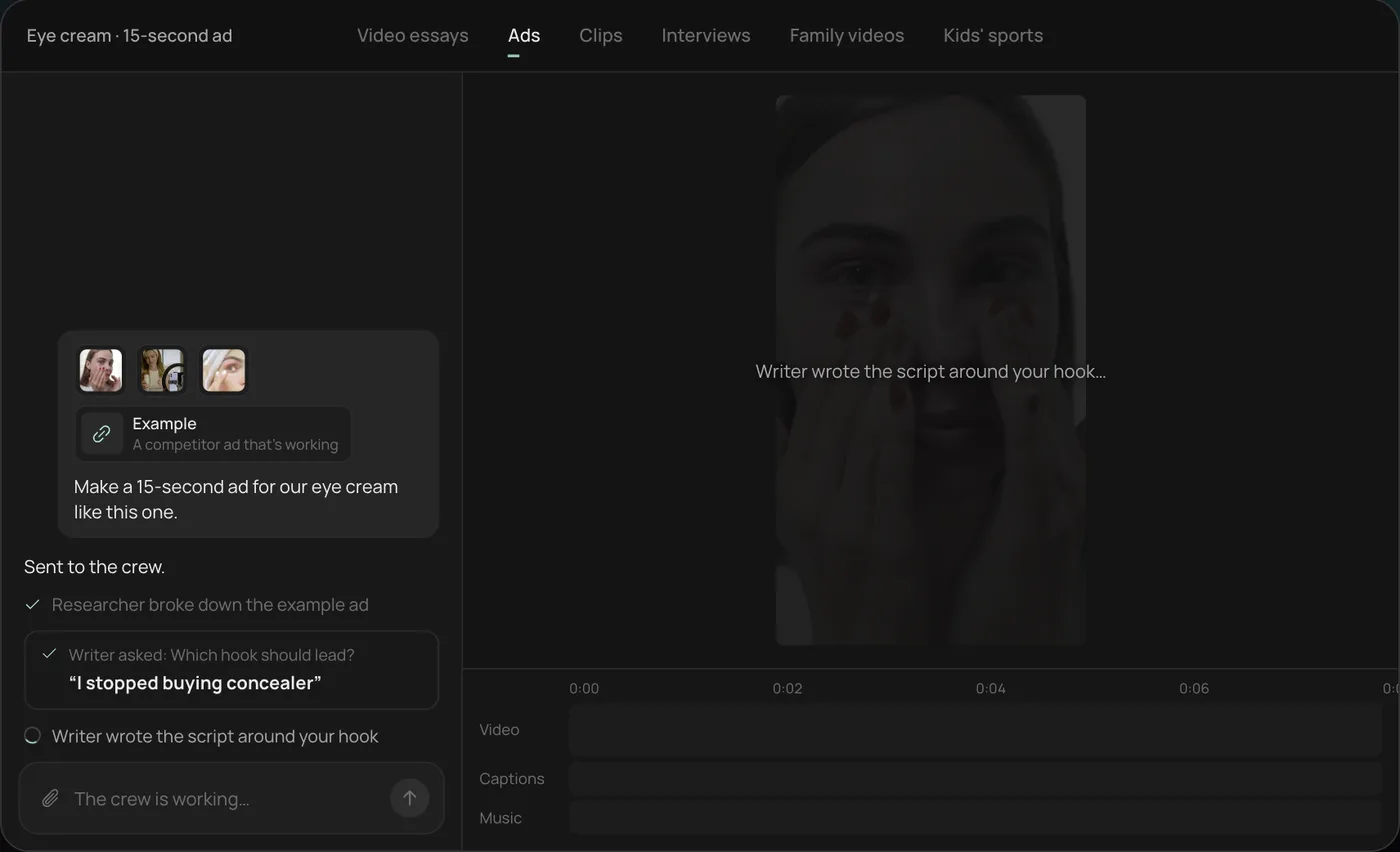
3. Let the crew work. The researcher breaks down the example ad and the writer builds the script around your hook, checking off each step in chat.
4. Open the finished ad. A 15-second vertical ad lands on a real timeline with captions and music on their own tracks, and Rend offers six more hooks to test.
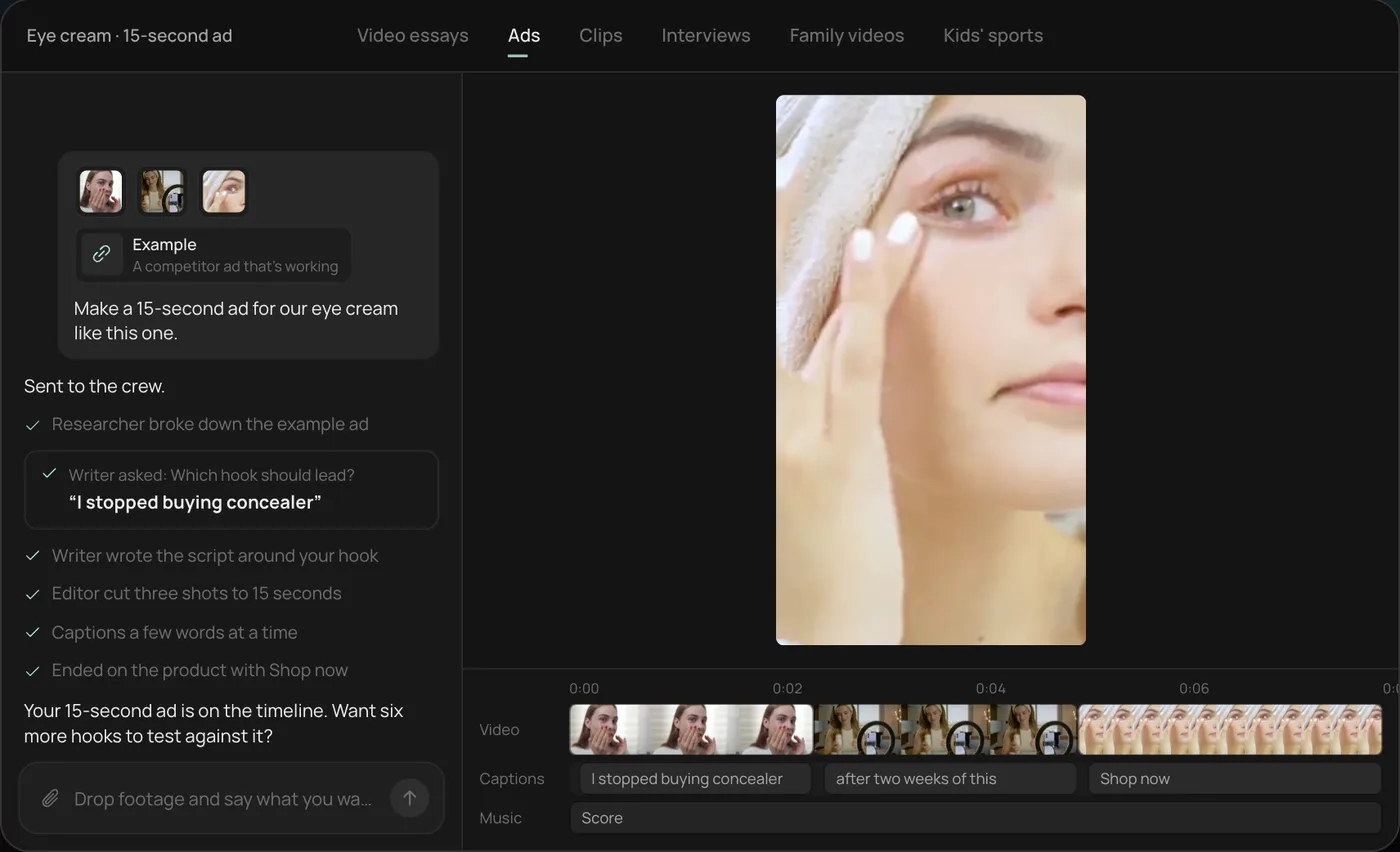
From there you can open the timeline and change anything by hand, share a review link, or export. For a service company, swap in a tech's clips and a line like "Make a 20-second no-heat ad with our number on screen the whole time." Start a free Rend project to try it on your own footage.
The seasonal calendar
Home service demand follows the weather, and your ads should move a few weeks ahead of it. Running a furnace ad during the first cold snap is late; everyone else is running one too, and your techs are already booked.
| Months (northern US) | HVAC ad | Plumbing ad | Offer that fits |
|---|---|---|---|
| March to May | AC tune-up before summer | Sump pump check before spring rain | Flat-price tune-up, maintenance plan signup |
| June to August | No-cool emergency, new system financing | Outdoor spigot and sprinkler leaks | Same-day service, financing |
| September to October | Furnace safety check | Water heater flush | Flat-price check, maintenance plan renewal |
| November to February | No-heat emergency | Frozen and burst pipes, water heater replacement | 24/7 calls (only if you truly answer), replacement financing |
| Year round | Indoor air quality, thermostat upgrades | Drain cleaning, leak detection, sewer camera | First-time customer offer |
Shift the calendar for your climate. A shop in Phoenix sells AC from April to October; a shop in Minnesota sells heat for six months.
Keep the offer simple enough to say in one line on screen. "Furnace safety check, flat price, book this week" beats a coupon with three conditions. If you list a price, make sure every tech and the front desk quote the same one.
Emergency-call ads
Emergency ads have one job: get the phone to ring. Everything else is decoration.
A 15-second emergency ad, shot list and timing:
- 0 to 2 s: the problem, in your own customer's house (with permission). Water on a basement floor. A thermostat reading 54 degrees. No intro, no logo.
- 2 to 8 s: a tech arriving, walking in with tools, getting to work. Real uniform, real van.
- 8 to 12 s: the fix happening. Pipe cut out, new section in. Furnace igniter swapped.
- 12 to 15 s: the number, large, plus one line: "Real person answers, day or night."
Your phone number stays on screen for the whole 15 seconds, top third of the frame so platform buttons don't cover it. Check placement against the safe zones in our video ad sizes guide.
Two cautions. Only say 24/7 if a human actually answers at 3 AM. And don't promise a response time you can't hit across your whole service area; "within the hour" on an ad that reaches a town 50 minutes away invites one-star reviews.
Where to run them
The three channels do different jobs. Most shops waste money by running the same ad everywhere.
| Channel | How you pay | What it's good at | Does your video show? |
|---|---|---|---|
| Google Local Services Ads | Per lead (calls, messages, bookings) | People searching "plumber near me" right now | No, the listing is built from your profile, reviews and badge |
| Meta (Facebook, Instagram) | Per impression or click, by your bid | Tune-ups, maintenance plans, replacements, reaching homeowners before they need you | Yes, 9:16 and 4:5 |
| YouTube | Per view or by bid strategy | Local awareness, longer explainers, financing offers | Yes, 16:9 in-stream, 9:16 Shorts, 6 s bumpers |
| Google Business Profile | Free | Proof on the profile people check before calling | Yes, up to 30 s |
Local Services Ads
Google's own Local Services help center says you're charged per valid lead, not per click, and you set a service area and job types instead of keywords. Since October 2025 there is one badge, Google Verified, replacing Google Guaranteed and the others. Your video doesn't play in the listing. What helps there is reviews, fast answers and a complete profile. Video still matters because the people who tap through to your profile or site will see it.
Meta
This is where video does the heavy lifting. Homeowners aren't searching for a furnace check in August, but a 20-second clip of a tech pulling a filthy filter out of a return gets attention in a feed. Location targeting does most of the work for a local service; keep the audience broad inside your service area.
YouTube
Skippable in-stream ads show a skip button after 5 seconds, so the problem has to be on screen before then. A 6-second bumper ("Water heater out? Same-day replacement" plus the number) is cheap to make and worth testing. Shorts takes the same vertical cut you made for Meta.
Google Business Profile
Google's help center allows videos up to 30 seconds and 75 MB at 720p or higher. Post real job footage there: a sewer camera reveal, a clean new install, a tech explaining a repair. The Google Business Profile video guide covers why uploads get rejected and how to post them.
What to film on every job
Give your techs a 60-second habit, not a production task. On each job they shoot:
- The problem before touching it, wide then close (5 to 10 s each).
- One clip of the repair in progress.
- The finished work, wide then close.
- Ten seconds talking to the camera: what was wrong and what they did, in plain words.
Hold the phone vertical, wipe the lens (it's always greasy), and turn on a work light for crawlspaces. Ask the homeowner before filming anything inside the house, and keep their address and face out of it unless they agree in writing.
After a month you'll have hundreds of clips. The best ones are usually the gross reveals: a root-packed drain line on a sewer camera, a rusted-through water heater, an evaporator coil caked in dust. People watch those to the end. Our post on contractor before and after videos has more on structuring a reveal.
Hooks that work for home services
The first two seconds decide whether anyone sees your offer. A few that fit plumbing and HVAC:
- "This is what's inside a 12-year-old water heater."
- "If your AC is blowing warm air, check this first."
- "This drain was clogged for three years."
- "Your furnace filter should not look like this."
- "Don't pour this down your sink."
Helpful tips make good hooks because they earn trust before they ask for the call. A clip that shows a homeowner how to reset a tripped condensate switch will bring in calls from people who tried it and still need a tech. For more, see our list of video ad hooks.
Making ten ads from one week of footage
The math of local ads favors volume. One ad wears out in a few weeks with a small audience, so you want fresh variations: the same water heater clip with three different hooks, in 9:16, 4:5 and 16:9, plus a 6-second bumper.
Rend builds that set from the clips you send, by chat, email or a web form. It writes new hooks, makes the sizes, adds word-timed captions in your look, and can make image ads and search ad copy from the same material. Set up a brand kit once (logo, colors, caption style, music bed) and every ad matches. You download the set for your own ad accounts, or hand it to Rend Boost, which is in early access, where Rend runs the ads on major networks and you pay per click. Our guide to mass ad creation shows the variation process in more detail.
Where Rend won't help: it can't answer your phones, manage your Local Services Ads profile or fix a bad review score. Those three things decide more of your lead flow than any ad.
Editing in Rend is free. You pay when it renders or generates something; see pricing.
FAQ
How long should a plumbing video ad be?
Fifteen to 30 seconds for Meta and YouTube in-stream, 6 seconds for a YouTube bumper, and up to 30 seconds for your Google Business Profile. Show the problem in the first 2 seconds.
Do Google Local Services Ads use video?
No. A Local Services Ads listing is built from your profile, reviews, service area and verification badge, and you pay per lead. Video helps when people click through to your profile or site.
What should an HVAC company advertise in the fall?
Furnace safety checks and maintenance plan renewals, starting in September before the first cold week. Switch to no-heat emergency ads once temperatures drop.
Can my technicians film the ads on their phones?
Yes, and they should. Real job footage from a tech in uniform reads as more trustworthy than staged footage. Shoot vertical, wipe the lens, and get the homeowner's permission before filming in their home.
Should I put prices in my ads?
For flat-price services like a tune-up or drain cleaning, a clear price can lift calls. Make sure your front desk and techs quote the same number, and leave prices out of emergency ads, where the job varies.
What's the Google Verified badge?
It's the single badge Google shows on eligible Local Services Ads profiles that pass its screening, replacing Google Guaranteed and Google Screened since October 2025, according to Google's Local Services help center.
Send Rend a week of job-site clips and your seasonal offer, and it will build the ads in every size on a timeline you can change. Start free here.