Best AI Video Tools for Small Business in 2026: Honest Picks
For most small businesses, the best AI video tool is whichever one turns the footage already on your phone into posts and ads without hiring an editor. Canva is the best fit if you already design there. CapCut is the cheapest way to keep up with social trends. Creatify makes quick avatar ads from a product link. Rend is the pick if you want an agent to make the whole video, ads included, in your brand and on a timeline you can change.
We build Rend, so weigh our view accordingly. Prices were checked on November 18, 2026.
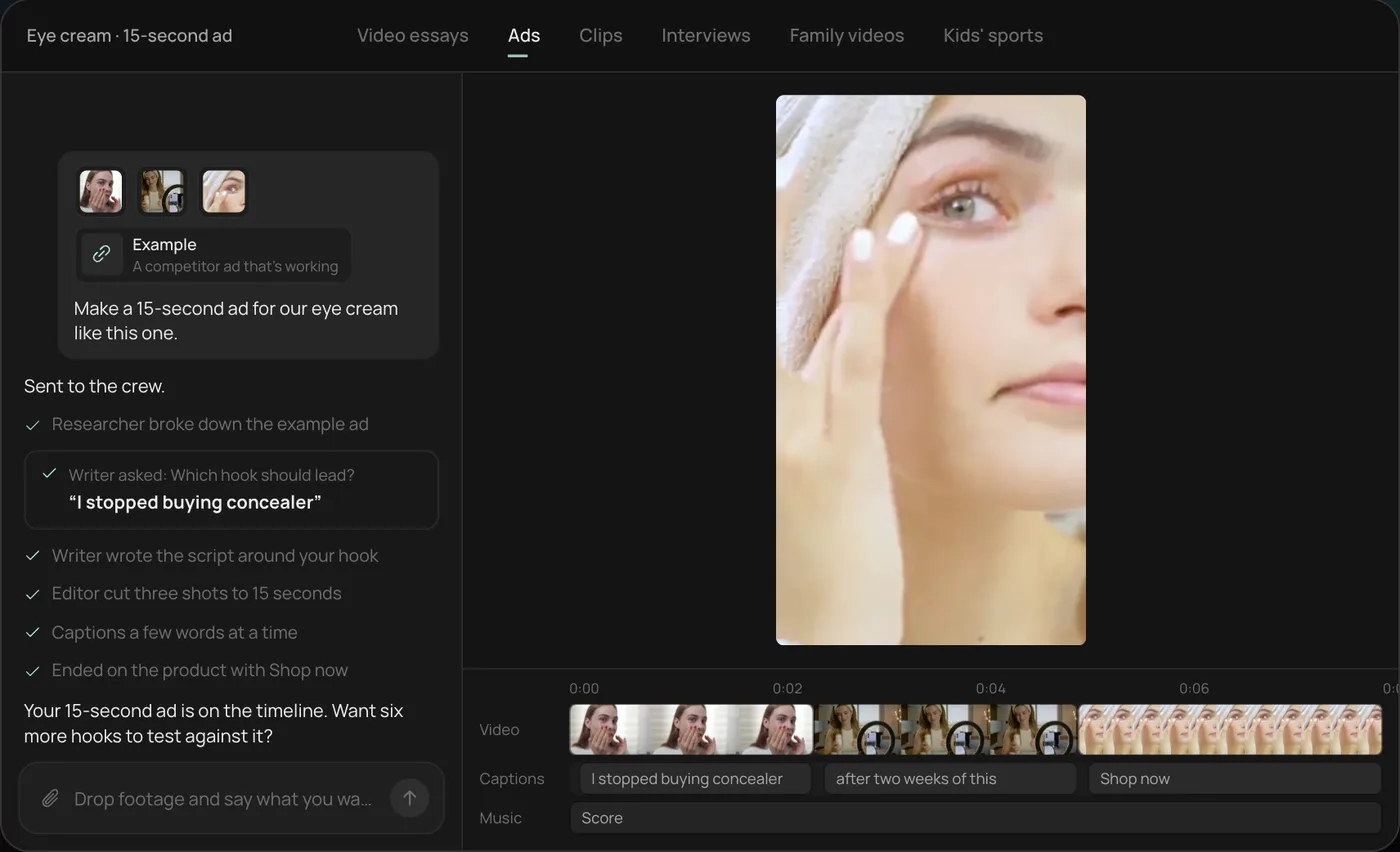
What a small business actually needs from video
Talk to a plumber, a taco shop or a med spa owner and the list is short:
- Three or four social posts a week that don't look like stock footage.
- A handful of ads in the right sizes for Facebook, Instagram and Google.
- One thing they can show on their Google Business Profile and website.
- All of it in under an hour a week, because they are running a business.
Very few owners want to learn an editor. Most want to hand off the clips and approve the result.
The picks at a glance
| Tool | Best for | Who does the editing | Brand reuse | Price (Nov 18, 2026) |
|---|---|---|---|---|
| Canva | Branded social posts from templates | You | Brand kit on paid plans | Pro $12/mo yearly, $18 monthly (US) |
| CapCut | Trend-style Reels and TikToks | You | Limited | Free; Pro $19.99/mo |
| Clipchamp | Simple promos on Windows | You | Brand kit with Microsoft 365 | Free 1080p exports |
| Creatify | Avatar ads from a product link | Mostly the tool | Some | Standard $15/mo, 55 credits |
| Rend | Whole videos and ad sets from your own footage | The agent; you approve and tweak | Brand kit reused every video | Editing free; pay for renders and generation (pricing) |
Canva
Canva Pro is $12 a month per person billed yearly in the US, or $18 month to month. If your menus, flyers and posts already live in Canva, making videos there keeps everything matching.
Wins: templates, brand kits and a tool your staff may already know.
Falls short: you still assemble every video by hand, and cutting down a long clip of your crew at work is slow. More in Canva video vs. Rend.
CapCut
Free to start, Pro at $19.99 a month. Trend templates are its superpower.
Wins: a 15-second trend Reel takes ten minutes.
Falls short: you are the editor, every time, and check CapCut's commercial-use terms before running anything as a paid ad.
Clipchamp
Microsoft's free editor exports 1080p without a watermark. Premium features come with Microsoft 365 Personal or Family.
Wins: cost. If you are on Windows and need a simple promo, it's free.
Falls short: basic AI help and no ad workflow.
Creatify
Paste a product URL, get short avatar video ads. Standard is $15 a month for 55 credits on monthly billing, and the credits expire after two months.
Wins: ecommerce shops with no footage at all can test video ads cheaply.
Falls short: an avatar standing in for your business is a hard sell for local services, where customers want to see your actual truck, kitchen or treatment room.
Rend
Rend is an AI video agent. You send what you have (phone clips, your camera roll, your website or product page) in chat, by email or through a web form, and say what you need: "three Reels from this week's jobs, plus ads for our spring tune-up special." A crew of specialist agents writes, cuts on exact transcript words, captions, adds titles and music, and checks its own work. Your brand kit (fonts, voice, music bed, caption style) carries into every video.
For ads, bring one video and your brand and Rend spins new hooks, sizes, image ads and search ads. Download them for your own ad accounts or hand them to Rend Boost, where Rend runs them on major networks and you pay per click (early access).
Everything lands on a real timeline, so you can open it and fix a price or a phone number yourself. Share a review link and your partner can draw on the frame; the agent reads the note and makes the change.
Falls short: for a single trend Reel, CapCut is faster. If you love designing in Canva, you may prefer staying there.
A one-hour weekly video routine
This is the routine we suggest to local owners, whatever tool they use:
| When | What | Time |
|---|---|---|
| During the week | Film 3 to 5 short clips on the job (before/after, a quick tip, a happy customer who agreed to be filmed) | 2 minutes each |
| Monday | Send the week's clips with one line per video | 10 minutes |
| Tuesday | Review drafts, fix one or two things | 20 minutes |
| Tuesday | Schedule posts; refresh ads with the best clip | 20 minutes |
Formats that work by industry are in video ads for local businesses, and online stores should read ecommerce product video ads. Check every size against the free video ad size checker before you post.
Pick X if...
- Pick Canva if your marketing already lives in Canva and you're happy editing.
- Pick CapCut if trend Reels are your main channel and budget is tight.
- Pick Clipchamp if you need a free, simple editor on Windows.
- Pick Creatify if you sell online, have no footage and want avatar ads now.
- Pick Rend if you want your own footage turned into posts and ads for you, in your brand, with the option to edit.
How to make a small business video ad in Rend, step by step
These screenshots are from Rend's demo of a 15-second eye cream ad; your own project works the same way.
1. Drop your clips and an example. Add your phone clips (here a creator take, a product close-up and a morning routine) plus a competitor ad you like, then type what you want: "Make a 15-second ad for our eye cream like this one."
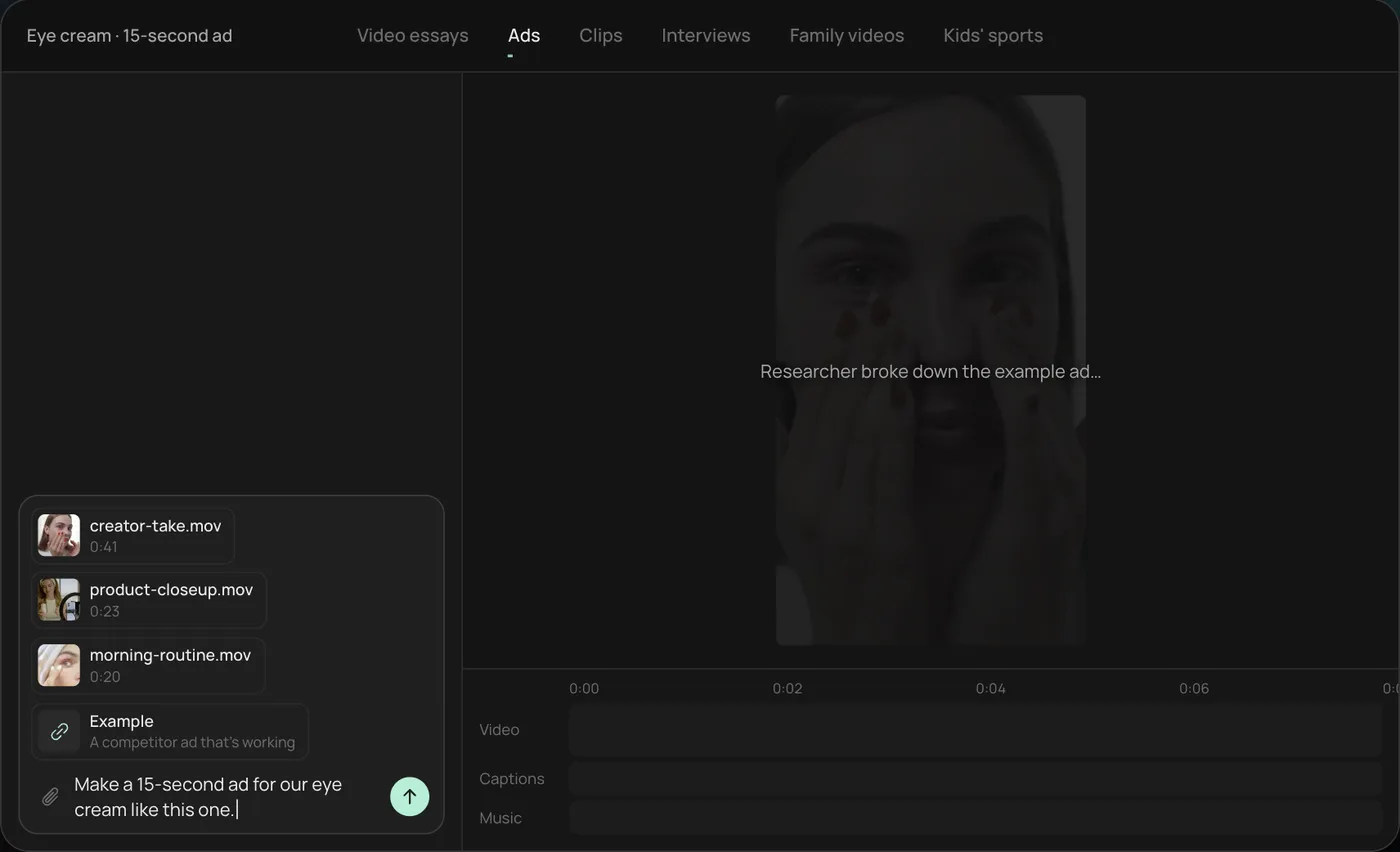
2. Answer the one question. Rend asks which hook should lead and marks a recommended answer. You can also ask it to make variations with both.
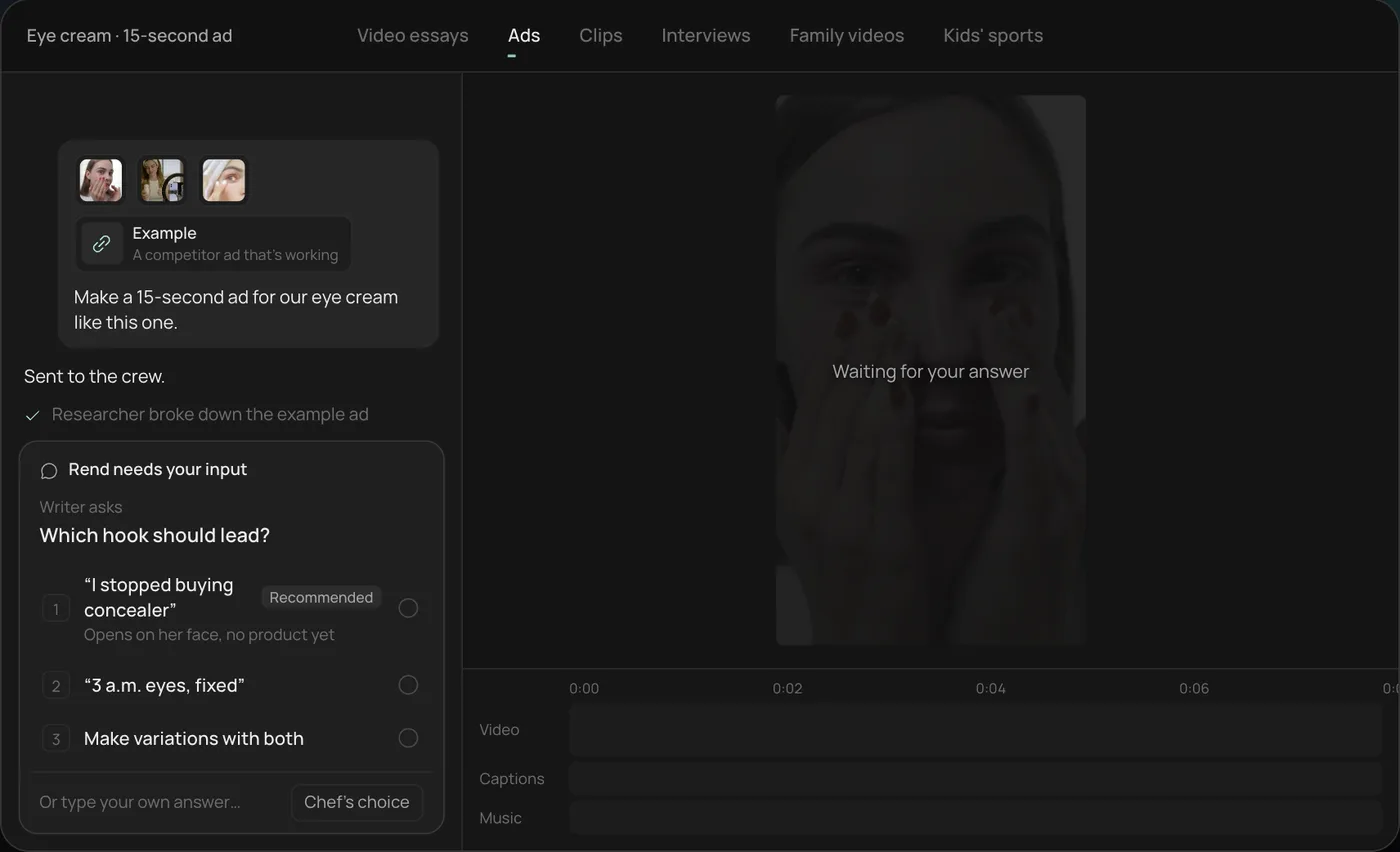
3. Let the crew work. The researcher breaks down the example ad and the writer builds the script around your hook, checking off each step in chat.
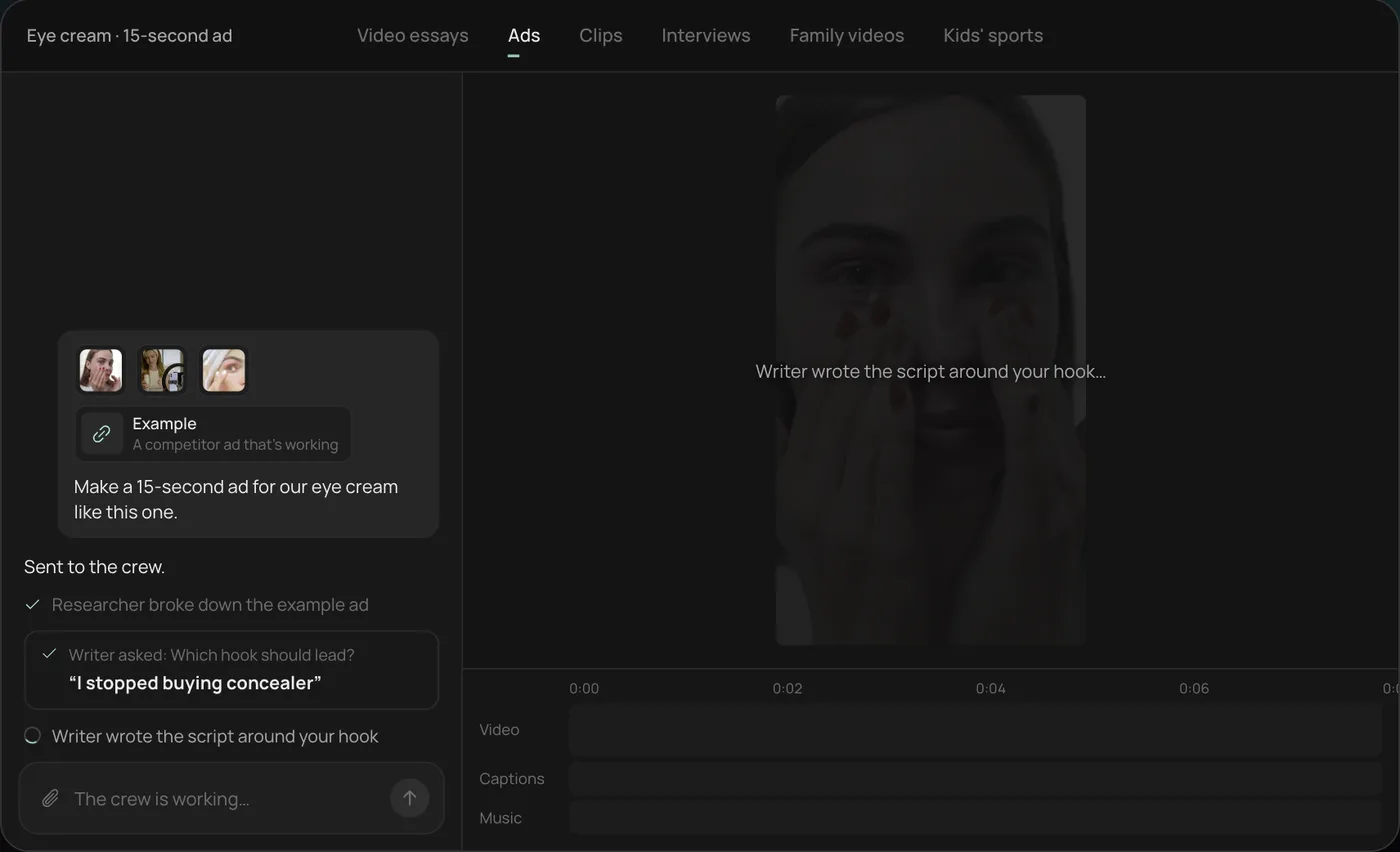
4. Open the finished ad. A 15-second vertical ad lands on a real timeline with captions and music on their own tracks, and Rend offers six more hooks to test.
From there you can open the timeline and change anything by hand, share a review link, or export. Start a free Rend project to try it on your own footage.
FAQ
What is the cheapest AI video tool for a small business?
Clipchamp and CapCut both have free plans. Rend's editing is free and you pay only when it renders or generates, which suits businesses that post in bursts.
Do small businesses need professional video?
Not for social. Real, well-cut phone footage of your work often does better than polished stock. Paid ads benefit from more variations, which is where AI tools save the most time.
Can AI make video ads for my business?
Yes. Some tools generate avatar ads from a link; Rend makes ad sets from your own footage and brand. For service businesses, real footage usually builds more trust.
How often should a small business post video?
Two to four short videos a week is a realistic target that most owners can sustain with an AI tool doing the editing.
Can I use these videos on my Google Business Profile?
Yes, short videos can be added to a Google Business Profile. See Google Business Profile video for specs and ideas.
Got a camera roll full of job-site clips doing nothing? Start free with Rend and send this week's batch.