Real Estate Agent Website Video Statistics 2026: 286 Sites
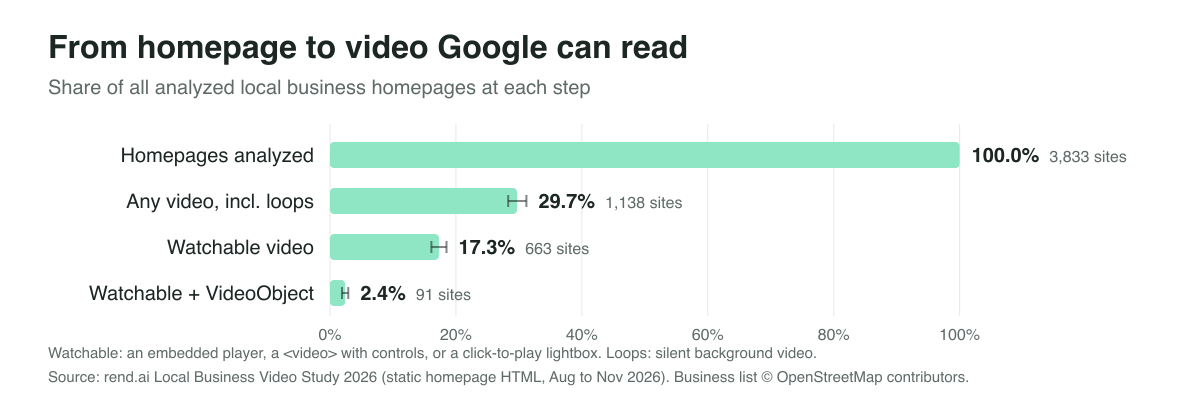
15.0% of US real estate agent homepages have a video a visitor can press play on. That comes from our fall 2026 check of 286 real estate office websites (95% CI 11.4 to 19.6%), a little under the 17.3% average across 14 local trades. And slightly more agent homepages, 16.1%, show only a silent background loop: 46 sites with a drone shot or a skyline on mute, against 43 with something to watch.
So the typical agent homepage moves, but says nothing. Only 1.0% of them (3 sites) have a playable video marked up with VideoObject schema, and 62.2% have no playable video and no link to a YouTube or TikTok account.
The numbers for real estate agents
Source: rend.ai, Local Business Video Statistics 2026. Method in one line: real estate offices listed in OpenStreetMap in 14 US metros, static homepage HTML from Common Crawl (August to October 2026) or one direct fetch (November 21, 2026), homepage only, and players injected by JavaScript are not counted, so every rate is a lower bound. Listing pages and IDX search pages were not crawled.
| Measure | Real estate (n=286) | 95% CI | All 14 trades (n=3,833) |
|---|---|---|---|
| Watchable video on the homepage | 15.0% | 11.4 to 19.6% | 17.3% |
| Only a silent background loop | 16.1% | 12.3 to 20.8% | 12.4% |
| Any video, including loops | 31.1% | 26.0 to 36.7% | 29.7% |
| Embedded YouTube player | 10.1% | 7.2 to 14.2% | 8.6% |
| VideoObject schema anywhere on the page | 1.7% | 0.7 to 4.0% | 3.1% |
| Watchable video plus VideoObject schema | 1.0% | 0.4 to 3.0% | 2.4% |
| Links to a YouTube channel | 31.5% | 26.4 to 37.1% | 22.4% |
| Links to Instagram | 52.4% | 46.7 to 58.2% | 54.4% |
| Links to TikTok | 8.4% | 5.7 to 12.2% | 8.4% |
| No watchable video and no YouTube or TikTok link | 62.2% | 56.5 to 67.7% | 64.8% |
How to read it:
Playable video is about average. 15.0% against 17.3% is inside the margin of error, so agents are neither behind nor ahead of other local businesses.
The loop is the real estate default. 16.1% of agent homepages have a background loop and nothing to play, against 12.4% overall. The intervals overlap slightly, so call it a lean, not a proven gap. What is clear in the counts: loops (46 sites) outnumber playable videos (43). Real estate is one of four trades where that happens, along with restaurants, cleaning companies and med spas.
Agents have channels. 31.5% link to YouTube, well above the 22.4% average, and the intervals don't overlap. As with home service trades, many more agents link to YouTube than embed a video from it (10.1%).
Schema is nearly absent. 3 of 286 agent homepages have a playable video with VideoObject markup.
The website platforms built for agents didn't change much. Sites on dedicated real estate platforms (42 sites, a small sample) had a watchable video 19.0% of the time (95% CI 10.0 to 33.3%) and VideoObject schema 2.4% of the time.
Why the drone loop doesn't do the job
The homepage visitor is not shopping for a house. The house search happens on the portals and your listing pages. Someone on your homepage is shopping for an agent: a seller comparing three names a neighbor gave them, or a relocating buyer who found your neighborhood guide. They want to know who you are, how you work, and how well you know their area.
A muted flyover of downtown answers none of that. It also does nothing for search: Google's video best practices say a video needs to be embedded on a watch page, and not hidden behind other elements, to be eligible for video features. A background clip with no title or description gives Google nothing to describe.
Keep the drone footage. It makes good b-roll under the video that actually does the job.
The fix: "what working with me looks like"
You probably film listing tours every month. Those belong on listing pages, the MLS and social (our real estate listing video guide covers them). The homepage needs a different video: 60 to 90 seconds of you walking a seller or buyer through how you work, start to closing.
This is not the personal brand video in our realtor video marketing guide, which is about who you are. This one is about process, the thing sellers actually compare when they interview agents.
Shot list: first meeting to closing day
| # | Shot | Length in the cut | What it answers |
|---|---|---|---|
| 1 | You walking up to a front door, drone or street b-roll of your area underneath | 3 to 4 s | Do they know my area |
| 2 | To camera at a kitchen table: name, brokerage, the areas you work | 6 to 8 s | Who is this |
| 3 | Pricing conversation: you with a printed comps sheet (no real client data visible) | 10 to 12 s | How will they price my home |
| 4 | Prep: photographer setting up, staging touches, the listing going live on a laptop | 6 to 8 s | What do they do before listing |
| 5 | Open house or showing, front door open, sign in the yard | 4 s | How do they get buyers in |
| 6 | To camera: how you communicate (when you call, how often you update) | 10 to 12 s | Will I hear from them |
| 7 | Negotiation and closing in one line, over a shot of paperwork or a title office exterior | 6 to 8 s | Will they handle the hard part |
| 8 | Keys handed over (a real past client who agreed, or a teammate) | 3 s | Does it end well |
| 9 | Close: "Call or text me, or book a 15-minute call on this page" | 4 to 5 s | What do I do now |
Fair housing applies here too. Describe the property and the process, not who should live in a neighborhood; the realtor guide linked above has the words to avoid. Don't quote results ("I sell homes for more") unless your broker has approved the claim and you can back it with your own data. Show your brokerage name the way your state and broker require.
Record the voice on a clip-on mic, not the phone's own mic across a kitchen. Caption the full cut so it works muted; the caption style previewer shows how a style reads on a phone.
Where it goes on the page
- Directly under the hero (where the drone loop sits now), beside your phone number or contact form, as an inline player.
- On your About or Sell page, same video, same schema.
- A 30-second vertical cut for your Google Business Profile, which accepts videos up to 30 seconds (see our Google Business Profile video guide).
- The full version on the YouTube channel your homepage already links to. Embedding it on the homepage keeps the seller on your site instead of sending them into YouTube's recommendations.
VideoObject schema for an agent homepage
Google's video structured data guide requires name, thumbnailUrl and uploadDate, and recommends description, duration and contentUrl or embedUrl. Paste this into the page with the video and change the values:
<script type="application/ld+json">
{
  "@context": "https://schema.org",
  "@type": "VideoObject",
  "name": "How I sell homes in East Nashville: from first meeting to closing",
  "description": "Agent Dana Cole explains pricing, listing prep, showings, weekly updates and closing for sellers in East Nashville and Inglewood.",
  "thumbnailUrl": "https://www.example.com/images/how-i-sell-thumbnail.jpg",
  "uploadDate": "2026-11-22",
  "duration": "PT1M25S",
  "embedUrl": "https://www.youtube.com/embed/VIDEO_ID"
}
</script>
Name the video the way a seller would search: what you do plus the neighborhood. Use a thumbnail of your face mid-sentence, not the skyline; the video frame grabber pulls a still at any timestamp. Check the page in Google's Rich Results Test, and see schema.org/VideoObject for every property.
Most agent website platforms let you paste custom code into a page or the site header. If yours doesn't, ask support whether it can add JSON-LD; some can't, and that is worth knowing before you renew.
Two-minute audit
| Check | What most agent homepages have | What to aim for |
|---|---|---|
| A video you can press play on | No (85 in 100) | Yes, under the hero |
| What the video shows | A muted skyline or drone loop | You, explaining how you work |
| Your area named on screen | Rarely | Neighborhoods in the title and captions |
| VideoObject schema | No (98 in 100) | Yes, tested |
| YouTube channel embedded, not just linked | Linked in the footer | One video embedded on the page |
| Checked on a phone after the last site update | No | Press play on your own phone |
Where Rend fits
Rend is an AI video agent. Send it your clips (the kitchen-table talk, last month's open house, the drone footage you already paid for), in chat, by email or through a web form, and say what you want: "an 85-second 'how I work' video for the homepage with my drone footage as b-roll, a 30-second vertical for Google, and three 15-second Reels." It cuts on your exact words, adds captions in your font, lays the b-roll under the right sentences, and builds it all on a real timeline you can open and change.
If your broker reviews marketing, send a review link: they draw on the frame or leave a note, and Rend reads every note and makes the fix. Editing is free, and you pay only when Rend renders or generates something (pricing).
FAQ
What percentage of real estate agent websites have video?
In our 2026 study of 286 US real estate office homepages, 15.0% had a video a visitor can play (95% CI 11.4 to 19.6%). Including muted background loops, 31.1% had some video. JavaScript-loaded players aren't counted, so these are lower bounds.
Is a drone background video good for a realtor website?
It looks good, but it doesn't tell a seller anything about you. 16.1% of agent homepages have only a background loop, slightly more than have a playable video. Keep the footage and use it as b-roll in a video where you talk.
What video should a real estate agent put on their homepage?
A 60 to 90 second video of you explaining how you work with sellers or buyers, from first meeting to closing, with your neighborhoods named. Listing tours belong on listing pages and social.
Do real estate agents use YouTube?
Many link to it: 31.5% of agent homepages link to a YouTube channel, against 22.4% across all trades. Only 10.1% embed a YouTube video on the homepage, so most of that work never reaches a site visitor.
Do I need VideoObject schema on my real estate website?
It's optional, and almost nobody has it: 3 of 286 agent homepages paired a playable video with schema. Google's guide says the markup lets you shape the title, thumbnail, date and duration it shows and makes the video easier to find.
If your homepage has a drone loop and nothing to play, you already have half the footage. Start free on Rend, add a ten-minute talk at your kitchen table, and get the homepage video plus short cuts for Google and Reels.