Restaurant Website Video Statistics 2026: 506 Sites Checked
Only 7.3% of US restaurant homepages have a video a diner can press play on, the lowest of the 14 local trades we measured. That's from our fall 2026 check of 506 restaurant websites (95% CI 5.4 to 9.9%), against 17.3% across all trades. Restaurants aren't short of footage: 22.1% of their homepages have some video, but 75 of those 112 sites show only a muted background loop.
The food is on Instagram. 61.5% of restaurant homepages link to an Instagram account, and 82.8% have no playable video and no YouTube or TikTok link, the worst rate of any trade. The website, where the reservation and the online order actually happen, gets a silent clip of a pour behind the menu button.
The numbers for restaurants
Source: rend.ai, Local Business Video Statistics 2026. Method in one line: businesses from OpenStreetMap in 14 US metros, static homepage HTML from Common Crawl (August to October 2026) or one direct fetch (November 21, 2026), homepage only, and players injected by JavaScript are not counted, so every rate is a lower bound.
| Measure | Restaurants (n=506) | 95% CI | All 14 trades (n=3,833) |
|---|---|---|---|
| Watchable video on the homepage | 7.3% | 5.4 to 9.9% | 17.3% |
| Only a silent background loop | 14.8% | 12.0 to 18.2% | 12.4% |
| Any video, including loops | 22.1% | 18.7 to 26.0% | 29.7% |
| Embedded YouTube player | 1.2% | 0.5 to 2.6% | 8.6% |
| Watchable video plus VideoObject schema | 0.6% | 0.2 to 1.7% | 2.4% |
| Links to Instagram | 61.5% | 57.2 to 65.6% | 54.4% |
| Links to Facebook | 60.9% | 56.6 to 65.0% | 66.2% |
| Links to TikTok | 8.5% | 6.4 to 11.3% | 8.4% |
| Links to a YouTube channel | 5.9% | 4.2 to 8.3% | 22.4% |
| No watchable video and no YouTube or TikTok link | 82.8% | 79.3 to 85.8% | 64.8% |
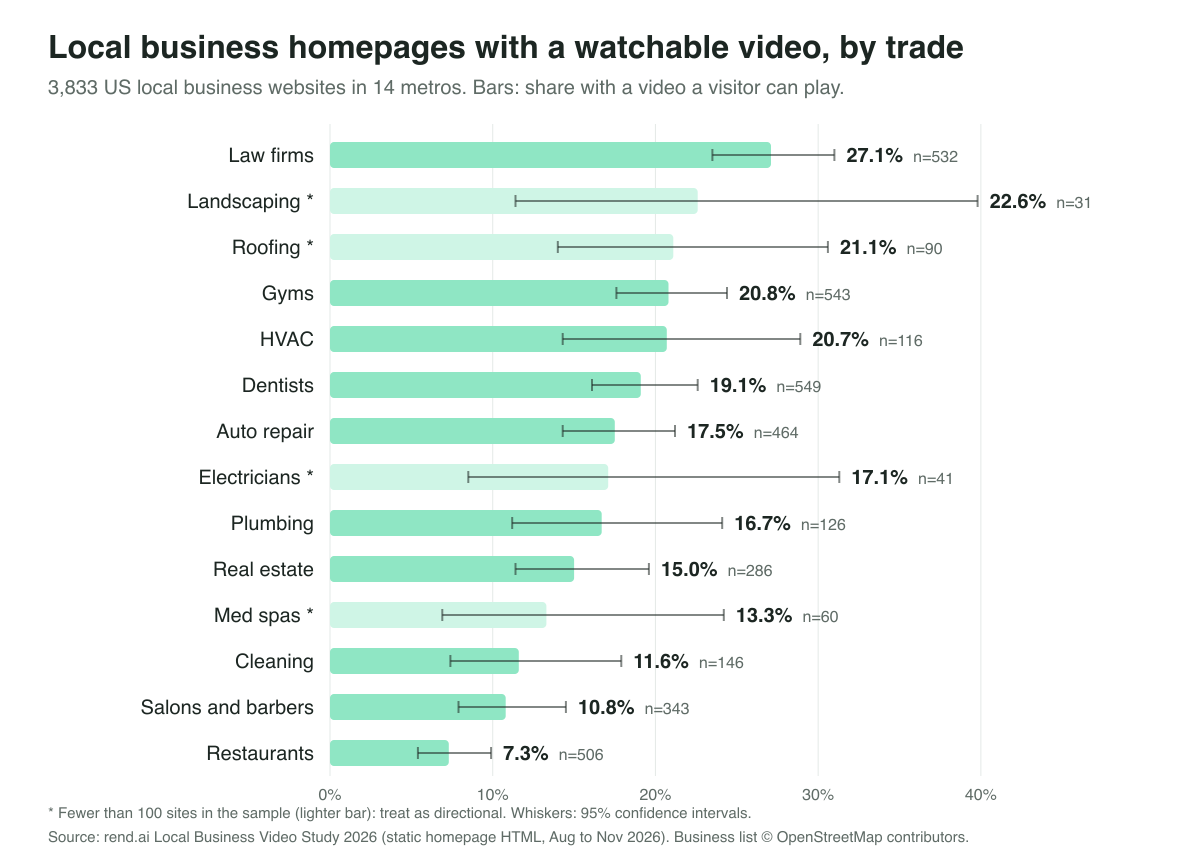
The gap is not noise. The restaurant interval tops out at 9.9%, well under the all-trade low of 16.1%.
Restaurants have mostly skipped YouTube. 5.9% link to a YouTube channel, the lowest of any trade, and 1.2% embed a YouTube player. More restaurant homepages link to TikTok (8.5%) than to YouTube.
Schema is close to zero. 3 of 506 restaurant homepages have a playable video with VideoObject markup.
The platform matters. In the same study, sites built on restaurant website platforms (158 sites, across all trades) had a watchable video 4.4% of the time and VideoObject schema 0.0% of the time, while 28.5% of them had some video. Those builders make background video easy and fashionable, so that's what restaurants get.
Why the loop isn't enough for a restaurant
A diner deciding where to eat tonight wants to see three things: the food up close, what the room feels like, and how to book or order. A five-second muted pour gets one of those halfway. It doesn't tell anyone what to order, it can't be shared, and it adds weight to the page.
The loop is also invisible to search. Google's video best practices say a video needs to be embedded on a watch page, not hidden behind other elements, to be eligible for video features. A background clip with no title, no description and no schema gives Google nothing to work with.
Keep the loop if the owner loves it. Add one playable video next to the button that makes money.
The fix: bring your best Reel home
You probably already have the video. Look at your last three months of Instagram or TikTok posts and pick the one that got the most saves or shares. That clip, re-cut to 20 to 40 seconds with sound and captions, is your homepage video. If nothing stands out, shoot the six shots below in one prep session.
The format that works on a restaurant homepage is "what to order here": one person (the chef, the owner or a server who loves the menu) naming two or three dishes while you see them made and plated. It answers the diner's real question, which is not "is this restaurant good" but "what would I eat."
For a longer list of food, kitchen and room shots and ad structures, see our guide to restaurant promo videos. This is the website piece.
Shot list: "what to order here" in six shots
| # | Shot | Length in the cut | Notes |
|---|---|---|---|
| 1 | The signature dish landing on the table, overhead or 45 degrees | 3 s | The first frame is the thumbnail, so make it the best plate |
| 2 | Chef or owner, to camera, one line: name and what the place is | 4 to 5 s | "I'm Tomas, this is our family's Oaxacan kitchen" |
| 3 | Dish one being finished: sauce, garnish, the pan flip | 5 s | Film close, by a window or under the pass lights |
| 4 | Chef, to camera: "If it's your first time, order these two" | 6 to 8 s | Name the dishes exactly as the menu does |
| 5 | The room at service, one slow move across tables | 4 s | Only include guests who agreed to be filmed |
| 6 | Close: front door or host stand, "Book on our site or walk in" | 4 s | Say how to book, the way you actually take bookings |
Record the voice with a clip-on mic, not the phone across a loud kitchen. Caption every line so the video works muted, and check the style on a phone with the caption style previewer.
Change the video when the menu changes. A homepage video naming a dish you dropped in spring does more harm than no video.
Where it goes on the page
- Directly beside or below the Menu, Reserve or Order button, above the fold on a phone.
- On the menu page, near the dishes it names.
- A 30-second vertical version for your Google Business Profile, which accepts videos up to 30 seconds (see our Google Business Profile video guide).
- The same clip back on Instagram and TikTok with a "menu and booking on our site" line.
If your restaurant website platform only offers a background video section, look for an embed or custom code block, or host the clip on YouTube and embed the player. Keep the file small; the video compressor shrinks it in the browser, and the video ad sizes tool shows the vertical and square sizes for each platform.
VideoObject schema for a restaurant homepage
Google's video structured data guide requires name, thumbnailUrl and uploadDate, and recommends description, duration and contentUrl or embedUrl. Paste this into the page with the video, in a code block or the page header:
<script type="application/ld+json">
{
  "@context": "https://schema.org",
  "@type": "VideoObject",
  "name": "What to order at Casa Ruiz, Oaxacan kitchen in Phoenix",
  "description": "Chef Tomas Ruiz picks the two dishes to order on your first visit: mole negro and tlayudas.",
  "thumbnailUrl": "https://www.example.com/images/what-to-order-thumbnail.jpg",
  "uploadDate": "2026-11-22",
  "duration": "PT0M35S",
  "contentUrl": "https://www.example.com/video/what-to-order.mp4"
}
</script>
Use contentUrl if you host the file yourself and embedUrl if it's a YouTube or Vimeo player. For the thumbnail, use shot 1; the video frame grabber pulls a still at any timestamp. Check the page in Google's Rich Results Test after you publish, and see schema.org/VideoObject for every property.
Audit your homepage in two minutes
| Check | What most restaurant homepages have | What to aim for |
|---|---|---|
| A video you can press play on | No (about 93 in 100) | Yes, beside Menu or Reserve |
| Sound and captions | Muted loop | Chef's voice, captioned |
| What it shows | A pour, flames, a blurry room | Two named dishes, plated |
| Length | 5 to 10 s loop | 20 to 40 s |
| VideoObject schema | No (above 99 in 100) | Yes, tested |
| Matches the current menu | Shot two menus ago | Re-cut when the menu changes |
Where Rend fits
Rend is an AI video agent. Send it the Reel that worked plus whatever you shot at prep, in chat, by email or through a web form, and say what you want: "a 35-second what-to-order video for the homepage with captions, a 30-second vertical for Google, and a square for the menu page." It cuts on the chef's exact words, adds captions in your font, can add an original music bed, and builds it all on a real timeline you can open and change. When the menu changes, you swap one dish and re-export instead of starting over.
Editing is free, and you pay only when Rend renders or generates something (pricing). For more ideas on what to film, our guide to video ads for local businesses has hooks and shot lists by trade.
FAQ
What percentage of restaurant websites have video?
In our 2026 study of 506 US restaurant homepages, 7.3% had a video a visitor can play (95% CI 5.4 to 9.9%), the lowest of 14 local trades. Including muted background loops, 22.1% had some video. JavaScript-loaded players aren't counted, so treat these as lower bounds.
Is a background video good for a restaurant website?
It can set a mood, but it doesn't sell a dish. In our data, 75 of the 112 restaurant homepages with any video had only a background loop. Keep it if you like it, and add a short playable video with sound next to your Menu or Reserve button.
How long should a restaurant website video be?
20 to 40 seconds is enough to name two or three dishes, show them plated and say how to book. Cut a 30-second vertical version for your Google Business Profile, which accepts videos up to 30 seconds.
Should I embed my Instagram Reels on my restaurant website?
Re-cutting your best Reel into a homepage video is the fastest route, since 61.5% of restaurant homepages already link to Instagram. Our study didn't measure Instagram embeds, but a player you host or embed directly is the version you can mark up with VideoObject schema.
Do restaurants need VideoObject schema?
It's optional, but almost nobody has it: 3 of 506 restaurant homepages paired a playable video with schema. Google's guide says the markup lets you shape the title, thumbnail, date and duration shown in results and makes the video easier to find.
If your homepage is one of the more than nine in ten with nothing to play, start with the Reel that already worked. Start free on Rend, send it with a few prep shots, and get a homepage cut plus versions for Google and your menu page.