Salon and Barbershop Website Video Statistics 2026: 343 Sites
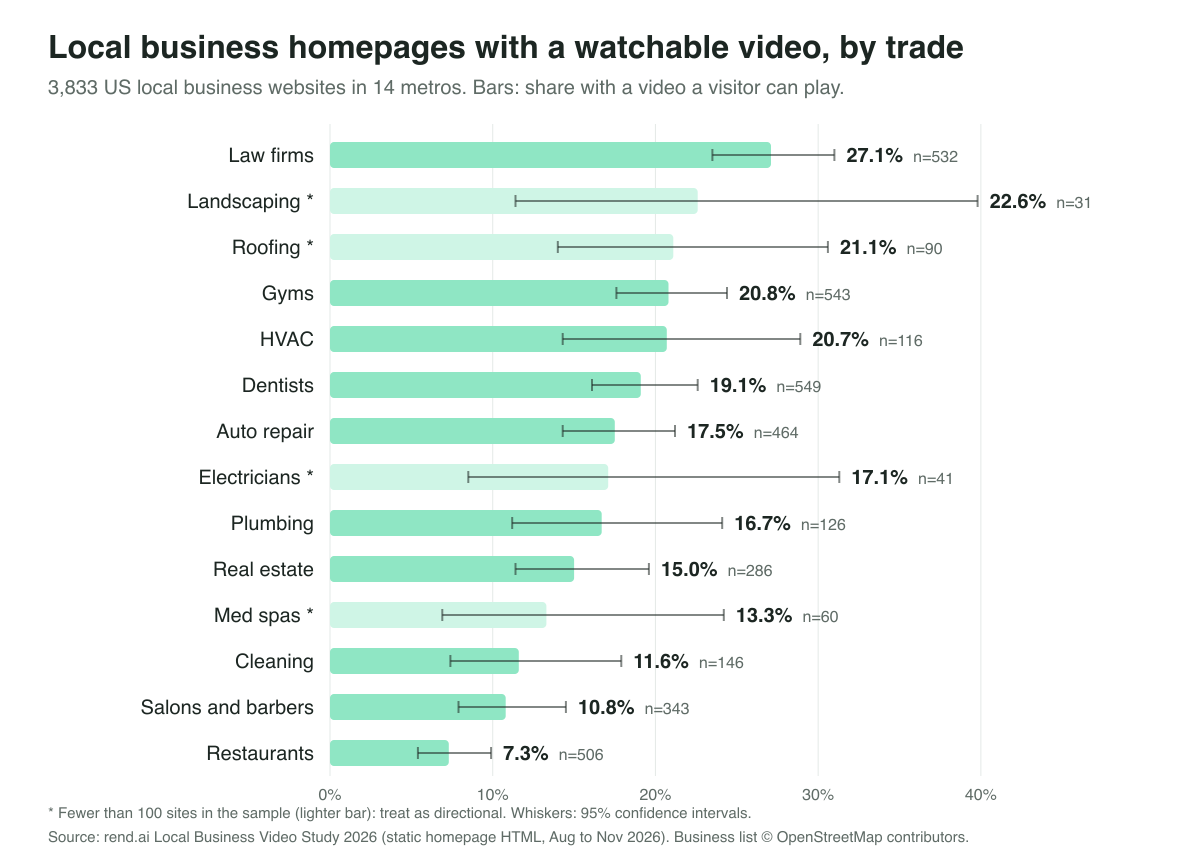
Only 10.8% of US hair salon and barbershop homepages have a video a visitor can press play on. That comes from our fall 2026 check of 343 salon and barber websites (95% CI 7.9 to 14.5%), well under the 17.3% average across 14 local trades. Not one of the 343 had a playable video marked up with VideoObject schema.
Salons are among the most visual businesses there are, and their work is on Instagram: 69.4% of salon and barber homepages link to an Instagram account. But 75.5% have no playable video and no YouTube or TikTok link, the second worst rate of any trade after restaurants. The booking page, where the money changes hands, usually shows a photo grid and a "Book now" button.
The numbers for salons and barbershops
Source: rend.ai, Local Business Video Statistics 2026. Method in one line: businesses from OpenStreetMap in 14 US metros, static homepage HTML from Common Crawl (August to October 2026) or one direct fetch (November 21, 2026), homepage only, and players injected by JavaScript are not counted, so every rate is a lower bound. Salons and barbers are one group in the study, so we can't split them.
| Measure | Salons and barbers (n=343) | 95% CI | All 14 trades (n=3,833) |
|---|---|---|---|
| Watchable video on the homepage | 10.8% | 7.9 to 14.5% | 17.3% |
| Only a silent background loop | 10.2% | 7.4 to 13.9% | 12.4% |
| Any video, including loops | 21.0% | 17.0 to 25.6% | 29.7% |
| Site-builder video block or player | 6.1% | 4.0 to 9.2% | 3.8% |
| Embedded YouTube player | 3.2% | 1.8 to 5.7% | 8.6% |
| Watchable video plus VideoObject schema | 0.0% | 0.0 to 1.1% | 2.4% |
| Links to Instagram | 69.4% | 64.3 to 74.0% | 54.4% |
| Links to TikTok | 9.9% | 7.2 to 13.5% | 8.4% |
| Links to a YouTube channel | 9.0% | 6.4 to 12.5% | 22.4% |
| No watchable video and no YouTube or TikTok link | 75.5% | 70.7 to 79.8% | 64.8% |
Four readings.
Salons are below average, and the gap is real. The salon interval tops out at 14.5%, under the all-trade low of 16.1%. Only restaurants (7.3%) are lower among the larger trades.
When salons do add video, they use the website builder's own video block. 6.1% have a builder video block or player, against 3.8% across all trades, and only 3.2% embed YouTube. That fits the numbers on YouTube itself: just 9.0% of salon homepages link to a YouTube channel, a bit fewer than link to TikTok (9.9%).
Instagram is the portfolio. 69.4% link to it, against 54.4% overall. The work exists. It just lives one tap away from the booking button, on someone else's app.
Nobody has schema. 0 of 343. The first salon in your area to add it is the only one.
Why the photo grid isn't enough
A new client picking a stylist wants to know whether this person can do the cut or color they have in mind, what the chair and the room feel like, and whether booking is easy. Photos answer the first question partly. A ten-second clip of a blowout finishing, with the stylist saying what they did, answers it completely.
Photos on a website also can't do what video does in search. Google's video best practices list the conditions for a video to be eligible for video features: embedded on a watch page, not hidden behind other elements, with a valid thumbnail at a stable URL. A salon with a real video that meets those conditions is competing against almost nobody.
The fix: one transformation, one stylist, one booking line
Pick your best recent transformation that a client agreed to share, and build a 30 to 45 second homepage video around it. This is a different cut from the Instagram Reel. The Reel is built to stop a scroll. The homepage version is built for someone who already found you and is deciding whether to book, so it adds the stylist's voice, the service name and how to book.
For the Reel itself, booking ads and stylist intros, see our guide to salon video marketing. For short intros of each stylist or barber, the format in our meet the team video guide fits a salon well.
Shot list: the homepage transformation
| # | Shot | Length in the cut | Notes |
|---|---|---|---|
| 1 | The finished look, client turning toward the light | 3 s | This is the thumbnail, so open on the result |
| 2 | Stylist or barber to camera: name, shop, what they specialize in | 5 s | "I'm Jess, I do lived-in color at Fern Salon" |
| 3 | The before, same angle and same light as shot 1 | 2 to 3 s | Match the angle or the comparison doesn't land |
| 4 | Two or three process shots: sectioning, foils, the fade line, the blow-dry | 8 to 10 s | Film the hands, close |
| 5 | Stylist, voice over shot 4 or to camera: the service by its menu name and how long it takes | 6 to 8 s | "This is our full balayage, about three hours" |
| 6 | The reveal: mirror turn, client's reaction | 3 to 4 s | Real reactions only |
| 7 | The front desk or chair, "Book with me online, link right here" | 3 to 4 s | Say how you take bookings |
Get the client's written permission before you post, and say where the video will appear (website, Google, social). The salon video guide linked above has the consent notes. Film by a window or under a ring light for color accuracy, and record the voice on a clip-on mic away from the dryers.
Caption the full video so it works muted, and preview the style on a phone with the caption style previewer.
Where it goes on the page
- Right beside or below the "Book now" button on the homepage. Visitors should see the play button on a phone without scrolling far.
- On the services page, next to the service the video shows.
- A 30-second vertical cut for your Google Business Profile, which accepts videos up to 30 seconds (our Google Business Profile video guide has the specs).
- Back on Instagram and TikTok with a "book on our site" line.
If your site is on Squarespace, know that not one Squarespace site in the whole study, any trade, had VideoObject schema: the built-in video block doesn't add it. Use a code block for the markup below. On Wix, use custom code in the page settings. On WordPress, most SEO plugins have a video schema field.
VideoObject schema for a salon homepage
Google's video structured data guide requires name, thumbnailUrl and uploadDate, and recommends description, duration and contentUrl or embedUrl. Paste this into the page with the video and change the values:
<script type="application/ld+json">
{
  "@context": "https://schema.org",
  "@type": "VideoObject",
  "name": "Lived-in balayage at Fern Salon, Austin",
  "description": "Stylist Jess Moreno takes a client from box-dye brown to a soft lived-in balayage, and explains how to book a color consultation.",
  "thumbnailUrl": "https://www.example.com/images/balayage-thumbnail.jpg",
  "uploadDate": "2026-11-22",
  "duration": "PT0M40S",
  "contentUrl": "https://www.example.com/video/balayage.mp4"
}
</script>
Use embedUrl instead if the video is on YouTube or Vimeo. For the thumbnail, pull a frame of the finished look with the video frame grabber. Then check the page in Google's Rich Results Test. Every property is documented at schema.org/VideoObject.
Name the video the way a client would search: the service plus your city. A barbershop might use "Skin fade and beard lineup at North End Barbers, Boston."
Two-minute audit
| Check | What most salon homepages have | What to aim for |
|---|---|---|
| A video you can press play on | No (about 89 in 100) | Yes, beside Book now |
| Who's on screen | Nobody, or a stock model | Your stylist and a real client |
| Service named in the video | No | The exact menu name |
| Before and after in matching light | Mixed | Same angle, same light |
| VideoObject schema | No (0 of 343 with a playable video) | Yes, tested |
| Booking line at the end | No | "Book with me online" |
Where Rend fits
Rend is an AI video agent. Send it the clips from the chair, in chat, by email or through a web form, and say what you want: "a 40-second homepage transformation with captions, a 30-second vertical for Google, and a 15-second Reel." It cuts on the stylist's exact words, lines up the before and after, adds captions in your font, and builds every version on a real timeline you can open and change. Set up a brand kit once and every stylist's video gets the same caption style and music bed.
Editing is free, and you pay only when Rend renders or generates something (pricing).
FAQ
What percentage of salon websites have video?
In our 2026 study of 343 US hair salon and barbershop homepages, 10.8% had a video a visitor can play (95% CI 7.9 to 14.5%). Including muted background loops, 21.0% had some video. Players loaded by JavaScript aren't counted, so these are lower bounds.
Do barbershops and salons use video less than other businesses?
Yes. The all-trade average was 17.3%, and among the larger trades only restaurants were lower. 75.5% of salon and barber homepages had no playable video and no link to YouTube or TikTok.
Should I put my Instagram Reels on my salon website?
Use them as the raw material. 69.4% of salon homepages link to Instagram, but a link sends visitors away from your booking button. Re-cut your best transformation into a 30 to 45 second homepage video with your voice, the service name and a booking line, and embed it on the page.
Do I need my client's permission to show their transformation on my website?
Yes. Get written permission that covers the website, Google and social, and keep it on file. A client who agreed to an Instagram post may not expect to be on your homepage.
What is VideoObject schema and does a salon need it?
It's a small block of code that tells Google a page has a video, with its title, thumbnail, date and length. None of the 343 salon and barber homepages in our study had a playable video with it, so ten minutes of work would make you the only one in our sample.
If your homepage is one of the nine in ten without a video to play, the footage is already in your camera roll. Start free on Rend, send your best transformation, and get a homepage cut plus versions for Google and Instagram.