Best AI Video Editor for Beginners in 2026: Easy Picks Compared
For a total beginner, the best AI video editor is one that gets you a watchable video before you get bored. Clipchamp is the easiest free start on Windows, with watermark-free 1080p exports. CapCut is the best free choice if you shoot on your phone. Canva suits people who already use it for graphics. If you would rather describe the video and let an agent do the editing, then tweak the result, Rend is the most hands-off option.
We build Rend, so weigh our view accordingly. Prices and plan details were checked on November 18, 2026.
What beginners actually struggle with
New editors rarely quit because of missing features. They quit at three specific walls:
- The blank timeline. You have 40 clips and no idea where to start.
- Audio. Music drowns the voice, or the voice cuts in and out.
- Captions. Typing them is miserable, and auto-captions in the wrong style look cheap.
A good beginner tool gets you past all three without a tutorial. So that's what we judged.
The picks at a glance
| Editor | Learning curve | Free plan | AI help with the blank timeline | Paid from (Nov 18, 2026) |
|---|---|---|---|---|
| Clipchamp | Very low | Yes, 1080p exports, no watermark | Some auto-compose, captions | Premium via Microsoft 365 Personal or Family |
| CapCut | Low on phone, medium on desktop | Yes | Templates, auto-captions | Pro $19.99/mo |
| Canva | Very low if you know Canva | Yes | Templates, Magic tools | Pro $12/mo billed yearly, $18 monthly |
| Descript | Low for talking video | 1 media hour/mo, 720p, watermark | Underlord removes filler, makes clips | Hobbyist $16/mo yearly |
| Rend | Lowest: you describe it | Editing is free | Builds the whole edit for you | Pay only for renders and generation (pricing) |
Clipchamp
Microsoft's browser and Windows editor. Its free plan exports up to 1080p without a watermark, which is unusually generous. Premium extras like 4K and the brand kit come with Microsoft 365 Personal and Family.
Why beginners like it: it looks like the slideshow tools people already know, and auto-captions are a click.
Where it gets hard: once you want pacing, layered graphics or a real sound mix, you run out of road.
CapCut
The default editor for phone-shot social video. The free plan covers most needs, and Pro is $19.99 a month.
Why beginners like it: templates. Pick a trend, drop in your clips, done. The captions look current.
Where it gets hard: the desktop version is a full editor with a lot of buttons, and template videos tend to look like everyone else's. Our CapCut vs. Rend post goes deeper.
Canva
If you've made a flyer in Canva, you can make a video in Canva. Pro is $12 a month per person billed yearly, or $18 monthly, in the US.
Why beginners like it: everything matches your other brand materials, and the template library is huge.
Where it gets hard: it is a design tool with a timeline, not an editor. Cutting a long talking video down is slow. See Canva video vs. Rend.
Descript
Descript lets you edit video by editing a transcript like a document. The free plan gives 1 media hour a month at 720p with a watermark; Hobbyist is $16 a month billed yearly ($24 monthly).
Why beginners like it: if you can delete a sentence in a document, you can edit a podcast. Studio Sound fixes a lot of bad audio.
Where it gets hard: anything visual beyond talking heads is manual.
Rend
Rend is an AI video agent, so the blank timeline problem disappears. You send what you have (phone clips, your camera roll, a product page) by chat, email or a web form, and tell it what you want: "a 60-second recap of my kid's soccer season with upbeat music." A crew of specialist agents picks the shots, cuts on exact words, adds word-timed captions in a style you choose, music and a mix that keeps voices clear, then checks its own work.
What you get is a real timeline. When you want to change something, open it and drag, or just ask: "make the third clip shorter."
Where it falls short: if your goal is to learn editing as a craft, doing it with your own hands in CapCut or Clipchamp teaches you more. And for a 15-second template trend, CapCut is quicker.
Your first video, start to finish
Use this checklist whichever tool you pick:
- Pick one length before you start: 30 seconds, 60 seconds or 3 minutes.
- Gather 3 to 5 times more footage than the final length.
- Lead with your best shot. The first two seconds decide if anyone keeps watching.
- Keep music at least 12 dB under the voice (most AI tools do this as "ducking").
- Add captions; most people watch on mute.
- Watch it once on your phone before you post.
If you go the Rend route, how to make your first video with Rend walks through it, and sending videos from your phone covers getting clips in. You can also preview caption looks with the free caption style previewer.
Pick X if...
- Pick Clipchamp if you are on Windows and want free, no-watermark exports.
- Pick CapCut if you shoot on your phone and like trend templates.
- Pick Canva if you already design in Canva and want videos that match.
- Pick Descript if your videos are mostly people talking.
- Pick Rend if you'd rather describe the video than build it, and adjust the result.
How to make your first video in Rend, step by step
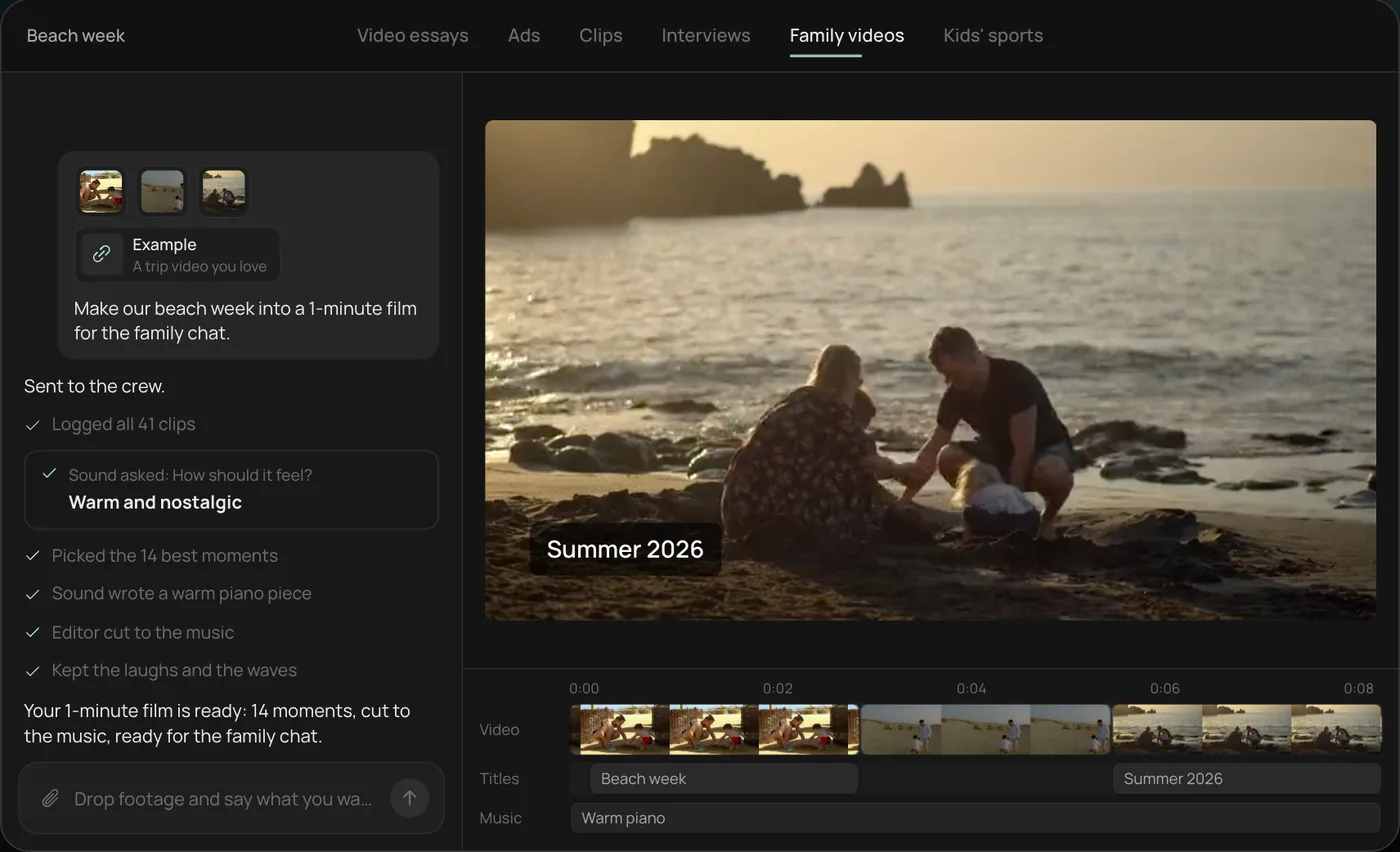
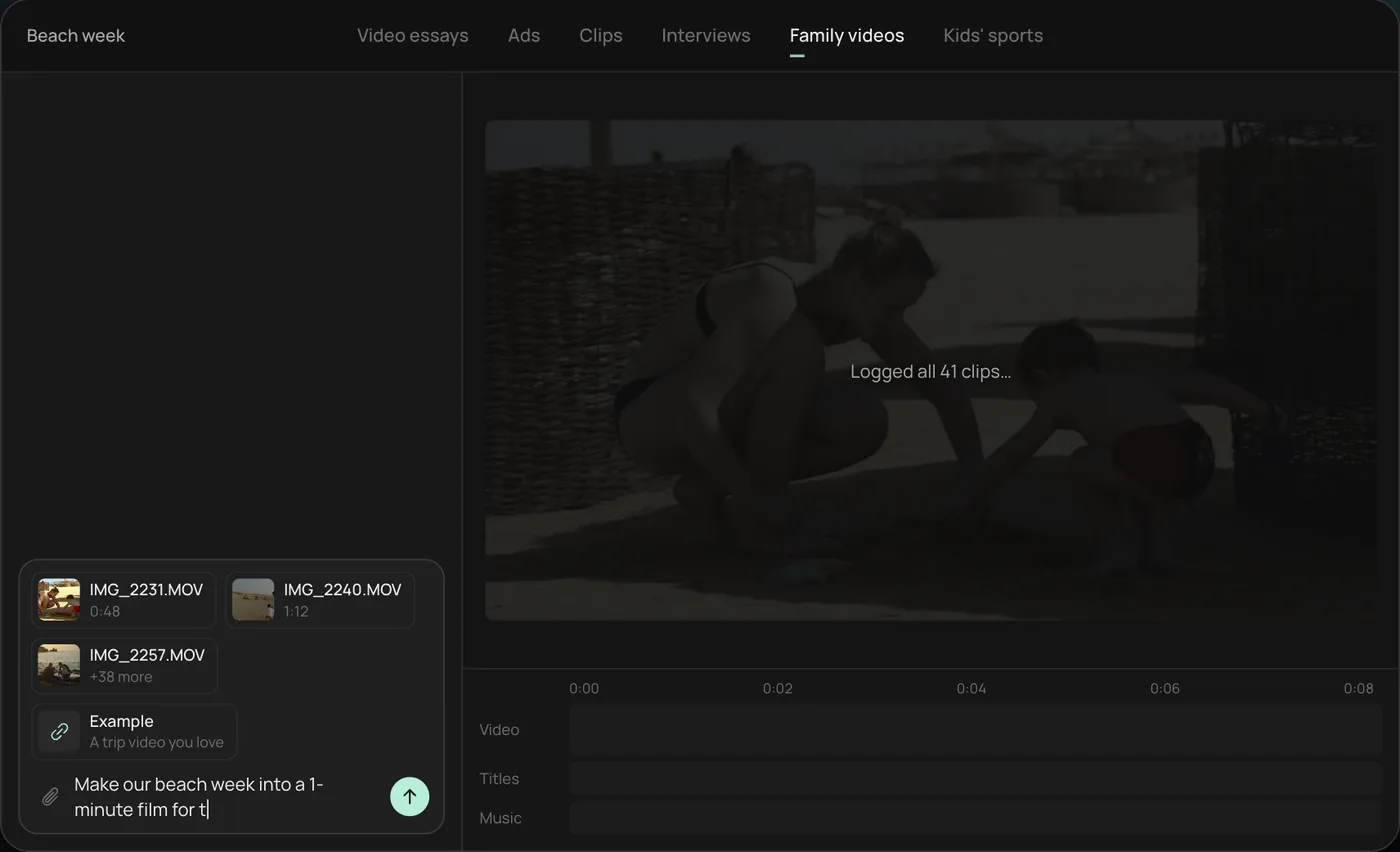
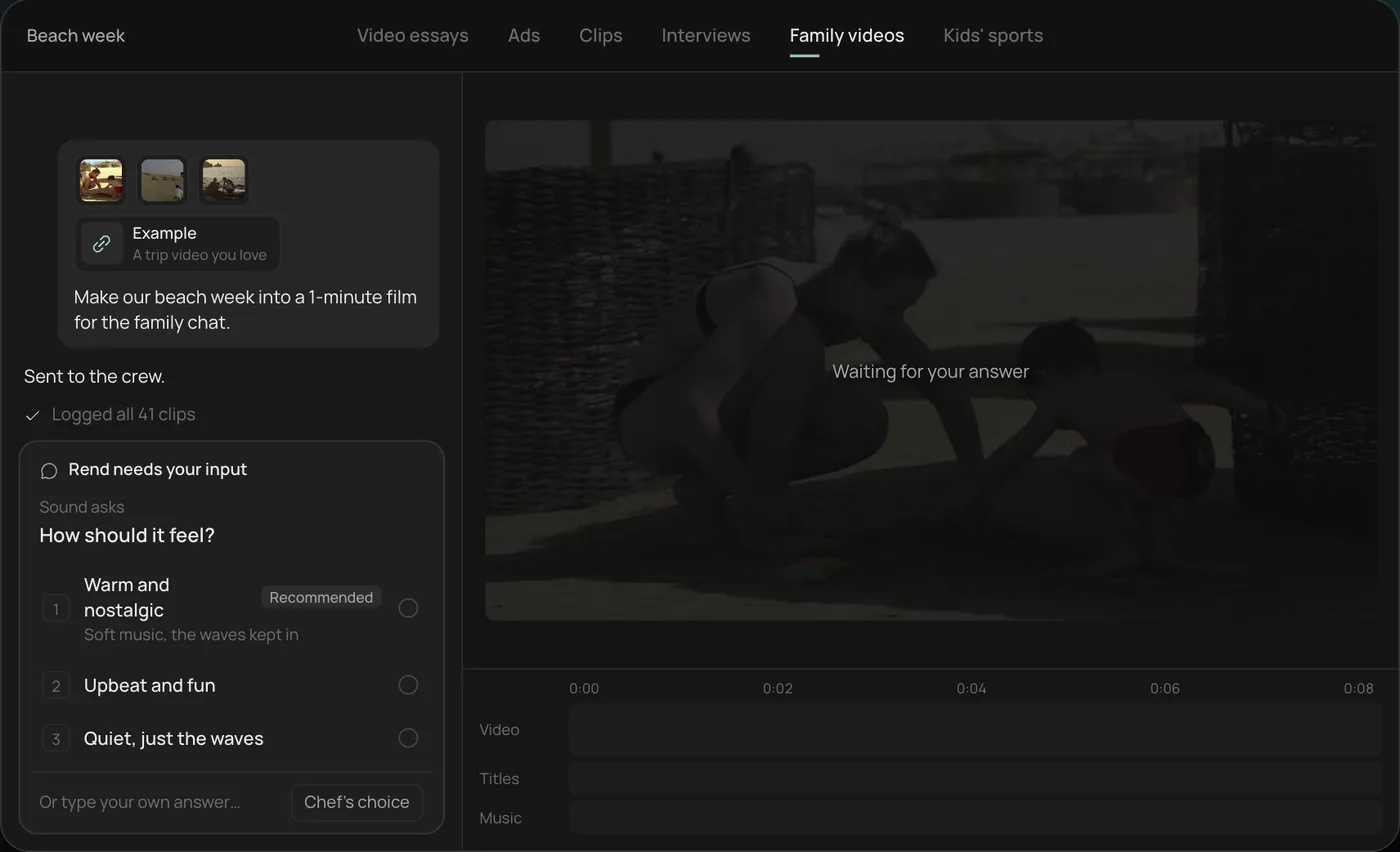
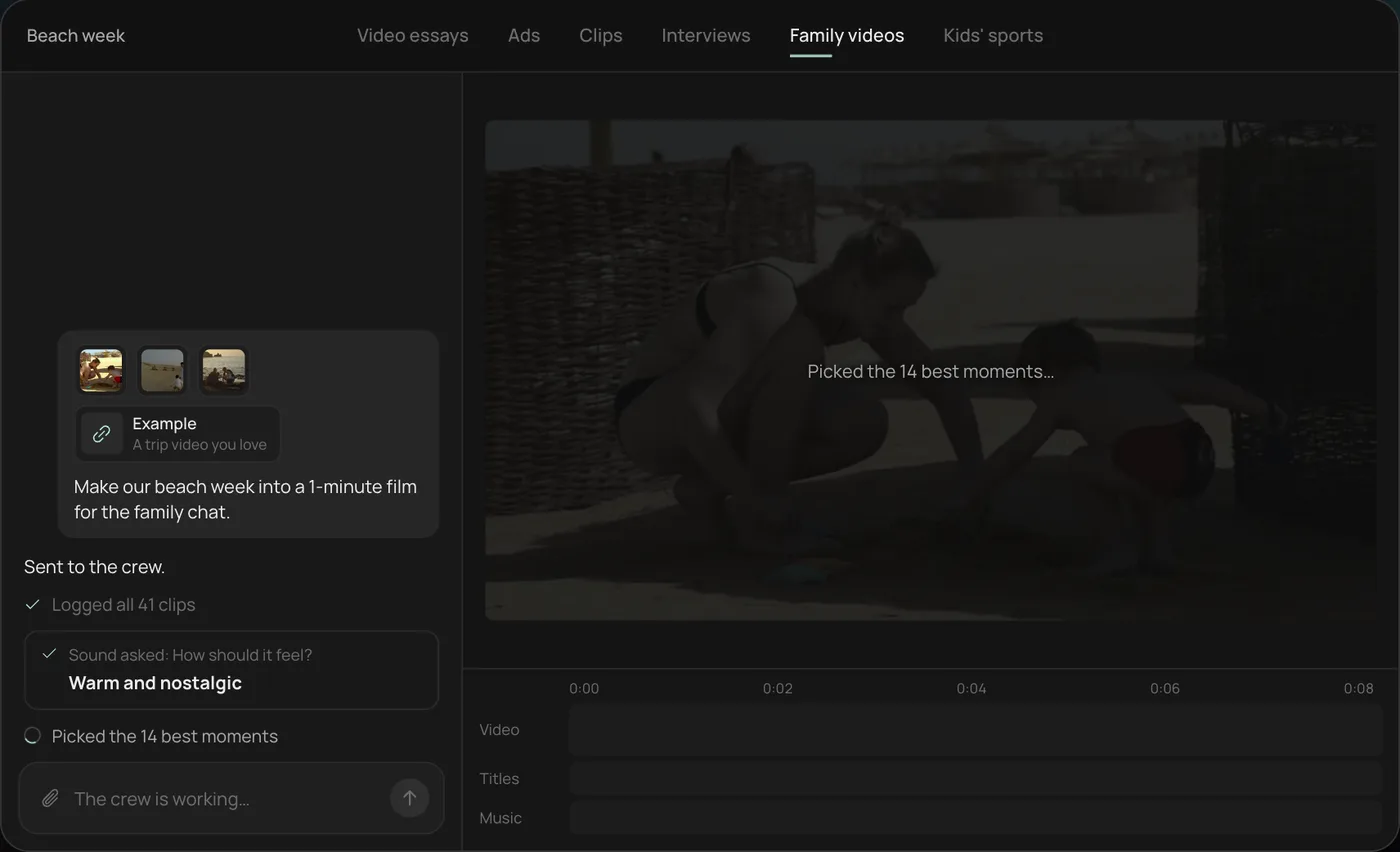
These screenshots are from Rend's demo of turning a beach week into a short film; your own project works the same way.
1. Drop your clips. Add everything from your phone (41 clips here) plus an example video you like, then ask: "Make our beach week into a 1-minute film for the family chat."
2. Answer the one question. Rend asks how the film should feel and recommends warm and nostalgic.
3. Let the crew work. The crew logs every clip and picks the 14 best moments, checking off each step in chat.
4. Open the finished film. A 1-minute film cut to warm piano, with a "Summer 2026" title, lands on a real timeline with video, titles and music on separate tracks.
From there you can open the timeline and change anything by hand, share a review link, or export. Start a free Rend project to try it on your own footage.
FAQ
What is the easiest video editor for beginners?
For editing yourself, Clipchamp and Canva have the gentlest learning curves. For not editing at all, an agent like Rend does the edit from a description.
Is there a free AI video editor with no watermark?
Clipchamp's free plan exports at 1080p without a watermark. CapCut's free plan is also widely used. Rend's editing is free; you pay only when it renders or generates.
Can I edit videos on my phone with AI?
Yes. CapCut is the strongest phone editor. With Rend you can send clips from your phone and review the result there.
Do I need a powerful computer for AI video editing?
No. Clipchamp, Canva, CapCut on the web, Descript and Rend all do the heavy lifting in the cloud. Rend runs each project on its own Linux computer.
How long does it take to learn video editing?
Basic cuts and captions take an afternoon in a beginner editor. Good pacing takes months of practice, which is the part an editing agent handles for you.
The fastest way to see whether an agent suits you is to try one: create a free Rend account and send it the clips sitting on your phone.