Chiropractor Video Marketing: Doctor Intros, Education, Reviews
Chiropractor video marketing works best with three kinds of video: a 60 to 90 second doctor intro that shows a new patient who they will meet and what the first visit looks like, a library of short patient education videos (one question or one stretch per video, 30 to 90 seconds), and patient testimonials recorded with written consent. Keep every claim to what you can back up, never promise a cure, and treat anything that shows a patient as protected health information until you have their signed authorization.
All of it can come out of one afternoon in your own clinic with a phone, a lavalier mic and a treatment room with good window light. The filming is quick. The editing is where most practices stall, so the steps below start there.
How to cut a chiropractic video in Rend, step by step
These screenshots come from Rend's demo of cutting an interview; your own project works the same way.
1. Drop in your footage. Add your files (here two camera angles and a lav mic recording) and say what you want: "Cut this interview into a 4-minute feature like this series."
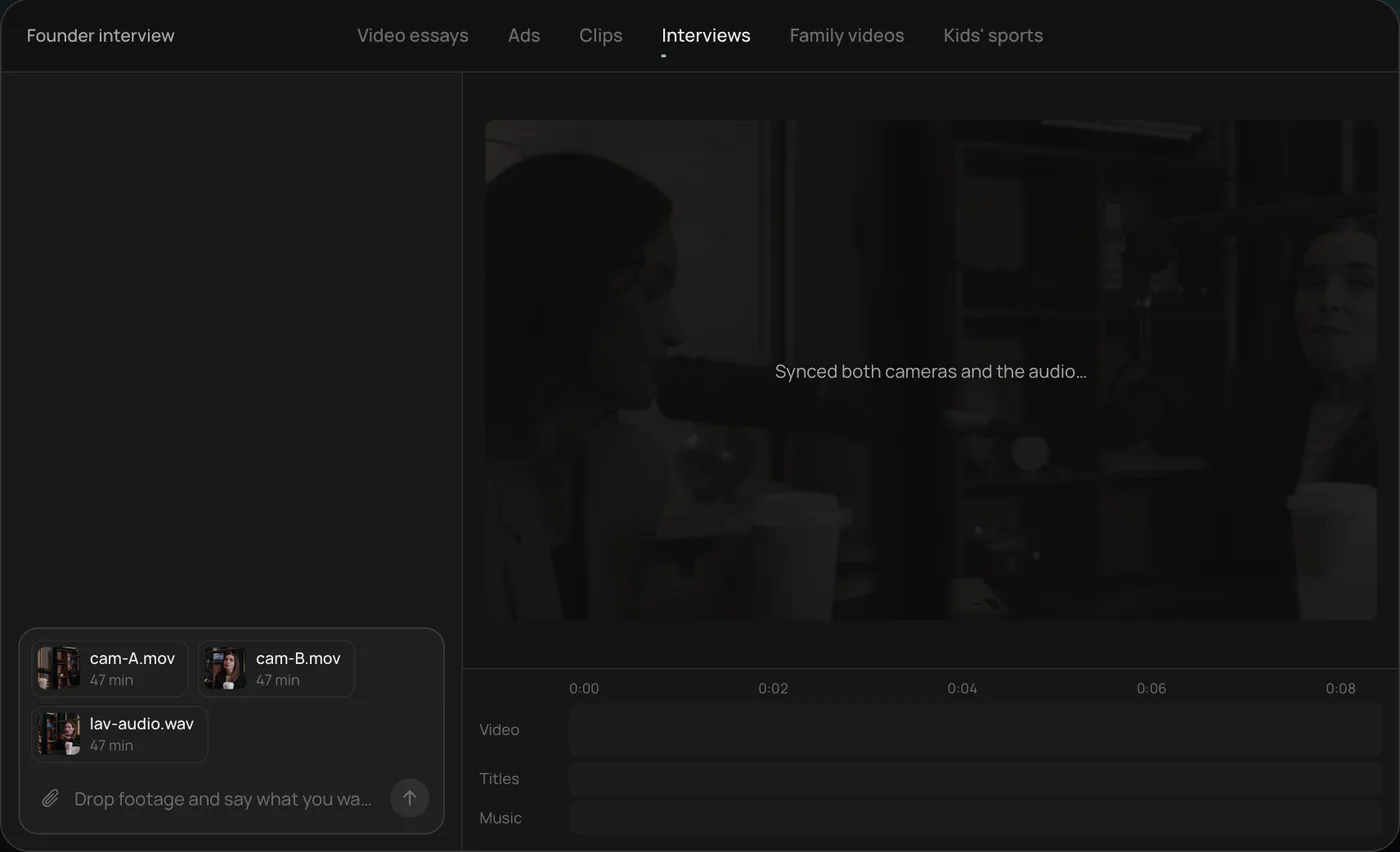
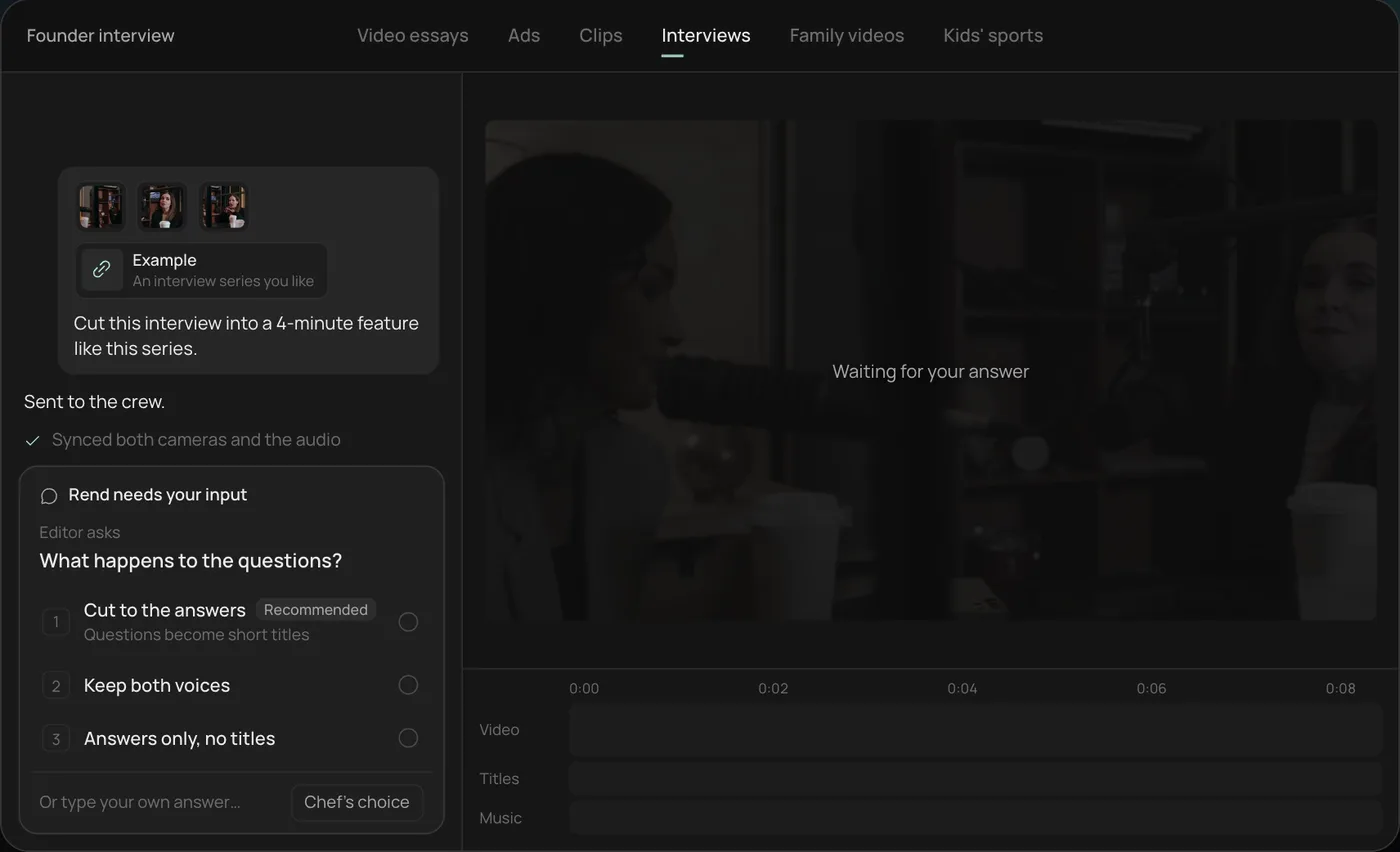
2. Answer one question. Rend asks what should happen to the interviewer's questions and recommends cutting straight to the answers.
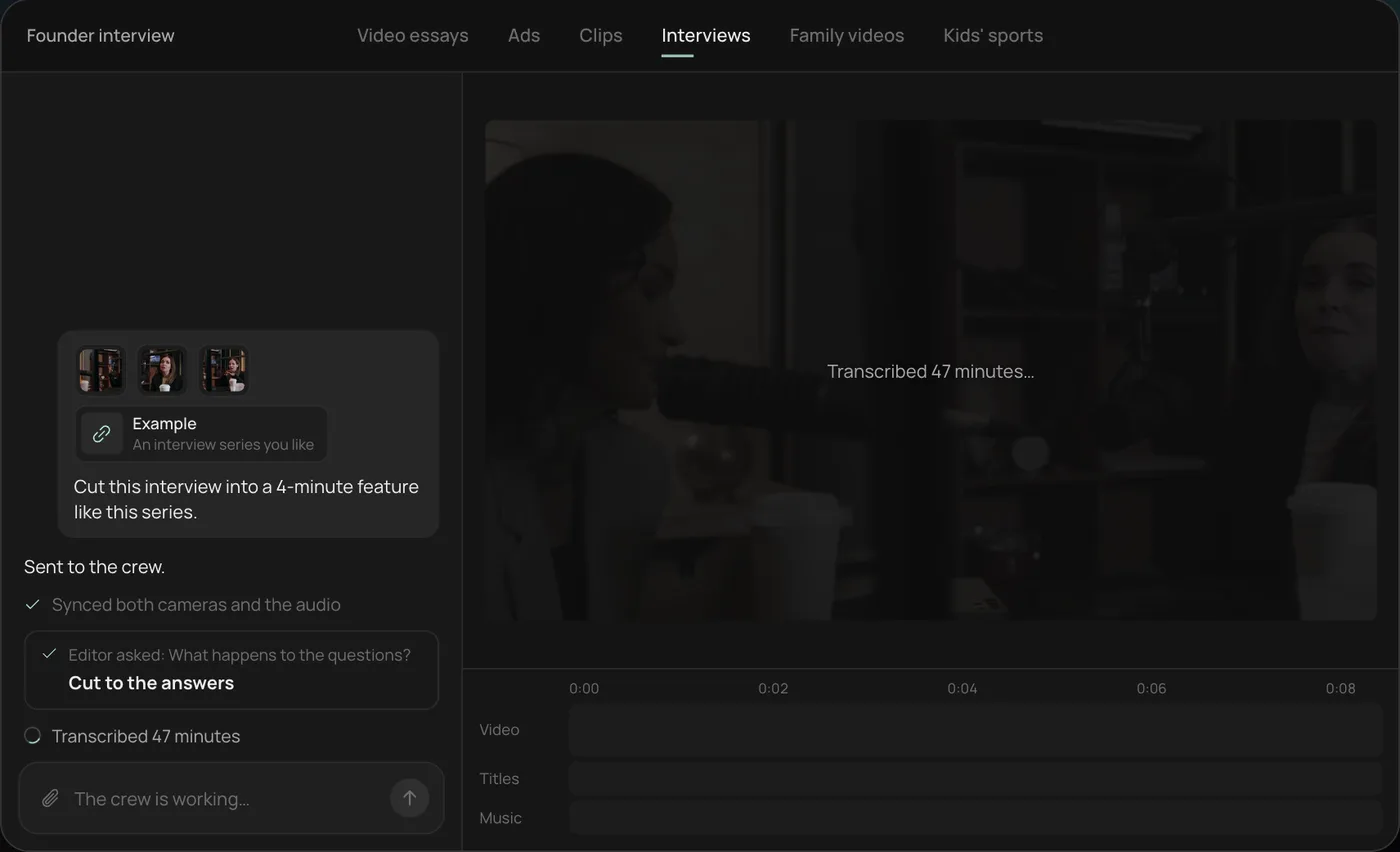
3. Watch the crew work. The crew syncs both cameras with the audio and transcribes all 47 minutes, each step checked off in the chat.
4. Get the finished cut. A 4-minute feature lands on a real timeline with both angles, a name title and the best answers in order, on separate tracks.
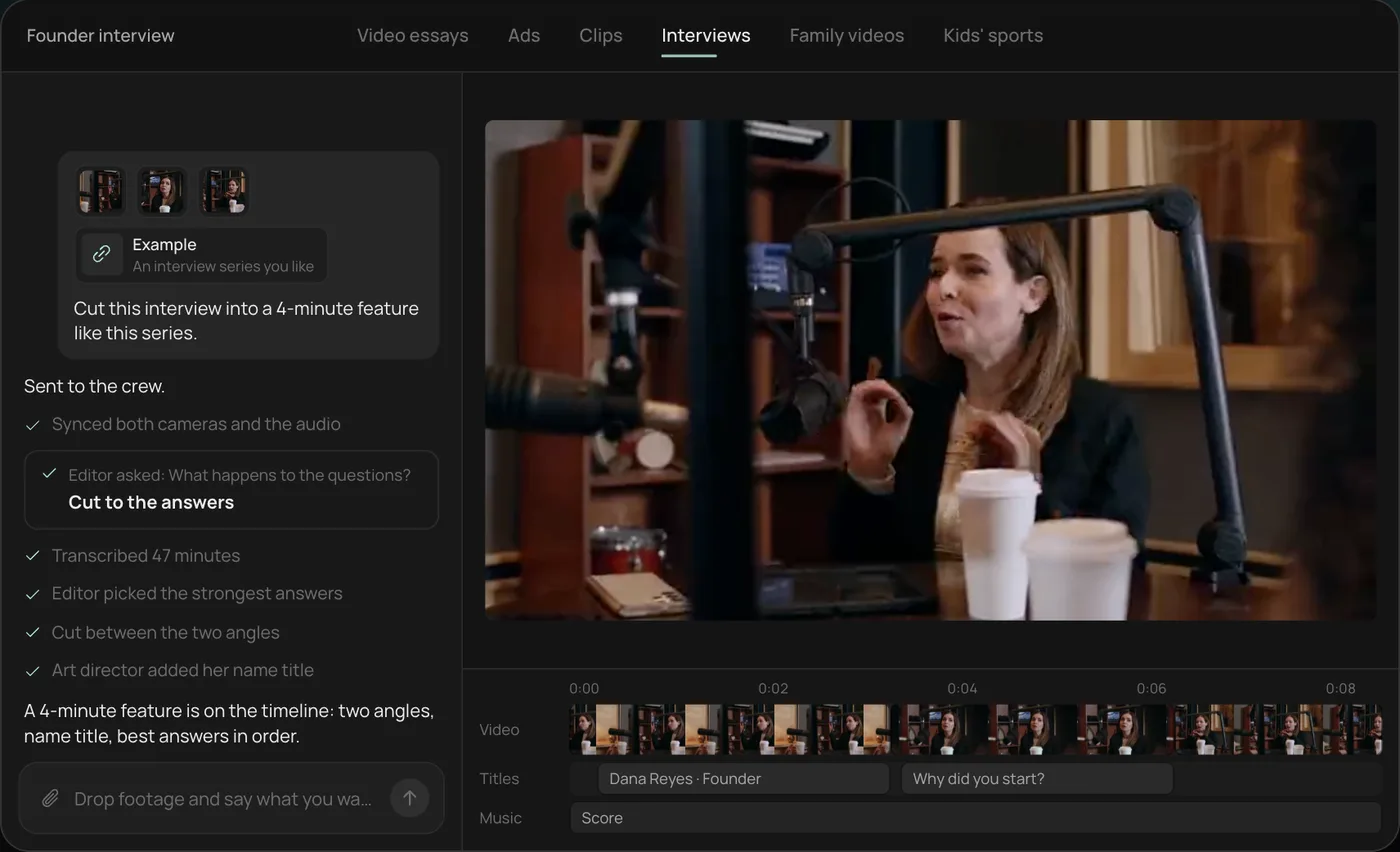
From there you can open the timeline and change anything by hand, share a review link so the doctor can mark lines to cut, or export. For a clinic, the same recording usually gives you the long intro plus eight to twelve short education clips. Start a free Rend project to try it on your own footage.
The videos a practice needs, in order
New patients are nervous about two things: whether it will hurt and whether the doctor will try to sign them up for 40 visits. Your videos should answer both before they call.
| Video | Length | Where it goes | Its job |
|---|---|---|---|
| Doctor intro | 60 to 90 s | Homepage, About page, Google Business Profile (30 s cut) | Make the doctor feel calm, specific and human |
| First visit walkthrough | 90 s to 2 min | New patient page, sent after booking | Remove the fear of the unknown |
| Education clip | 30 to 90 s each | YouTube, Shorts, Reels, condition pages | Answer one question patients really ask |
| Home stretch or ergonomics tip | 30 to 60 s | Reels, TikTok, email to current patients | Be useful enough to save and share |
| Patient testimonial | 30 to 60 s | Website, organic social | Show someone like the viewer felt better |
Make the intro and the first visit walkthrough first. They need no patient consent, and they do more for bookings than anything else on the list.
The doctor intro: shot list
Film the doctor sitting in a treatment room, angled about 30 degrees off the lens, with the adjusting table visible behind them. Skip the white coat if the doctor doesn't wear one day to day. Patients will meet the real version, so show the real version.
Shoot these, with three takes of each:
- Name, clinic and town in one line. "I'm Dr. Priya Shah, and I run Riverside Chiropractic in Asheville."
- Who they see most. Office workers with neck pain, runners, pregnant patients, people after a car accident. Specific beats broad.
- What happens at a first visit. History, exam, whether they adjust on day one, how long it takes, roughly what it costs if your practice is comfortable saying.
- What they won't do. "If I don't think I can help, I'll tell you and refer you out." This one line does more for trust than any amount of b-roll.
- B-roll: the front desk, a handshake at the door, the doctor reviewing posture with a patient (an actor or staff member, not a real patient without consent), hands on the table, the parking lot and sign. Five steady seconds each.
Two phones help. Put one tight on the doctor and one wide, start both, then clap once on camera so the edit can sync them. Record audio on a lav mic into a third device. A tiled treatment room echoes badly, so hang a blanket or towel just out of frame.
Patient education: where the views come from
Education clips are the work that keeps paying. Pull the topics from your front desk: ask staff to write down every question new patients ask on the phone for two weeks. You will end up with 30 or so, and they will repeat.
Topics that reliably do well for practices:
- What that cracking sound actually is
- Is it safe to see a chiropractor while pregnant
- Desk setup for neck pain, shown on a real desk
- Three stretches for lower back stiffness after driving
- When you should see a doctor instead of a chiropractor
- What to expect after your first adjustment (soreness, how long it lasts)
Rules for a good cut. Put the question on screen in the first second, in the patient's own words. Answer it in the first ten seconds, then explain. One topic per video, because a video about five things ranks for none of them. End with a calm next step, such as "If this sounds like you, book an exam and we'll check." Burn captions into the vertical versions, since most social viewers watch muted; the caption styles previewer shows which looks stay legible on a phone.
For stretches and exercises, film the movement from the side and the front, slowly, with the doctor talking over it. Add a line on screen saying to stop if anything hurts and to check with a provider first. That line protects the viewer and protects you.
Claims: what you can and can't say
Chiropractic ads get into trouble on claims more than anything else. The FTC's Health Products Compliance Guidance (December 2022) says health claims need "competent and reliable scientific evidence," and that testimonials can't be used to make a claim you couldn't support on your own. State boards add their own advertising rules, and they vary, so read yours before you publish.
| Risky | Safer |
|---|---|
| "We cure sciatica" | "Many of our patients come to us for sciatica. Here's how we assess it." |
| "Chiropractic boosts your immune system" | Leave it out |
| "Get off your pain meds" | Leave it out; medication decisions belong to the prescriber |
| "Guaranteed relief in 3 visits" | "Most care plans are reviewed after the first few visits." |
| A testimonial saying "it fixed my migraines" | Keep the patient's experience, add context, and cut lines that read as a promise |
Paid social has a second layer. Meta's Advertising Standards restrict ads that assert or imply a viewer's personal attributes, and medical conditions are one of them. "Is your back pain ruining your life?" in an ad addressed to the viewer can get rejected. "Back pain after long drives is common. Here's one stretch that helps" says the same thing without pointing at the viewer.
Testimonials and HIPAA-safe consent
A patient on camera talking about their care is protected health information: their face, their name and their condition together. Under the HIPAA Privacy Rule, HHS says a covered provider generally needs the individual's written authorization before using or disclosing that information for marketing (45 CFR 164.508). A verbal "sure, film me" is not enough.
In general terms, a workable process looks like this:
- Use a written marketing authorization form your compliance adviser or attorney has approved. It should say what will be filmed, where it will be used, for how long, and that the patient can revoke it.
- Ask after a good outcome, never during a vulnerable visit, and make it clear that saying no changes nothing about their care.
- Let them watch the final cut before it goes live.
- Keep the signed form and the raw footage in the same folder.
- Never show charts, X-rays, schedules or other patients in the background. Check every frame of b-roll for a monitor with names on it.
On the interview itself, don't script the patient. Ask open questions ("What were you not able to do before?" "What's different now?") and cut to their real words. Our guide to making a customer testimonial video has the full question list and phone setup. Dental and aesthetic clinics face the same consent problem; see videos for dentists and med spas for how they handle before and after footage.
Where each cut goes
| Channel | Shape | What to post |
|---|---|---|
| Website | 16:9 | Doctor intro, first visit walkthrough, full education answers |
| Google Business Profile | Up to 30 s | Walking into the clinic plus the doctor's one-line intro |
| YouTube | 16:9 | Education library, one question per video |
| Shorts, Reels, TikTok | 9:16 | First 30 to 45 s of each education clip, captioned |
| Paid social | 9:16 and 4:5 | 15 to 30 s doctor intro with a new patient offer |
Google's Business Profile help center allows videos up to 30 seconds and 75 MB; our Google Business Profile video guide covers the details. Check paid sizes and safe zones with the video ad size checker before you upload.
What goes wrong
- The doctor reads off a phone propped by the lens. Eyes drift and the warmth disappears. Give them three bullet points per answer and accept a few "ums", which can be cut on the exact word later.
- Adjustment footage that looks violent. A fast thrust with a loud crack in a close-up scares the exact people you want to book. Shoot adjustments wide, show the setup and the patient relaxing after, and keep the sound low.
- Everything is about the spine. Patients care about sleeping through the night and picking up their kid. Talk about the life part.
- No captions on social. Without them the video is a silent picture of someone talking.
- No review before posting. The doctor should watch every cut once. A review link where they can tap the exact frame and leave a note takes ten minutes.
How Rend fits a clinic's week
The shoot takes an afternoon. Turning a 45-minute recording into an intro, a walkthrough, ten education clips, vertical versions and captions takes days by hand. Rend does that from what you send in chat, by email or through a web form: it transcribes with speakers labeled, cuts on the exact words you pick, adds word-timed captions in your look, and keeps music on its own track. A brand kit holds your fonts, caption style, lower third and music bed, so every clip matches without anyone setting it up again.
When the doctor wants a line removed, they leave a note on the review link at that moment and the agent makes the fix on the timeline. Where Rend is not the answer: if you want a lit, crewed brand film, hire a local production company for the shoot and bring their footage in for the cutdowns. Editing is free; you pay when Rend renders or generates something, as listed on the pricing page.
For ads specifically, see video ads for local businesses and the ad video review checklist.
FAQ
What videos should a chiropractor make first?
A 60 to 90 second doctor intro and a first visit walkthrough. Neither needs patient consent, and together they answer the two things new patients worry about most: who they'll meet and what will happen.
Can I post patient testimonial videos?
Yes, with the patient's written authorization. Under HIPAA, using a patient's health information for marketing generally requires a signed authorization, and your state board may have its own advertising rules. Have your compliance adviser approve the form.
Can I film real adjustments for social media?
Only with the patient's written consent, and think about how it looks. Wide shots with calm sound read as care; tight shots with loud cracks read as risk.
How long should a chiropractic education video be?
Thirty to 90 seconds, one topic each, with the answer in the first ten seconds. Cut the first 30 to 45 seconds for Shorts and Reels.
What health claims should I avoid?
Cures, guarantees, claims about immunity or replacing medication, and anything you couldn't back with solid evidence. The FTC expects health claims to be substantiated, and testimonials don't get around that.
Do I need a professional videographer?
Not for intros and education clips. Two phones, a lav mic and window light are enough. A crew earns its fee on a brand film or a TV spot.
Send Rend the files from one recording session and it will cut the intro, the walkthrough and the education clips on a timeline your team can review and change. Start free here.