Insurance Agent Video Marketing: Explainers, Trust, Renewals
Insurance agent video marketing works when each video answers one question a client is too embarrassed or too busy to call about: what a deductible actually does, why their premium went up, whether they need umbrella coverage. Build three kinds of video: short policy explainers (60 to 90 seconds, one coverage question each), local trust videos that show who you are and where your office is, and a renewal season set that you send before clients start shopping. Keep every statement accurate and general, and check your state's insurance advertising rules and your carriers' approval requirements before anything goes live.
You can film a quarter's worth in one afternoon at your desk with a phone and a clip-on mic. The steps below show the edit; the rest covers what to film and when to post it.
How to cut an insurance video in Rend, step by step
These screenshots come from Rend's demo of cutting an interview; your own project works the same way.
1. Drop in your footage. Add your files (here two camera angles and a lav mic recording) and say what you want: "Cut this interview into a 4-minute feature like this series."
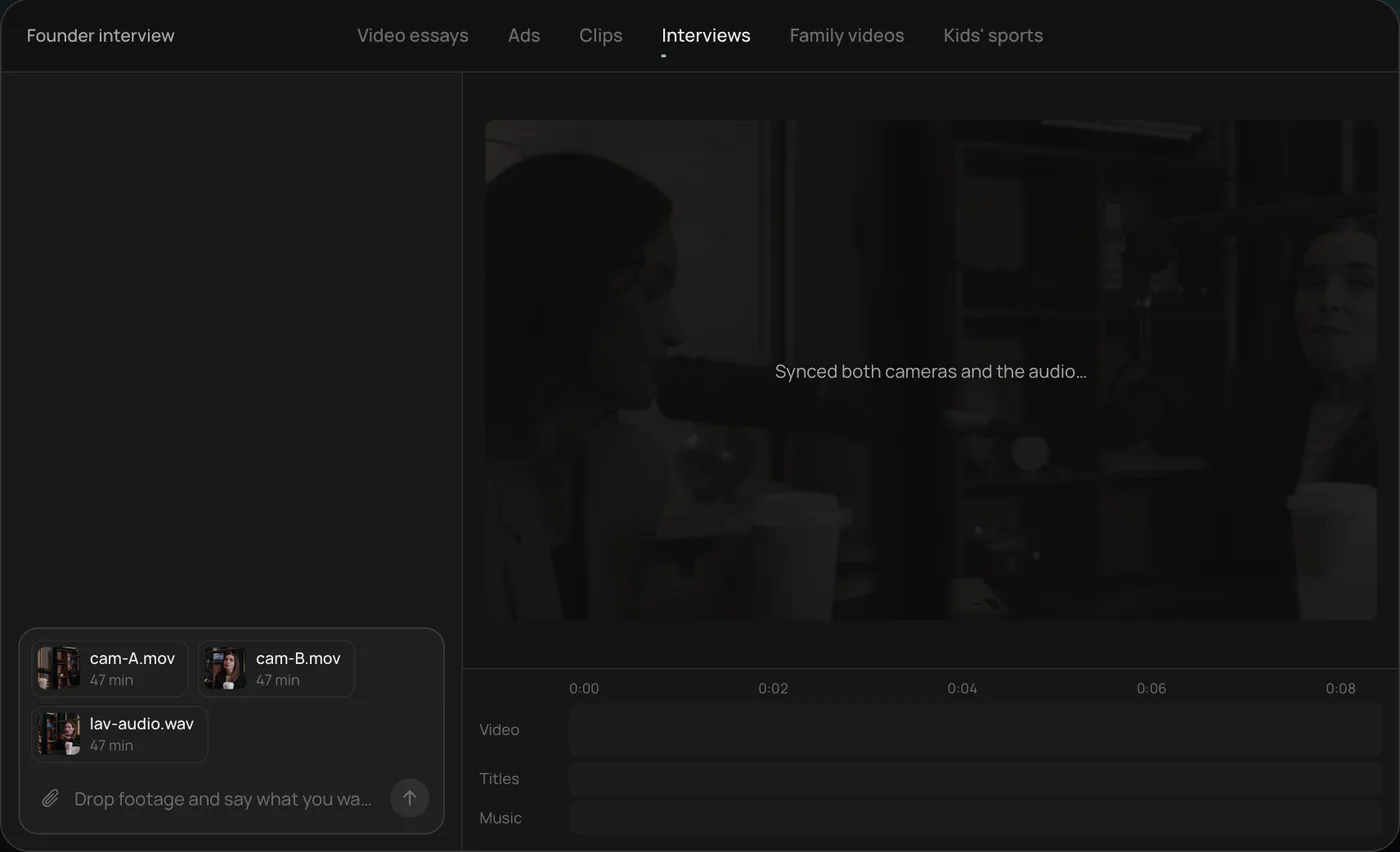
2. Answer one question. Rend asks what should happen to the interviewer's questions and recommends cutting straight to the answers.
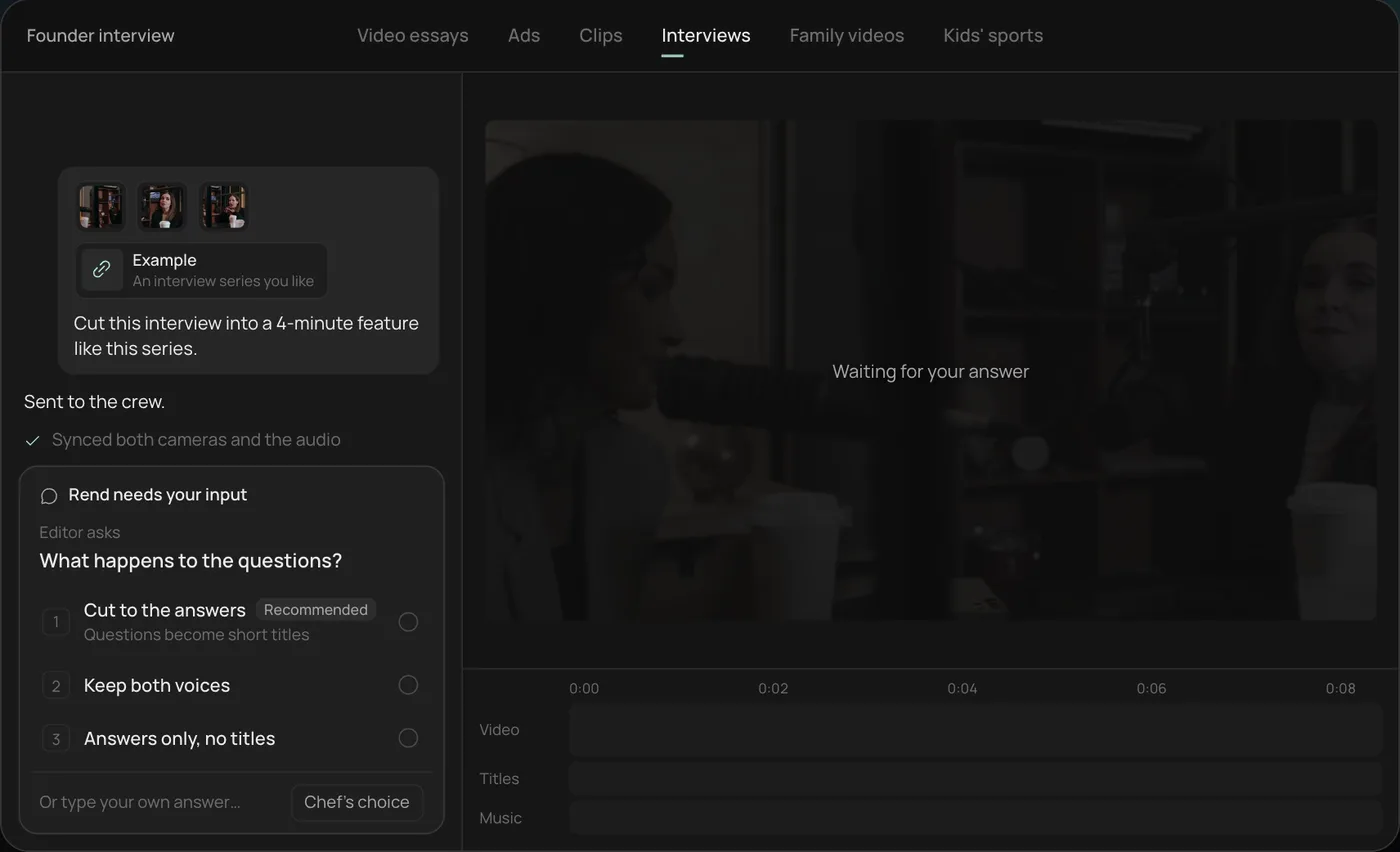
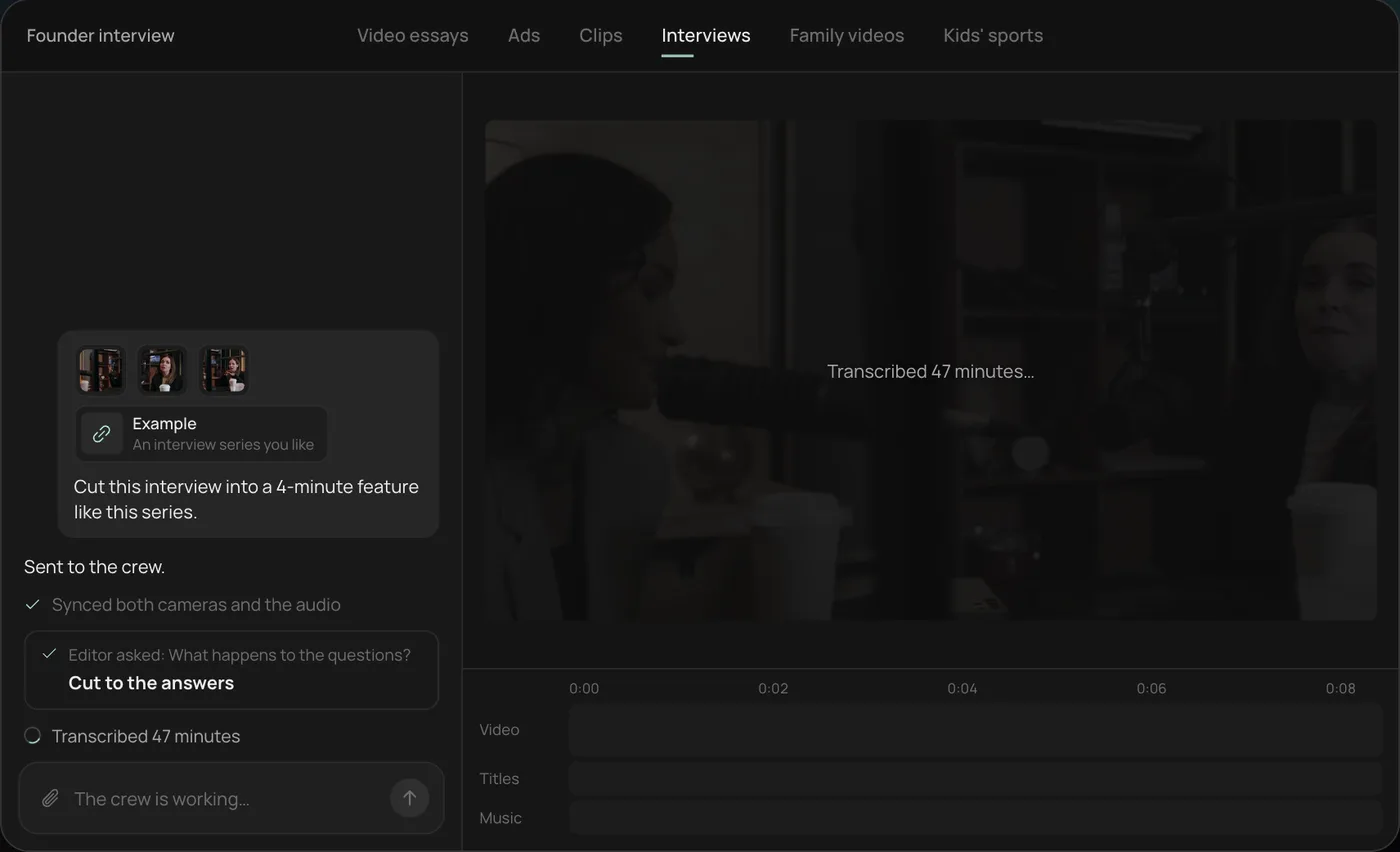
3. Watch the crew work. The crew syncs both cameras with the audio and transcribes all 47 minutes, each step checked off in the chat.
4. Get the finished cut. A 4-minute feature lands on a real timeline with both angles, a name title and the best answers in order, on separate tracks.
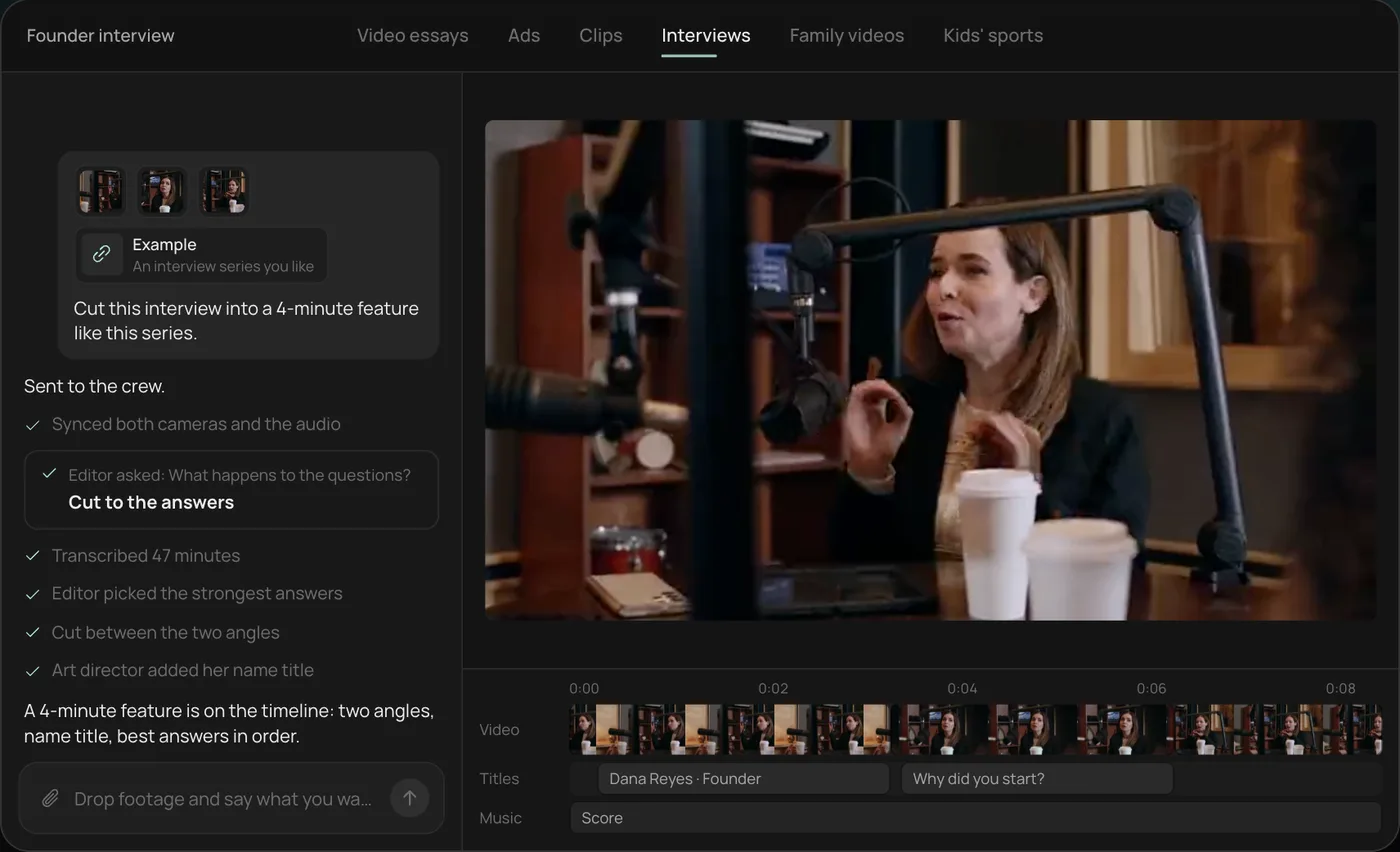
From there you can open the timeline and change anything by hand, share a review link with your agency principal or carrier contact, or export. For an agency, one recorded Q&A session usually turns into eight to fifteen short explainers. Start a free Rend project to try it on your own footage.
Why video works for agents in particular
Insurance is bought on trust and price, and price comparison sites have won the price part. The agent's edge is the human one: a person nearby who explains things plainly and picks up the phone after a hailstorm. Video is the cheapest way to show that before anyone calls.
It also cuts your phone time. If you answer "why did my renewal go up" in a 90-second video, you can send it to every client who asks, and to the whole book before they ask.
The three video types
| Type | Length | Where it lives | What it does |
|---|---|---|---|
| Policy explainer | 60 to 90 s | YouTube, website coverage pages, texted to clients | Answers one coverage question |
| Local trust video | 45 to 90 s | Google Business Profile (30 s cut), homepage, Facebook | Shows the agent, the office, the town |
| Renewal season video | 60 to 120 s | Email and text to your book, Facebook | Explains rate changes before clients shop |
| Claim walkthrough | 90 s to 2 min | Website, sent after a storm or accident | What to do in the first 24 hours |
| Short tip | 20 to 40 s | Reels, Shorts, TikTok | One fact, captioned, to stay visible |
Policy explainers: 15 topics to start
Pull the list from your own inbox and call notes. These are the ones that come up at most personal lines agencies:
- What a deductible is and how raising it changes your premium
- Liability limits: what 100/300/100 means on an auto policy
- Why your homeowners policy might not cover a flood
- Umbrella insurance in plain words
- Replacement cost versus actual cash value
- What happens when a teen driver joins your policy
- Renters insurance and what it actually covers
- Do you need gap coverage on a new car loan
- Term versus whole life, in one minute (if you're licensed for life)
- What to do right after a fender bender
- Why bundling home and auto usually saves money
- How a claim affects your premium
- Business owner's policy basics for a small shop
- What a home inspection for insurance looks for
- Wind and hail deductibles, if your state has them
Each explainer starts with the question on screen in the client's words, answers it in the first ten seconds, then uses one example with round numbers. "If your deductible is $500 and the repair is $2,000, you pay $500 and the policy pays the rest." Keep any numbers clearly labeled as examples. Coverage varies by carrier, policy and state, so end each one with "Your policy may be different. Call us and we'll check yours."
That closing line matters twice over. It's honest, and it's the call to action.
Local trust videos: show the real office
The local trust video is the one prospects watch when they're deciding between you and a call center. Film:
- The outside of the office, the sign, the street (five seconds each, steady)
- The agent at their desk, one sentence on who they are and how long they've been in town
- The team, by name, each saying what they handle
- Something local: the high school sponsorship banner, the parade float, the coffee shop next door
- The agent saying how clients reach them, including after hours if that's true
Keep it under 90 seconds and cut a 30-second version for your Google Business Profile, where Google's help center allows videos up to 30 seconds and 75 MB. Our Google Business Profile video guide covers the upload details. A short claim walkthrough filmed after a real local storm (with no client details shown) is often the most shared video an agency makes.
Renewal season calendar
Personal lines renew all year, so "renewal season" for most agents means two things: the stretch when rate increases hit your book, and the health and Medicare enrollment windows if you sell those lines.
| When | What to send | Why |
|---|---|---|
| 45 to 60 days before a client's renewal | "Why your renewal might change" explainer | Clients shop when they're surprised |
| Spring | Storm prep and claim walkthrough | Hail and wind season in many states |
| Before Medicare Open Enrollment (CMS dates: October 15 to December 7) | Plan review explainer, if you're appointed | Beneficiaries review and switch plans then |
| Early November | Marketplace open enrollment reminder, if you sell ACA plans | Open enrollment starts November 1; confirm this year's end date on HealthCare.gov |
| December | Year-end check: new car, new house, new driver, new business | Life changes that change coverage |
| Any rate filing month | Plain video on why rates moved in your state | Get ahead of the angry calls |
The renewal explainer should never blame the carrier or promise a lower price. Say what drives rates in general (repair costs, claims in your area, the client's own changes), say you'll shop or review their coverage, and give a deadline that's real.
Rules to check before you post
Insurance advertising is regulated by each state's insurance department, and your carrier appointments usually add their own approval rules for anything that names the carrier or a product. In general terms:
- Don't name a carrier, show its logo or describe a specific product without checking your appointment agreement and the carrier's marketing guidelines. Many require pre-approval.
- Don't promise savings ("save 30 percent") unless you can document it and your state allows it.
- Don't describe coverage in a way that's broader than the policy. "You're covered for anything" is the classic problem.
- Medicare is its own world. CMS's Medicare Communications and Marketing Guidelines govern what agents and third-party marketing organizations can say, including a required disclaimer, and CMS changed several of those rules for contract year 2027 materials starting October 1, 2026. Get the current required wording from your carrier or marketing organization before filming any Medicare content.
- Testimonials are allowed in many states with conditions. Never pay for one without checking your state's rules, and get written consent from the client.
If you're unsure, send the script to your agency's compliance contact or carrier rep before filming. It's faster than reshooting.
Shooting setup that sounds professional
Sit at your desk, angled about 30 degrees off the lens, window to the side. Clear the desk of client files and turn the monitor away from the camera; a visible screen with a client's name on it is a privacy problem. Use a lavalier mic. Offices with hard floors and glass walls echo, and viewers forgive a soft picture long before bad sound.
Two phones help: one tight, one wide, a clap on camera to sync them. Answer each question three times. The second take is usually the keeper, and the third is the backup when you stumble on a number.
Where each cut goes
| Channel | Shape | Cut |
|---|---|---|
| Website coverage pages | 16:9 | Full explainers |
| YouTube | 16:9 | Explainer library, one question each |
| Text and email to clients | 16:9 link | Renewal and claim videos |
| Facebook, Instagram | 9:16 and 4:5 | 30 to 45 s cuts of explainers, captioned |
| Google Business Profile | Up to 30 s | Local trust cut |
| Paid ads | 9:16, 4:5, 1:1 | 15 to 30 s quote offer |
Check ad sizes and safe zones with the video ad size checker, and see video ads for local businesses for budgets and targeting.
How Rend fits an agency
The agent's time is the constraint. Rend takes the recording you send in chat, by email or through a web form, transcribes it with speakers labeled, and cuts one explainer per question on the exact words you pick. It adds the question as a title, word-timed captions in your style, a lower third with your name and license line, and music on its own track. A brand kit keeps the logo, colors and caption look the same on every video. When your principal or carrier rep wants a change, they leave a note on the review link at the exact moment and the agent fixes it on the timeline.
Rend doesn't check insurance law for you; that review stays with your compliance contact. Editing is free and you pay when Rend renders or generates something, per the pricing page. For more on turning one recording into many short clips, see repurposing a long video into Shorts, and for testimonial interviews see how to make a customer testimonial video.
FAQ
What videos should an insurance agent make first?
A 60 to 90 second local trust video and five policy explainers on the questions clients ask most. They're easy to approve and they keep answering calls for you.
How long should an insurance explainer video be?
Sixty to 90 seconds, one question each, with the answer in the first ten seconds. Cut 30 to 45 seconds for Reels and Shorts.
Can I mention the carriers I represent?
Usually, but check your appointment agreement and each carrier's marketing guidelines first. Many require approval before you use their name, logo or product details.
When is Medicare Open Enrollment?
CMS lists October 15 to December 7 each year. If you sell Medicare plans, get the current required disclaimer and marketing rules from your carrier or marketing organization before posting.
Do I need to put my license number in videos?
Many states require license information in some advertising. Add it to the lower third or end card and confirm with your state insurance department's rules.
Can I use client testimonials?
In many states, yes, with written consent and within your state's rules. Never pay for one without checking first, and keep claim details out of it.
Send Rend one recorded Q&A session and it will cut your explainers and local trust video on a timeline you can review and change. Start free here.