Electrician Video Marketing: The Estimate Explainer Playbook
The electrician video that books the most work is a 60 to 90 second estimate explainer for each big job you quote often (panel upgrade, EV charger, generator, rewire), not a DIY tip. Text it with the quote, put it on the matching service page and your Google profile, and cut 15 to 30 second ads from it.
Most advice on video marketing for electricians stops at a list of how-tos, tips and testimonials, and some of it suggests teaching homeowners to change a light fixture. The estimate explainer answers the questions people sit on after you leave: what am I actually getting, why does it cost this, how long will my power be off, and what happens on the day.
Why the estimate explainer beats DIY tips
A homeowner holding your panel upgrade quote may be comparing it against one or two other totals. The homeowner doesn't know what a load calculation is, why there's a permit fee, or why the utility has to be involved. The cheapest quote looks like the same job for less money.
A short video from the electrician who walked their basement changes that comparison. It shows the reasoning behind the number, and it can be forwarded to a spouse who missed the walkthrough.
DIY content does the opposite. OSHA's electrical safety page lists "electric shock, electrocution, fires, and explosions" among the dangers its standards protect workers from, and those are trained workers. A clip that makes panel work look easy is a liability with your logo on it. If you want educational content, make decision videos ("Three signs your panel is undersized") that end with "call a licensed electrician." Our FAQ video guide covers how to structure them.
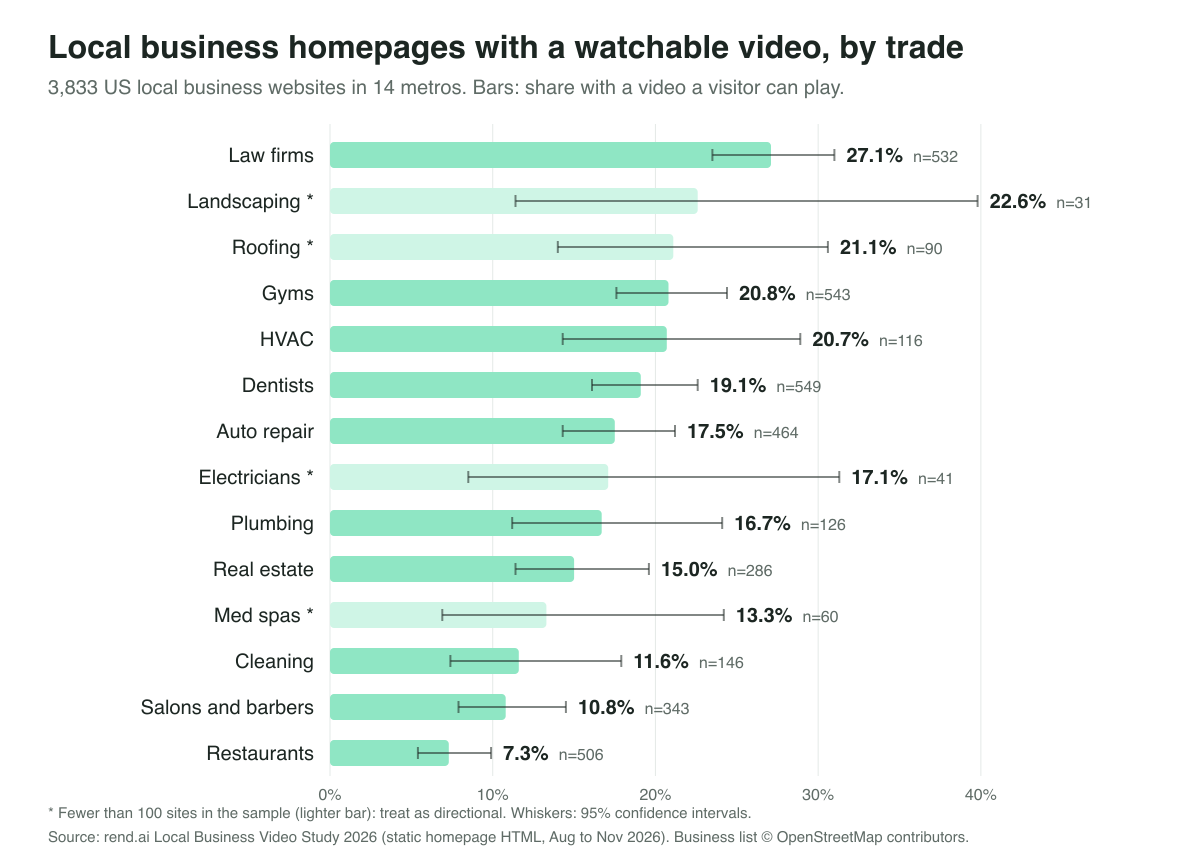
Few competitors have done it yet. In Rend's 2026 study of local business homepages, 7 of the 41 electrician sites we checked had a video a visitor could play. That's a small sample, so treat it as directional.
Which jobs get an explainer first
Start with the jobs you quote most and lose most often on price, for example:
- Panel upgrade or service change
- Level 2 EV charger installation
- Whole-home standby generator and transfer switch
- Rewiring an older house (knob and tube, aluminum branch circuits, ungrounded circuits)
- Code correction after a home inspection, including GFCI and AFCI protection
Make one video per job type, not one per customer, and re-shoot only when your process or local permit process changes.
The 6-beat estimate explainer script
Every explainer follows the same six beats. Keep the whole thing to 60 to 90 seconds; a homeowner opening a text will give you about that long.
| Beat | Time | What you say | What's on screen |
|---|---|---|---|
| 1. The problem | 0 to 10 s | The symptom or goal that brings people to this quote | The thing itself: an old panel, an EV in a garage, a dark house in an outage |
| 2. What you get | 10 to 25 s | The finished result in plain words | A finished install, door closed, labels neat |
| 3. Why it costs what it costs | 25 to 45 s | The parts of the price a quote doesn't explain: load calculation, permit, inspection, utility coordination, materials | Tech with a clipboard, permit card on site, wire and parts on the truck |
| 4. How long it takes | 45 to 55 s | Your real range for the work and for any waiting on the permit or utility | A simple on-screen timeline |
| 5. The day itself | 55 to 75 s | When power goes off, what you protect, how you clean up | Drop cloths, shoe covers, crew arriving |
| 6. Next step | 75 to 90 s | How to approve the quote or ask a question | Your face, your number, your logo |
Beat 3 is the one that matters most. Don't put a price in the video. Explain the parts of the price instead, so the homeowner can see what's in your total before comparing it to one that skips the permit.
Keep code talk general. Say "we pull the permit your city requires and the inspector checks our work," not a section number. Requirements vary by jurisdiction and change when your area adopts a new edition of the National Electrical Code.
Example: panel upgrade explainer (about 80 seconds)
This is a worked example. Swap in your own wording, ranges and process.
- "If your breakers trip when the dryer and the microwave run together, or you're adding an EV charger or a heat pump, your panel may not have room for what your house needs now."
- "We replace the panel with a new one sized for your house, with every circuit labeled so you know what each breaker does."
- "Before we quote, we do a load calculation, which is the math on everything your house draws. The quote includes the permit, the inspection, and coordinating with the utility if they need to disconnect and reconnect your service. If you're comparing quotes, ask whether the others include those."
- "The work itself usually takes [your range]. Scheduling the inspection and the utility can add [your range], and we handle the calls."
- "Your power is off for most of the day. We'll tell you when. We lay down drop cloths, keep the work area closed off, and take the old panel with us."
- "Reply to this text with any questions, or tap the link to approve the quote. I'm [name], and I'll be the one at your house."
Example: Level 2 EV charger explainer (about 70 seconds)
- "Charging on a regular outlet can take a long time. A Level 2 charger on its own circuit charges faster."
- "A dedicated circuit from your panel to the charger, mounted where your cable reaches the car, tested before we leave."
- "The price depends mostly on two things: whether your panel has room for a new circuit, and how far the wire runs from the panel to the garage. We check your panel's capacity first. If it's full, we'll tell you your options before you spend anything. Permit and inspection are in the quote."
- "Most installs are done in [your range]. Add time if the panel needs work."
- "We'll shut off power briefly to connect the circuit, route the wire as cleanly as your house allows, and patch anything we open."
- "Send us a photo of your panel with the door open and where you park, and we'll confirm the quote."
Phone shot list for a safe, private video
You need about eight clips per explainer, and you can shoot them across three or four real jobs. Film horizontal for the website and YouTube, or vertical if ads come first.
| # | Shot | How to film it | Rule |
|---|---|---|---|
| 1 | Old panel, door closed | Wide, level, 3 s | Door closed, no tight close-up of live parts |
| 2 | Tech explaining to camera | Chest up, quiet room, 20 to 40 s | Lav mic or phone close to mouth |
| 3 | Load calc on a clipboard or tablet | Over the shoulder | Blur or crop the customer's name and address |
| 4 | Permit card posted on site | Close-up | Crop out the address and permit number |
| 5 | Crew arriving, shoe covers on | From the driveway, low angle | Keep the house number, street sign and plates out of frame |
| 6 | New panel, finished, labeled | Door closed, or open only with the panel de-energized | Never film live, open gear up close without PPE on the person in frame |
| 7 | EV charger mounted, cable coiled | Wide, then detail | Garage only, no view of the street |
| 8 | Owner or lead tech sign-off | Chest up, outside the truck | Your number on the truck is fine; theirs isn't |
Two privacy habits make every clip reusable. Ask for written permission before you film inside someone's home, and frame the shot so nothing identifies the house: house numbers, mailboxes, street signs, license plates, family photos, mail on the counter.
A testimonial filmed after the inspection passes pairs well with the explainer; see our customer testimonial video guide.
Where each video goes
| Video | Length | Estimate text | Site service page | Google Business Profile | Facebook / Instagram ad | YouTube |
|---|---|---|---|---|---|---|
| Estimate explainer | 60 to 90 s | Yes, main use | Yes, near the quote form | No (too long) | Cut it down | Yes |
| Explainer cut-down | 15 to 30 s | No | No | Yes | Yes | Shorts |
| Before and after | 15 to 30 s | Sometimes | Yes, gallery | Yes | Yes | Shorts |
| Customer testimonial | 30 to 60 s | Yes, for hesitant buyers | Yes | Trim to 30 s | Yes | Yes |
The Google profile is strict on length. Google's Business Profile help center says videos can be "up to 30 seconds long," "up to 75 MB" and "720p or higher." So the cut-down goes there, not the explainer. Our Google Business Profile video guide covers uploads, and the free video compressor gets a file under 75 MB.
For the ad cut, open on beat 1 (the symptom), jump to beat 2 (the result) and end on beat 6. "Breakers tripping when the dryer runs?" is a hook a homeowner recognizes in a second. If you run ads already, our guide to HVAC and plumbing video ads and video ads for local businesses cover hooks and ad setup. Check sizes and safe zones with the free video ad size checker before you upload.
What not to film
- Anyone working on live, open equipment without the right PPE, even for a few seconds of b-roll
- Close-ups that read as a how-to: hands landing a conductor on a breaker with step-by-step narration
- A homeowner's house number, street, car plate, alarm panel code or anything on their fridge
- Specific prices, code sections or rebate amounts you'll have to re-shoot when they change
- Jokes about other contractors' work that show their truck or their name
Before and after shots of a messy panel replaced by a clean one are still worth filming, with the door closed or the work de-energized. Our guide to contractor before and after videos covers matching the angle.
Turning phone clips into the explainer with Rend
Most shops already have the footage, spread across three techs' camera rolls. The slow part is the edit.
Rend is an AI video agent built for that kind of job. Send the phone clips by chat, email or web form, and ask for something like "a 75-second panel upgrade estimate explainer in our brand kit, using the six beats in my notes, with captions." A crew of specialist agents cuts it on a real timeline you can open and change. Captions are word-timed and always editable, in your font and look. If you'd rather not record narration yourself, Rend can narrate in a voice you approve, either designed from a description or cloned from your own recording with your consent. Your brand kit keeps the logo, captions, music and voice the same on every explainer.
When the long version is right, ask for the 30-second Google profile cut and the ad sizes from the same timeline. Share a review link with your office manager, who can draw on the frame where the house number slipped into shot, and the agent reads the note and makes the fix. Editing is free; you pay only when Rend renders or generates something. See pricing for the details.
FAQ
What videos should an electrician post?
Start with one estimate explainer per big job you quote often: panel upgrade, EV charger, generator, rewire. Add a 15 to 30 second cut-down of each for your Google profile and ads, before and after clips of finished work, and customer testimonials filmed after the job passes inspection.
Should electricians post DIY electrical videos?
We wouldn't. Electrical work can cause shock, electrocution and fires, and you can't control how a viewer applies what they watched. Make decision videos instead, such as "signs your panel is undersized," that end with a call to a licensed electrician.
How long should an electrician video be?
60 to 90 seconds for an estimate explainer you text with a quote or put on a service page. 15 to 30 seconds for ads and Shorts. Google Business Profile videos can be up to 30 seconds, so the long version won't fit there.
Can I use videos filmed in customers' homes?
Yes, with their written permission, and with anything that identifies the home kept out of frame: house numbers, street signs, plates, mail and family photos. Clips that show any of those should stay private to that customer.
Is TikTok or YouTube better for an electrician?
YouTube and your own site first, because people searching for a panel upgrade or EV charger install are closer to hiring. Post vertical cuts of the same clips to TikTok, Reels and Shorts, since it takes no extra filming.
If you have a folder of job site clips and a list of jobs you quote every week, start a free Rend account and ask for your first estimate explainer.