Jewelry Product Video: How to Film Jewelry on Your Phone
To make a jewelry product video on your phone, light polished metal with one large diffused source and shape it with white and black cards, then add a small hard point light so the stones sparkle. Lock focus and exposure, shoot from a little farther back with the zoom lens instead of pressing the phone into the piece, and always include one on-body shot that shows the true size. Then check every word in your captions and voiceover against the FTC Jewelry Guides, because "gold", "vermeil" and "diamond" have legal meanings.
Most jewelry videos fail for two reasons: the metal mirrors the room and your phone, and nobody can tell how big the piece is. Underneath both, the soft light that flatters metal is the wrong light for sparkle. Below are the setup, an 8-shot list by piece type, platform specs and a table of words you can and can't use. For non-jewelry basics, see our guide to making a product video with your phone.
Why jewelry is harder to film than other products
A polished ring band is a curved mirror. Whatever sits around it shows up on the metal: a red sweater, a lamp, the black rectangle of your phone. That's the dark smudge that slides across so many seller videos as the ring turns. With metal you light what it reflects: a bright white surface gives clean silver, a strip of black gives a crisp edge that shows the shape.
Stones work the opposite way. A diamond or cubic zirconia sparkles when small, hard points of light hit the facets and bounce back at the lens. A big soft light gives a smooth stone with no fire. So the setup needs both kinds of light at once.
The lighting setup
| Item | Job | Cheap version |
|---|---|---|
| One large diffused source | Smooth reflections on metal | A window covered in baking parchment |
| White cards (2) | Polished areas read as bright metal | Foam board or folded printer paper |
| Black cards (2) | Dark lines that show curves and edges | Black card stock |
| Small hard point light | Sparkle in stones | One small LED or a second phone's flashlight |
| Neutral surround | Keeps colored walls out of the metal | White, grey or black paper sweep |
How to place it:
- Put the diffused source to one side and slightly behind the piece, so light wraps over the top.
- Stand a white card close on the opposite side to fill the shadow.
- Slide a black card in at the edge of frame until a thin dark line appears along the curve of the metal, usually the outer edge of a band.
- For stones, add the point light from the front or above, a hand's width or more away (smaller and farther gives tighter sparkle). Move it slowly during the take so the facets flash.
- Turn off the room lights. Mixed light sources put two different color casts on the metal.
Skip the ring light. It puts a bright donut in the middle of a polished band.
Phone settings
Lock focus and exposure before you roll (on an iPhone, press and hold until AE/AF Lock appears; on Android, use Pro mode if you have it). Otherwise focus hunts as the piece turns and exposure pumps on every sparkle.
Shoot from farther back than feels natural on the 2x or 3x lens. The phone's reflection in the metal shrinks and the piece distorts less than at wide-angle macro distance. Save macro mode for the detail shot. Wipe the piece with a lint-free cloth before each take and handle polished pieces in cotton gloves; fingerprints show at macro distance.
The 8-shot list, by piece type
Hold each shot 5 to 8 seconds and shoot every one twice. One session covers a listing video, a product page video and a few ads.
| # | Shot | Ring | Necklace | Earrings | Bracelet |
|---|---|---|---|---|---|
| 1 | Hero on surface | Upright in a slit of foam or a ring cone, slow push-in | Pendant laid flat, chain in an S curve | Pair side by side, posts hidden | Closed in a circle, clasp out of frame |
| 2 | Sparkle pass | Move the point light across the stone | Light across the pendant stone | Light across both stones together | Light along the stones or links |
| 3 | Macro detail | Prongs, setting, inside hallmark | Bail and clasp | Back, post or hook | Clasp and link joins |
| 4 | Turn | Slow 360 on a turntable | Lift by the chain so the pendant swings once | Turn the card they sit on | Roll slowly on the surface |
| 5 | Coin or hand reference | Next to a coin, then in an open palm | Pendant in a palm | One earring on a fingertip | Draped over two fingers |
| 6 | On-body scale | On the finger, hand turning toward the light | Worn, framed collarbone to chin | Worn, hair tucked back, head turns | On the wrist, wrist rotates |
| 7 | Movement | Hand reaches for a cup | Wearer turns, chain catches the light | Drops swing as the head turns | Wrist moves, bracelet slides |
| 8 | Packaging or gift moment | Box opens | Necklace lifted from the box | Card in the box | Box opens, bracelet lifted |
Shots 5 and 6 are the ones sellers skip and buyers need. In macro, a 2 mm band and an 8 mm band look the same. A note to 16 CFR 23.1 says showing a diamond or other gemstone larger than its actual size may mislead buyers unless you disclose its true size. So put the real measurement on screen ("Stone: 4 mm. Band: 2 mm. Chain: 18 in.").
Platform specs
From each platform's help center, checked November 22, 2026. Limits change, so recheck before a big upload.
| Platform | Length | Shape and size | Sound | What we export |
|---|---|---|---|---|
| Etsy listing video | 3 to 15 seconds, up to 2 per listing (Etsy Help) | 2:1 or 1:2, at least 500 px (1080 px ideal), up to 100 MB | Removed on upload | 10 seconds, vertical, product centered |
| Shopify product media | Up to 10 minutes (Shopify Help) | 16:9, 9:16, 4:3, 3:4 or 1:1; up to 1 GB; MP4, MOV or WebM | Kept | 15 to 30 seconds, 1:1 or 3:4 |
| Instagram Reels | Not stated on the specs page | 1.91:1 to 9:16, at least 30 fps and 720 px (Instagram Help) | Kept | 1080 x 1920, 9:16 |
| TikTok | Up to 10 minutes recorded in the app, up to 60 uploaded (TikTok Support) | Vertical | Kept | 1080 x 1920, 9:16 |
Etsy strips the sound, so metal, size and stone have to be on screen or in the listing text. More detail: the Etsy listing video guide, the Shopify product video guide and, for Amazon sellers, the Amazon product video guide. For ad placements, the video ad size checker shows the safe zones so a caption doesn't land under a button.
The part nobody covers: what your captions can say
None of the top-ranking jewelry video guides mention this. The FTC's Guides for the Jewelry, Precious Metals, and Pewter Industries (16 CFR Part 23, quoted above) apply to advertising and all other marketing, including claims made through "words, symbols ... illustrations, depictions". A caption, a voiceover line and a hashtag all count. The Guides are the FTC's "current thinking" rather than binding rules, but the FTC can act under the FTC Act against claims inconsistent with them. Its plain-English summary, In the Loupe, covers the stone rules.
| Word or claim | What the Guides require | Say this | Not this |
|---|---|---|---|
| Gold | Unqualified "gold" means 24 karat throughout (23.3) | "14K gold ring" | "Gold ring" for 14K |
| Gold plated | Karat named in front with equal prominence; electroplate at least 10K and 0.175 microns thick (23.3) | "14K gold plated brass" | "Gold" or "gold ring" on plated brass |
| Gold filled | Gold layer at least 1/20 of the metal's total weight, karat named in front (23.3) | "14K gold filled chain" | "Gold filled" on a thin electroplate |
| Vermeil | Sterling silver base, gold of at least 10K, at least 2.5 microns thick (23.4) | "Gold vermeil over sterling silver" | "Vermeil" on plated brass |
| Sterling silver | At least 925/1000 silver (23.5) | "Sterling silver hoops" | "Silver" on silver-plated base metal without saying it's plated |
| Rhodium | Rhodium plating on precious metal must be disclosed (23.7) | "Rhodium-plated sterling silver" | "Sterling silver" alone on a rhodium-plated piece |
| Handmade | Only if the whole piece was shaped, formed and finished by hand (23.2) | "Hand-finished" if that's what you did | "Handmade" on a cast piece you polished |
| Lab-grown diamond | "Laboratory-grown" or "laboratory-created" immediately before "diamond", equally prominent; "faux" is not enough (In the Loupe; 23.25) | "Lab-grown diamond studs" with "lab-grown" the same size as "diamond" | "Diamond studs" with "lab-grown" in small print |
| Simulated stones | "Imitation" or "simulated" immediately before the stone name (23.25) | "Simulated diamond" | "Diamond look" captions next to a sparkle shot |
| Real, genuine, natural | Not for anything made or produced artificially (23.27) | "Mined sapphire" if it is | "Genuine sapphire" on a lab-created stone |
| Hypoallergenic | Not defined in the Guides | Only what you can back up, such as "nickel-free" if you have test results | "Hypoallergenic" with no evidence behind it |
On "hypoallergenic": it appears in Part 23 only once, as one property a platinum alloy seller needs evidence for. It isn't defined, so the general rule in 23.1 against misrepresenting a product applies. Don't say it unless you can back it up.
Two video traps. If "lab-grown" sits in a small corner caption while "DIAMOND" fills the screen, the qualifier is neither immediately before the word nor equally conspicuous; put both on one caption line in one size. And the voiceover must agree with the captions: "solid gold" spoken over a "14K gold plated" caption is still misleading. This is a summary, not legal advice; for anything borderline, read the section itself.
Editing the shoot into a listing video and ads
From 16 or so clips, build:
- A 10-second silent listing cut: hero, sparkle pass, on-body scale, with the size and metal as text.
- A 15 to 30 second product page cut: all eight shots, a caption for each claim.
- Two or three 9:16 ads, each opening on a different shot (the sparkle pass, the on-body shot, the gift box).
Match white balance across clips so yellow gold doesn't turn rose between shots, and check the export against the piece in your hand.
Rend does this part. Send the clips from your phone in chat, by email or a web form, and say what you want: "a 10-second silent Etsy cut, a 20-second product page video, and three 9:16 ads with different hooks, captions in our font." Rend cuts them on a real timeline you can open and change, with word-timed captions in your font and look, makes the vertical and square versions, and spins new hooks and sizes for ads. Every caption is editable text, so checking that "lab-grown" sits right before "diamond" takes a minute. A brand kit carries your fonts, caption style and music bed into every piece. Preview caption looks with the caption style previewer.
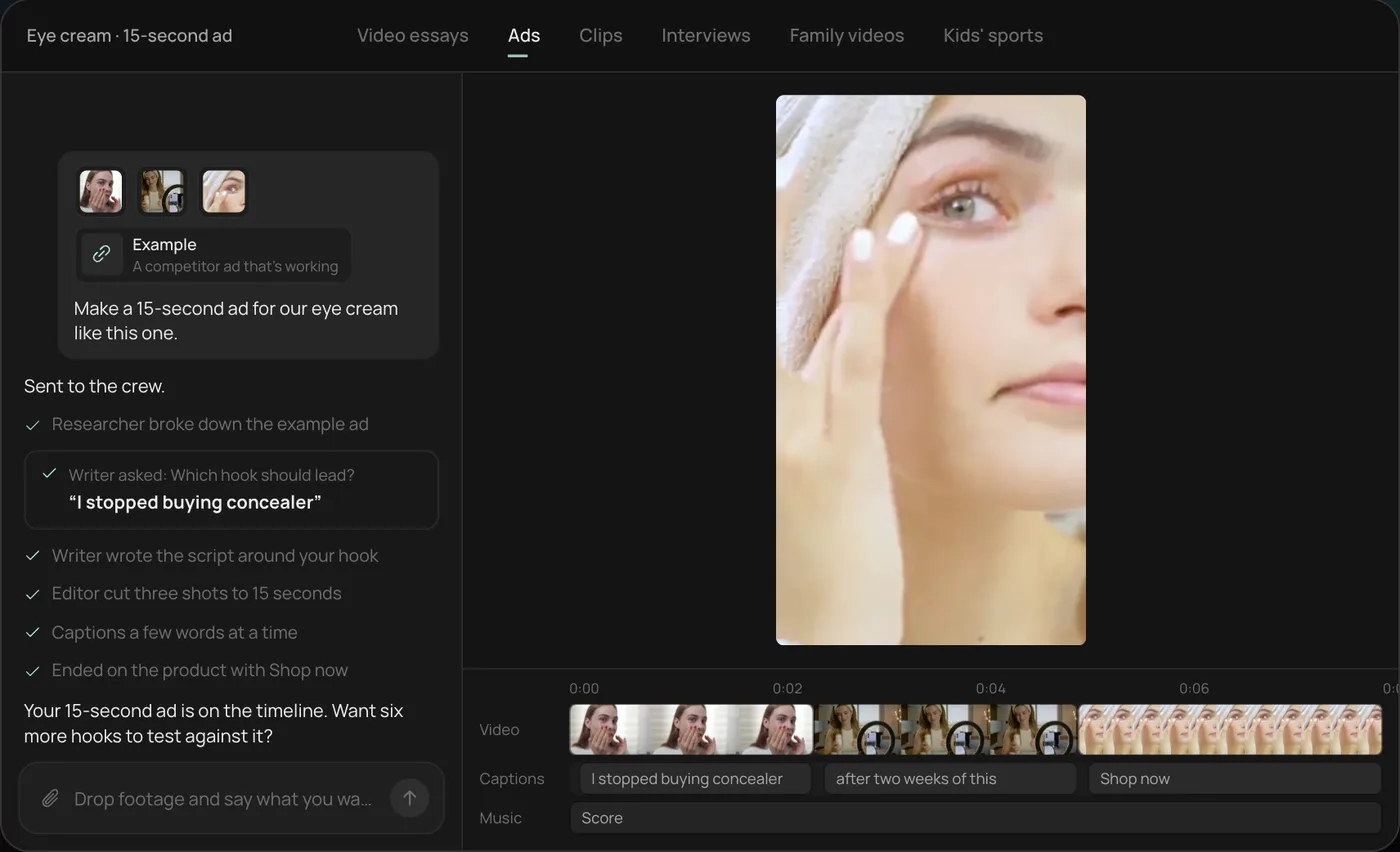
If you only need one clip trimmed to 10 seconds, your phone's editor is faster. Rend earns its place with a whole collection, or when you want listing videos and ads from one shoot. Editing is free and you pay only when Rend renders or generates something; see pricing. For running many ad versions from one shoot, see how to make 100 ad variations from one video.
FAQ
How do I stop reflections when filming jewelry?
Control what the metal sees: white and black cards, a neutral background, room lights off, and the 2x or 3x lens from farther back so the phone's reflection shrinks. For very shiny pieces, a white paper tent with a hole for the lens works.
How do I make diamonds sparkle on camera?
Add a small, hard light (one LED or a phone flashlight) at a distance, alongside your soft main light, and move it slowly during the take. Lock exposure first so each sparkle doesn't dim the image.
How long should a jewelry product video be?
Etsy allows 3 to 15 seconds and removes the sound. On Shopify, 15 to 30 seconds is plenty though it allows 10 minutes. For Reels and TikTok ads, start at 15 seconds with the strongest shot first.
How do I show jewelry size in a video?
Shoot it on the body and next to a coin or in an open hand, and put the listing measurements on screen. Under the FTC Guides, showing a stone larger than life without disclosing its true size may mislead.
Can I call gold vermeil or gold filled jewelry "gold" in my video?
Not unqualified. Under 16 CFR 23.3, plain "gold" means 24 karat throughout. Say "14K gold filled" or "gold vermeil over sterling silver", and use vermeil only if the piece has a sterling base with at least 2.5 microns of 10K or better gold.
If you have a drawer of jewelry clips and listings without video, start a free Rend project, send the clips, and ask for a listing cut and a set of vertical ads.