Opus Clip Pricing 2026: Plans, Credits and the Fine Print
OpusClip has four plans: Free ($0, 60 credits a month), Starter ($15 a month, 150 credits, monthly billing only), Pro ($29 a month for 300 credits, or $174 a year, which works out to $14.50 a month) and Business (custom). One credit is one minute of the video you upload, not one finished clip. So the plan you need depends on how many minutes of source video you feed it each month, and on a few rules about expiry, refunds and the trial that most pricing summaries leave out.
We build Rend, a different kind of video tool, so weigh our view accordingly. Every OpusClip figure below was read on the OpusClip pricing page and its help center on November 22, 2026. Prices change; check before you buy.
OpusClip plans at a glance
| Free | Starter | Pro | Business | |
|---|---|---|---|---|
| Price | $0 | $15/mo (monthly only) | $29/mo, or $174/yr ($14.50/mo) | Custom |
| Credits | 60 a month | 150 a month | 300 a month per pack (3,600 a year) | Custom |
| Watermark | Yes | No | No | No |
| Editing | None | Text and timeline editing | Text and timeline editing | Same |
| Aspect ratios | 9:16 | 9:16 | 9:16, 1:1, 16:9 | Same |
| Export window | 3 days, up to 1080p | 30 days, highest resolution | No limit | No limit |
| Media storage | Expires after 3 days | Expires after 29 days | 100GB | Unlimited |
| Virality score | No | Yes | Yes | Yes |
| Scheduler, Premiere Pro and DaVinci Resolve export | No | No | Yes | Yes |
| Upload size per video | 10GB | 10GB | 30GB | 30GB |
Pro is sold in packs. The pricing page says each pack gives a team workspace with 2 seats, and the plans article in the help center says each extra pack adds 300 monthly credits and 2 seats, up to 4 seats. The page's slider goes up to 15 packs and shows the price when you pick a size.
How OpusClip credits actually work
The credits article spells out the meter:
- Processing costs 1 credit per minute of the original video you import.
- A video under a minute rounds up to 1 credit. Longer videos round down to the whole minute, so a 45-minute 50-second file costs 45.
- Posting or scheduling to X costs 3 credits per clip, per X account.
- On monthly plans, credits last 60 days, so unused credits roll over for one extra month. On yearly plans, you get the full year's credits at purchase and they're valid for 12 months.
- If you cancel, remaining credits keep their original expiry date.
The thing to internalize: you pay for what goes in, not what comes out. A 60-minute podcast costs 60 credits whether OpusClip finds 25 good clips or 3. OpusClip's help center describes a Co-Pilot timeframe setting for processing only part of a long video. One reviewer at AI Alleyway reports the setup screen showed the credit cost before the run, and that the slider bills only the span you select. OpusClip's own help page doesn't state the billing effect, so check the cost on screen before you submit.
The cost per hour of source video
Divide the price by the credits and you get the real unit price:
| Plan | Price | Minutes | Cost per hour of source |
|---|---|---|---|
| Starter (monthly) | $15 | 150 | $6.00 |
| Pro (monthly, 1 pack) | $29 | 300 | $5.80 |
| Pro (yearly, 1 pack) | $174 | 3,600 | $2.90 |
The surprise in that table: Pro billed yearly costs $14.50 a month, less than Starter's $15, and gives twice the credits plus the Pro features. If you're sure you'll still be clipping in six months, Starter is the worse deal. Starter only makes sense when you want to test for a month or two without a year's commitment.
For comparison, Vizard, OpusClip's closest rival, lists 600 credits for $29 a month on its Creator plan, which is half OpusClip's price per source hour. We break that down in Opus Clip vs Vizard.
Which plan fits you: a picker by monthly minutes
Add up the minutes of source video you'll upload in a typical month, not the number of clips you want.
| Source video per month | Example | Plan to start with | Watch out for |
|---|---|---|---|
| Under 60 minutes, testing | One 45-minute episode | Free | Watermark, no editing, clips stop being exportable after 3 days |
| 60 to 150 minutes | Two 60-minute episodes | Starter, $15 monthly | 9:16 only, media expires after 29 days |
| 150 to 300 minutes | Weekly 60-minute podcast | Pro, $29 monthly or $174 yearly | A month with five episodes goes over 300 |
| 300 to 600 minutes | Weekly 2-hour podcast | Pro with 2 packs | Price per pack shows on the slider, check it |
| Over 600 minutes, or 10+ seats | Network or agency | Business, custom | Sales call needed |
A practical note on the 150 to 300 row: a weekly 60-minute show is 240 to 300 minutes a month, which fits Pro. Because monthly credits roll over for one extra month, a light month helps cover a heavy one, but not indefinitely.
The fine print that changes what you pay
Refunds are per project, and only on Pro
The help center's project refund article says a Pro user who hasn't downloaded any clips yet can refund a project's credits from the clip preview page, up to 14 days after upload. Once you download a clip, the refund is gone. Deleting a project doesn't return its credits. The practical habit: review the whole batch before downloading anything, so a bad run can still be refunded.
The free trial is Pro, with strings
OpusClip offers a free trial of Pro with no credit card. The help center says the trial converts to the Free Forever plan after 7 days, and lists Pro features the trial doesn't include: trial exports carry the watermark, there's no social posting or scheduling, no music library, no 4K, no team workspace, and trial users can't refund a project. So the trial shows you clip quality, which is the thing worth testing, but not the publishing workflow.
Upgrading removes old watermarks
According to the watermark article, upgrading to a paid plan removes the watermark from projects you made on Free or the trial. If a test run produced clips you like, you don't need to reprocess them after paying.
Downgrades have rules
From the plans article: a Pro to Starter downgrade takes effect at the end of the billing cycle, Pro yearly can't switch straight to Starter (you cancel and resubscribe), and you can't move to Free unless you have fewer than 30 minutes of credits left. After cancelling, projects stop being accessible after 3 days, so download what you need first.
What a month really costs: two worked examples
A weekly 60-minute interview podcast, 4 episodes. That's 240 credits. Starter's 150 won't cover it. Pro monthly ($29) covers it with 60 to spare, Pro yearly ($14.50 a month equivalent) covers it for half the price. If you keep 6 clips per episode, that's 24 clips, about $1.21 each on Pro monthly or $0.60 each on Pro yearly.
A 3-hour weekly livestream, 4 streams. That's 720 credits, more than two Pro packs. Before paying for three packs, use the timeframe setting to process only the segments worth clipping (and confirm the on-screen cost), or ask whether a per-video tool fits better. Submagic counts its long-video clipper per video rather than per minute on its pricing page, which changes the math for very long sources; see Opus Clip vs Submagic.
The number that matters most isn't on the pricing page: how many of the clips you'll actually post. Independent tests vary a lot (we collected some in our OpusClip review). Run one real episode through the trial and count your keepers before you pick a plan.
Is OpusClip worth the price?
For a podcaster or YouTuber with long recordings every week, yes, usually. Finding moments in hours of talk is slow work and OpusClip automates it at a few dollars per source hour. It's weaker value when:
- Your source videos are short. A 10-minute talking head is quick to clip by hand, and you pay for every minute regardless.
- You reject most of what it picks. Then you're paying per minute for suggestions you redo yourself.
- You need the clips to look and sound like your brand in detail. Starter has one brand kit; heavy styling happens in another editor anyway.
- You don't have a long video at all.
Where Rend fits
Rend is an AI video agent, not a clipper with a credit meter on source minutes. You send what you have (an episode, phone clips, a product page) and say what you want, and a crew of specialist agents builds it on a real timeline you can open and change. For clips, that means you can name the moments in plain words, cuts land on exact transcript words, and captions are word-timed in your own font and look.
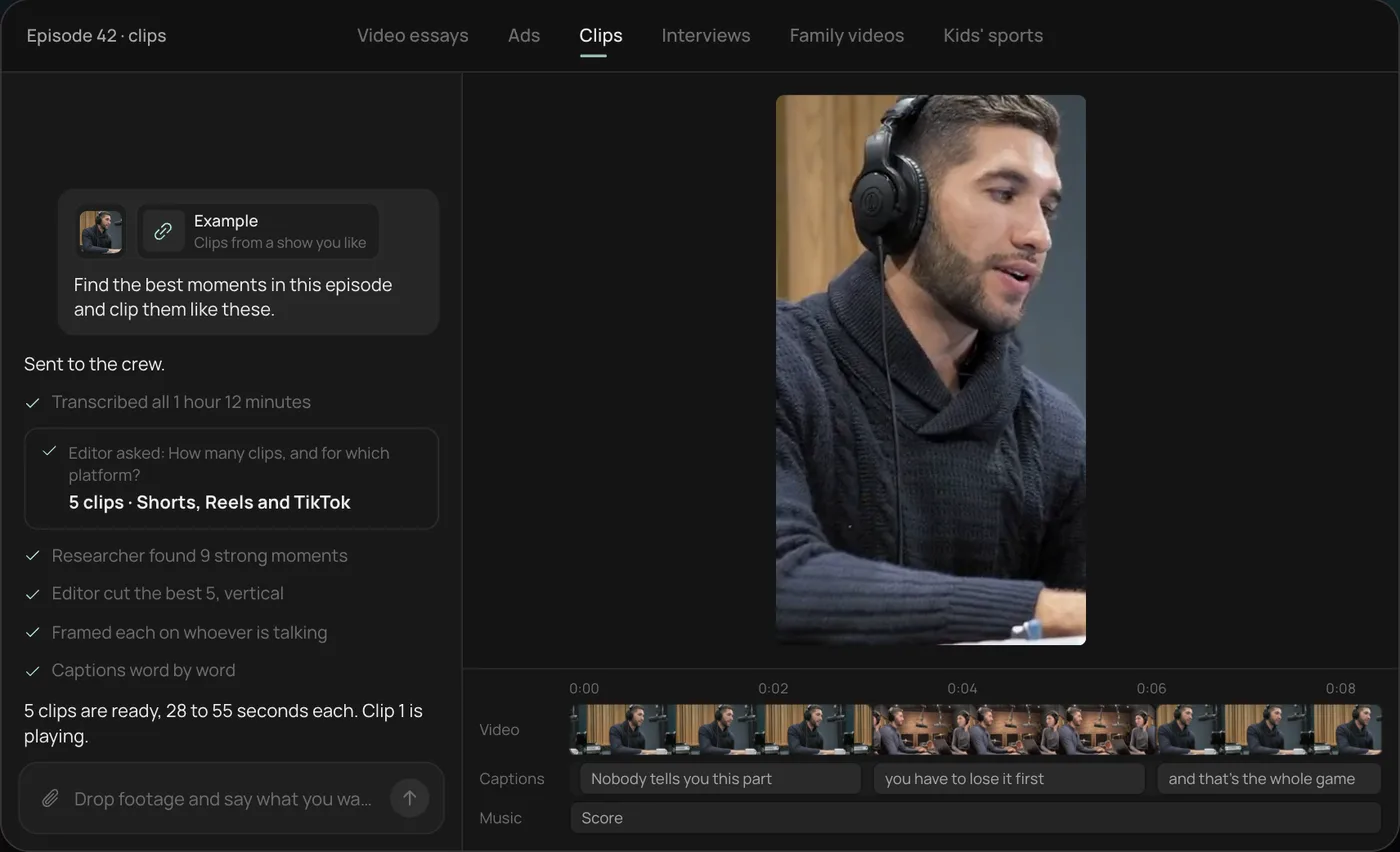
Rend's pricing works differently: editing is free and you pay only when Rend renders or generates something, with optional monthly credit plans or pay-as-you-go. See Rend pricing for the current numbers. Where OpusClip is the better buy: if you want 30 scored clips out of a 2-hour episode with a built-in scheduler, it's purpose-built for that. For other options, see OpusClip alternatives and Opus Clip vs CapCut.
FAQ
Is OpusClip free?
There's a Free Forever plan with 60 credits (60 minutes of uploaded video) a month. Free clips carry a watermark, export up to 1080p, can't be edited, and stop being exportable after 3 days. There's also a 7-day Pro trial that reverts to Free on its own.
How much is OpusClip Pro?
$29 a month billed monthly for one pack of 300 credits, or $174 a year ($14.50 a month) for 3,600 credits issued up front. Extra packs add 300 monthly credits and 2 seats each.
Do OpusClip credits roll over?
On monthly plans, credits expire after 60 days, so they roll over for one extra month. Yearly credits are valid for 12 months.
Does OpusClip charge per clip or per minute?
Per minute of the source video you import: 1 credit per minute, whatever number of clips comes out. The exception is posting to X, which costs 3 credits per clip per X account.
Can I get credits back for bad clips?
On Pro, yes, if you haven't downloaded any clip from that project and it's within 14 days of upload. Free, Starter and trial users can't refund projects, and deleting a project doesn't return credits.
Is there an annual discount?
Yes, on Pro. The pricing page says annual billing saves up to 50%, and Pro yearly is $174 versus $348 for twelve monthly payments. Starter is monthly only.
If you'd rather direct your clips in plain words and pay only when something renders, start a free Rend project with one episode. Our free video tools handle quick jobs like trimming and resizing without an account.