Script to Video AI: How to Turn a Script Into a Video That Works
Script to video AI takes a script you wrote (or a brief it writes from) and returns an edited video: narration, shots matched to each line, music and captions on a timeline. That is different from a clip generator, which turns a one-line prompt into a few seconds of footage with no voice and no edit. If you need a finished video to post, you want the script-to-video kind, and the quality of what you type decides most of the result.
That split is where most people go wrong on their first try. They type "a video about saving for retirement" into a clip generator, get eight seconds of a silver-haired couple on a beach, and conclude the technology is a toy. The technology is fine. They asked a shot generator to do an editor's job.
How to turn your footage and a script into a video in Rend, step by step
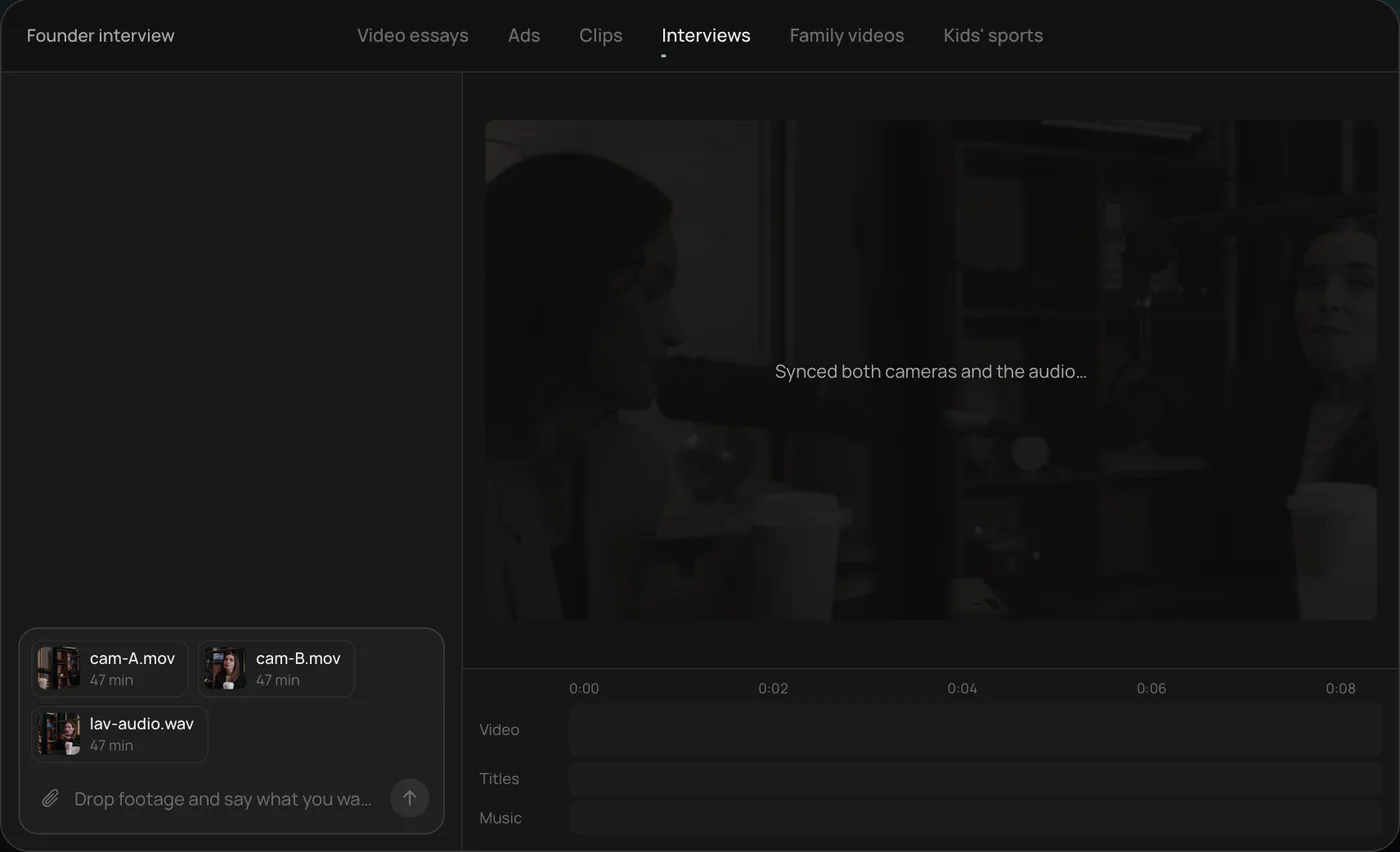
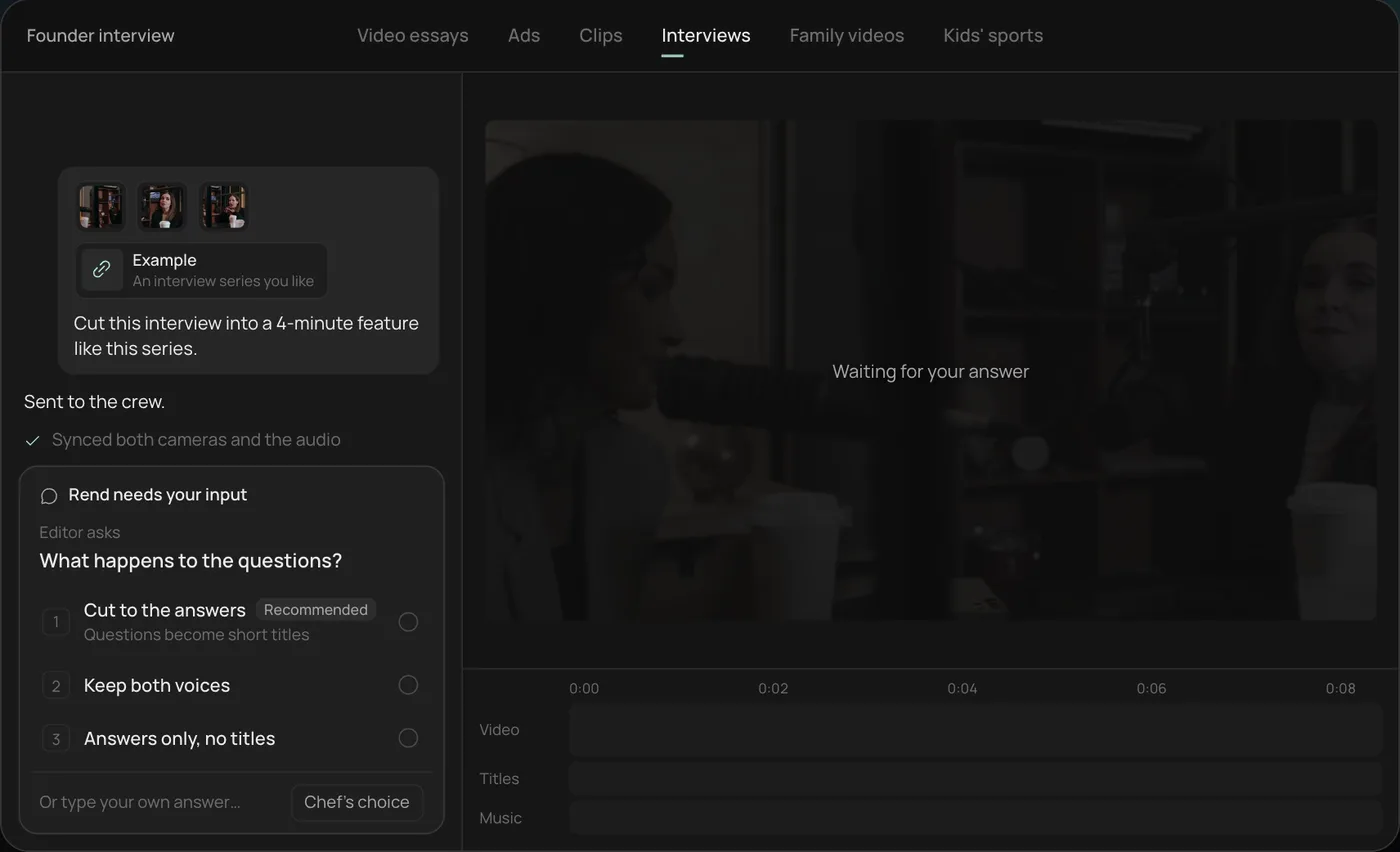
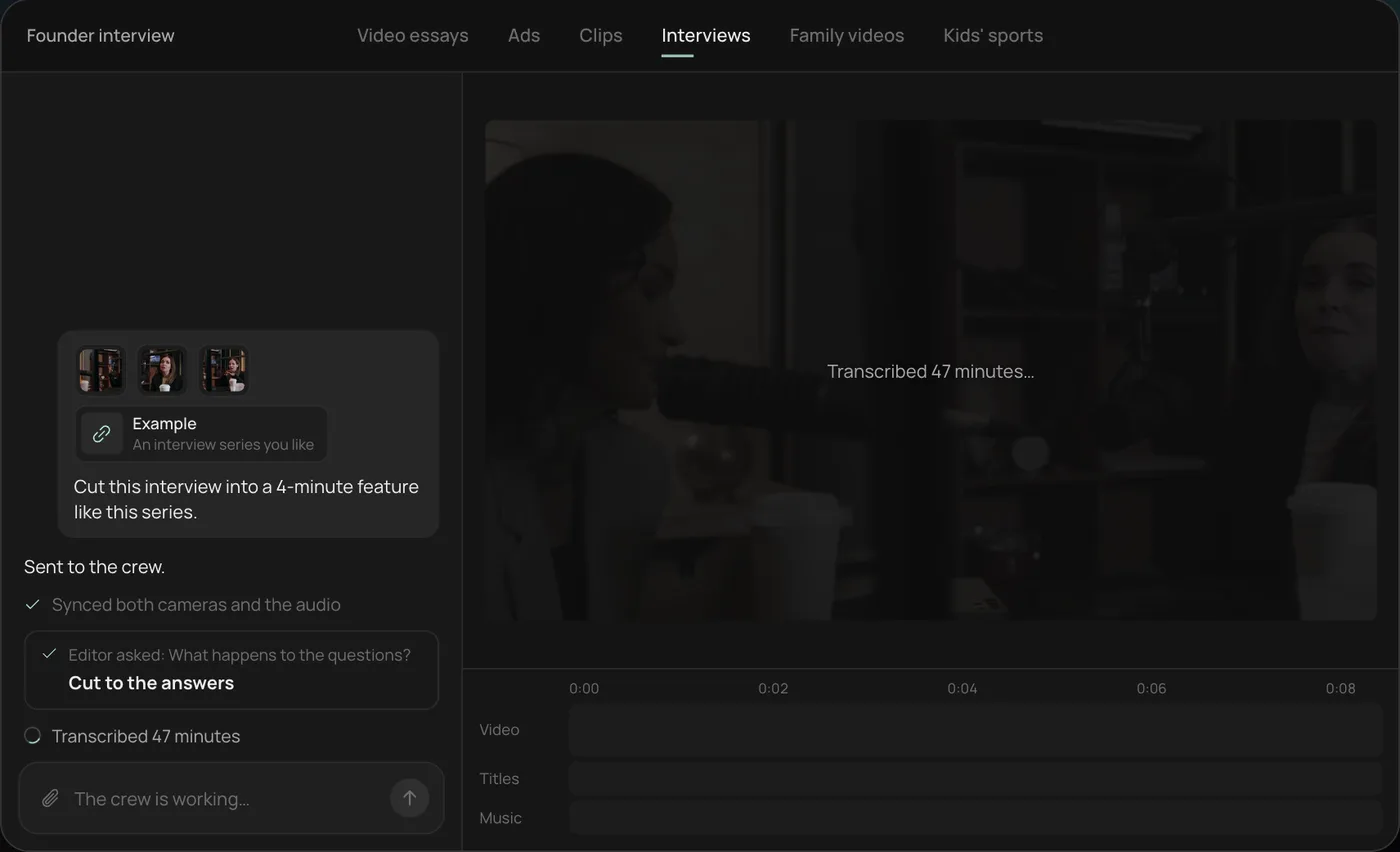
These screenshots are from Rend's demo of cutting a two-camera interview into a 4-minute feature; your own project works the same way.
1. Drop your footage and an example. Add both camera files and the audio, point to a video in the style you want, and type the job in one line.
2. Answer one question. Rend asks one thing before it starts, here what happens to the interviewer's questions, and recommends cutting straight to the answers.
3. Let the crew prepare the edit. Rend syncs both cameras with the audio and transcribes all 47 minutes, checking off each step in chat.
4. Review the cut on the timeline. The 4-minute feature lands on a real timeline: two angles, a name title and the best answers in order, with sound on its own tracks.
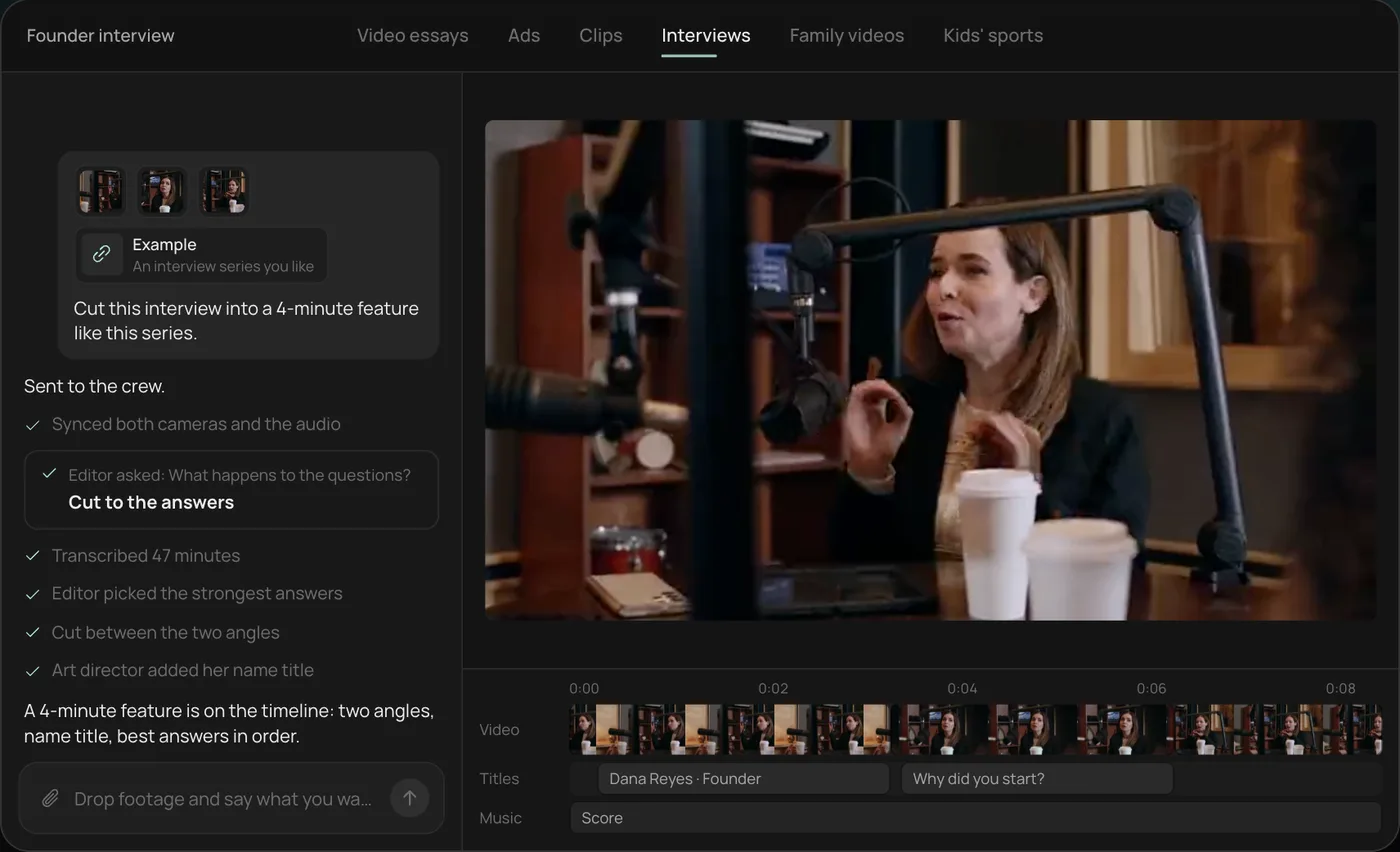
From there you can open the timeline and change anything by hand, share a review link for notes, or export. Start a free Rend project to try it on your own footage.
The two kinds of text to video AI
| Clip generator | Video agent | |
|---|---|---|
| What you type | A shot description | A brief or a full script |
| What you get | One clip, usually a few seconds, no edit | A cut video: voice, shots, captions, music, export |
| Good for | A single striking shot, b-roll, concept frames | Explainers, Shorts, ads, essays, course lessons |
| Weak at | Anything longer than one moment, spoken audio, structure | A single hero shot with very specific camera moves |
| Can you change it after | Re-prompt and hope | Edit the timeline, swap a line, re-render one part |
A video agent will often use a clip generator underneath for the shots it can't find or film. The difference is that something sits above it deciding which shots the script needs, in what order, for how long, with what sound.
What to write: prompt, brief or script
How much you write depends on how much you care about the words.
A brief is enough when the topic matters more than the exact lines. "60-second vertical explainer on why sourdough needs a starter, for home bakers who've never made bread, friendly, one joke, ends with 'follow for the recipe'." The agent writes the script and shows it to you before building anything.
A script is right when you're the expert or the words carry the brand. Write it the way it will be spoken. Narration runs about 140 to 155 words a minute, so a 60-second video is roughly 150 words and a 3-minute explainer is about 450.
A prompt (one line describing a picture) is for single shots. "Close-up of flour dust falling through a beam of window light, slow motion, warm" makes a good b-roll clip. It does not make a video.
A worked example: one paragraph to a shot list
Here's a 35-word script paragraph and how a good text to video tool should read it.
Most sourdough fails before it's baked. The starter is too young, the kitchen's too cold, and the dough never rises. Fix the starter first. Feed it twice a day for a week.
| Line | Shot | Why |
|---|---|---|
| "Most sourdough fails before it's baked." | A flat, dense loaf cut open on a board | Shows the failure the viewer already knows |
| "The starter is too young," | Jar of thin, barely bubbling starter | Names the cause on screen |
| "the kitchen's too cold," | Thermometer on a counter reading 64°F | A number reads faster than a phrase |
| "and the dough never rises." | Time-lapse of dough not moving | Visual joke, earns the next line |
| "Fix the starter first." | Title card, two words, on beat | The takeaway, said and shown |
| "Feed it twice a day for a week." | Hands pouring flour and water into the jar | The action, so the viewer can copy it |
Six lines, six shots, each one tied to the exact words on screen. If your tool gives you a generic kitchen montage under that paragraph instead, the cut will feel like wallpaper. Ask for shots that show what the line says.
How to write text that turns into good video
A few habits make a bigger difference than any setting.
Write short spoken sentences. A narrator can't breathe inside a 40-word sentence, and the cuts have nowhere to land. One thought per sentence, the important word last.
Name concrete things. "Kitchen at 64 degrees" gives the tool a shot. "Suboptimal conditions" gives it stock footage of a frowning person.
Say who it's for and where it goes. "TikTok, 9:16, under 45 seconds, people who've failed at this once" changes the pace, the hook and the caption size.
Put your hook in the first line. The opening two seconds decide whether anyone reaches second three. Our video ad hooks guide has openers that work outside ads too.
Mark what must be real. If the video needs your product, your face or your shop, say so and send the footage. Generated stand-ins for real things are where AI video starts to look fake. There's more on that in how to make AI videos not look like AI.
What you should get back
Judge a text to video result on five things, in this order:
- The words. Did it keep your script, or rewrite it into mush? With a brief, is the script something you'd say out loud?
- The voice. Listen to the first sentence. If it reads instead of talks, it'll be worse by sentence ten.
- Shot to line match. Pause on three random moments. Does the picture show what's being said right then?
- Captions. Are they timed to the word, in the safe zone, in a style you'd pick? Can you fix a typo without re-rendering everything?
- Sound. Does the music duck under the voice, or fight it?
If any of those fail, the fix should be a note ("swap the shot at 0:14 for the thermometer"), not a fresh generation from scratch. That's the real test of a tool: whether you can change one thing without losing the rest.
Labels to add before you post
The tool pages that rank for this skip the step after export: telling the platform what's generated. The rules hinge on whether the result looks real.
YouTube's disclosure rules ask you to flag content that makes a real person appear to say or do something they didn't, alters footage of a real event or place, or generates a realistic scene that didn't happen. The same page says you don't need to disclose using AI to draft scripts, titles or thumbnails, to make captions, for clearly unrealistic content, or to clone your own voice for a voiceover. You set it under "AI use" in the Attributes section when you upload in YouTube Studio.
TikTok's synthetic media policy, as its newsroom describes it, requires people to label AI-generated content that contains realistic images, audio or video, and there is a creator label for it in the posting flow. For ads, Meta may label ads made or edited with AI.
Applied to a typical script-to-video project:
| What's in the video | Label it? |
|---|---|
| Your script, read by a voice cloned from your own recording | Usually no on YouTube |
| Word-timed captions, music, cuts of your own footage | No |
| A generated, realistic shot of a street, kitchen or crowd | Yes |
| A generated person who looks real | Yes |
| A cartoon, a diagram, an obviously stylized scene | Usually no |
One realistic generated shot inside a mostly real video still counts, so label it. These policies change often; recheck before a big upload.
How script to video works in Rend
Rend is an AI video agent. You type what you want in chat (or send it by email or a web form), and a crew of specialist agents takes it from idea to export on a real, editable timeline.
You can start from a brief and let it write the script, or paste your own. It shows you the script and the narration voice before it builds. Voices are designed from a description or cloned from your own recording with consent. Then it cuts the video, finds or generates the shots and b-roll, adds original music and sound effects on separate tracks, mixes with ducking, and puts word-timed captions on top that stay editable in your font and look. It checks its own work before you see it.
You can also send what you already have: phone clips, a product page, a video that worked for you. Text to video gets better fast when the text comes with a few real pictures.
Editing is free. You pay only when Rend renders or generates something, on a monthly credit plan or pay as you go. See pricing and the full list of tools the agent uses.
Which length and format to ask for
| Goal | Length | Shape | Words |
|---|---|---|---|
| Short for TikTok, Reels or Shorts | 20 to 60 s | 9:16 | 50 to 150 |
| Product or service ad | 15 to 30 s | 9:16 and 1:1 | 40 to 75 |
| Explainer on a website | 60 to 120 s | 16:9 | 150 to 300 |
| Course lesson | 3 to 8 min | 16:9 | 450 to 1,200 |
| Video essay | 8 to 20 min | 16:9 | 1,200 to 3,000, built in chapters |
For the longer formats, approve an outline before the full script. Fixing structure in an outline takes a minute. Fixing it in a finished 12-minute cut takes an afternoon. Our guides on AI explainer videos and AI video essays go deeper on each.
Common mistakes
Asking for "a video about X" with no audience. The tool has to guess, and it guesses the average viewer, which is nobody.
Accepting the first voice. You will hear that voice dozens of times. Spend two minutes on it.
Letting the AI invent your product. If the viewer can buy it, show the real one.
Re-generating the whole video to fix one line. Use a tool where the timeline is yours, so a fix costs a fix.
FAQ
What is the best text to video AI?
It depends on what you need out. For one cinematic shot, a clip generator is the right tool. For a finished video with narration, captions and music that you can post, use a video agent that edits on a timeline and lets you change single parts. Our 2026 roundup of AI video editing agents compares the options.
Can text to video AI make a long video?
Yes, if it builds in parts. A single generation won't hold a 10-minute video together. Agents that work from an approved outline and build chapters separately can make long explainers and essays. Rend builds long videos in chapters in parallel.
Do I need to write the script myself?
No. A clear brief (topic, audience, length, platform, tone, ending) is enough for the agent to draft one. Read it aloud before approving. If you're the expert, write it yourself or rewrite the draft.
How do I make AI video narration sound natural?
Write shorter sentences, use contractions, and pick or design a voice that matches the audience. Cloning your own voice, with consent, usually sounds the most natural for personal channels. See the AI voiceover video maker guide.
Is there a free text to video AI with voiceover?
Most tools have a free tier with limits. In Rend, editing is free and you pay only for rendering and generation. Check pricing for current rates.
You can try it on your next script with a free account: start here, paste the text, and approve the script and voice before anything is built.