Clipchamp Alternatives in 2026: 7 Editors for PC, Mac and Phone
We build Rend, so weigh our view accordingly. Competitor details were checked on November 19, 2026; prices and features change, so confirm on their sites.
The best Clipchamp alternative depends on why you're leaving. If you want a free editor with more control on Windows or Mac, use DaVinci Resolve. If you need to edit on a phone now that Clipchamp's iOS app is gone, use Adobe Premiere's free mobile app (iPhone and Android) or iMovie on an iPhone. For trend-style vertical video, CapCut. For talking videos you'd rather edit as text, Descript. If you'd rather describe the video and get a finished cut you can still change, use an AI video agent like Rend.
Clipchamp is still a good free editor, and plenty of people should stay. It exports at 1080p with no watermark on the free plan, it runs in Edge or Chrome on any desktop and as an app on Windows, and it has auto captions, text to speech and silence removal built in. The reasons people look elsewhere are specific, and most of them showed up this year.
What changed with Clipchamp in 2026
Three things send people searching.
The iPhone app is gone. Microsoft's support page says the Clipchamp iOS app stopped being supported on June 9, 2026, and projects stored only in the app could be deleted if they weren't exported. There has never been an Android app. If you edited the kids' clips on your phone, you need something else.
4K and premium stock sit inside Microsoft 365. Microsoft's Clipchamp support page says premium features for personal accounts (4K export, premium stock, premium filters and effects, a brand kit) come through qualifying Microsoft 365 subscriptions. On Microsoft's US compare page today, Microsoft 365 Personal is $9.99 a month or $99.99 a year after an intro offer, and Family is $12.99 a month or $129.99 a year for up to six people. That's good value if you already use Word and OneDrive. It's a lot for 4K export alone.
Work accounts are a different product. Clipchamp for work comes with selected Microsoft 365 business and education plans, and Microsoft says only some premium stock is included there. If your company admin hasn't turned it on, you won't see it.
Quick comparison
| Tool | Best for | Platforms | Free plan | Paid price (Nov 19, 2026) | Where Clipchamp is better |
|---|---|---|---|---|---|
| DaVinci Resolve | Free pro-grade editing and color | Windows, Mac, Linux, iPad | Yes, no watermark, up to UHD 60 fps | Studio $295 one time | Learning curve, speed for simple edits |
| Adobe Premiere (mobile) | Editing on any phone | iPhone, Android | Yes | Optional paid AI credits and storage | Desktop editing in a browser |
| iMovie | Free, simple, Apple only | Mac, iPhone, iPad | Yes, no watermark | Free | Runs on Windows and Chromebooks |
| CapCut | Short vertical video, trends, templates | Phone, desktop, web | Yes | Pro $19.99/month | Fewer paywalls on basics, Microsoft account sign-in |
| Canva | Social videos next to your other designs | Web, desktop, phone | Yes | Pro $144/year | A real timeline for long footage |
| Descript | Talking-head and podcast video | Windows, Mac, web | Yes, 720p, watermark | Hobbyist $16/month yearly | Free 1080p exports with no watermark |
| Rend | Describe it and get a finished, editable cut | Web, plus phone uploads | Editing is free | Pay only for renders and generation (pricing) | Hands-on editing for its own sake, no cost at all for 1080p |
1. DaVinci Resolve: more control, still free
Blackmagic Design's free DaVinci Resolve edits and exports up to UHD at 60 fps, with professional color, audio and effects pages, on Windows, Mac and Linux. The paid Studio version is a $295 one-time purchase and adds things like more AI tools and higher frame rates. For most home and small business video, the free version is plenty.
Where it beats Clipchamp: real color grading, multicam, keyframes on everything, a proper audio mixer, and no subscription.
Where Clipchamp wins: Resolve takes a weekend to learn and wants a decent computer. Clipchamp opens in a browser tab on a school Chromebook.
2. Adobe Premiere on mobile: the phone app Clipchamp never had
Adobe's Premiere mobile app is free on iPhone and, since September 2026, on Android. It has a multitrack timeline, free unlimited captions, background removal and exports up to 4K, with paid AI credits and storage as options.
This is the straightest swap for anyone who lost Clipchamp on iOS. It also means Android users finally have a free editor from a major company.
Where Clipchamp wins: desktop editing from any browser, and text to speech built into the free plan.
3. iMovie: free and simple, if you're on Apple
iMovie is free on Mac, iPhone and iPad with no watermark. The phone version has Magic Movie and Storyboards, which build a rough edit from your clips. For a birthday video cut on a MacBook, it does the job.
Where Clipchamp wins: iMovie doesn't exist on Windows, Android or Chromebook, and its timeline is limited (one main video track plus overlays, few title styles). We cover the next step up in iMovie alternatives.
4. CapCut: for vertical video and trends
CapCut is the default for TikTok-style editing: templates, trending effects, animated captions, beat sync. Its pricing page lists Pro at $19.99 a month, and more of the good tools sit behind Pro than used to. Read its music license before you use library tracks in an ad. We compared its rivals in CapCut alternatives.
Where Clipchamp wins: free 1080p exports without as many paywalls, and a calmer editor for long, plain videos.
5. Canva: when the video sits next to your designs
If your video is mostly text, photos, logos and short clips for social posts, Canva's video editor lives next to your templates and brand kit. Canva lists Pro at $144 a year for one person, with five brand kits and premium stock.
Where Clipchamp wins: a real timeline for longer footage, and silence removal for talking videos.
6. Descript: edit talking videos like a document
For podcasts, tutorials and talking-head videos, Descript turns your recording into a transcript; delete a sentence and it's gone from the video. Its pricing page lists a free plan (1 media hour a month, 720p with a watermark), Hobbyist at $16 a month billed yearly ($24 monthly) and Creator at $24 yearly ($35 monthly). More in Descript alternatives.
Where Clipchamp wins: free 1080p with no watermark, and better for videos that aren't mostly speech.
7. Rend: when you'd rather describe the video than build it
Rend is an AI video agent. You send what you have (phone clips, a camera roll, a product page, a video you like) and say what you want in plain words. A crew of specialist agents picks the moments, cuts on exact transcript words, adds word-timed captions, titles, music and a mix with ducking, checks its own work, and leaves a real timeline you can open and change.
That matters most for the jobs people used Clipchamp for and never finished: the 200 vacation clips, the school concert, a year of the dog. Instead of scrubbing every clip, you say "a 3-minute film of our Maine trip, time order, keep the laughing" and correct what it gets wrong.
Where Rend beats Clipchamp:
- It does the first cut for you, then hands you the timeline.
- Family can send clips from their own phones with one upload link, no app; see send videos from your phone.
- Review links: everyone watches the same link and leaves notes on the frame ("Aunt Jen has one n"), and the agent makes each fix.
- Captions are always editable, in your font and look.
Where Clipchamp is better: if you enjoy dragging clips yourself, Clipchamp's free 1080p export costs nothing, ever. Rend's editing is free, but rendering and generating cost credits; see pricing. And if your file is a two-minute screen recording that needs one trim, Clipchamp is faster to open.
Which one fits your reason for leaving
| Your reason | Pick |
|---|---|
| I edited on my iPhone and the app is gone | Adobe Premiere mobile, or iMovie |
| I'm on Android | Adobe Premiere mobile, CapCut |
| I want 4K without a Microsoft 365 bill | DaVinci Resolve (free) |
| My videos are mostly me talking | Descript |
| I make TikToks and Reels | CapCut |
| I have hundreds of clips and no time | Rend |
| It's for work and IT controls the apps | Ask IT first; Clipchamp for work may already be in your license |
Before you switch: get your projects out
Clipchamp projects don't open in any other editor. Before you move:
- Export every finished video you care about at the highest resolution your plan allows.
- For unfinished projects, download the original clips, not just the edit. Clipchamp's media lives in your account, and you'll want the raw files for the new editor.
- Download caption files where you can. Clipchamp lets you download an SRT from autocaptions, which saves retyping.
- Note your fonts, colors and logo files so you can rebuild the look as a brand kit or template elsewhere.
A practical rule from moving client libraries: export the finals first, the raw files second, and rebuild nothing until you've had to. Most old projects never get opened again.
How to make a family video in Rend, step by step
These screenshots come from Rend's demo of a family video from phone clips; your own project works the same way.
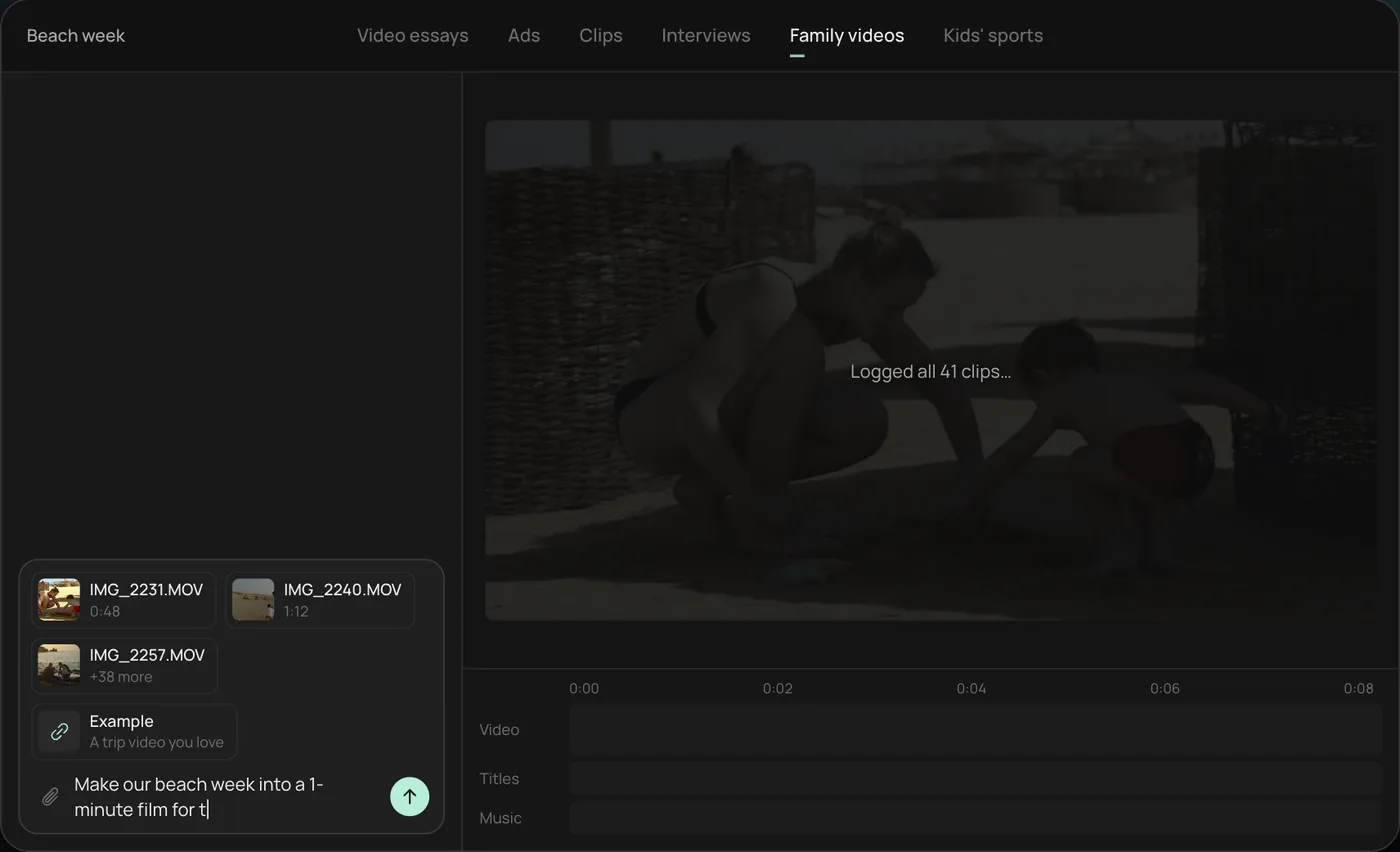
1. Drop in your phone clips. Add the clips straight from your camera roll (here 41 beach week videos) plus an example you like, then ask: "Make our beach week into a 1-minute film for the family chat."
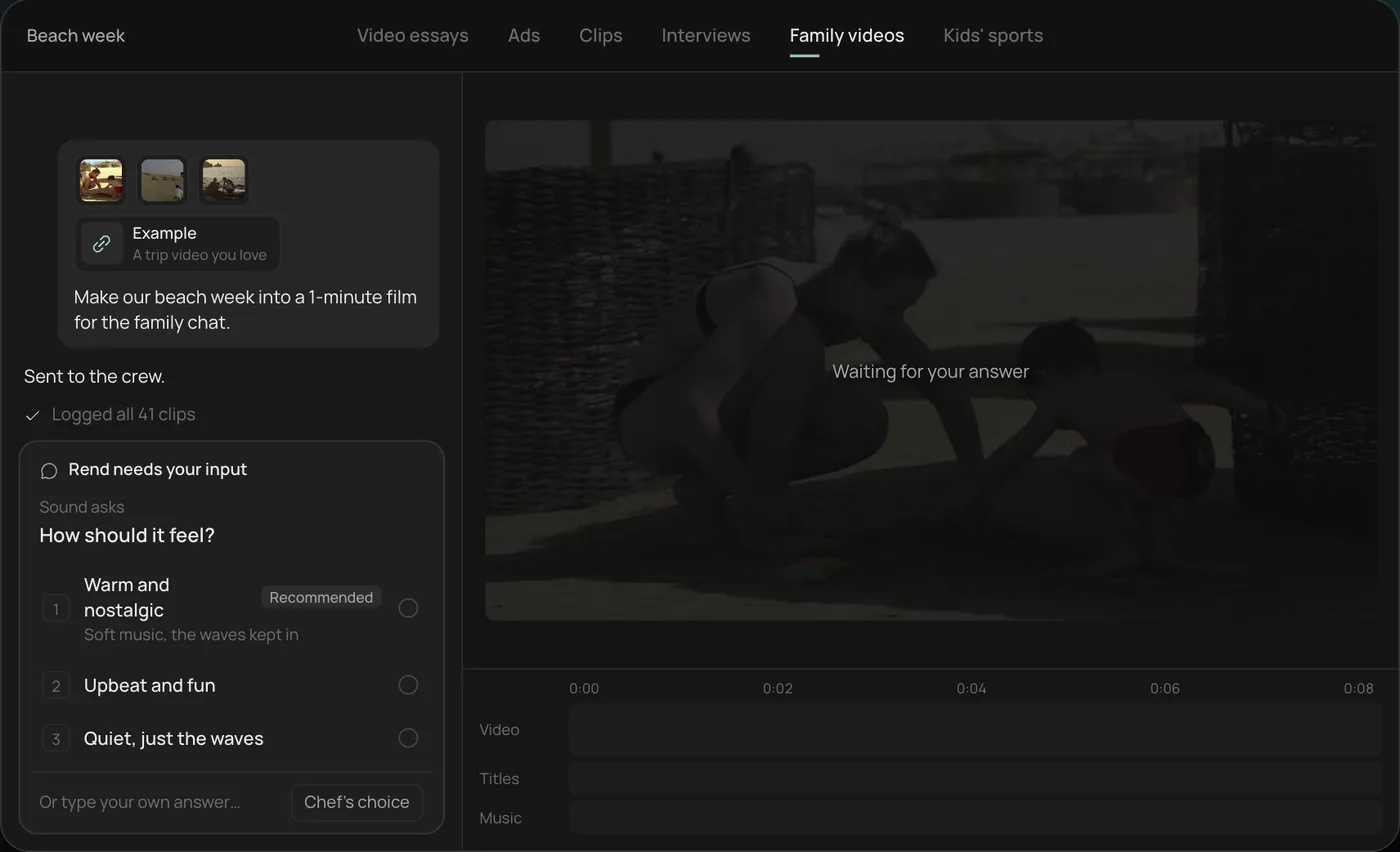
2. Pick the feel. Rend asks how the film should feel and recommends warm and nostalgic.
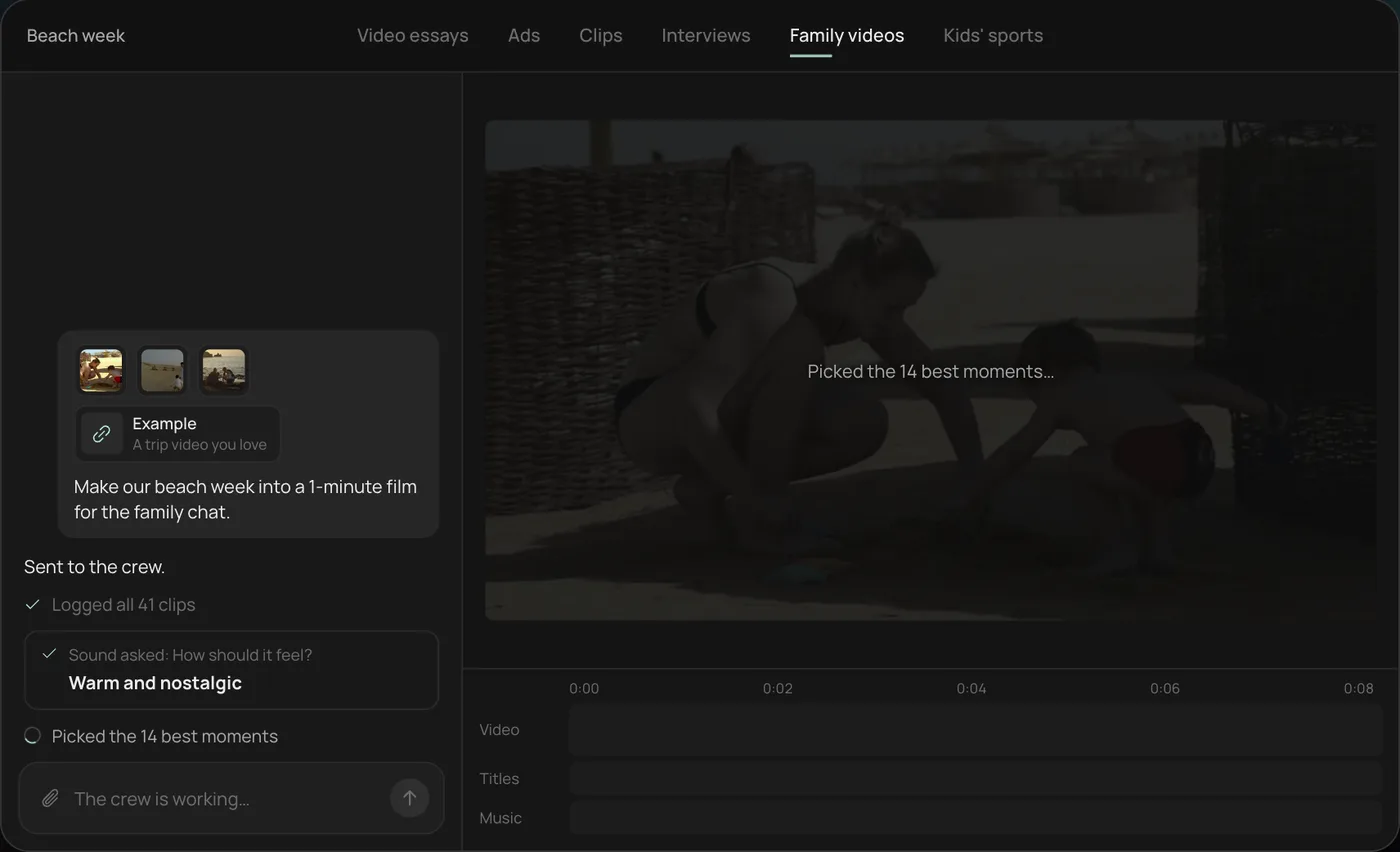
3. Watch the crew work. The crew logs every clip and picks the 14 best moments, each step checked off in the chat.
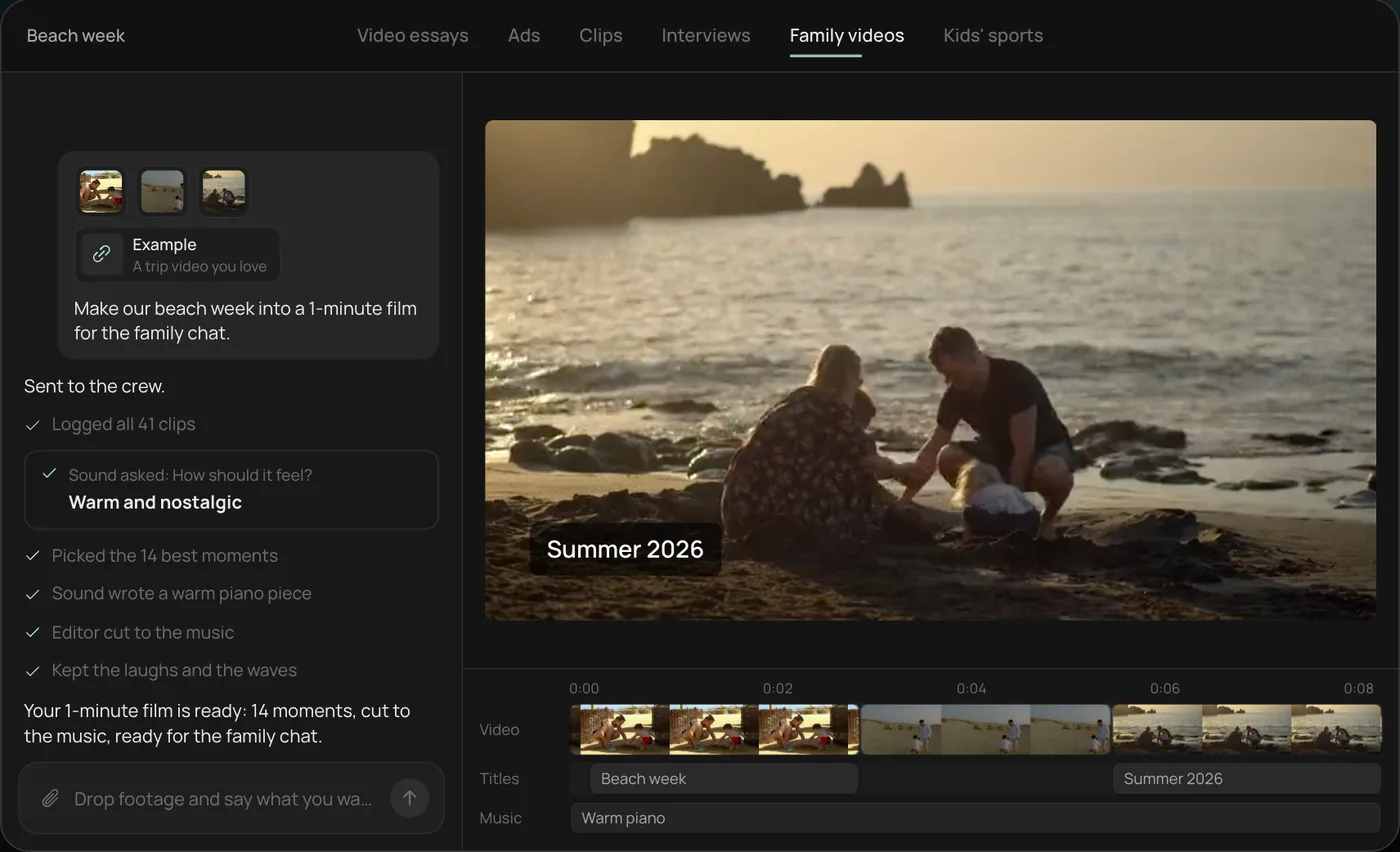
4. Get the finished film. A 1-minute film cut to warm piano, with a "Summer 2026" title, lands on a real timeline with video, title and music on separate tracks.
From there you can open the timeline and change anything by hand, share a review link for notes, or export. Start a free Rend project to try it on your own footage. For more on cutting family footage, see how to edit home movies, and the full toolset is on the tools page.
FAQ
Is Clipchamp still free?
Yes. Microsoft's support pages say the free personal plan includes core editing, free stock and watermark-free exports up to 1080p. 4K export, premium stock and the brand kit come with qualifying Microsoft 365 subscriptions.
Why did Clipchamp disappear from my iPhone?
Microsoft retired the Clipchamp iOS app; support ended June 9, 2026, and Microsoft says it is focusing on the web and Windows apps. On iPhone, the closest free replacements are Adobe Premiere's mobile app and iMovie.
Is there a Clipchamp app for Android?
No. Clipchamp has never shipped an Android app. On Android, Adobe Premiere's free mobile app (launched September 2026) and CapCut are the main options.
What is the best free alternative to Clipchamp on Windows?
DaVinci Resolve if you want more power and don't mind learning it. CapCut if you mostly make short vertical videos. Both are free to start.
Can an AI tool edit my family videos for me?
Yes. With Rend you send the clips and describe the video; it picks the moments, adds music and titles, and leaves an editable timeline. You can also ask relatives to upload from their phones with one link.
If Clipchamp was where your clips went to wait, start a free Rend project, drop in one event's footage, and see what the first cut looks like.