iMovie Alternatives in 2026: For Mac, Windows, Android and iPhone
We build Rend, so weigh our view accordingly. Competitor details were checked on November 19, 2026; prices and features change, so confirm on their sites.
The best iMovie alternative depends on where you're going. Staying on a Mac and want more power: Final Cut Pro, now part of Apple Creator Studio, or the free DaVinci Resolve. Moving to Windows: Clipchamp (built into Windows) or DaVinci Resolve. Moving to Android: Adobe Premiere's free mobile app, CapCut or LumaFusion. If you'd rather describe the video and get a finished cut on a timeline you can still change, an AI video agent like Rend works in a browser on any of them.
iMovie is still a lovely free editor. It's free on Mac, iPhone and iPad with no watermark, and on a phone, Magic Movie and Storyboards will rough out an edit from your clips. Most people leave for one of two reasons: they've hit its ceiling, or they've bought a computer or phone Apple doesn't make.
Where iMovie runs out
You'll know you've outgrown iMovie when you try to do one of these:
- Layer more than one thing over your video. iMovie has a main track plus overlays, and you can't stack many layers. Picture in picture over a title over b-roll gets messy fast.
- Animate anything. There are no keyframes, so a title that slides in where you want it, or a slow push on a photo you control, isn't possible beyond the presets.
- Make it look like yours. A handful of title styles and filters, and you'll see the same ones on every school video in town.
- Cut long footage fast. Scrubbing two hours of a recital to find your kid's four minutes is all on you.
- Open it on Windows or Android. It doesn't exist there. Your iMovie projects also won't open in any other editor, though Final Cut Pro can import them.
Quick comparison
| Tool | Platforms | Price (Nov 19, 2026) | Best for | Where iMovie is better |
|---|---|---|---|---|
| Final Cut Pro | Mac, iPad | Apple Creator Studio $12.99/month or $129/year; Mac app also $299.99 one time | The natural next step on a Mac | Free, simpler |
| DaVinci Resolve | Mac, Windows, Linux, iPad | Free; Studio $295 one time | Free pro editing on any computer | Learning curve |
| Clipchamp | Windows app, Edge or Chrome on any desktop | Free to 1080p; 4K with Microsoft 365 | Easy editing on a Windows PC | Phone editing (no iOS or Android app now) |
| Adobe Premiere (mobile) | iPhone, Android | Free; optional paid AI credits and storage | A free phone editor on both platforms | Magic Movie's instant rough cut |
| CapCut | Phone, desktop, web | Free; Pro $19.99/month | Vertical video and trends | Fewer paywalls, no account needed |
| LumaFusion | iPhone, iPad, Android, ChromeOS | $29.99 one time | Pro multitrack editing on a phone or tablet | Free |
| Descript | Mac, Windows, web | Free (720p, watermark); Hobbyist $16/month yearly | Talking and podcast video | Free with no watermark |
| Rend | Web, plus phone uploads | Editing free; pay for renders and generation (pricing) | Getting a finished cut from a pile of clips | Zero cost, offline editing |
Staying on a Mac
Final Cut Pro
Final Cut Pro is the editor iMovie was designed to graduate into. It imports iMovie projects (Apple's page says from Mac, iPad or iPhone), so you don't lose your work. Since January 2026 it's included in Apple Creator Studio, a subscription with Logic Pro, Pixelmator Pro and Motion, at $12.99 a month or $129 a year after a free trial. Apple says the $299.99 one-time Mac purchase is still available.
You get unlimited tracks, keyframes, real color tools, multicam and the magnetic timeline that makes rearranging clips forgiving. If you're on a Mac and have outgrown iMovie, this is the safe pick.
DaVinci Resolve
Free, and more capable than most paid editors. The free version exports up to UHD at 60 fps, with a full color page and audio mixer; Studio is a $295 one-time upgrade. It also runs on Windows and Linux, which matters if your next computer might not be a Mac. It's harder to learn than Final Cut, and it wants a reasonably strong machine.
Moving to Windows
Clipchamp
Clipchamp is Microsoft's own editor and the closest thing Windows has to iMovie in feel. The free plan exports watermark-free up to 1080p, with auto captions, text to speech and silence removal. Microsoft's support pages say 4K, premium stock and the brand kit come with qualifying Microsoft 365 subscriptions. One catch for phone editors: Microsoft retired the Clipchamp iOS app in June 2026 and never made an Android one. Our Clipchamp alternatives post covers its gaps.
DaVinci Resolve again
If you want one editor that works the same on your old Mac and your new PC, Resolve is it.
Moving to Android
Android has never had an iMovie. Adobe launched Premiere for Android this September, and Google has never had a comparable offering. That has finally changed.
Adobe Premiere mobile
Free on iPhone and, since September 2026, on Android. It has a multitrack timeline, free unlimited captions, background removal, beat detection and exports up to 4K, with paid AI credits and storage optional. If you're switching phones, you can learn it on your iPhone first and keep using it on Android.
CapCut
The most popular phone editor for short vertical video, with templates, trend effects and animated captions. The pricing page lists Pro at $19.99 a month, and many effects now need it. See CapCut alternatives if you've hit its paywalls.
LumaFusion
A serious multitrack editor for phones and tablets, sold as a one-time purchase ($29.99, with an optional Creator Pass subscription for advanced features). It runs on iPhone, iPad, Android and ChromeOS. Pick it if you edit long projects on a tablet and want proper tracks and keyframes without a subscription.
When you don't want to edit at all: Rend
Plenty of people searching for an iMovie alternative don't want a better editor. They want the video done. The vacation clips are still sitting in Photos because cutting 300 clips down to four minutes takes an evening they never have.
Rend is an AI video agent. You send the clips (from your camera roll, by email, or through one upload link the whole family can use without an app) and describe the movie. A crew of specialist agents logs every clip, picks the moments, cuts to music, adds titles and word-timed captions if you want them, mixes the sound so voices stay clear over the music, and checks its own work. You get a real timeline with video, titles and music on separate tracks that you can open and change.
A request that works well:
Make a 4-minute movie of Mia's 8th birthday from these clips. Time order. Open on her blowing out the candles, with the title "Mia Turns 8." Keep the moments where kids are laughing or talking and keep their voices clear. Upbeat acoustic music. End on the group photo.
Then you share a review link. Grandma can watch it and leave a note on the frame ("this one's blurry, cut it"), and the agent makes each fix.
Where Rend beats iMovie: it does the first cut, it works in a browser on Mac, Windows, Android or a Chromebook, and the music can be original, so a posted video won't get muted for a commercial song.
Where iMovie is better: it's completely free and works offline. Rend's editing is free, but rendering and generating use credits; see pricing. If you enjoy building the edit clip by clip, iMovie or Final Cut will give you more of that pleasure.
Pick by your situation
| You are | Pick |
|---|---|
| On a Mac, want more control, fine paying | Final Cut Pro |
| On a Mac, want more control, want free | DaVinci Resolve |
| Switching to a Windows PC | Clipchamp for easy, Resolve for power |
| Switching to Android | Adobe Premiere mobile, or LumaFusion for tablets |
| Making Reels and TikToks | CapCut |
| Making a podcast or talking video | Descript |
| Sitting on hundreds of family clips | Rend |
Moving your iMovie work out
- Export the finals. In iMovie on a Mac, choose File > Share > File and pick the highest resolution. On iPhone, tap Share and Save Video. Do this for everything you'd hate to lose.
- Keep the originals. Your raw clips live in Photos, not in iMovie. Make sure they're there, at full quality, before you change phones.
- Moving to Android or Windows? Copy the originals out of Photos first. iCloud Links work well for sharing a batch; they expire after 30 days.
- Going to Final Cut? Import the iMovie project directly instead of rebuilding.
One habit worth keeping whatever you choose: after each trip or holiday, turn that event's clips into a short movie within a week. A 2-minute birthday film made now beats a 40-minute "best of the year" that never gets made. For the craft of picking clips, see how to edit home movies.
How to make a family video in Rend, step by step
These screenshots come from Rend's demo of a family video from phone clips; your own project works the same way.
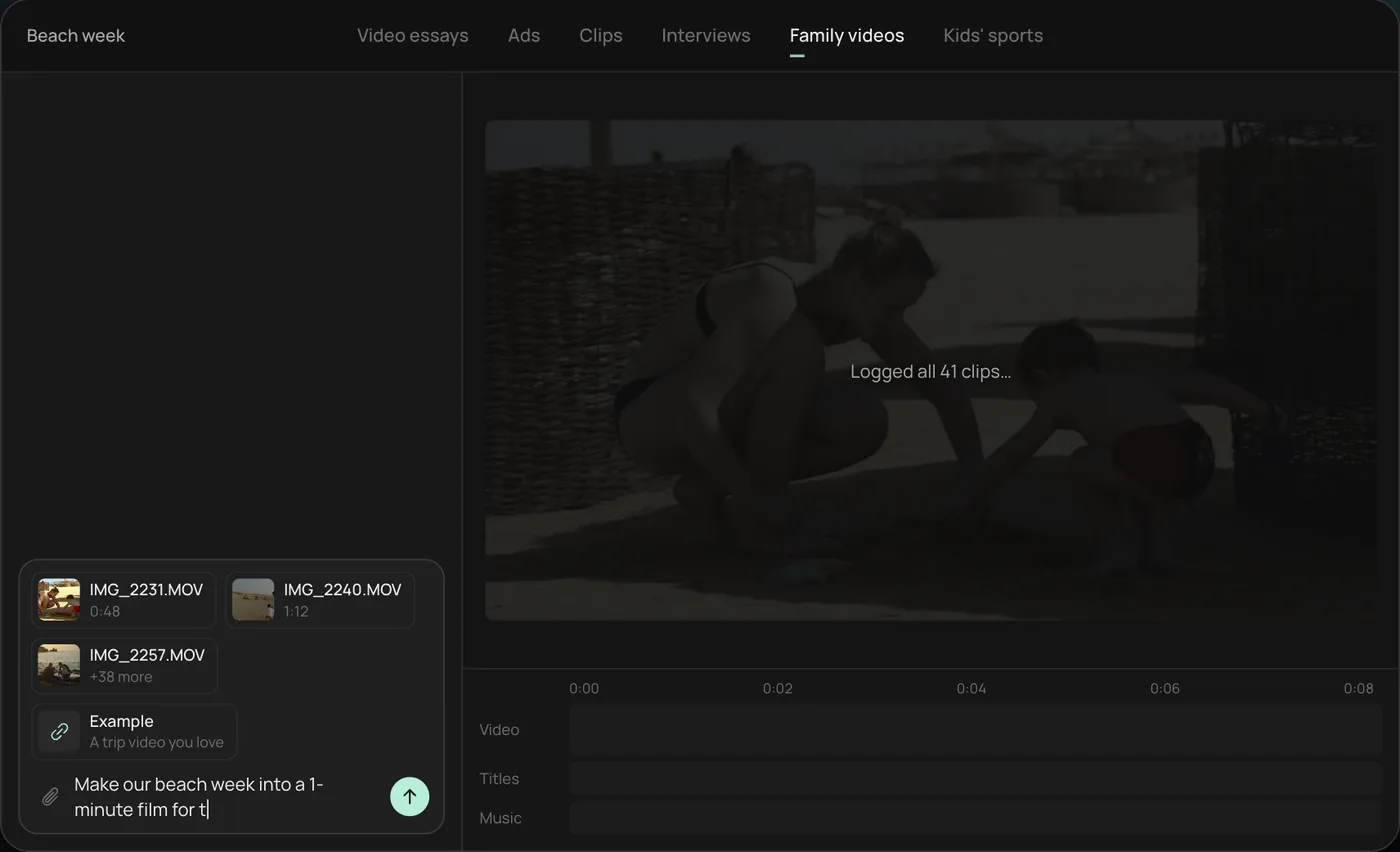
1. Drop in your phone clips. Add the clips straight from your camera roll (here 41 beach week videos) plus an example you like, then ask: "Make our beach week into a 1-minute film for the family chat."
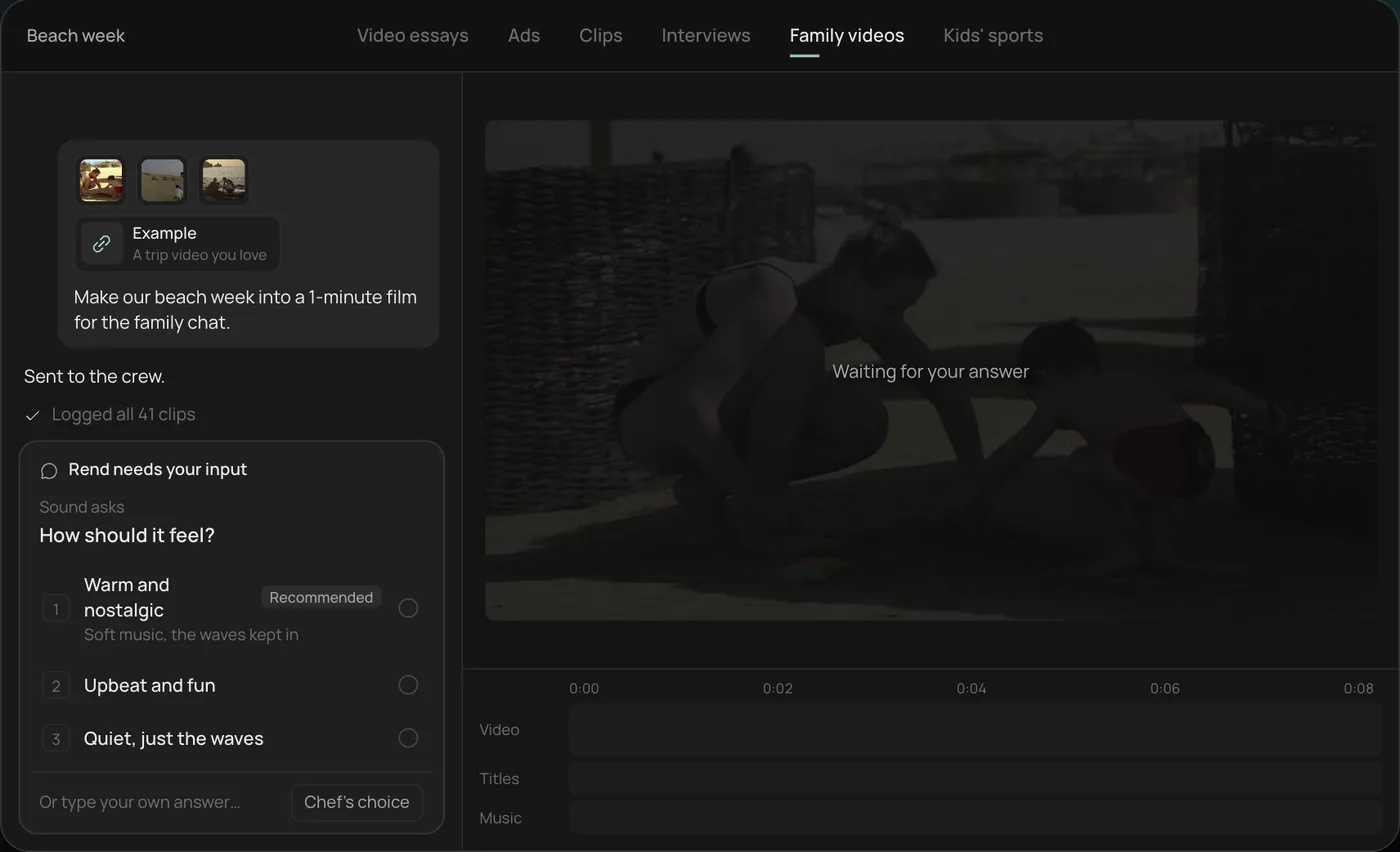
2. Pick the feel. Rend asks how the film should feel and recommends warm and nostalgic.
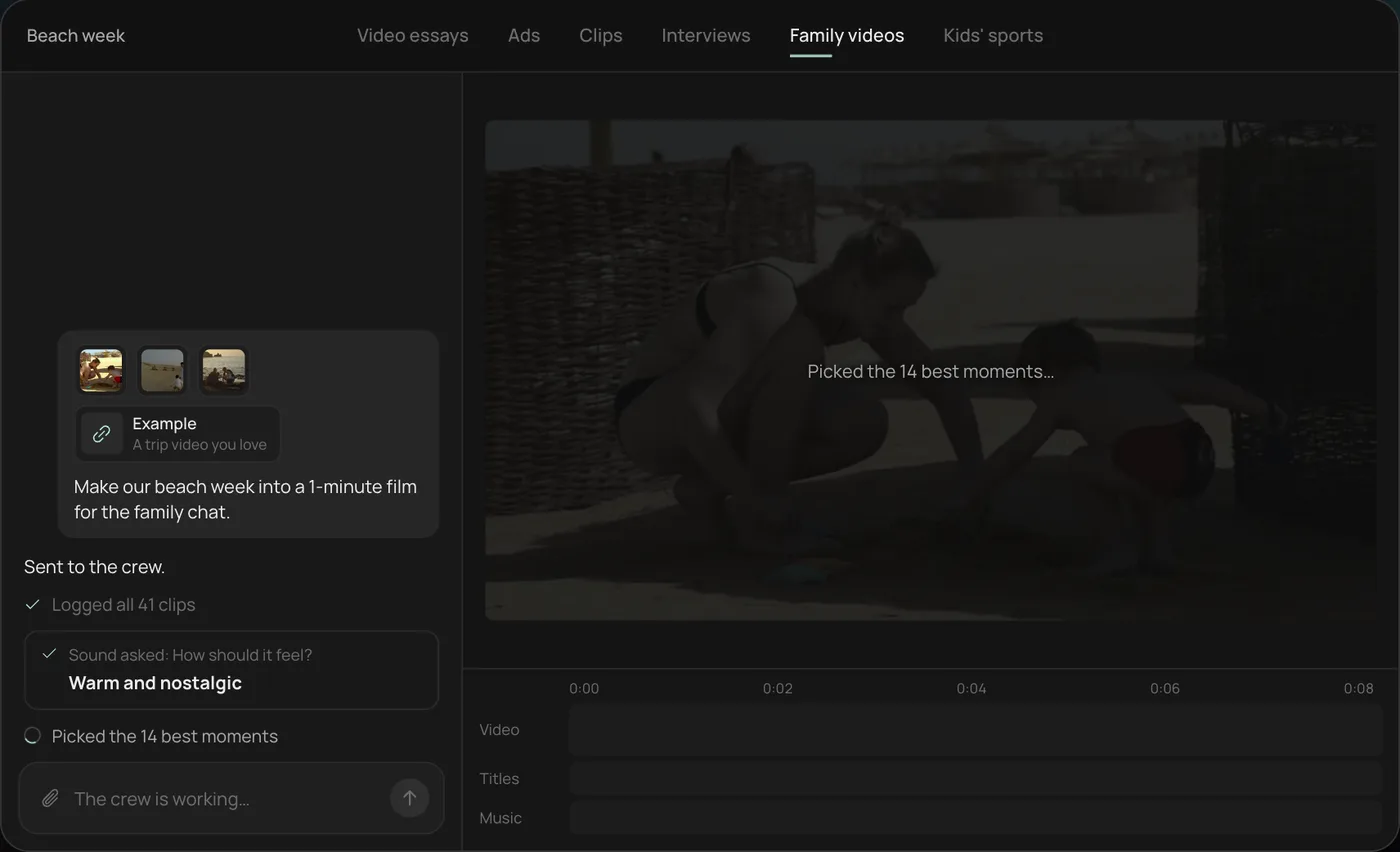
3. Watch the crew work. The crew logs every clip and picks the 14 best moments, each step checked off in the chat.
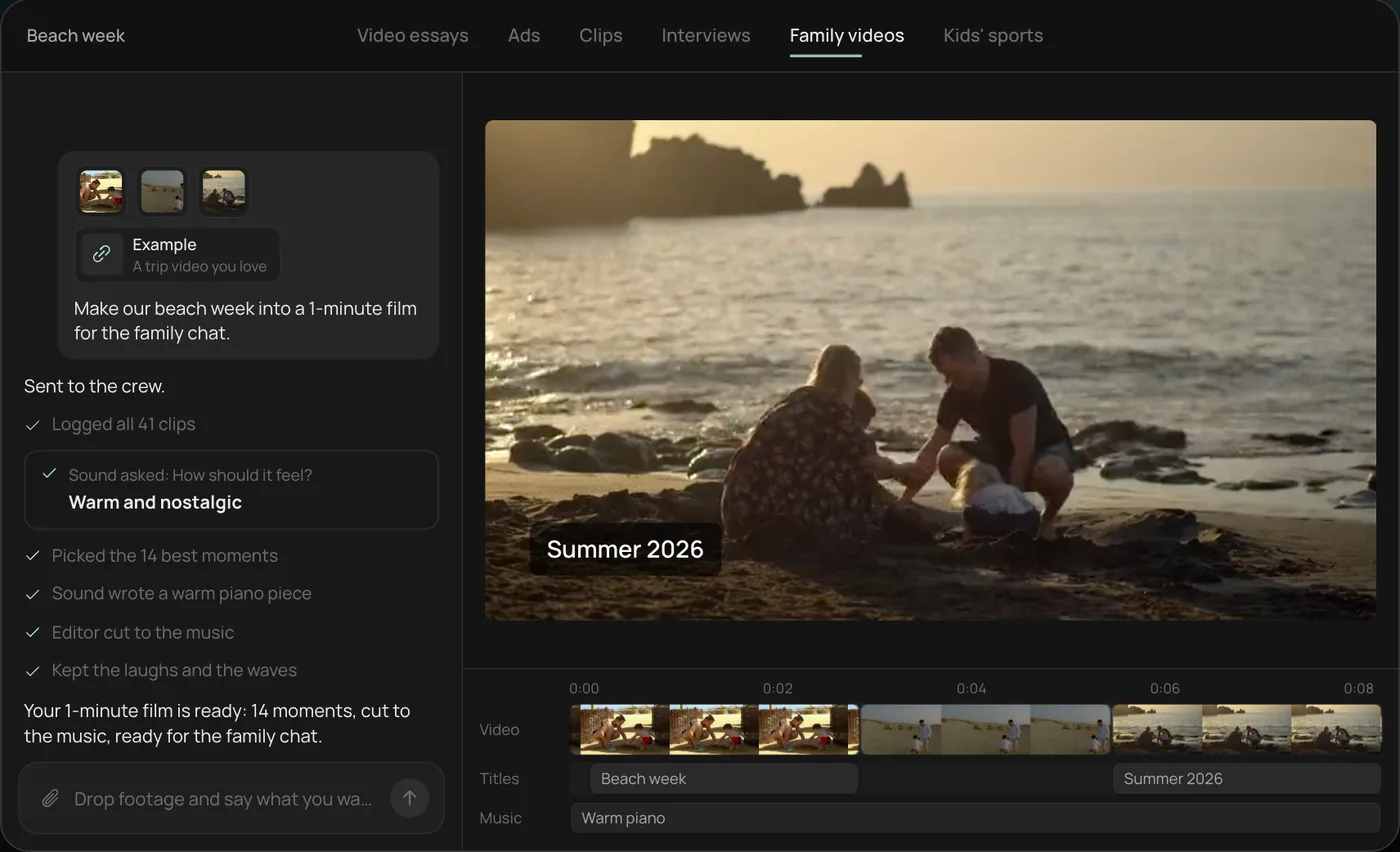
4. Get the finished film. A 1-minute film cut to warm piano, with a "Summer 2026" title, lands on a real timeline with video, title and music on separate tracks.
From there you can open the timeline and change anything by hand, share a review link for notes, or export. Start a free Rend project to try it on your own footage. Getting clips off a phone is covered in send videos from your phone.
FAQ
Is there an iMovie for Windows?
No. Apple only makes iMovie for Mac, iPhone and iPad. On Windows, Clipchamp is the closest in feel and DaVinci Resolve is the free power option.
What is the best iMovie alternative for Android?
Adobe Premiere's free mobile app, launched on Android in September 2026, is the closest all-round match. CapCut is better for trend-style short video, and LumaFusion ($29.99 one time) suits tablets and longer projects.
Can I open iMovie projects in another editor?
Only in Final Cut Pro, which imports iMovie projects. For anything else, export the finished video and keep the original clips from Photos.
Is Final Cut Pro still a one-time purchase?
Apple's Final Cut Pro page says it's included in Apple Creator Studio ($12.99 a month or $129 a year), and the $299.99 one-time Mac purchase is still available.
What's the easiest way to turn lots of phone clips into one video?
Have an AI agent do the first cut. With Rend you send the clips, say how long and what feel, and get an editable timeline back. iMovie's Magic Movie on iPhone also builds a quick automatic edit, with less control.
If your clips are waiting in Photos, start a free Rend project with one event and see the first cut before you spend anything.