Filmora Alternatives in 2026: 7 Editors With Fewer Strings
We build Rend, so weigh our view accordingly. Competitor details were checked on November 19, 2026; prices and features change, so confirm on their sites.
The best Filmora alternative for most people is DaVinci Resolve if you want a free editor with more power, CapCut if you mostly make short vertical video, or Final Cut Pro if you're on a Mac and ready to pay for a cleaner pro tool. For talking videos, Descript. If what you really want is for the editing to happen without you, an AI video agent like Rend builds the cut from your clips and leaves a timeline you can change.
Filmora is a decent editor at a fair price. Wondershare's buy page lists Basic at $49.99 a year with no watermark and 4K export, and it has multicam, motion tracking and keyframes, which iMovie and Clipchamp don't. People leave for the strings attached, not the editing.
What Filmora actually costs now
From Wondershare's US individual buy page on November 19, 2026:
| Plan | Price | AI credits | Notes |
|---|---|---|---|
| Free | $0 | None | Exports carry a watermark |
| Basic | $49.99/year | None | No watermark, 1 GB cloud |
| Advanced | $59.99/year | 1,000 a month | 10 GB cloud |
| Premium | $99.99/year | 2,000 a month | 100 GB cloud, creative assets included |
| Perpetual | One-time (SaaSPic lists $79.99) | 1,000, once | Updates within Filmora 16 only |
Wondershare also sells AI credit packs (1,500 credits for $9.99, valid a year) and a separate Creative Assets subscription offered as a 7-day trial that then bills automatically.
Why people look for a Filmora alternative
The AI features run on credits. Basic has none. Most of Filmora's headline AI tools (generation, smart editing helpers) draw from a monthly credit balance on Advanced and Premium, or from packs. If you bought Filmora for the AI, Basic won't do it.
The perpetual license is tied to one version. Wondershare's page says the one-time license covers Filmora 16 updates only. When 17 ships, you're on the old version or paying again.
Checkout adds things. Independent reviewers including SaaSPic and Vorec point out that the Creative Assets trial is pre-selected at checkout and renews unless you untick or cancel it. Watch the cart.
It sits in the middle. Filmora is more capable than phone editors and less capable than Resolve or Final Cut. Some people want simpler, others want the real thing.
Quick comparison
| Tool | Platforms | Price (Nov 19, 2026) | Best for | Where Filmora is better |
|---|---|---|---|---|
| DaVinci Resolve | Mac, Windows, Linux, iPad | Free; Studio $295 one time (on sale at $236) | Free pro editing and color | Easier to learn, more effects and templates |
| Final Cut Pro | Mac, iPad | Apple Creator Studio $12.99/month or $129/year; Mac $299.99 one time | Mac users ready to go pro | Runs on Windows, cheaper Basic plan |
| Adobe Premiere | Mac, Windows (plus free mobile app) | $22.99/month, annual plan billed monthly | Pro editing, industry standard | Price, simpler |
| CapCut | Phone, desktop, web | Free; Pro $19.99/month | Vertical video and trends | Long horizontal edits, a cheaper paid plan |
| Clipchamp | Windows, browser | Free to 1080p; 4K with Microsoft 365 | Free, simple Windows editing | Keyframes, multicam, motion tracking |
| Descript | Mac, Windows, web | Free (720p, watermark); Hobbyist $16/month yearly | Talking-head and podcast video | Effects, music video, general editing |
| Rend | Web, plus phone uploads | Editing free; pay for renders and generation (pricing) | Getting a finished cut without editing it yourself | Offline, fixed yearly cost, hands-on effects |
1. DaVinci Resolve: more power, no subscription
The free version of DaVinci Resolve exports up to UHD at 60 fps and includes the same color page, Fairlight audio and Fusion effects pages used on feature films. Studio is a $295 one-time purchase, on sale at $236 as we write. Compared with a Filmora subscription, Resolve free plus your time is the cheapest serious editor there is.
Where Filmora wins: Resolve is harder. Filmora's drag-on effects, stickers and transitions get a fun YouTube video out in an afternoon. Resolve's first afternoon is learning where things are.
2. Final Cut Pro: the Mac upgrade
Final Cut Pro now comes with Apple Creator Studio ($12.99 a month or $129 a year, with a 30-day trial), alongside Logic Pro, Pixelmator Pro and Motion. Apple says the $299.99 one-time Mac purchase is still available. It's fast on Apple silicon, the magnetic timeline is forgiving, and it imports iMovie projects. On a Mac, this is the clean step up from Filmora.
Where Filmora wins: Windows support, and Filmora Basic is cheaper per year.
3. Adobe Premiere: the industry standard
Adobe's plans page lists Premiere at $22.99 a month on an annual plan billed monthly, which includes Premiere on desktop and mobile. If you want to work with other editors, agencies or clients who send project files, this is what they use. It's overkill for a family video.
Where Filmora wins: price, and a much shorter road to a finished video.
4. CapCut: for short-form
CapCut has more trending templates, effects and caption styles than anything else, and it runs on phones, desktops and the web. Pro is listed at $19.99 a month, and more of the tools sit behind it than before. Check its music license before using library tracks commercially. See CapCut alternatives.
Where Filmora wins: longer horizontal projects, and Filmora's yearly plans cost less than two months of CapCut Pro.
5. Clipchamp: free and simple on Windows
Microsoft's Clipchamp exports watermark-free at 1080p on the free plan and has auto captions, text to speech and silence removal. 4K and premium stock come with Microsoft 365 Personal or Family. It has no mobile app since the iOS app was retired in June 2026. More in Clipchamp alternatives.
Where Filmora wins: keyframes, multicam, motion tracking, and far more effects.
6. Descript: when the video is mostly talking
Descript edits video through its transcript. Delete a sentence of text and the clip goes with it. The free plan has 1 media hour a month at 720p with a watermark; Hobbyist is $16 a month billed yearly. Tutorials, podcasts and talking-head YouTube go faster here than in any timeline editor. See Descript alternatives.
Where Filmora wins: everything that isn't speech-led.
7. Rend: when you don't want to do the editing
Rend is an AI video agent. You send what you have (phone clips, a whole camera roll, a recording, a video you like the look of) and describe the result. A crew of specialist agents picks the moments, cuts on exact transcript words, adds titles and motion graphics, word-timed captions in your font, original music, sound effects and a mix with ducking. It checks its own work, then leaves a real timeline with everything on separate tracks for you to change.
That's a different deal from Filmora's AI credits, which speed up steps you're still doing yourself. With Rend you write a request like this:
Make a 6-minute video of our Lake Placid ski week from these 180 clips. Day by day, with a title card for each day. Open on Sam's first run without poles. Keep the funny lift conversations. Upbeat music, quieter for the evening by the fire. End with the group photo and "Winter 2026."
Then you watch it, leave notes on the frame through a review link ("cut the blurry chairlift," "more of day three"), and the agent makes each fix. Family can upload their own clips from their phones with one link.
Where Rend beats Filmora: the first cut is done for you; style packs and brand kits mean every video in a series looks the same without rebuilding a template; and the agent can generate a shot, image or b-roll you don't have.
Where Filmora is better: it works offline, costs a fixed amount a year, and if you love picking every transition yourself, that's what it's for. Rend's editing is free, but renders and generation cost credits; see pricing.
How to choose in two questions
- Do you enjoy editing? If yes, choose by platform and ceiling: Resolve (free, any computer), Final Cut (Mac), Premiere (working with others), CapCut (vertical). If no, skip to an agent.
- What do you make most? Talking videos: Descript. Short trend videos: CapCut. Family and trip films from lots of clips: Rend. YouTube with effects and graphics you build yourself: stay on Filmora or move to Resolve.
A tip from moving people off Filmora: don't try to rebuild old projects in the new editor. Export every finished video at full quality, keep the raw clips in a folder per event, and start fresh with the next project. Filmora project files (.wfp) don't open anywhere else.
How to make a family video in Rend, step by step
These screenshots come from Rend's demo of a family video from phone clips; your own project works the same way.
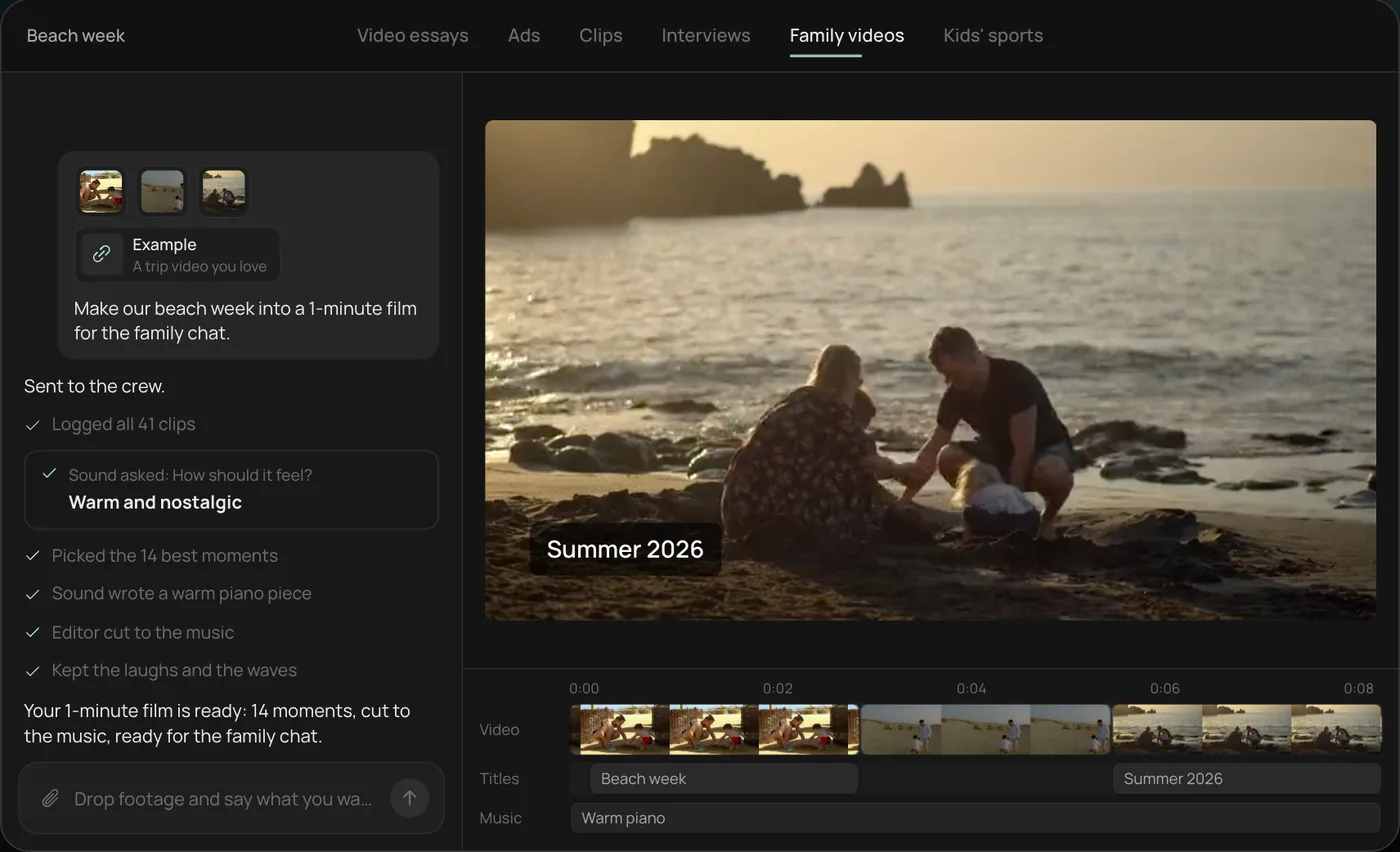
1. Drop in your phone clips. Add the clips straight from your camera roll (here 41 beach week videos) plus an example you like, then ask: "Make our beach week into a 1-minute film for the family chat."
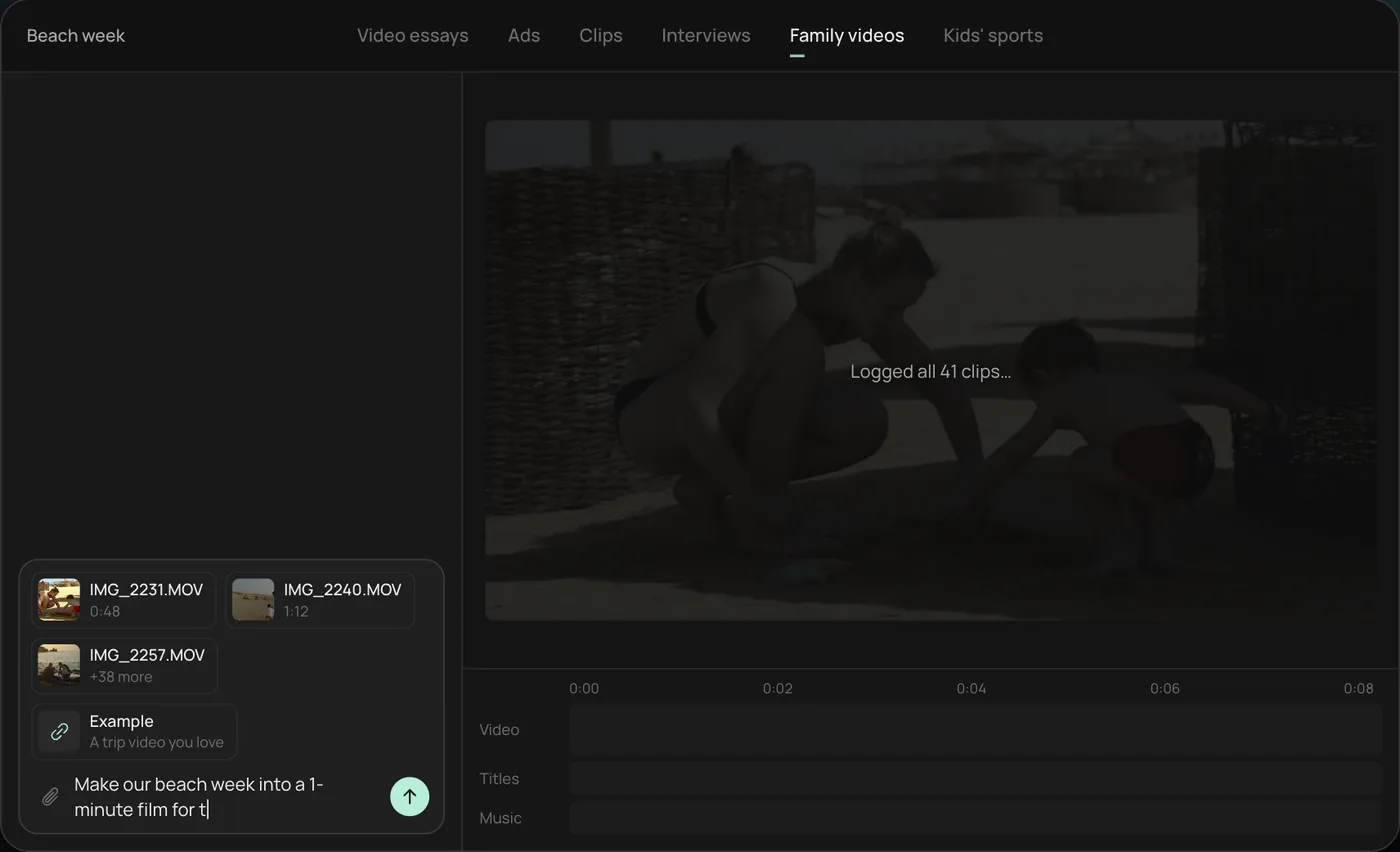
2. Pick the feel. Rend asks how the film should feel and recommends warm and nostalgic.
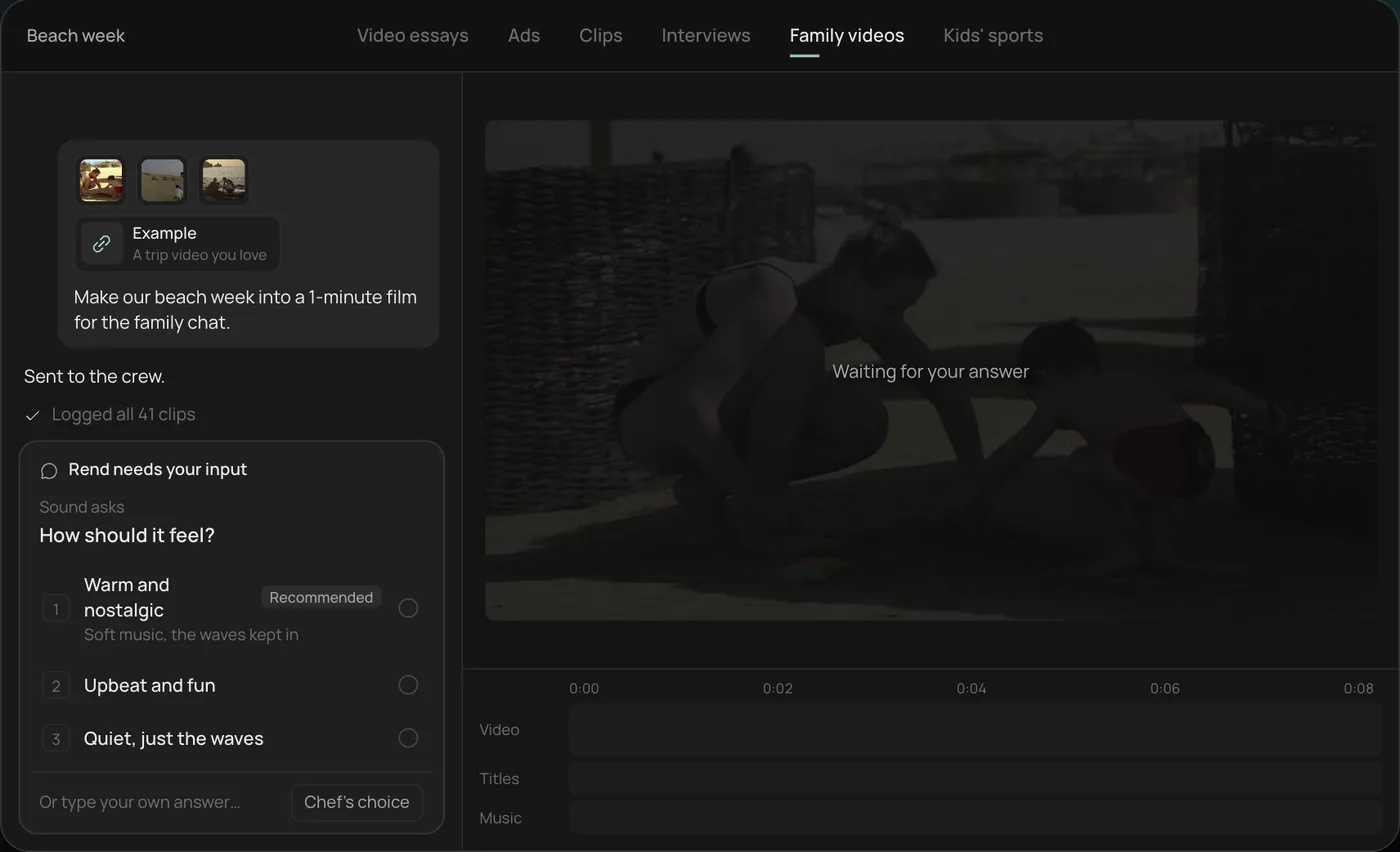
3. Watch the crew work. The crew logs every clip and picks the 14 best moments, each step checked off in the chat.
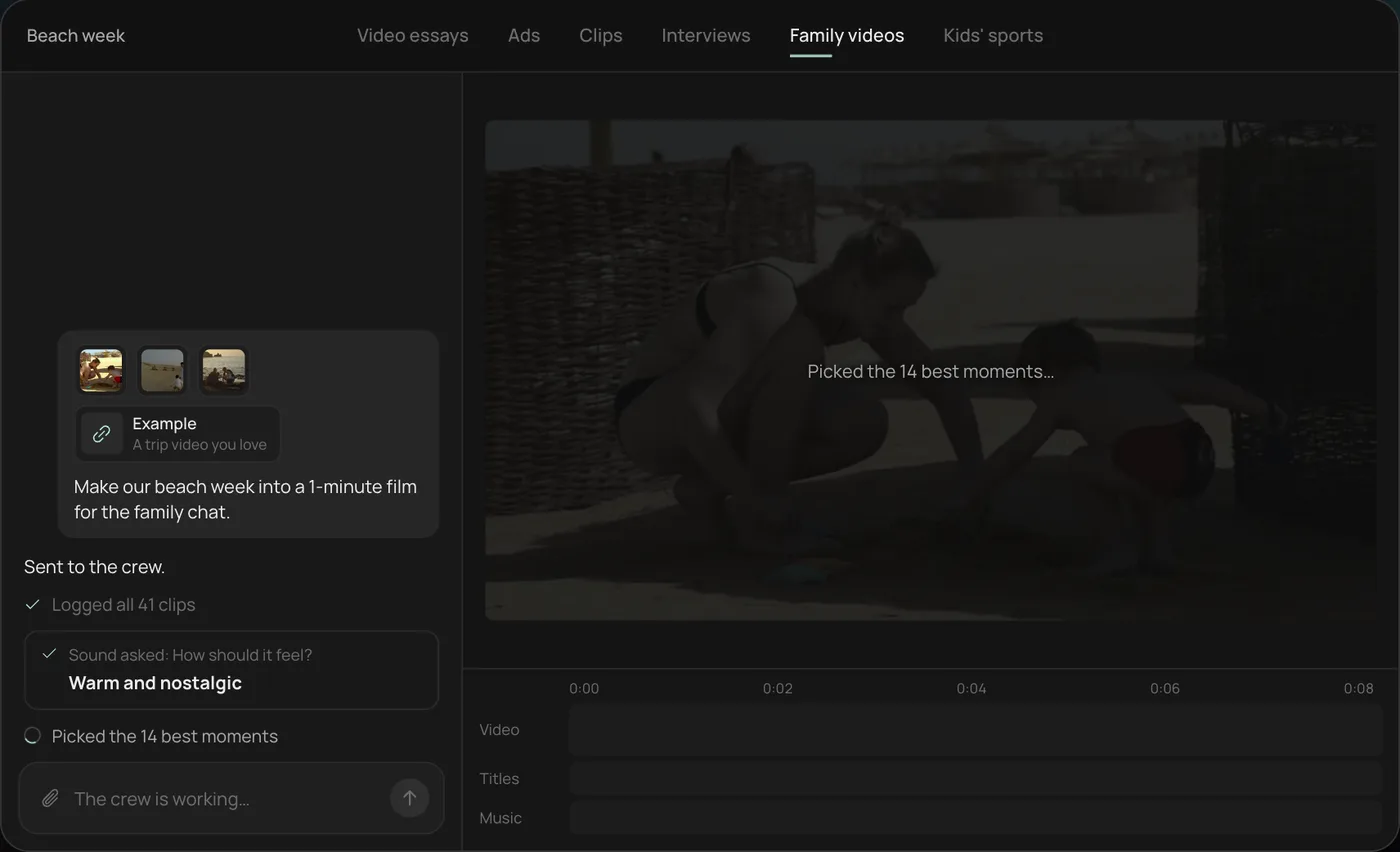
4. Get the finished film. A 1-minute film cut to warm piano, with a "Summer 2026" title, lands on a real timeline with video, title and music on separate tracks.
From there you can open the timeline and change anything by hand, share a review link for notes, or export. Start a free Rend project to try it on your own footage. For more on structuring the edit, read how to edit home movies, or see the full list of what the agent can do on the tools page.
FAQ
Is there a free alternative to Filmora with no watermark?
Yes. DaVinci Resolve's free version exports up to UHD with no watermark, and Clipchamp's free plan exports up to 1080p with no watermark. iMovie is free with no watermark on Apple devices.
Is Filmora's perpetual license really lifetime?
You keep the software, but Wondershare's buy page says the perpetual license covers Filmora 16 updates only. New major versions aren't included.
What's the best Filmora alternative for beginners?
Clipchamp on Windows or iMovie on a Mac if you want to edit by hand. If you'd rather not edit at all, an AI agent like Rend makes the first cut from your clips. Our AI video editor for beginners guide goes further.
Is DaVinci Resolve harder than Filmora?
Yes, noticeably at first. It's built for professional color and audio work. Expect a few evenings of tutorials before you're as quick as you were in Filmora.
Does Filmora's AI need extra payment?
Basic includes no AI credits. Advanced and Premium include 1,000 and 2,000 a month, and extra credits are sold in packs.
If you'd like to stop editing and start getting videos back, start a free Rend project with one event's clips and see the first cut.