Kapwing Alternatives in 2026: Editors and AI Agents Compared
We build Rend, so weigh our view accordingly. Competitor prices and features were checked on each company's own site on November 19, 2026; they change often, so confirm before you buy.
The best Kapwing alternatives are VEED (the closest browser editor, with yearly plans from $12 a seat a month), Descript (for podcasts and talking-head video edited by transcript), CapCut (for vertical social video and its phone app), Clipchamp (free exports up to 1080p on Windows and the web), OpusClip (automatic clips from long videos) and Rend, an AI video agent that does the edit for you and leaves it on a timeline you can change. Which one fits depends on what you're replacing: Kapwing's collaboration, its AI tools, or the hours your team spends editing in it.
Kapwing is good at what it was built for: several people editing the same project in a browser tab, with credits for subtitles, dubbing and text to speech. The usual reasons to look elsewhere are per-member pricing, credit limits, and the fact that someone still has to make every cut.
What Kapwing costs today
From Kapwing's pricing page on November 19, 2026, in USD:
| Plan | Price | Credits | Exports | Other limits |
|---|---|---|---|---|
| Free | $0 | 10 | Up to 4 minutes, 720p, watermark, 30 minutes of export a month | 10 min of auto subtitles, 2 GB uploads |
| Pro | From $16 per member a month | 1,000 a month | Up to 120 minutes, 4K | Up to 1,000 min of subtitles and 50 min of dubbing a month |
| Business | From $50 per member a month | 4,000 a month | Up to 120 minutes, 4K | Voice clones, lip sync, extra credits |
| Enterprise | Custom | Custom | Same | SAML SSO, account manager |
The page offers 33 percent off for annual billing, and the figures it shows appear to be those annual rates, so month-to-month costs more. Our Kapwing vs Rend post read the page the same way two days ago.
Why people look for a Kapwing alternative
- Per-member pricing. A team of six on Business is six seats, even if two of them edit once a month.
- Credits run out on AI-heavy months. Subtitles, dubbing and generation all draw from the pool.
- The free plan is a trial. Four-minute, 720p, watermarked exports don't work for anything public.
- Editing is still the bottleneck. Collaboration helps three people work faster; it doesn't remove the work.
Quick comparison
| Tool | Best for | Free plan | Paid from (checked Nov 19, 2026) | Where it beats Kapwing | Where Kapwing is better |
|---|---|---|---|---|---|
| VEED | Browser editing and subtitles | 720p, 10-minute exports, watermark | $12 a seat a month yearly, $25 monthly | Subtitle styling, generation options, published monthly prices | Real-time collaboration, 4K and 120-minute exports on its base paid plan |
| Descript | Podcasts, interviews, tutorials | 1 media hour, 720p, watermark | $16 a month yearly, $24 monthly | Edit by transcript, filler-word removal | Shared browser workspace for social teams |
| CapCut | Vertical social video, phone editing | Yes | $19.99 a month or $179.99 a year | Effects, trends, templates, mobile app | Team projects, education use |
| Clipchamp | Free editing on Windows | Exports up to 1080p | 4K via Microsoft 365 | Cost, no-watermark free exports | AI tools, collaboration |
| OpusClip | Clips from long videos | Yes, watermark | $15 a month Starter | Finding and clipping moments automatically | General editing |
| Rend | Having the edit done for you | Editing is free | Pay for renders and generation; see pricing | Whole edit, composed music, mix, ad variants, review notes applied | Hands-on group editing in one tab |
1. Rend: when nobody has time to edit
Rend is an AI video agent. You send what you have (a recorded webinar, a podcast, a pile of phone clips, a product page, a video whose style you like) and say what you want. A crew of specialist agents reads the footage and transcript, cuts on exact words, adds word-timed captions in your look, generates shots and b-roll where needed, composes original music, narrates in a voice you approve, mixes everything on separate tracks and checks its own work. Long videos are built in chapters in parallel.
Collaboration works differently than in Kapwing. Instead of three people in the same timeline, your team and clients watch a review link, draw on the frame and leave notes. The agent reads every note and makes the fix, and every version stays on the same link. Anyone can still open the timeline and change something by hand.
Where Rend beats Kapwing: when the edit itself is the expensive part, when you need music and a real mix rather than library tracks, and when one source has to become many pieces (a long cut, Shorts, ad hooks in several sizes). See repurpose a long video into Shorts and mass ad creation.
Where Kapwing is better: a classroom of students learning to edit, or a newsroom where three producers touch the same video at once, wants a shared hands-on editor. That's Kapwing's home turf, and Rend isn't trying to be it.
2. VEED: the closest browser editor
VEED is the obvious like-for-like swap. Its pricing page today lists Free (watermark, 720p, 10-minute exports), Creator at $25 a month or $12 a month billed yearly ($144) with 1080p and unlimited auto subtitles under a fair-use limit, and Pro at $45 a month or $22.08 billed yearly ($265) with 4K, translation to 50+ languages and multiple brand kits. Every editor is a seat.
VEED is cheaper per seat than Kapwing on yearly billing for the entry tier, and its subtitle tools are a strength. Kapwing gives you 4K and 120-minute exports from its first paid tier, where VEED's Creator tops out at 1080p. More in VEED alternatives.
3. Descript: when the content is people talking
Many Kapwing teams spend most of their time on talking-head content: podcasts, interviews, webinars, tutorials. Descript was built for that. You edit the transcript and the video follows; delete a rambling sentence and it's gone.
Descript's pricing page lists Free (1 media hour a month, 720p with a watermark), Hobbyist at $16 a month yearly or $24 monthly, Creator at $24 yearly or $35 monthly with 30 media hours and 4K, and Business at $50 yearly or $65 monthly. It's less handy for meme-style social edits and templates, where Kapwing is quicker. See Descript alternatives.
4. CapCut: social video on a phone
If your Kapwing use is mostly TikTok, Reels and Shorts, CapCut has more effects, trends and templates, and its phone app is the best of this group. Its pricing page lists Pro at $19.99 a month or $179.99 a year, and says the shown prices are for reference, with the final price after sign-in. Teams plans are priced per seat. For classrooms and newsrooms, Kapwing's browser-first, shared-project setup is easier to manage. Compared in CapCut alternatives.
5. Clipchamp: the free option on Windows
Clipchamp comes with Windows 11 and runs in the browser. Microsoft's help page says 1080p is the largest free export resolution, which beats Kapwing's 720p watermarked free tier for anyone who just needs a clean export. Microsoft's support pages put 4K and premium extras behind qualifying Microsoft 365 subscriptions. It has fewer AI tools and no real-time team editing. See Clipchamp alternatives.
6. OpusClip: if repurposing is the whole job
Some teams use Kapwing mainly to cut long videos into short ones. OpusClip automates that: upload a long video and it suggests clips with captions and vertical reframing. Its pricing page lists Free, Starter at $15 a month and Pro at $29 a month, with watermark-free exports from Starter and export to Premiere Pro and DaVinci Resolve on Pro. It won't help with the long edit or with anything that isn't a clip. See OpusClip alternatives.
Match the tool to your team
| Your team | What they mostly make | Best fit |
|---|---|---|
| Social team of 2 to 4 | Daily Reels and TikToks | CapCut or VEED |
| Podcast or interview show | Long episode plus clips | Descript, or Rend for the full set |
| Teacher and students | Class projects, learning to edit | Kapwing, or Clipchamp free on school PCs |
| Agency with clients | Ads, many versions, client notes | Rend |
| Marketing team without an editor | Webinars, launches, explainers | Rend |
| Solo creator on a budget | Short edits, no watermark | Clipchamp |
A worked example: one week of a weekly show
A two-person team records a 50-minute interview show every Tuesday and publishes a 15-minute YouTube cut plus five Shorts.
In Kapwing: one person cuts the long version in a shared project, the other clips the Shorts, both caption, style and export. Comments go back and forth in the project. Most of a working day, split across two people.
In Descript plus OpusClip: the long cut is faster because they edit the transcript; OpusClip suggests Shorts and they keep the best five. Two tools, two subscriptions, and music and graphics are still on them.
In Rend: they send the recording with "15-minute YouTube cut, cut the dead air, our brand kit, b-roll on the stats, plus five vertical Shorts from the strongest moments." Rend builds both on one timeline, both people review on a link, leave six notes on the frame, and the agent applies them. The brand kit keeps captions, titles and the music bed the same every week. Our podcast clips guide has the details.
The editorial calls stay with the team in every version. What changes is who does the mechanics.
How to turn a long recording into clips in Rend, step by step
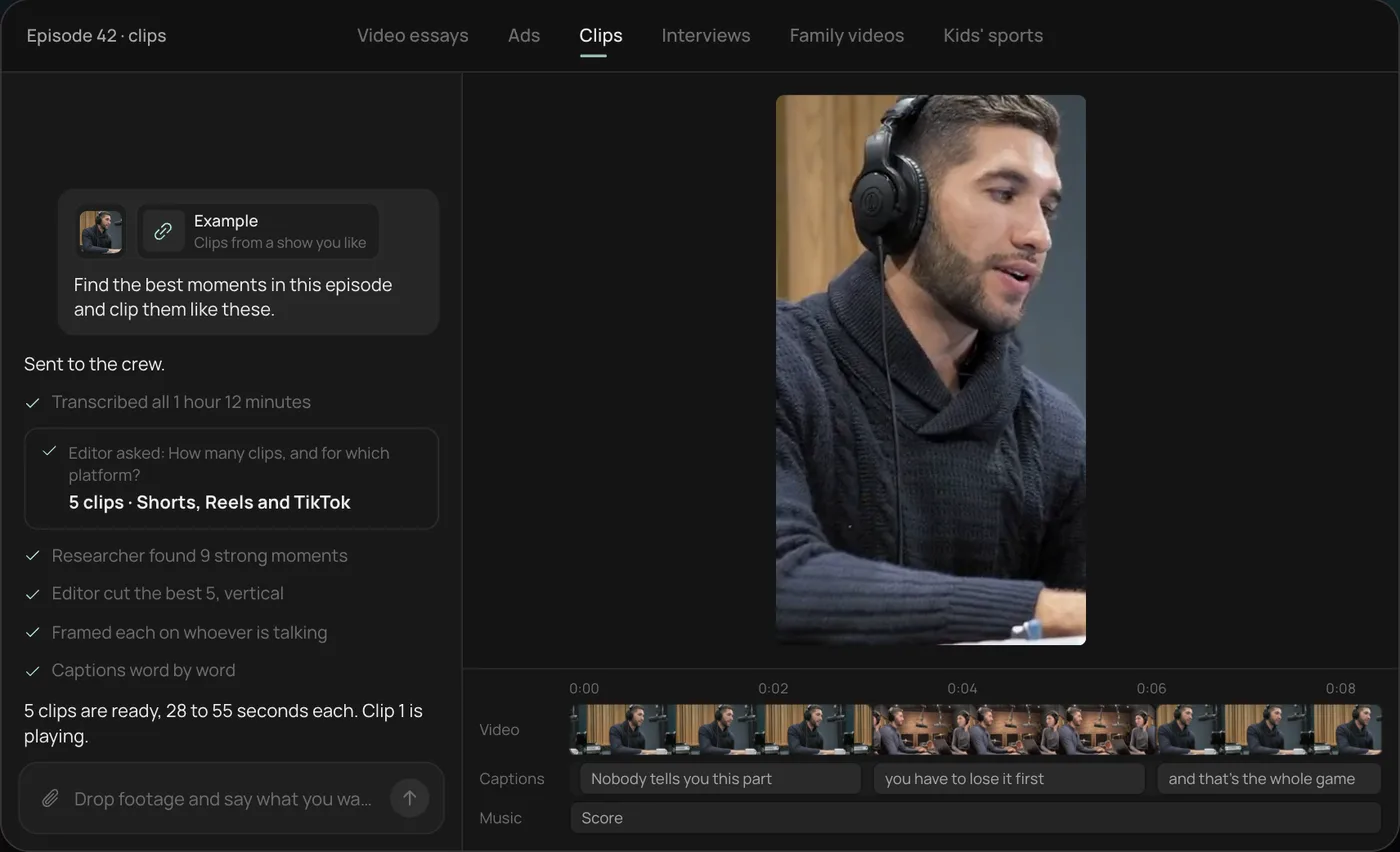
These screenshots come from Rend's demo of clipping a podcast; your own project works the same way.
1. Drop in the episode and example clips. Add the full episode (here a 1 hour 12 minute podcast) and a few clips you like, then ask Rend to find the best moments and clip them like those.
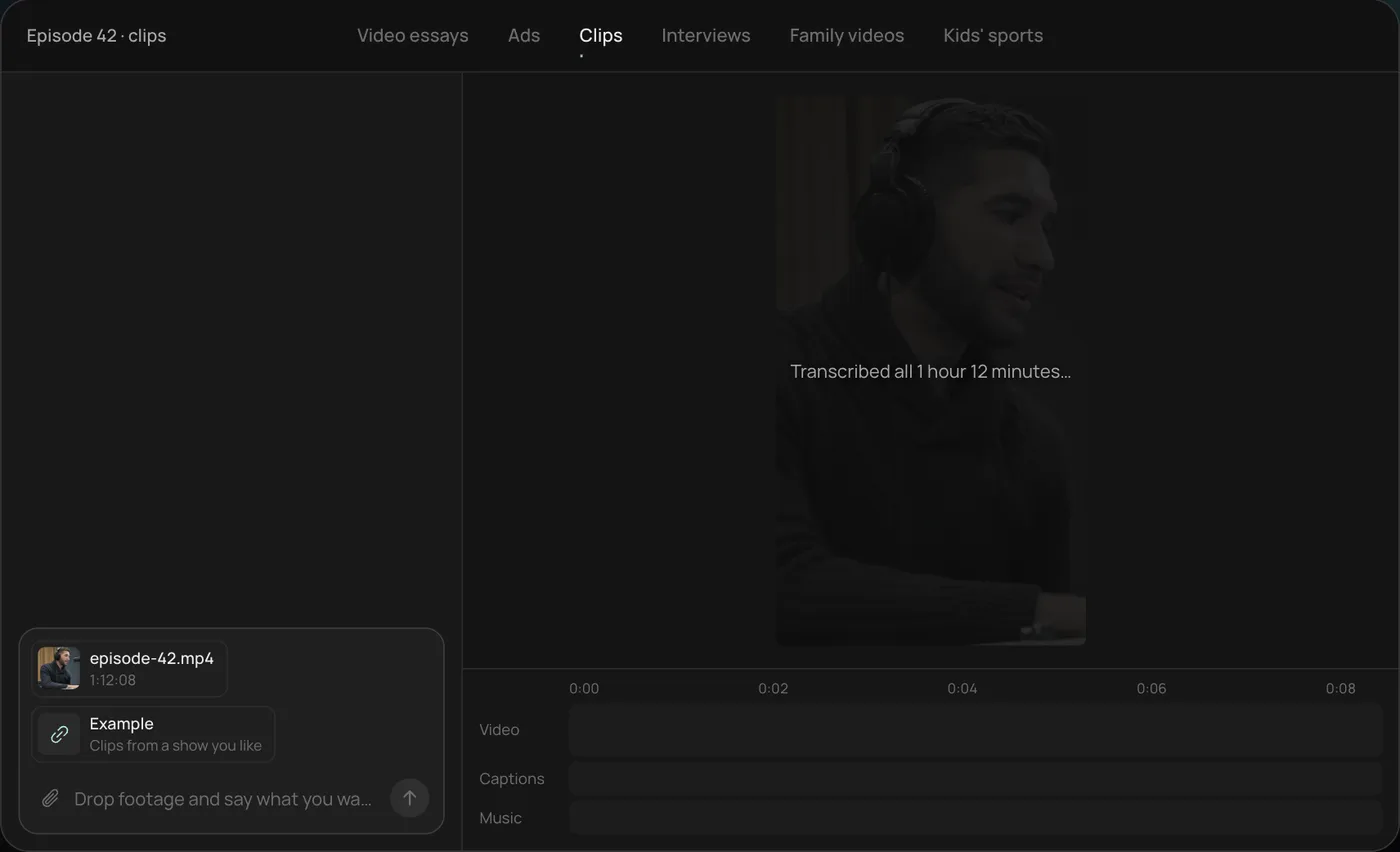
2. Pick how many clips and where. Rend asks how many clips you want and for which platform, and recommends five vertical clips for Shorts, Reels and TikTok.
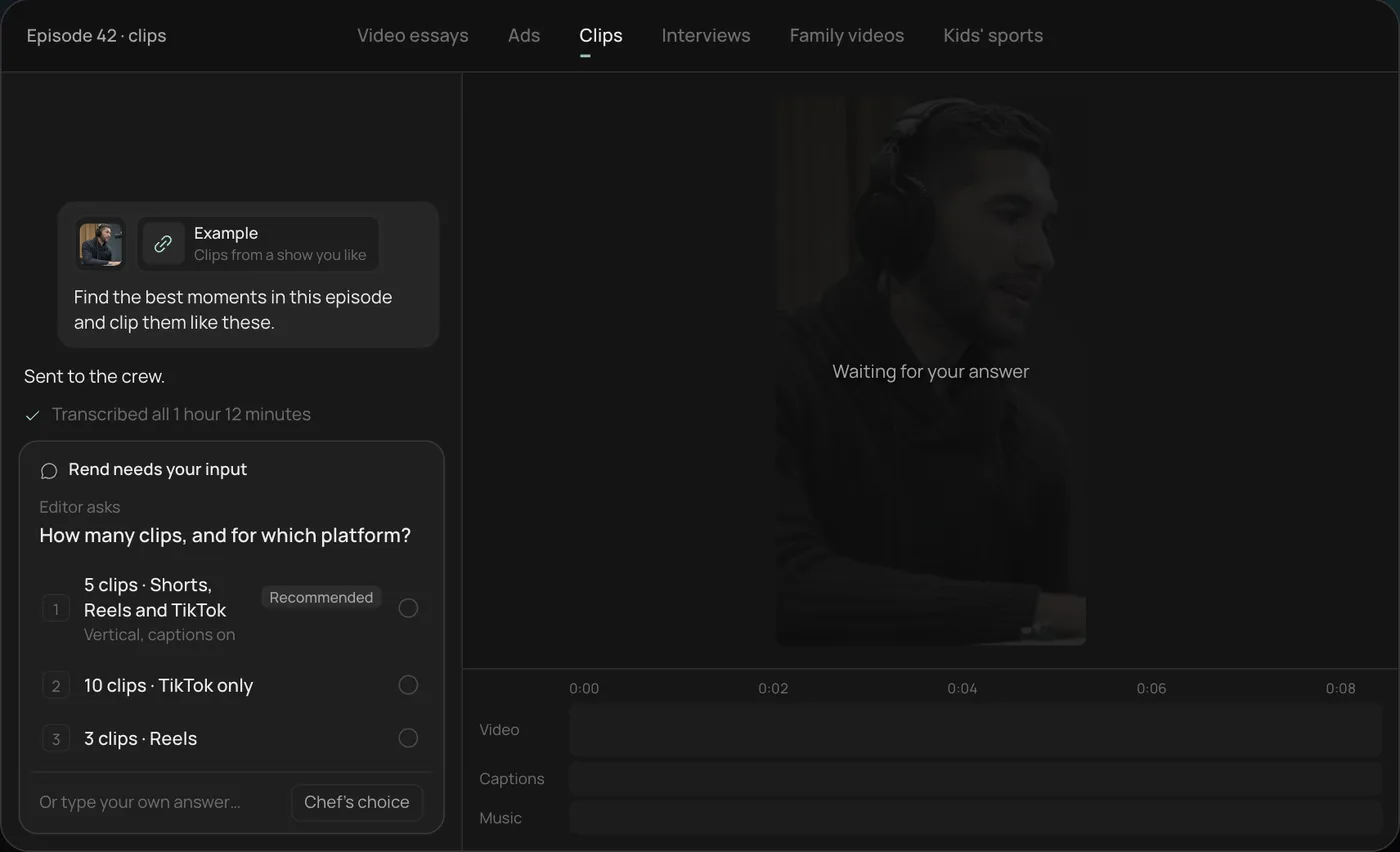
3. Watch the crew work. Rend transcribes the episode and a researcher finds the strongest moments, each step checked off in the chat.
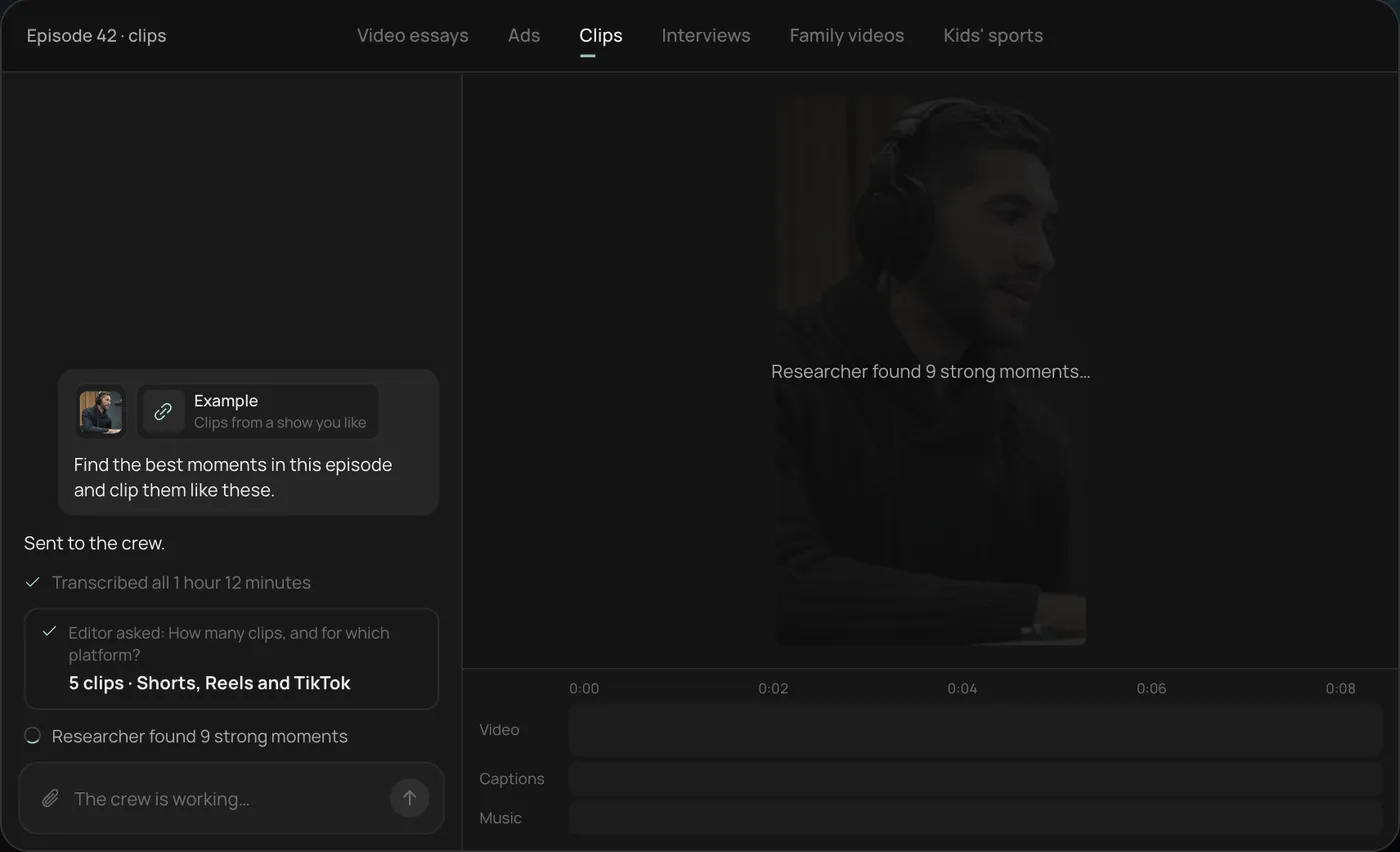
4. Get the clips. Five vertical clips of 28 to 55 seconds land on the timeline, with word-by-word captions on their own track that you can still edit.
From there you can open the timeline and change anything by hand, share a review link for notes, or export. Start a free Rend project to try it on your own footage.
FAQ
What is the best free alternative to Kapwing?
For clean free exports, Clipchamp: Microsoft's help page lists 1080p as its largest free resolution. Kapwing, VEED, Descript and OpusClip all watermark on their free plans, by their own pricing pages. In Rend, editing is free and you pay only when it renders or generates something.
Is VEED or Kapwing better?
For real-time team editing and 4K, 120-minute exports on the first paid tier, Kapwing. For subtitle styling and a lower yearly entry price per seat, VEED. Both charge per editor.
How much does Kapwing cost in 2026?
On November 19, 2026, Kapwing listed Pro from $16 per member a month and Business from $50 per member a month, with 33 percent off on annual billing. The free plan has 10 credits and watermarked 720p exports up to 4 minutes.
Which Kapwing alternative is best for teams?
For hands-on group editing, VEED or Kapwing itself. For teams that want to brief and review rather than edit, Rend: anyone on a review link can leave notes on the frame and the agent makes each fix.
Is there a Kapwing alternative that edits videos for me?
Yes. Rend is an AI video agent that does the whole edit, then hands you a timeline. OpusClip automates clipping only. Our roundup of the best AI video editing agents compares more options.
If your team is tired of doing the mechanics, start a free Rend project with this week's recording. Editing is free, so you pay nothing until it renders something you want to keep.