Synthesia Alternatives in 2026: Avatar Tools and Real Footage
We build Rend, so weigh our view accordingly. Competitor prices and features were checked on each company's own site on November 19, 2026; they change often, so confirm before you buy.
The main Synthesia alternatives for AI avatar video are HeyGen (the most flexible, strong for marketing and translation), Colossyan (built for training teams, with SCORM exports on its paid plan) and Elai (a lower entry price for avatar training video). D-ID suits quick tests and developers. If your training or explainer can use a real person, a screen recording or narration over b-roll, Descript (you edit the recording by transcript) and Rend (an AI video agent that does the whole edit) are often a better fit than any avatar.
Synthesia is still the safe corporate choice for avatar video. Most people who leave do so because of minutes, price per seat, or because learners have started to tune out a synthetic presenter.
What Synthesia costs today
From Synthesia's pricing page on November 19, 2026, in USD:
| Plan | Monthly | Yearly | What you get |
|---|---|---|---|
| Basic | $0 | $0 | 10-minute monthly allowance, 9 avatars, watermark |
| Starter | $19/month ($9 the first month) | $14/month ($168/year) | About 12 extra minutes a month, 125+ avatars, downloads, no watermark |
| Pro | $89/month ($49 the first month) | $59/month ($708/year) | About 60 extra minutes a month, 180+ avatars, interactive videos, custom fonts |
| Business and Enterprise | Sales | Sales | Workspaces, live collaboration, API, brand kits, audit logs |
Synthesia lists 140+ languages and voices on every plan. A studio-quality custom avatar is a $1,000-a-year add-on for annual plans. That's in line with what we found two days ago in Synthesia vs Rend.
Why people look for a Synthesia alternative
- Minutes run out. About 12 minutes a month on Starter is two short modules.
- Learners can tell. A presenter who never changes expression gets skipped, and course completion is the number training teams are judged on.
- They need SCORM or LMS output on a smaller budget than an enterprise contract.
- The video needs more than a presenter. Screen recordings, product footage, real employees, music and graphics.
Quick comparison
| Tool | Best for | Free plan | Paid from (checked Nov 19, 2026) | Where it beats Synthesia | Where Synthesia is better |
|---|---|---|---|---|---|
| HeyGen | Marketing, sales, translation | 3 videos a month, up to 1 min, watermark | $24/month yearly, $29 monthly | Avatar range, video agent, longer videos per plan | Enterprise training workflow and admin maturity |
| Colossyan | L&D teams of 1 to 3 editors | Yes, 20 min a month on its standard engine | $59/month on a yearly plan | SCORM exports and interactive video on the base paid plan | Avatar library breadth, brand recognition |
| Elai | Budget training video | 1 minute | $23/month yearly, $29 monthly | Lower price for a small minute allowance | Languages, avatars, polish |
| D-ID | Tests, short clips, API | Trial, watermark | Not stated here (see below) | Quick photo-to-talking clips, API | Quality and length for real courses |
| Descript | Editing real recordings | 1 media hour, 720p, watermark | $16/month yearly | Real people, edit by transcript | Making a presenter from nothing |
| Rend | Finished explainers and courses from real footage | Editing is free | Pay for renders and generation; see pricing | Whole edit: cuts, captions, b-roll, music, mix, review notes applied | Rend has no avatar presenters |
1. HeyGen: the most direct swap
HeyGen does what Synthesia does, with more range on the marketing side. Its pricing page on November 19 lists:
- Free: 3 videos a month up to 1 minute, watermarked.
- Creator: $29 a month, or $24 a month billed yearly. 600 credits, videos up to 30 minutes, 1080p, a custom video avatar of yourself.
- Pro: from $49 a month with 1,000 credits, 4K, a professional voice clone.
- Business: $149 a month plus $20 per extra seat. 1,500 credits, videos up to 60 minutes, SSO, SCORM export and LMS integrations.
The Business tier is the interesting one for training teams, since SCORM is there without an enterprise contract. HeyGen beats Synthesia on avatar variety, length per plan and its prompt-driven video agent. Synthesia still feels more like a tool built for an L&D department. Our full rundown is in HeyGen alternatives.
2. Colossyan: training first
Colossyan is built for learning and development. Its pricing page today lists a free Starter plan (20 minutes a month on its standard engine, a 20-minute video limit, 120+ languages, 10 interactive videos a month) and Professional at $59 a month on a yearly plan plus $30 a month per additional member, with up to 3 editors, watermark removal, 5 SCORM course and 5 SCORM video exports a month, and 15 interactive videos. Enterprise adds unlimited minutes, SSO and SOC 2 Type II.
Pick Colossyan over Synthesia if SCORM and branching quizzes matter and you're a small team. It's less suited to marketing video.
3. Elai: the lower-cost avatar option
Elai's pricing page lists Free (1 minute), Creator at $29 a month or $23 a month billed yearly with 15 minutes a month in Full HD, and Team at $125 a month or $100 billed yearly with 50 minutes, 4K, 3 editors, a selfie avatar and a voice clone. Extra minutes are $2 each. It's a reasonable starting point for a small training library. The avatar and voice range is narrower than Synthesia's or HeyGen's.
4. D-ID: quick tests and developers
D-ID animates a face from a photo and has an API that draws on the same minutes as its web app. Its pricing page FAQ says minutes renew monthly and don't roll over, and that Trial and Lite videos carry a D-ID watermark. We couldn't read current plan prices on D-ID's own site today, so we're not quoting any; check its Studio pricing page. It's the fastest way to see whether an avatar works for your use case. For a full course, the length and quality show.
5. Descript: when a real person can record
Most avatar projects start because nobody wants to be filmed. A ten-minute recording on a webcam, cleaned up afterward, usually beats a synthetic presenter for trust. Descript turns the recording into a transcript you edit like a document, and removes filler words.
Its pricing page today lists Free (1 media hour, 720p with a watermark), Hobbyist at $16 a month yearly or $24 monthly, Creator at $24 yearly or $35 monthly, and Business at $50 yearly or $65 monthly. More in Descript alternatives.
6. Rend: when you need the finished video, with real people
Rend is an AI video agent. You send what you have (webcam recordings, screen captures, an interview with a subject-matter expert, a slide deck, a product page) and say what you want. A crew of specialist agents transcribes with speakers, cuts on exact words, adds word-timed captions in your style, titles, lower thirds and motion graphics, generates b-roll and images where you're missing a shot, narrates in a voice you approve (designed from a description or cloned from a recording with consent), composes music, and mixes it. Long courses are built in chapters in parallel, and a brand kit keeps every lesson consistent.
The output is on a real timeline you can change. Reviewers draw on the frame through a review link and write "wrong product name here," and the agent makes the fix.
Where Rend beats Synthesia: when there's real footage, when the video needs pacing, b-roll and sound to hold an audience, and when you want every part of the edit on separate tracks to adjust.
Where Synthesia is better, plainly: Rend doesn't make avatar presenters, and it doesn't lip-sync a person into a new language. If you need a presenter on screen without filming anyone, or the same video in 30 languages with a speaking face, use Synthesia or HeyGen. Our workflow for course and tutorial videos shows what Rend does with recorded lessons.
Which approach fits your video
This decision usually matters more than which avatar tool you pick.
| Your video | Avatar? | Better approach |
|---|---|---|
| Compliance module in 12 languages | Yes | Synthesia, HeyGen or Colossyan |
| Software walkthrough | No | Screen recording, narration, zooms and captions |
| Leadership update | Usually not | A 5-minute real recording, cleaned up |
| Onboarding with interviews of real staff | No | Interview footage cut into short answers |
| Product explainer for the website | Rarely | Narration over product footage and motion graphics |
| Personalized sales outreach | Yes | HeyGen or a custom avatar |
The pattern: avatars are efficient when the viewer is required to watch and the message must exist in many languages. When the viewer chooses to watch, a produced video with real people tends to hold them longer. More on that in how to make AI videos not look like AI and our AI explainer video maker guide.
A worked example: a 6-module onboarding course
An HR lead at a 200-person company needs six onboarding modules of 4 to 6 minutes.
With Synthesia or HeyGen: write six scripts, pick an avatar, add slides and screen captures as scenes. About a day of work for a full set, easy to update and translate. New hires see a synthetic presenter.
With Rend: record the head of each department for 20 minutes on a laptop camera answering five questions, add screen recordings of the tools. Send them with the outline. Rend cuts each interview down to the answers, adds name titles, b-roll, captions and a music bed from the company brand kit, and builds the six modules in parallel. New hires see the people they'll work with. Updating a module means re-recording one answer, not a whole script.
Neither is wrong. If you'll translate into many languages, avatars win. If the faces matter, real footage wins.
How to cut a training video from real footage in Rend, step by step
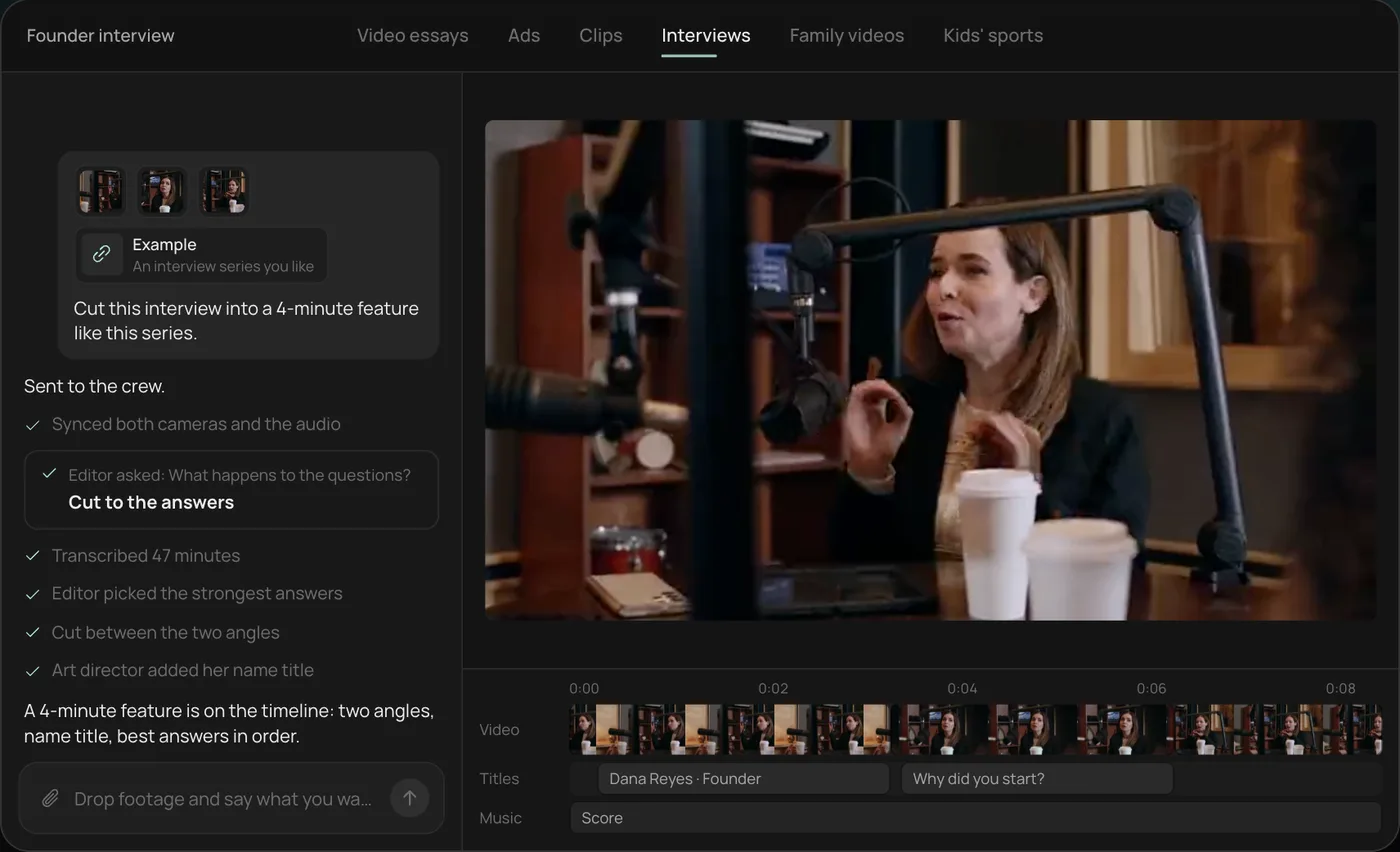
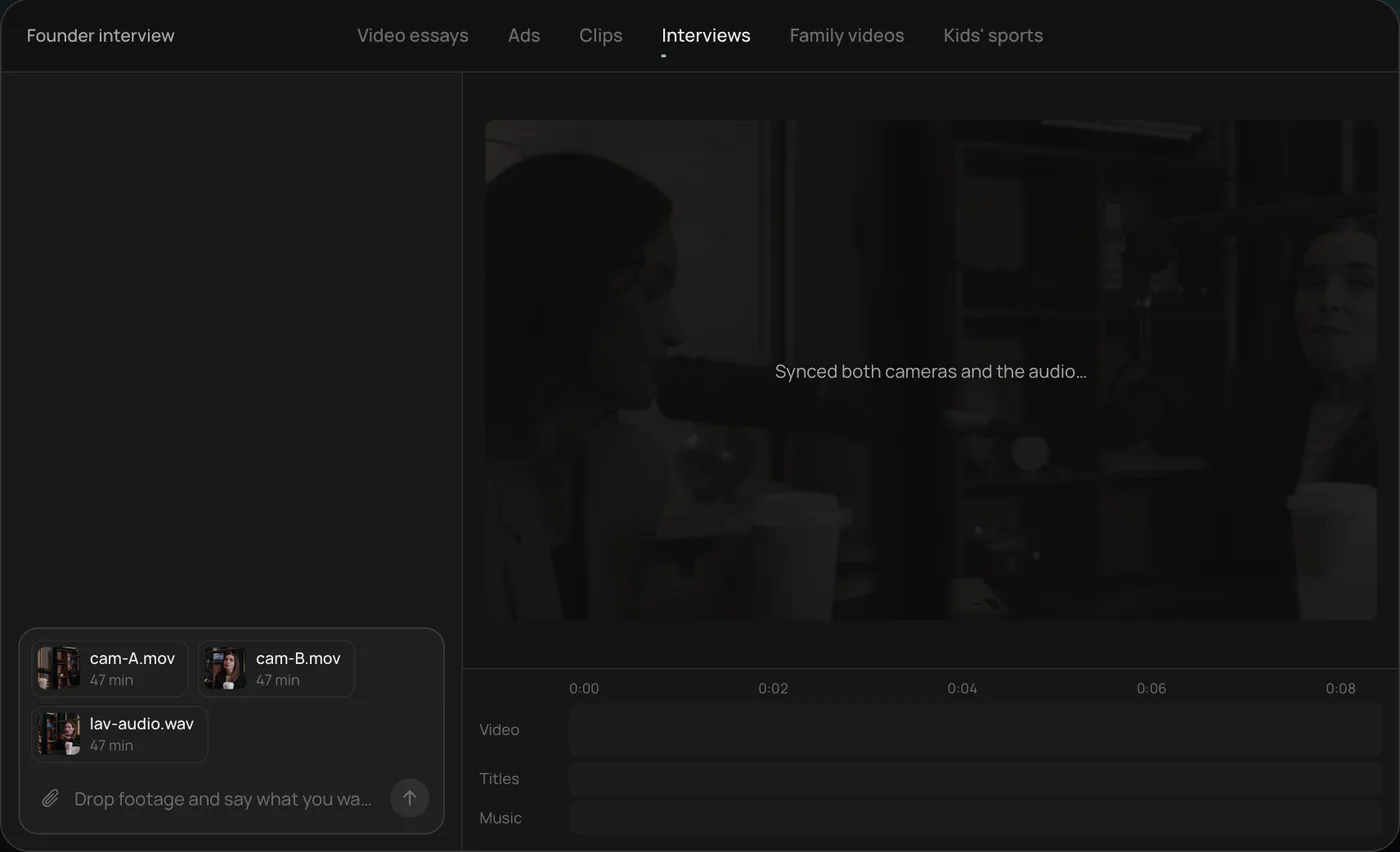
These screenshots come from Rend's demo of cutting a two-camera interview into a 4-minute feature; your own training footage works the same way.
1. Drop your footage and an example. Add both camera files and the audio, point to a video in the style you want, and type the job in one line.
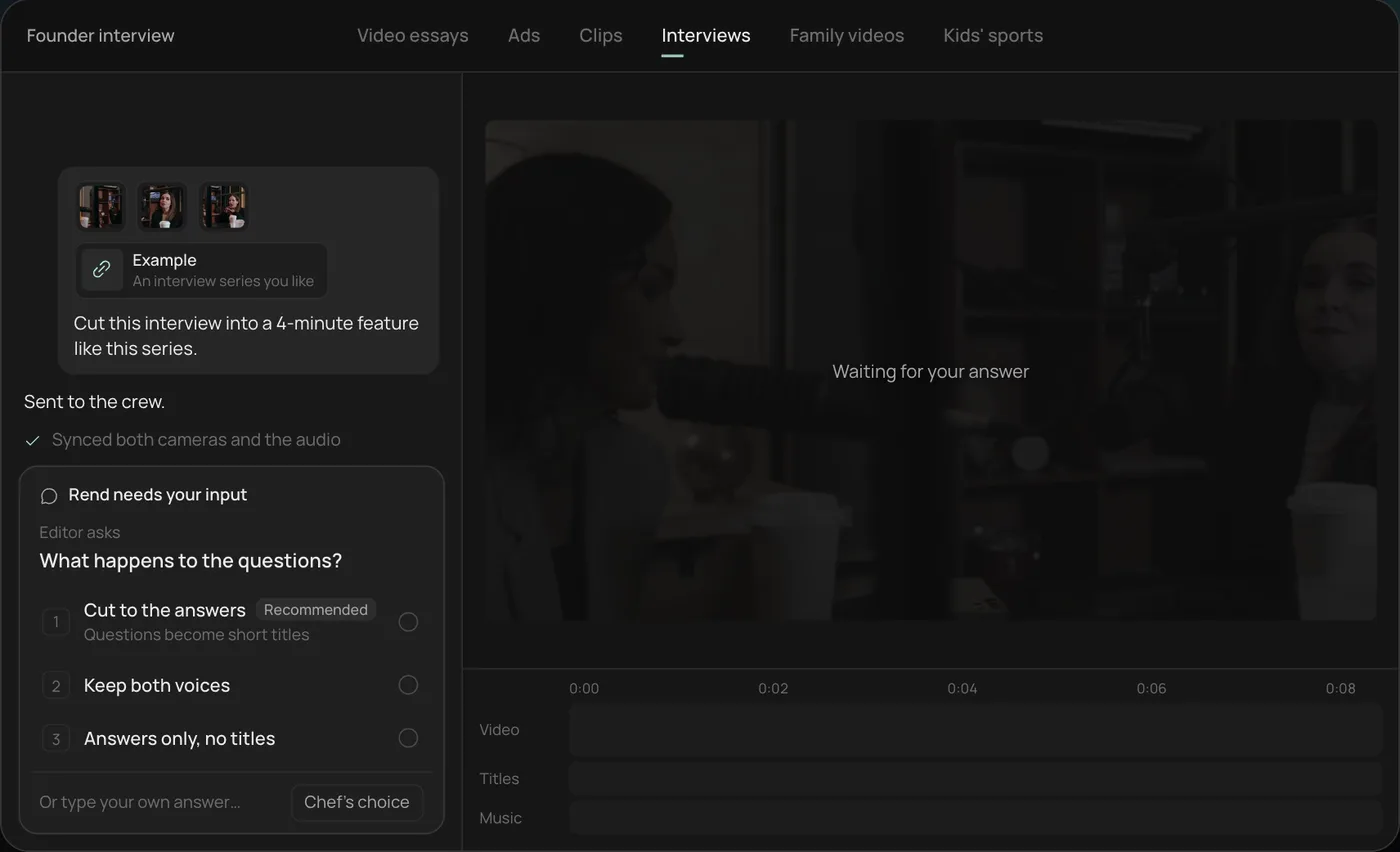
2. Answer one question. Rend asks one thing before it starts, here what happens to the interviewer's questions, and recommends cutting straight to the answers.
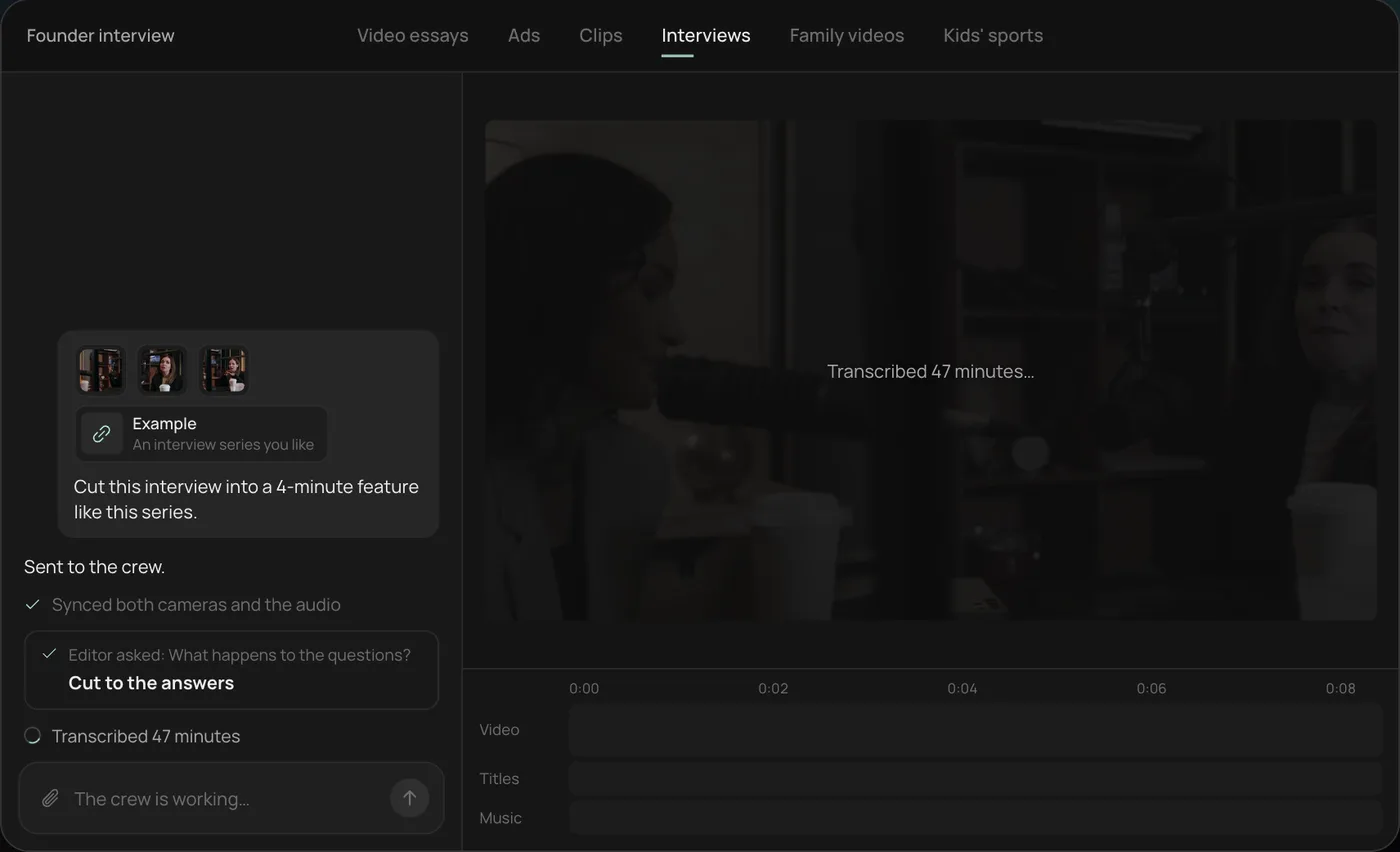
3. Let the crew prepare the edit. Rend syncs both cameras with the audio and transcribes all 47 minutes, checking off each step in chat.
4. Review the cut on the timeline. The 4-minute feature lands on a real timeline: two angles, a name title and the best answers in order, with sound on its own tracks.
From there you can open the timeline and change anything by hand, share a review link for notes, or export. Start a free Rend project to try it on your own footage.
FAQ
What is the cheapest Synthesia alternative?
On price alone, Synthesia's own Starter ($14 a month billed yearly on November 19, 2026) is hard to beat. Among the alternatives, Elai's Creator ($23 a month yearly) and HeyGen's Creator ($24 a month yearly) are the cheapest paid avatar plans we checked, and all have free tiers with limits. Compare minutes, not sticker price. If you don't need an avatar, Rend's editing is free and you pay only for renders and generation.
Which Synthesia alternative has SCORM export?
On their pricing pages today, Colossyan's Professional plan includes 5 SCORM course exports a month, and HeyGen's Business plan lists SCORM export. Check each page for limits.
Is HeyGen better than Synthesia?
For marketing, sales outreach and avatar variety, many teams prefer HeyGen. For large-company training with an established admin and security process, Synthesia is still the common pick.
Does Rend make AI avatars?
No. Rend edits real footage and screen recordings, generates shots, images and b-roll, and narrates in a voice you approve. For a digital presenter, use one of the avatar tools above.
Can I use my own voice instead of an avatar?
Yes. In Rend, narration can be cloned from your recording with your consent or designed from a description, then laid over footage, screen captures and graphics. See AI voiceover video maker.
If your next training video can use a real person or a screen recording, start a free Rend project and send it the raw files. Editing is free, so the first cut costs nothing to review.